
[UWP]了解模板化控件(8):ItemsControl
1. 模仿ItemsControl
顾名思义,ItemsControl是展示一组数据的控件,它是UWP UI系统中最重要的控件之一,和展示单一数据的ContentControl构成了UWP UI的绝大部分,ComboBox,ListBox,ListView,FlipView,GridView等控件都继承自ItemsControl。曾经有个说法:了解ContentControl和ItemsControl才能算是了解WPF的控件,这一点在UWP中也是一样的。

以我的经验来说,通过继承ItemsControl来自定义模板化控件十分常见,了解ItemsControl对将来要自定义模板化控件十分有用。但ItemsControl的话题十分庞大,和ContentControl不同,不太适合在这里展开讨论,所以这里就只是稍微讨论核心的思想。
虽然ItemsControl及其派生类很复杂,但核心功能很简单,所以索性自己实现一次。这次用于讨论的SimpleItemsControl直接继承自Control,简单地模仿ItemsControl实现了它基本的功能,通过这个控件可以一窥ItemsControl的原理。在XAML中使用如下,基本上和ItemsControl一样:
<StackPanel Margin="20" HorizontalAlignment="Center">

    <local:SimpleItemsControl>

       <ContentPresenter Content="this is ContentPresenter" />

         <Rectangle  Height="50"

                    HorizontalAlignment="Stretch"

                    Fill="Red" />

        <local:ScoreModel />

    </local:SimpleItemsControl>

    <local:SimpleItemsControl Margin="0,20,0,0">

        <local:SimpleItemsControl.ItemTemplate>

            <DataTemplate>

                <TextBlock Text="{Binding Score}" />

            </DataTemplate>

        </local:SimpleItemsControl.ItemTemplate>

        <local:ScoreModel Score="70" />

        <local:ScoreModel Score="80" />

        <local:ScoreModel Score="90" />

        <local:ScoreModel Score="100" />

    </local:SimpleItemsControl>

</StackPanel>
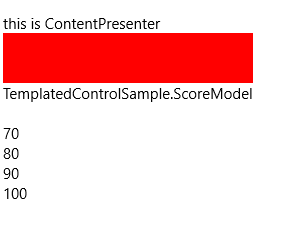
SimpleItemsControl除了没有ItemsSource、ItemsPanelTemplate及虚拟化等功能等功能外,拥有ItemsControl基本的功能。
1.1 Items属性
public ICollection<object> Items

	{

            get;

	}
实现这个控件首要的是提供Items属性,Items在构造函数中实例化成ObservableCollection类型,并且订阅它的CollectionChanged事件。注意:TemplatedControl中的集合属性通常都被可以被实例化成O巴塞尔,以便监视事件。
var items = new ObservableCollection<object>();

items.CollectionChanged += OnItemsCollectionChanged;

Items = items;
当然,为了可以在XAML的子节点直接添加元素,别忘了使用ContentPropertyAttribute。
[ContentProperty(Name = "Items")]
1.2 ItemsPanel
在ItemsControl中,ControlTemplate包含一个ItemsPresenter,它根据ItemsControl的ItemsPanelTemplate生成一个Panel,并且把Items中各个元素放入这个Panel。
SimpleItemsControl由于不是继承自ItemsControl,所以直接在ControlTemplate中放一个StackPanel代替。
_itemsPanel = GetTemplateChild(ItemsPanelPartName) as Panel;
<Style TargetType="local:SimpleItemsControl">

    <Setter Property="Template">

        <Setter.Value>

            <ControlTemplate TargetType="local:SimpleItemsControl">

                <StackPanel Background="{TemplateBinding Background}"

                            BorderBrush="{TemplateBinding BorderBrush}"

                            BorderThickness="{TemplateBinding BorderThickness}">

                    <StackPanel x:Name="ItemsPanel" />

                </StackPanel>

            </ControlTemplate>

        </Setter.Value>

    </Setter>

</Style>
ControlTemplate中只需要一个用于承载Items的ItemsPanel。在这个例子中使用StackPanel。
1.3 ItemTemplate属性
接下来需要提供public DataTemplate ItemTemplate { get; set; }属性,它定义了Items中每一项数据如何显示。事实上Items中每一项通常都默认使用ContentControl或ContentPresenter显示(譬如ListBoxItem和ComboxItem),所以ItemTemplate相当于它们的ContentTemplate。熟悉ContentControl的话会更容易理解这个属性。
1.4 GetContainerForItemOverride
//

// 摘要:

//     创建或标识用于显示给定项的元素。

//

// 返回结果:

//     用于显示给定项的元素。

protected virtual DependencyObject GetContainerForItemOverride()

{

    return new ContentPresenter();

}
ItemsControl使用GetContainerForItemOverride函数为Items中每一个item创建它的容器用于在UI上显示,默认是ContentPresenter。对于不是派生自UIElement的Item,它们无法直接在UI上显示,所以Container是必须的。
1.5 IsItemItsOwnContainerOverride
//

// 摘要:

//     确定指定项是否是为自身的容器,或是否可以作为其自身的容器。

//

// 参数:

//   item:

//     要检查的项。

//

// 返回结果:

//     如果项是其自己的容器(或可以作为自己的容器),则为 true;否则为 false。

protected virtual System.Boolean IsItemItsOwnContainerOverride(System.Object item)

{

    return item is ContentPresenter;

}
对于Items中的每一个item,ItemsControl在为它创建容器前都用这个方法检查它是不是就是容器本身。譬如这段XAML:
<local:SimpleItemsControl>

    <ContentPresenter Content="this is ContentPresenter" />

    <Rectangle  Height="50"

                Width="200"

                Fill="Red" />

    <local:ScoreModel />

</local:SimpleItemsControl>
在这段XAML中,ContentPresenter本身就是容器,所以它将直接被放到ItemsPanel中;Rectangle 不是容器,需要创建一个ContentPresenter,将Rectangle 设置为这个ContentPresenter的Content再放到ItemsPanel中。
1.6 PrepareContainerForItemOverride
//

// 摘要:

//     准备指定元素以显示指定项。

//

// 参数:

//   element:

//     用于显示指定项的元素。

//

//   item:

//     要显示的项。

protected virtual void PrepareContainerForItemOverride(DependencyObject element, System.Object item)

{

    ContentControl contentControl;

    ContentPresenter contentPresenter;

    if ((contentControl = element as ContentControl) != null)

    {

        contentControl.Content = item;

        contentControl.ContentTemplate = ItemTemplate;

    }

    else if ((contentPresenter = element as ContentPresenter) != null)

    {

        contentPresenter.Content = item;

        contentPresenter.ContentTemplate = ItemTemplate;

    }

}
这个方法在Item被呈现到UI前调用,目标是设定ContainerForItem中的某些值,譬如Content及ContentTemplate。其中参数element即之前创建的ContainerForItem(也有可能是Item自己)。在调用这个函数后ContainerForItem将被放到ItemsPanel中。
1.7 UpdateView
private void UpdateView()

{

    if (_itemsPanel == null)

        return;

    _itemsPanel.Children.Clear();

    foreach (var item in Items)

    {

        DependencyObject container;

        if (IsItemItsOwnContainerOverride(item))

        {

            container = item as DependencyObject;

        }

        else

        {

            container = GetContainerForItemOverride();

            PrepareContainerForItemOverride(container, item);

        }

        if (container is UIElement)

            _itemsPanel.Children.Add(container as UIElement);

    }

}
这个函数在OnItemsCollectionChanged或OnApplyTemplate后调用,简单地将ItemsPanel.Children清空,然后将所有Item创建容器(或者不创建)然后放进ItemsPanel。实际上ItemsControl的逻辑要复杂很多,这里只是个极端简化的版本。
到这一步一个简单的ItemsControl就完成了,总共只有100多行代码。
看到这里可能会有个疑惑,GetContainerForItemOverride、IsItemItsOwnContainerOverride、PrepareContainerForItemOverride三个函数明明做的是同一件事(为Item创建Container),为什么要将它们分开?这是因为ItemsControl支持使用UI虚拟化技术。
假设Items中包含一万个项,为这一万个项创建容器并放到ItemsPanel上,将会造成巨大的内存消耗。而且拖动ItemsControl的滚动条时由于要将所有一万个容器同时移动,对CPU造成很大的负担。UI虚拟化就是为了解决这两个问题。通常一个ItemsControl能同时显示的Item最多几十个,ItemsControl就只是创建几十个容器,在拖动滚动条时回收移出可视范围的容器,更改容器的内容(因为容器通常是ContentControl,所以就是更改ContentControl.Content),再重新放到可视范围里面。为了实现这个技术,Item和它的Container就不能是一一对应的,所以才会把上述的三个函数分离。
注意: UWP中ItemsControl默认没有启用UI虚拟化,但它的派生类有。
1.8 完整的代码
[TemplatePart(Name = ItemsPanelPartName, Type = typeof(Panel))]

[ContentProperty(Name = "Items")]

public class SimpleItemsControl : Control

{

    private const string ItemsPanelPartName = "ItemsPanel";

    public SimpleItemsControl()

    {

        this.DefaultStyleKey = typeof(SimpleItemsControl);

        var items = new ObservableCollection<object>();

        items.CollectionChanged += OnItemsCollectionChanged;

        Items = items;

    }

    /// <summary>

    /// 获取或设置ItemTemplate的值

    /// </summary>

    public DataTemplate ItemTemplate

    {

        get { return (DataTemplate)GetValue(ItemTemplateProperty); }

        set { SetValue(ItemTemplateProperty, value); }

    }

    /// <summary>

    /// 标识 ItemTemplate 依赖属性。

    /// </summary>

    public static readonly DependencyProperty ItemTemplateProperty =

        DependencyProperty.Register("ItemTemplate", typeof(DataTemplate), typeof(SimpleItemsControl), new PropertyMetadata(null, OnItemTemplateChanged));

    private static void OnItemTemplateChanged(DependencyObject obj, DependencyPropertyChangedEventArgs args)

    {

        SimpleItemsControl target = obj as SimpleItemsControl;

        DataTemplate oldValue = (DataTemplate)args.OldValue;

        DataTemplate newValue = (DataTemplate)args.NewValue;

        if (oldValue != newValue)

            target.OnItemTemplateChanged(oldValue, newValue);

    }

    protected virtual void OnItemTemplateChanged(DataTemplate oldValue, DataTemplate newValue)

    {

        UpdateView();

    }

    public ICollection<object> Items

    {

        get;

    }

    private Panel _itemsPanel;

    protected override void OnApplyTemplate()

    {

        base.OnApplyTemplate();

        _itemsPanel = GetTemplateChild(ItemsPanelPartName) as Panel;

        UpdateView();

    }

    private void OnItemsCollectionChanged(object sender, NotifyCollectionChangedEventArgs e)

    {

        UpdateView();

    }

    //

    // 摘要:

    //     创建或标识用于显示给定项的元素。

    //

    // 返回结果:

    //     用于显示给定项的元素。

    protected virtual DependencyObject GetContainerForItemOverride()

    {

        return new ContentPresenter();

    }

    //

    // 摘要:

    //     确定指定项是否是为自身的容器,或是否可以作为其自身的容器。

    //

    // 参数:

    //   item:

    //     要检查的项。

    //

    // 返回结果:

    //     如果项是其自己的容器(或可以作为自己的容器),则为 true;否则为 false。

    protected virtual System.Boolean IsItemItsOwnContainerOverride(System.Object item)

    {

        return item is ContentPresenter;

    }

    //

    // 摘要:

    //     准备指定元素以显示指定项。

    //

    // 参数:

    //   element:

    //     用于显示指定项的元素。

    //

    //   item:

    //     要显示的项。

    protected virtual void PrepareContainerForItemOverride(DependencyObject element, System.Object item)

    {

        ContentControl contentControl;

        ContentPresenter contentPresenter;

        if ((contentControl = element as ContentControl) != null)

        {

            contentControl.Content = item;

            contentControl.ContentTemplate = ItemTemplate;

        }

        else if ((contentPresenter = element as ContentPresenter) != null)

        {

            contentPresenter.Content = item;

            contentPresenter.ContentTemplate = ItemTemplate;

        }

    }

    private void UpdateView()

    {

        if (_itemsPanel == null)

            return;

        _itemsPanel.Children.Clear();

        foreach (var item in Items)

        {

            DependencyObject container;

            if (IsItemItsOwnContainerOverride(item))

            {

                container = item as DependencyObject;

            }

            else

            {

                container = GetContainerForItemOverride();

                PrepareContainerForItemOverride(container, item);

            }

            if (container is UIElement)

                _itemsPanel.Children.Add(container as UIElement);

        }

    }

}
2. 扩展ItemsControl
了解过ItemsControl的原理,或通过继承ItemsControl自定义控件就很简单了。譬如要实现这个功能:一个事件列表,自动为事件添加上触发的时间。效果如下:
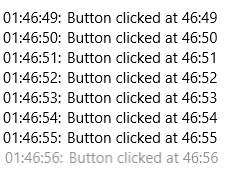
通过重载GetContainerForItemOverride、IsItemItsOwnContainerOverride、PrepareContainerForItemOverride这三个函数,很简单就能实现这个需求:
public class EventListView : ListView

{

    public EventListView()

    {

        _items = new Dictionary<object, DateTime>();

    }

    private Dictionary<object, DateTime> _items;

    protected override DependencyObject GetContainerForItemOverride()

    {

        return new HeaderedContentControl();

    }

    protected override bool IsItemItsOwnContainerOverride(object item)

    {

        return item is HeaderedContentControl;

    }

    protected override void PrepareContainerForItemOverride(DependencyObject element, object item)

    {

        base.PrepareContainerForItemOverride(element, item);

        var control = element as HeaderedContentControl;

        control.Content = item;

        if (_items.ContainsKey(item))

        {

            var time = _items[item];

            control.Header = time.ToString("HH:mm:ss")+": ";

        }

    }

    protected override void OnItemsChanged(object e)

    {

        base.OnItemsChanged(e);

        foreach (var item in Items)

        {

            if (_items.ContainsKey(item) == false)

                _items.Add(item, DateTime.Now);

        }

    }

}
public sealed class EventListViewItem : ListViewItem

{

    public EventListViewItem()

    {

        this.DefaultStyleKey = typeof(EventListViewItem);

    }

    public object Header

    {

        get { return (object)GetValue(HeaderProperty); }

        set { SetValue(HeaderProperty, value); }

    }

    // Using a DependencyProperty as the backing store for Header.  This enables animation, styling, binding, etc...

    public static readonly DependencyProperty HeaderProperty =

        DependencyProperty.Register("Header", typeof(object), typeof(EventListViewItem), new PropertyMetadata(null));

}
3. 集合类型属性
在XAML中使用集合类型属性,通常不会这样:
<ItemsControl>

    <ItemsControl.Items>

        <ItemCollection>

            <local:ScoreModel Score="70" />

            <local:ScoreModel Score="80" />

            <local:ScoreModel Score="90" />

            <local:ScoreModel Score="100" />

        </ItemCollection>

    </ItemsControl.Items>

</ItemsControl>
而是这样:
<ItemsControl>

    <ItemsControl.Items>

        <local:ScoreModel Score="70" />

        <local:ScoreModel Score="80" />

        <local:ScoreModel Score="90" />

        <local:ScoreModel Score="100" />

    </ItemsControl.Items>

</ItemsControl>
因为集合类型属性通常定义为只读的,不必也不可以对它赋值,只可以向它添加内容。
控件中的集合属性一般遵循以下做法:
3.1 只读属性
public IList<HubSection> Sections { get; }
这是Hub的Section属性,模板化控件中的集合类型属性基本都定义成这样的CLR属性。
3.2 监视更改通知
如果需要监视集合项更改,可以将属性定义为继承INotifyCollectionChanged 自的集合类型,譬如 ObservableCollection。
3.3 不使用依赖属性
因为集合属性通常不会使用动画,或者通过Style中的Setter赋值,而且依赖属性标识符是静态的,集合属性的初始值有可能引起单例的问题。集合属性通常在构造函数中初始化。
3.4 绑定到集合属性
通常不会绑定到集合属性,更常见的做法是如ItemsControl那样,绑定到ItemsSource。
[UWP]了解模板化控件(8):ItemsControl的更多相关文章
- [UWP]了解模板化控件(10):原则与技巧
1. 原则 推荐以符合以下原则的方式编写模板化控件: 选择合适的父类:选择合适的父类可以节省大量的工作,从UWP自带的控件中选择父类是最安全的做法,通常的选择是Control.ContentContr ...
- [UWP]了解模板化控件(1):基础知识
1.概述 UWP允许开发者通过两种方式创建自定义的控件:UserControl和TemplatedControl(模板化控件).这个主题主要讲述如何创建和理解模板化控件,目标是能理解模板化控件常见的知 ...
- [UWP]了解模板化控件(2):模仿ContentControl
ContentControl是最简单的TemplatedControl,而且它在UWP出场频率很高.ContentControl和Panel是VisualTree的基础,可以说几乎所有VisualTr ...
- [UWP]了解模板化控件(4):TemplatePart
1. TemplatePart TemplatePart(部件)是指ControlTemplate中的命名元素.控件逻辑预期这些部分存在于ControlTemplate中,并且使用protected ...
- [UWP]了解模板化控件(9):UI指南
1. 使用TemplateSettings统一外观 TemplateSettings提供一组只读属性,用于在新建ControlTemplate时使用这些约定的属性. 譬如,修改HeaderedCont ...
- [UWP]了解模板化控件(2.1):理解ContentControl
UWP的UI主要由布局容器和内容控件(ContentControl)组成.布局容器是指Grid.StackPanel等继承自Panel,可以拥有多个子元素的类.与此相对,ContentControl则 ...
- [UWP]了解模板化控件(3):实现HeaderedContentControl
1. 概述 来看看这段XMAL: <StackPanel Width="300"> <TextBox Header="TextBox" /&g ...
- [UWP]了解模板化控件(5):VisualState
1. 功能需求 使用TemplatePart实现上篇文章的两个需求(Header为空时隐藏HeaderContentPresenter,鼠标没有放在控件上时HeaderContentPresent半透 ...
- [UWP]了解模板化控件(5.2):UserControl vs. TemplatedControl
1. UserControl vs. TemplatedControl 在UWP中自定义控件常常会遇到这个问题:使用UserControl还是TemplatedControl来自定义控件. 1.1 使 ...
随机推荐
- nao安装中文包教程
本文介绍nao离线安装中文包 相官方索取 .demo 文件夹,里面包含很多的例程和中文包 下载winscp和putty(或者xshell),下载过程和安装我就不多说了,免费 把nao开机,连接路由器等 ...
- Linux(CentOS6.7) 安装MySql5.7数据库
linux(CentOS6.7) 环境Mysql 5.7.17安装教程分享给大家,供大家参考,具体内容如下: 1系统约定安装文件下载目录:/data/softwareMysql目录安装位置:/usr/ ...
- Android开发遇到手机无法弹出Toast
今天遇到了一个很奇怪的问题,一个很简单的程序,就是点击按钮弹出一个Toast,但在手机上运行起来,却没有正常弹出Toast 第一反应就是看看是否调用了show方法,很显然,并不是这个低级问题,为了确定 ...
- MVC5 DB FIRST
跟着师父一直在做codefirst的开发,最近有个新需求,就是需要人家的数据库,然后来开发,现在出现问题了.整理如下 目前有个现成的我们之前的codefirst的工程代码,我记得师父说过,根据数据库生 ...
- ZooKeeper集群-搭建指南
第一步: 上传安装程序到Linux 这一步很简单就不在这过多说明了! 第二步: 在Linux上使用命令行安装 第三步: 修改配置文件 1.修改zoo.cfg文件 2.修改集群中各台主机的名称 1).如 ...
- 多线程图像处理中对选入DC的位图保护
我在应用多线程加速图像处理(具体参见图像处理的多线程计算)的过程中,曾遇到过一个线程同步的问题.多线程对图像不同子块进行处理,再合成.结果发现最终不是全部子块都处理成功,有的子块好像没有被处理.而且发 ...
- iOS 文本转语音(TTS)详解:Swift
上一篇博客讲解了iOS的speech FrameWork语音识别的功能:http://www.cnblogs.com/qian-gu-ling/p/6599670.html,对应的这篇博客就写一下文本 ...
- Nagios邮件报警
p.MsoNormal,li.MsoNormal,div.MsoNormal { margin: 0cm; margin-bottom: .0001pt; line-height: 150%; fon ...
- Android IPC机制全解析<一>
概要 多进程概念及多进程常见注意事项 IPC基础:Android序列化和Binder 跨进程常见的几种通信方式:Bundle通过Intent传递数据,文件共享,ContentProvider,基于Bi ...
- ElasticSearch 基本概念
Elasticsearch是一个接近实时的搜索平台,就是说从索引一个文档直到这个文档能够被搜索到有一个轻微的延迟,通常是一秒钟 集群 一个集群通常有一个或多个elasticsearch节点组成,给这些 ...