
SpringMVC返回JSON方案
SpringMVC已经大行其道。一般的,都是返回JSP视图。如果需要返回JSON格式,我们大都掌握了一些方法。
在ContentNegotiatingViewResolver之前,一般使用XmlViewResolver的location属性,手工编写一个视图专门处理Json类型,就是将返回的数据封装成Json输出。下面介绍该方案具体代码。
exam-servlet.xml:
    <bean id="xmlViewResolver" class="org.springframework.web.servlet.view.XmlViewResolver">

        <property name="order" value="1"/>

        <property name="location" value="/WEB-INF/views.xml"/>

    </bean>

    <bean id="viewResolver"

        class="org.springframework.web.servlet.view.InternalResourceViewResolver">

        <property name="order" value="2"></property>

        <property name="prefix" value="/WEB-INF/jsp/"/>

        <property name="suffix" value=".jsp"/>

        <property name="viewClass"

            value="org.springframework.web.servlet.view.JstlView" />

    </bean>
views.xml
<?xml version="1.0" encoding="UTF-8"?>

<beans xmlns="http://www.springframework.org/schema/beans"

    xmlns:xsi="http://www.w3.org/2001/XMLSchema-instance"

    xsi:schemaLocation="http://www.springframework.org/schema/beans http://www.springframework.org/schema/beans/spring-beans.xsd">

    <bean id="json" class="cc.monggo.web.views.JsonView"></bean>

</beans>
JsonView.java
/**

 *

 */

package cc.monggo.web.views;

import java.util.HashMap;

import java.util.Iterator;

import java.util.Map;

import javax.servlet.http.HttpServletRequest;

import javax.servlet.http.HttpServletResponse;

import net.sf.json.JSON;

import net.sf.json.JSONArray;

import net.sf.json.JSONSerializer;

import net.sf.json.JsonConfig;

import net.sf.json.filters.OrPropertyFilter;

import net.sf.json.util.PropertyFilter;

import org.springframework.web.servlet.view.AbstractView;

import cc.monggo.web.form.BaseForm;

/**

 * @author fangjinsong

 *

 */

public class JsonView extends AbstractView {

    private static final String DEFAULT_JSON_CONTENT_TYPE = "application/json;charset=UTF-8";

    private boolean forceTopLevelArray = false;

    private boolean skipBindingResult = true;

    private JsonConfig jsonConfig = new JsonConfig();

    public JsonView() {

        super();

        setContentType(DEFAULT_JSON_CONTENT_TYPE);

    }

    public boolean isForceTopLevelArray() {

        return forceTopLevelArray;

    }

    public void setForceTopLevelArray(boolean forceTopLevelArray) {

        this.forceTopLevelArray = forceTopLevelArray;

    }

    public boolean isSkipBindingResult() {

        return skipBindingResult;

    }

    public void setSkipBindingResult(boolean skipBindingResult) {

        this.skipBindingResult = skipBindingResult;

    }

    public JsonConfig getJsonConfig() {

        return jsonConfig;

    }

    public void setJsonConfig(JsonConfig jsonConfig) {

        this.jsonConfig = jsonConfig != null ? jsonConfig : new JsonConfig();

        if (skipBindingResult) {

            PropertyFilter jsonPropertyFilter = this.jsonConfig.getJavaPropertyFilter();

            if (jsonPropertyFilter == null) {

                this.jsonConfig.setJsonPropertyFilter(new BindingResultPropertyFilter());

            } else {

                this.jsonConfig.setJsonPropertyFilter(new OrPropertyFilter(new BindingResultPropertyFilter(), jsonPropertyFilter));

            }

        }

    }

    public static String getDefaultJsonContentType() {

        return DEFAULT_JSON_CONTENT_TYPE;

    }

    public boolean isIgnoreDefaultExcludes() {

        return getJsonConfig().isIgnoreDefaultExcludes();

    }

    public void setExcludedProperties(String[] excludedProperties) {

        jsonConfig.setExcludes(excludedProperties);

    }

    public void setIgnoreDefaultExcludes(boolean ignoreDefaultExcludes) {

        jsonConfig.setIgnoreDefaultExcludes(ignoreDefaultExcludes);

    }

    protected String[] getExcludedProperties() {

        return jsonConfig.getExcludes();

    }

    @Override

    protected void renderMergedOutputModel(Map<String, Object> model, HttpServletRequest request, HttpServletResponse response) throws Exception {

        response.setContentType(getContentType());

        Map newModel = new HashMap();

        for (Iterator it = model.keySet().iterator(); it.hasNext();) {

            Object key = it.next();

            Object value = model.get(key);

            if (!(value instanceof BaseForm)) {

                newModel.put(key, value);

            }

        }

        writeJSON(newModel, request, response);

    }

    protected void writeJSON(Map<String, Object> model, HttpServletRequest request, HttpServletResponse response) throws Exception {

        JSON json = createJSON(model, request, response);

        if (forceTopLevelArray) {

            json = new JSONArray().element(json);

        }

        json.write(response.getWriter());

    }

    protected final JSON defaultCreateJSON(Map model) {

        if (skipBindingResult && jsonConfig.getJavaPropertyFilter() == null) {

            jsonConfig.setJsonPropertyFilter(new BindingResultPropertyFilter());

        }

        return JSONSerializer.toJSON(model, jsonConfig);

    }

    private JSON createJSON(Map model, HttpServletRequest request, HttpServletResponse response) {

        return defaultCreateJSON(model);

    }

    private static class BindingResultPropertyFilter implements PropertyFilter {

        @Override

        public boolean apply(Object source, String name, Object value) {

            return name.startsWith("org.springframework.validation.BindingResult");

        }

    }

}
这种方案会增加一个views.xml文件。另一个方案使用ContentNegotiatingViewResolver内容协商解析器。该解析器可以解析多种Controller返回结果,方法是分派给其他的解析器解析。这样就可以返回JSP视图,Xml视图,Json视图。其中Json视图由MappingJacksonJsonView视图表示。ContentNegotiatingViewResolver的一般配置如下:
    <bean class="org.springframework.web.servlet.view.ContentNegotiatingViewResolver">

        <property name="order" value="1" />

        <property name="ignoreAcceptHeader" value="true" />

        <property name="favorParameter" value="false" />

        <property name="defaultContentType" value="text/html" />

        <property name="mediaTypes">

            <map>

                <entry key="json" value="application/json" />

            </map>

        </property>

        <property name="viewResolvers">

            <list>

                <bean class="org.springframework.web.servlet.view.BeanNameViewResolver" />

                <bean class="org.springframework.web.servlet.view.InternalResourceViewResolver">

                    <property name="viewClass" value="org.springframework.web.servlet.view.JstlView" />

                    <property name="prefix" value="/WEB-INF/jsp/" />

                    <property name="suffix" value=".jsp"></property>

                </bean>

            </list>

        </property>

        <property name="defaultViews">

            <list>

                <bean id="json" class="com.mogee.web.views.MogeeMappingJacksonJsonView" />

            </list>

        </property>

    </bean>
要返回Json格式数据,Controller中一般使用JsonResult,@responseBody等技术。例如:
@RequestMapping("/json3.json")

    public JsonResult testJson3(@RequestBody User u){

        log.info("handle json output from ContentNegotiatingViewResolver");

        return new JsonResult(true,"return ok");

    }
这样一来,有一个问题:Controller总是返回Object对象,不能返回ModelAndview类型。按笔者的经验,经常有这样的需求:一个请求,如果返回了正确的结果,返回正常的JSP;如果返回了错误的结果,我们希望返回Json类型数据。为了满足这样要求,一般使用response.getWriter.print("")技术。笔者并不喜欢这样写法,不像Spring的风格。所以下面笔者将提出第二种方案。两者都能兼顾。Contoller代码如下。
@RequestMapping(value = "/test", method = RequestMethod.GET)

    public ModelAndView jsonView(HttpServletRequest request, HttpServletResponse response, HelloForm form)

            throws Exception {

        Map<String, Object> map = new HashMap<String, Object>();

        map.put("hello", "Hello");

        ModelAndView mv = new ModelAndView(new MappingJacksonJsonView(), map);

        return mv;

    }
通过这样的代码,可以在Controller中灵活控制,返回JSON或者JSP都可以。看似完美的方案,也有一个问题,返回的时候会将Form也打包到Json中去。如下:

原因是因为MappingJacksonJsonView代码中将数据map,mv.add(),还有form,还有错误提示等四项数据都加入Json,原程序只是过滤了错误提示,所以就留下了form数据。
为此我们需要重写MappingJacksonJsonView,将剩余三种数据中的form也过滤掉。一般的,form都会继承BaseForm,所以只要使用instanceof判断即可。这样的改造简洁明了,符合Spring编程的特点。具体代码如下:
public class MogeeMappingJacksonJsonView extends MappingJacksonJsonView {

    @Override

    protected Object filterModel(Map<String, Object> model) {

        Map<String, Object> result = new HashMap<String, Object>(model.size());

        Set<String> renderedAttributes = !CollectionUtils.isEmpty(super.getRenderedAttributes()) ? super

                .getRenderedAttributes() : model.keySet();

        for (Map.Entry<String, Object> entry : model.entrySet()) {

            if (!(entry.getValue() instanceof BindingResult) && renderedAttributes.contains(entry.getKey())) {

                if (!(entry.getValue() instanceof BaseForm)) {

                    result.put(entry.getKey(), entry.getValue());

                }

            }

        }

        return result;

    }

}
相应的,exam-servlet.xml中也要修改,代码如下:
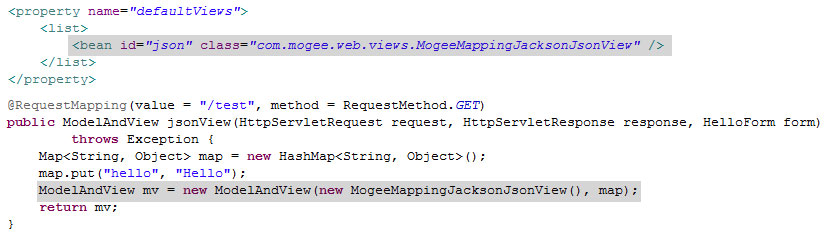
如此,就完成了输出Json的方案。
方劲松 东莞虎门信丰物流
2015.3.20
SpringMVC返回JSON方案的更多相关文章
- 【Spring学习笔记-MVC-3.1】SpringMVC返回Json数据-方式1-扩展
<Spring学习笔记-MVC>系列文章,讲解返回json数据的文章共有3篇,分别为: [Spring学习笔记-MVC-3]SpringMVC返回Json数据-方式1:http://www ...
- 【Spring学习笔记-MVC-4】SpringMVC返回Json数据-方式2
<Spring学习笔记-MVC>系列文章,讲解返回json数据的文章共有3篇,分别为: [Spring学习笔记-MVC-3]SpringMVC返回Json数据-方式1:http://www ...
- 【Spring学习笔记-MVC-3】SpringMVC返回Json数据-方式1
<Spring学习笔记-MVC>系列文章,讲解返回json数据的文章共有3篇,分别为: [Spring学习笔记-MVC-3]SpringMVC返回Json数据-方式1:http://www ...
- SpringMVC返回Json,自定义Json中Date类型格式
http://www.cnblogs.com/jsczljh/p/3654636.html —————————————————————————————————————————————————————— ...
- 配置SpringMVC返回JSON遇到的坑
坑一:官方网站下载地址不明朗,最后找了几个下载地址:http://wiki.fasterxml.com/JacksonDownload Jackson2.5下载地址:jackson2.5.0.jar ...
- SpringMVC返回JSON数据时日期格式化问题
https://dannywei.iteye.com/blog/2022929 SpringMVC返回JSON数据时日期格式化问题 博客分类: Spring 在运用SpringMVC框架开发时,可 ...
- springmvc 返回json数据给前台jsp页面展示
spring mvc返回json字符串的方式 方案一:使用@ResponseBody 注解返回响应体 直接将返回值序列化json 优点:不需要自己再处理 步骤一:在spring- ...
- spring入门(七)【springMVC返回json串】
现在多数的应用为了提高交互性多使用异步刷新,即在不刷新整个页面的情况下,只刷新局部,局部刷新用得最多就是ajax,ajax和后台进行交互的数据格式使用的最多的是JSON,这里简单描述,在springm ...
- springmvc返回json字符串中文乱码问题
问题: 后台代码如下: @RequestMapping("menuTreeAjax") @ResponseBody /** * 根据parentMenuId获取菜单的树结构 * @ ...
随机推荐
- Android Fragment(二)
废话:在上一篇的博客中我们给出了Fragment的简单介绍,这一片博客给大家介绍一下Fragment到底该怎样用.主要都用在哪方面等等. 需求:现有一个界面,要求,竖屏时界面的背景颜色为红色,横屏时界 ...
- 将myeclipse中不适用的插件禁用掉
转载地址http://blog.csdn.net/yuanboitliuyuan/article/details/7360553 去掉启动时不用的插件启动: 操作方法: windows->pre ...
- React Native创建一个APP
React Native 结合了 Web 应用和 Native 应用的优势,可以使用 JavaScript 来开发 iOS 和 Android 原生应用.在 JavaScript 中用 React 抽 ...
- OC实现个人中心页面
AppDelegate.m: - (BOOL)application:(UIApplication *)application didFinishLaunchingWithOptions:(NSDic ...
- 查看历史命令 history
生产上有文件被清空了,想查查是谁操作的? 通过history查看历史命令: $history |more 也可以通过文件查看历史命令: $vi ~/.bash_history 只显示历史命令,像查一查 ...
- Bagging(R语言实现)—包外错误率,多样性测度
1. Bagging Bagging即套袋法,其算法过程如下: 从原始样本集中抽取训练集.每轮从原始样本集中使用Bootstraping的方法抽取n个训练样本(在训练集中,有些样本可能被多次 ...
- python基础3之文件操作、字符编码解码、函数介绍
内容概要: 一.文件操作 二.字符编码解码 三.函数介绍 一.文件操作 文件操作流程: 打开文件,得到文件句柄并赋值给一个变量 通过句柄对文件进行操作 关闭文件 基本操作: #/usr/bin/env ...
- 20155216 Exp2 后门原理与实践
后门原理与实践 实验内容: 常用后门工具 NC 或 netcat netcat是一个底层工具,进行基本的TCP UDP数据收发.常被与其他工具结合使用,起到后门的作用. Linux: 一般自带netc ...
- POJ 3278&&2049&&3083
这次的题目叫图的深度&&广度优先遍历. 然后等我做完了题发现这是DFS&&BFS爆搜专题. 3278:题目是经典的FJ,他要抓奶牛.他和牛(只有一头)在一条数轴上,他们 ...
- mfc 虚函数
知识点 类虚函数概念 类虚函数定义virtual 一.虚函数 简单地说,那些被virtual关键字修饰的成员函数,就是虚函数. 二.虚函数定义 定义:在某基类中声明为 virtual 并在一个或多个派 ...