
Abp Vnext 动态(静态)API客户端源码解析
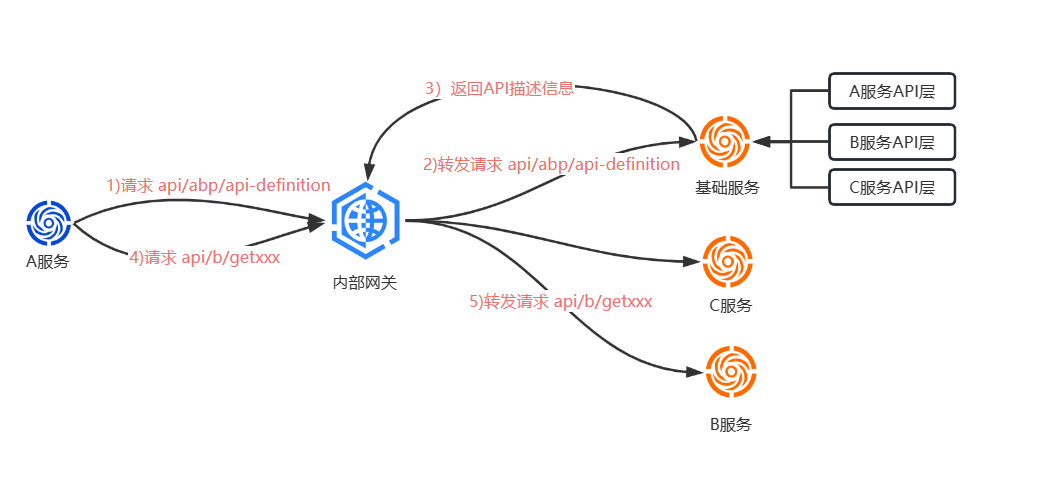
- 服务端:根据接口定义方法的签名生成路由,并暴露Api。
- 客户端:根据接口定义方法的签名生成请求,通过HTTPClient调用。
一.动态API客户端
context.Services.AddHttpClientProxies(

            typeof(IdentityApplicationContractsModule).Assembly,  //接口层程序集

            RemoteServiceName   //远程服务名称

        );

public static IServiceCollection AddHttpClientProxy(this IServiceCollection services, Type type, string remoteServiceConfigurationName = "Default", bool asDefaultService = true)

        {

            /*省略一些代码...*/

            Type type2 = typeof(DynamicHttpProxyInterceptor<>).MakeGenericType(type); //拦截器

            services.AddTransient(type2);

            Type interceptorAdapterType = typeof(AbpAsyncDeterminationInterceptor<>).MakeGenericType(type2);

            Type validationInterceptorAdapterType = typeof(AbpAsyncDeterminationInterceptor<>).MakeGenericType(typeof(ValidationInterceptor));

            if (asDefaultService)

            {

                //生成代理,依赖注入到容器

                services.AddTransient(type, (IServiceProvider serviceProvider) => ProxyGeneratorInstance.CreateInterfaceProxyWithoutTarget(type, (IInterceptor)serviceProvider.GetRequiredService(validationInterceptorAdapterType), (IInterceptor)serviceProvider.GetRequiredService(interceptorAdapterType)));

            }

            services.AddTransient(typeof(IHttpClientProxy<>).MakeGenericType(type), delegate (IServiceProvider serviceProvider)

            {

                //生成代理,通过HttpClientProxy封装,依赖注入到容器

                object obj = ProxyGeneratorInstance.CreateInterfaceProxyWithoutTarget(type, (IInterceptor)serviceProvider.GetRequiredService(validationInterceptorAdapterType), (IInterceptor)serviceProvider.GetRequiredService(interceptorAdapterType));

                return Activator.CreateInstance(typeof(HttpClientProxy<>).MakeGenericType(type), obj);

            });

            return services;

} public override async Task InterceptAsync(IAbpMethodInvocation invocation)
{
var context = new ClientProxyRequestContext(
await GetActionApiDescriptionModel(invocation), //获取Api描述信息
invocation.ArgumentsDictionary,
typeof(TService));
if (invocation.Method.ReturnType.GenericTypeArguments.IsNullOrEmpty())
{
await InterceptorClientProxy.CallRequestAsync(context);
}
else
{
var returnType = invocation.Method.ReturnType.GenericTypeArguments[0];
var result = (Task)CallRequestAsyncMethod
.MakeGenericMethod(returnType)
.Invoke(this, new object[] { context });
invocation.ReturnValue = await GetResultAsync(result, returnType); //调用CallRequestAsync泛型方法
}
} protected virtual async Task<ActionApiDescriptionModel> GetActionApiDescriptionModel(IAbpMethodInvocation invocation)
{
var clientConfig = ClientOptions.HttpClientProxies.GetOrDefault(typeof(TService)) ?? //获取远程服务名称
throw new AbpException($"Could not get DynamicHttpClientProxyConfig for {typeof(TService).FullName}.");
var remoteServiceConfig = await RemoteServiceConfigurationProvider.GetConfigurationOrDefaultAsync(clientConfig.RemoteServiceName);//获取远程服务端点配置
var client = HttpClientFactory.Create(clientConfig.RemoteServiceName); //创建HttpClient
return await ApiDescriptionFinder.FindActionAsync(
client,
remoteServiceConfig.BaseUrl, //远程服务地址
typeof(TService),
invocation.Method
);
} "RemoteServices": {
"Default": {
"BaseUrl": "http://localhost:44388"
},
"XXXDemo":{
"BaseUrl": "http://localhost:44345"
}
},public async Task<ActionApiDescriptionModel> FindActionAsync(
HttpClient client,
string baseUrl,
Type serviceType,
MethodInfo method)
{
var apiDescription = await GetApiDescriptionAsync(client, baseUrl); //获取Api描述信息并缓存结果
//TODO: Cache finding?
var methodParameters = method.GetParameters().ToArray();
foreach (var module in apiDescription.Modules.Values)
{
foreach (var controller in module.Controllers.Values)
{
if (!controller.Implements(serviceType)) //不继承接口跳过,所以写控制器为什么需要要继承服务接口的作用之一便在于此
{
continue;
}
foreach (var action in controller.Actions.Values)
{
if (action.Name == method.Name && action.ParametersOnMethod.Count == methodParameters.Length) //签名是否匹配
{
/*省略部分代码 */
}
}
}
}
throw new AbpException($"Could not found remote action for method: {method} on the URL: {baseUrl}");
}
public virtual async Task<ApplicationApiDescriptionModel> GetApiDescriptionAsync(HttpClient client, string baseUrl)
{
return await Cache.GetAsync(baseUrl, () => GetApiDescriptionFromServerAsync(client, baseUrl)); //缓存结果
} protected virtual async Task<ApplicationApiDescriptionModel> GetApiDescriptionFromServerAsync(
HttpClient client,
string baseUrl)
{
//构造请求信息
var requestMessage = new HttpRequestMessage(
HttpMethod.Get,
baseUrl.EnsureEndsWith('/') + "api/abp/api-definition"
);
AddHeaders(requestMessage); //添加请求头
var response = await client.SendAsync( //发送请求并获取响应结果
requestMessage,
CancellationTokenProvider.Token
);
if (!response.IsSuccessStatusCode)
{
throw new AbpException("Remote service returns error! StatusCode = " + response.StatusCode);
}
var content = await response.Content.ReadAsStringAsync();
var result = JsonSerializer.Deserialize<ApplicationApiDescriptionModel>(content, DeserializeOptions);
return result;
}public virtual async Task<T> CallRequestAsync<T>(ClientProxyRequestContext requestContext)
{
return await base.RequestAsync<T>(requestContext);
}
public virtual async Task<HttpContent> CallRequestAsync(ClientProxyRequestContext requestContext)
{
return await base.RequestAsync(requestContext);
} protected virtual async Task<HttpContent> RequestAsync(ClientProxyRequestContext requestContext)
{
//获取远程服务名称
var clientConfig = ClientOptions.Value.HttpClientProxies.GetOrDefault(requestContext.ServiceType) ?? throw new AbpException($"Could not get HttpClientProxyConfig for {requestContext.ServiceType.FullName}.");
//获取远程服务端点配置
var remoteServiceConfig = await RemoteServiceConfigurationProvider.GetConfigurationOrDefaultAsync(clientConfig.RemoteServiceName);
var client = HttpClientFactory.Create(clientConfig.RemoteServiceName);
var apiVersion = await GetApiVersionInfoAsync(requestContext); //获取API版本
var url = remoteServiceConfig.BaseUrl.EnsureEndsWith('/') + await GetUrlWithParametersAsync(requestContext, apiVersion); //拼接完整的url
var requestMessage = new HttpRequestMessage(requestContext.Action.GetHttpMethod(), url) //构造HTTP请求信息
{
Content = await ClientProxyRequestPayloadBuilder.BuildContentAsync(requestContext.Action, requestContext.Arguments, JsonSerializer, apiVersion)
};
AddHeaders(requestContext.Arguments, requestContext.Action, requestMessage, apiVersion); //添加请求头
if (requestContext.Action.AllowAnonymous != true) //是否需要认证
{
await ClientAuthenticator.Authenticate( //认证
new RemoteServiceHttpClientAuthenticateContext(
client,
requestMessage,
remoteServiceConfig,
clientConfig.RemoteServiceName
)
);
}
HttpResponseMessage response;
try
{
response = await client.SendAsync( //发送请求
requestMessage,
HttpCompletionOption.ResponseHeadersRead /*this will buffer only the headers, the content will be used as a stream*/,
GetCancellationToken(requestContext.Arguments)
);
}
return response.Content;
} public override async Task Authenticate(RemoteServiceHttpClientAuthenticateContext context)
{
if (context.RemoteService.GetUseCurrentAccessToken() != false)
{
var accessToken = await GetAccessTokenFromHttpContextOrNullAsync(); //获取当前登录用户Token
if (accessToken != null)
{
context.Request.SetBearerToken(accessToken);
return;
}
}
await base.Authenticate(context);
}[DependsOn(typeof(AbpHttpClientIdentityModelWebModule))]
      "UseCurrentAccessToken": "true"

    }

} protected virtual void AddHeaders(
IReadOnlyDictionary<string, object> argumentsDictionary,
ActionApiDescriptionModel action,
HttpRequestMessage requestMessage,
ApiVersionInfo apiVersion)
{
/*省略代码/*
//TenantId
if (CurrentTenant.Id.HasValue)
{
//TODO: Use AbpAspNetCoreMultiTenancyOptions to get the key
requestMessage.Headers.Add(TenantResolverConsts.DefaultTenantKey, CurrentTenant.Id.Value.ToString());
}
/*省略代码/*
}要点
二.静态API客户端
[Dependency(ReplaceServices = true)]

[ExposeServices(typeof(IIdentityRoleAppService), typeof(IdentityRoleClientProxy))]

public partial class IdentityRoleClientProxy : ClientProxyBase<IIdentityRoleAppService>, IIdentityRoleAppService

{

    public virtual async Task<ListResultDto<IdentityRoleDto>> GetAllListAsync()

    {

        return await RequestAsync<ListResultDto<IdentityRoleDto>>(nameof(GetAllListAsync));

    }

}

protected virtual async Task RequestAsync(string methodName, ClientProxyRequestTypeValue arguments = null)

{

    await RequestAsync(BuildHttpProxyClientProxyContext(methodName, arguments));

}
protected virtual ClientProxyRequestContext BuildHttpProxyClientProxyContext(string methodName, ClientProxyRequestTypeValue arguments = null)
{
if (arguments == null)
{
arguments = new ClientProxyRequestTypeValue();
}
var methodUniqueName = $"{typeof(TService).FullName}.{methodName}.{string.Join("-", arguments.Values.Select(x => TypeHelper.GetFullNameHandlingNullableAndGenerics(x.Key)))}";
var action = ClientProxyApiDescriptionFinder.FindAction(methodUniqueName); //获取调用方法的API描述信息
if (action == null)
{
throw new AbpException($"The API description of the {typeof(TService).FullName}.{methodName} method was not found!");
}
var actionArguments = action.Parameters.GroupBy(x => x.NameOnMethod).ToList();
if (action.SupportedVersions.Any())
{
//TODO: make names configurable
actionArguments.RemoveAll(x => x.Key == "api-version" || x.Key == "apiVersion");
}
return new ClientProxyRequestContext( //封装未远程调用上下文
action,
actionArguments
.Select((x, i) => new KeyValuePair<string, object>(x.Key, arguments.Values[i].Value))
.ToDictionary(x => x.Key, x => x.Value),
typeof(TService));
} private ApplicationApiDescriptionModel GetApplicationApiDescriptionModel()
{
var applicationApiDescription = ApplicationApiDescriptionModel.Create();
var fileInfoList = new List<IFileInfo>();
GetGenerateProxyFileInfos(fileInfoList);
foreach (var fileInfo in fileInfoList)
{
using (var streamReader = new StreamReader(fileInfo.CreateReadStream()))
{
var content = streamReader.ReadToEnd();
var subApplicationApiDescription = JsonSerializer.Deserialize<ApplicationApiDescriptionModel>(content);
foreach (var module in subApplicationApiDescription.Modules)
{
if (!applicationApiDescription.Modules.ContainsKey(module.Key))
{
applicationApiDescription.AddModule(module.Value);
}
}
}
}
return applicationApiDescription;
}
private void GetGenerateProxyFileInfos(List<IFileInfo> fileInfoList, string path = "")
{
foreach (var directoryContent in VirtualFileProvider.GetDirectoryContents(path))
{
if (directoryContent.IsDirectory)
{
GetGenerateProxyFileInfos(fileInfoList, directoryContent.PhysicalPath);
}
else
{
if (directoryContent.Name.EndsWith("generate-proxy.json"))
{
fileInfoList.Add(VirtualFileProvider.GetFileInfo(directoryContent.GetVirtualOrPhysicalPathOrNull()));
}
}
}
}要点
总结
动态API客户端
静态API客户端
最后
ABPVNEXT框架 QQ交流群:655362692
Abp Vnext 动态(静态)API客户端源码解析的更多相关文章
- Netty5客户端源码解析
Netty5客户端源码解析 今天来分析下netty5的客户端源码,示例代码如下: import io.netty.bootstrap.Bootstrap; import io.netty.channe ...
- Spring中AOP相关的API及源码解析
Spring中AOP相关的API及源码解析 本系列文章: 读源码,我们可以从第一行读起 你知道Spring是怎么解析配置类的吗? 配置类为什么要添加@Configuration注解? 谈谈Spring ...
- FileZilla客户端源码解析
FileZilla客户端源码解析 FTP是TCP/IP协议组的协议,有指令通路和数据通路两条通道.一般来说,FTP标准命令TCP端口号是21,Port方式数据传输端口是20. FileZilla作为p ...
- JDK1.8 动态代理机制及源码解析
动态代理 a) jdk 动态代理 Proxy, 核心思想:通过实现被代理类的所有接口,生成一个字节码文件后构造一个代理对象,通过持有反射构造被代理类的一个实例,再通过invoke反射调用被代理类实例的 ...
- 自定义Visual Studio.net Extensions 开发符合ABP vnext框架代码生成插件[附源码]
介绍 我很早之前一直在做mvc5 scaffolder的开发功能做的已经非常完善,使用代码对mvc5的项目开发效率确实能成倍的提高,就算是刚进团队的新成员也能很快上手,如果你感兴趣 可以参考 http ...
- .Net Core 中间件之静态文件(StaticFiles)源码解析
一.介绍 在介绍静态文件中间件之前,先介绍 ContentRoot和WebRoot概念. ContentRoot:指web的项目的文件夹,包括bin和webroot文件夹. WebRoot:一般指Co ...
- Spark streaming技术内幕6 : Job动态生成原理与源码解析
原创文章,转载请注明:转载自 周岳飞博客(http://www.cnblogs.com/zhouyf/) Spark streaming 程序的运行过程是将DStream的操作转化成RDD的操作,S ...
- 6.Spark streaming技术内幕 : Job动态生成原理与源码解析
原创文章,转载请注明:转载自 周岳飞博客(http://www.cnblogs.com/zhouyf/) Spark streaming 程序的运行过程是将DStream的操作转化成RDD的操作, ...
- Zookeeper ZAB协议-客户端源码解析
因为在Zookeeper的底层源码中大量使用了NIO,线程和阻塞队列,在了解之前对前面这些有个基础会更容易理解 ZAB 是Zookeeper 的一种原子广播协议,用于支持Zookeeper 的分布式协 ...
- Soul API 网关源码解析 02
如何读开源项目:对着文档跑demo,对着demo看代码,懂一点就开始试,有问题了问社区. 今日目标: 1.运行examples下面的 http服务 2.学习文档,结合divde插件,发起http请求s ...
随机推荐
- 文件的上传&预览&下载学习(三)
0.参考博客 https://www.pianshen.com/article/18961690151/ (逻辑流程图讲得很清楚) https://www.cnblogs.com/xiahj/p/vu ...
- 全网最详细中英文ChatGPT接口文档(一)开始使用ChatGPT——导言
目录 Introduction 导言 Overview 概述 Key concepts 关键概念 Prompts and completions 提示和完成 Tokens 标记/符号 Models 模 ...
- 纠删码在实时视频流中的应用丨Dev for Dev 专栏
本文为「Dev for Dev 专栏」系列内容,作者为声网网络体验团队王瑞. 01 背景 在实时音视频通话中,音视频质量受网络丢包影响较大,特别是对于视频. 为什么视频对丢包更敏感呢?通常来说,音频的 ...
- 利用selenium爬取前程无忧招聘数据
1.背景介绍 selenium通过驱动浏览器,模拟浏览器的操作,进而爬取数据.此外,还需要安装浏览器驱动,相关步骤自行解决. 2.导入库 import csv import random import ...
- 设计师必备:免费素材管理工具Billfish v3.0更新了!
Billfish是专门为设计师打造的图片收藏管理工具,可以轻松管理您的各种素材文件.Billfish是一个免费的软件,支持对大量的图片素材进行管理,提供多种快速的检索筛选功能,如颜色,格式,方向, ...
- 【JS基础】ES6模块系统
export export 导出方式有两种,命名导出和默认导出. 命名导出还是默认导出都是都导出模块中内容的一种方式,可以混合使用. 个人理解:默认导出其实是导出了default别名变量. 一个模块只 ...
- Spring事务的底层原理
1. 划分处理单元--IOC 由于spring解决的问题是对单个数据库进行局部事务处理的,具体的实现首相用spring 中的IOC划分了事务处理单元.并且将对事务的各种配置放到了ioc容器中(设置事务 ...
- Qt连接不上Linux服务器?
目录 1. Qt连接代码 2. 问题分析(按照顺序排除) 2.1 服务器IP是否能被Ping通? 2.2 客户端中的服务器IP和Port是否填写正确? 2.3 Linux的代码处理是否正确? 2.4 ...
- AI工具导航
.xe-comment-entry img { float: left; display: block; background: rgba(136, 136, 136, 0.15); margin-r ...
- [数据库/MySQL]解决异常:Data truncation: Truncated incorrect DOUBLE value: 'dc5'
1 场景复现 MySQL: 5.7.24-27 表结构 (两张独立的表) [表 RRR1] CREATE TABLE `RRR1` ( `R1` float NOT NULL COMMENT 'R1' ...