
python应用-matplotlib绘图
详细内容参看:官网
测试数据:
# 传入的参数

x=[1,2,3,4,5]

squares=[1,4,9,16,25]
简单的绘图
import matplotlib.pyplot as plt

def plot1(x,squares):

    """plot simple pic"""

    plt.plot(x,squares,linewidth=1)

    # or plt.plot(squares)

    plt.show()
- plt.plot(x,y)
- plt.show()
改变文字、字体、线宽
def plot2(x,squares):

    """change literature and line width"""

    plt.plot(x,squares,linewidth=2)

    plt.title("Literatures",fontsize=24)

    plt.xlabel("xlabel",fontsize=14)

    plt.ylabel("ylabel",fontsize=14)

    # set labelsize of x, y

    plt.tick_params(axis='both',labelsize=14)

    plt.show()
- plt.title("title")
- plt.xlabel('xlabel')
- plt.ylabel('ylabel')
- plt.tick_params(axis,labelsize)
自动生成数据
def plot3():

    """automatically compute the data"""

    x_val = list(range(1,1001))

    y_val = [x**2 for x in x_val]

    plt.scatter(x_val,y_val,s=5)

    plt.title("Literatures",fontsize=24)

    plt.xlabel("xlabel",fontsize=14)

    plt.ylabel("ylabel",fontsize=14)

    # set labelsize of x, y

    plt.tick_params(axis='both',labelsize=14)

    plt.axis([0,1100,0,1100000])

    plt.show()
- plt.axis([0,1100,0,110000])
- plt.scatter(x,y,s)
颜色改变(很漂亮)
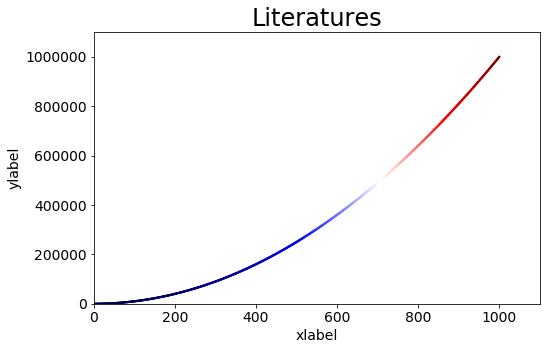
def plot4():

    """change the color"""

    x_val = list(range(1,1001))

    y_val = [x**2 for x in x_val]

    # delete the default edgecolor(black)

    # change color by adjusting c

    plt.scatter(x_val,y_val,edgecolor='none',c=(0.5,0.6,0.3),s=5)

    plt.title("Literatures",fontsize=24)

    plt.xlabel("xlabel",fontsize=14)

    plt.ylabel("ylabel",fontsize=14)

    # set labelsize of x, y

    plt.tick_params(axis='both',labelsize=14)

    plt.axis([0,1100,0,1100000])

    plt.show()
- plt.scatter(x,y,edgecolor='none',c,s)
- c用来调节颜色
- s代表size
def plot5():

    """using colormap"""

    x_val = list(range(1,1001))

    y_val = [x**2 for x in x_val]

    # delete the default edgecolor(black)

    # using cmap to make gradient

    plt.scatter(x_val,y_val,edgecolor='none',c=y_val,s=5,cmap=plt.cm.Blues)

    plt.title("Literatures",fontsize=24)

    plt.xlabel("xlabel",fontsize=14)

    plt.ylabel("ylabel",fontsize=14)

    # set labelsize of x, y

    plt.tick_params(axis='both',labelsize=14)

    plt.axis([0,1100,0,1100000])

    plt.show()
- plt.scatter(x,y,edgecolor,c,s,cmap)
- cmap颜色映射
- plt.cm.Blues
- plt.cm.Reds
- plt.cm.Greens
- plt.cm.Paired
- plt.cm.binary
- plt.cm.seismic
- cmap颜色映射
保存图片
def plot6():

    """using colormap"""

    x_val = list(range(1,1001))

    y_val = [x**2 for x in x_val]

    # delete the default edgecolor(black)

    # using cmap to make gradient

    # cmap(plt.cm.*) Blues Reds Greens Paired binary seismic

    plt.scatter(x_val,y_val,edgecolor='none',c=y_val,s=5,cmap=plt.cm.seismic)

    plt.title("Literatures",fontsize=24)

    plt.xlabel("xlabel",fontsize=14)

    plt.ylabel("ylabel",fontsize=14)

    # set labelsize of x, y

    plt.tick_params(axis='both',labelsize=14)

    plt.axis([0,1100,0,1100000])

    # do not show, save it

    plt.savefig('save.png',bbox_inches='tight')
- plt.savefig('name.jpg',bbox_inches)
- 一般bbox_inches='tight'比较好
python应用-matplotlib绘图的更多相关文章
- python 中matplotlib 绘图
python 中matplotlib 绘图 数学建模需要,对于绘图进行简单学习 matpoltlib之类的包安装建议之间用anaconda 绘制一条y=x^2的曲线 #比如我们要绘制一条y=x^2的曲 ...
- python之matplotlib绘图基础
Python之matplotlib基础 matplotlib是Python优秀的数据可视化第三方库 matplotlib库的效果可参考 http://matplotlib.org/gallery.ht ...
- python基于matplotlib绘图
import math import numpy as np import matplotlib.pyplot as plt from matplotlib.font_manager import F ...
- python中matplotlib绘图封装类之折线图、条状图、圆饼图
DrawHelper.py封装类源码: import matplotlib import matplotlib.pyplot as plt import numpy as np class DrawH ...
- Python用matplotlib绘图网格线的设置
一.X轴网格线的设置 import matplotlib.pyplot as plt import numpy as np from pylab import mpl mpl.rcParams['fo ...
- python中利用matplotlib绘图可视化知识归纳
python中利用matplotlib绘图可视化知识归纳: (1)matplotlib图标正常显示中文 import matplotlib.pyplot as plt plt.rcParams['fo ...
- python 利用matplotlib中imshow()函数绘图
matplotlib 是python最著名的2D绘图库,它提供了一整套和matlab相似的命令API,十分适合交互式地进行制图.而且也可以方便地将它作为绘图控件,嵌入GUI应用程序中.通过简单的绘图语 ...
- python实战学习之matplotlib绘图
matplotlib 是最流行的Python底层绘图库,主要做数据可视化图表 可以将数据可视化,能够更直观的呈现数据 matplotlib绘图基本要点 首先实现一个简单的绘图 # 导入pyplot f ...
- python强大的绘图模块matplotlib示例讲解
Matplotlib 是 Python 的绘图库.作为程序员,经常需要进行绘图,在我自己的工作中,如果需要绘图,一般都是将数据导入到excel中,然后通过excel生成图表,这样操作起来还是比较繁琐的 ...
随机推荐
- serializeArray()与serialize()的区别
serialize()序列化表单元素为字符串,用于 Ajax 请求. serializeArray()序列化表单元素为JSON数据. <script type="text/javasc ...
- Oracle预定义的21个系统异常类型
命名的系统异常 产生原因 ACCESS_INTO_NULL 未定义对象 CASE_NOT_FOUND CASE 中若未包含相应的 WHEN ,并且没有设置 ELSE 时 COLLECTION_IS_N ...
- [Android] 配置安卓模拟器,使得dex文件不被优化成odex
最近做一个模块,需要将apk里面加载的dex文件dump出来,所以需要配置让dalvik不要把dex文件优化成odex. 1. 配置build.prop 主要是通过修改文件/system/build. ...
- Groovy中的面向对象
Groovy中的面向对象 前面说到groovy支持脚本和类,前面一节已将简单说了脚本和类之间的关系,这一节主要介绍一下groovy中类的相关知识,即面向对象相关知识. 1.类型 1.1 原始类型 gr ...
- Spring源码学习之IOC容器实现原理(一)-DefaultListableBeanFactory
从这个继承体系结构图来看,我们可以发现DefaultListableBeanFactory是第一个非抽象类,非接口类.实际IOC容器.所以这篇博客以DefaultListableBeanFactory ...
- AC自动机板子题/AC自动机学习笔记!
想知道484每个萌新oier在最初知道AC自动机的时候都会理解为自动AC稽什么的,,,反正我记得我当初刚知道这个东西的时候,我以为是什么神仙东西,,,(好趴虽然确实是个对菜菜灵巧比较难理解的神仙知识点 ...
- scrapy框架(2)
一.使用scrapy框架发送post请求 1.需求一:使用scrapy发送百度翻译中的ajax请求 创建一个项目,如下目录,修改settings.py文件中的 "ROBOTSTXT_OBEY ...
- Oracle数据库的经典问题 snapshot too old是什么原因引起的
Oracle数据库的经典问题 snapshot too old是什么原因引起的 ORACLE经典错误求解:ORA-1555错误(Snapshot too old ) - ... 书上说是因为the r ...
- word安装楷体gb2312方法。
1:下载:楷体gb2312.http://www.downza.cn/soft/7732.html 2: 双击安装,将会下载楷体2312 的压缩文件,解压得到楷体2312.ttf. 3: 打开控制 ...
- [py][mx]django实现课程机构排名
如果是第一次做这个玩意,说实话,确实不知道怎么弄, 做一次后就有感觉了 此前我们已经完成了: 分类筛选 分页 这次我们做的是 课程机构排名 知识点: - 按照点击数从大到小排名, 取出前三名 hot_ ...