
libgdx学习记录15——音乐Music播放
背景音乐是游戏中必备的元素,好的背景音乐能为游戏加分不少,使人更容易融入到游戏的氛围中去。
Music类中主要有以下函数:
play()播放
stop()停止
pause()暂停
setVolume()设置音量
setLooping()是否循环播放
代码示例:
 package com.fxb.newtest;

 import com.badlogic.gdx.ApplicationAdapter;

 import com.badlogic.gdx.Gdx;

 import com.badlogic.gdx.audio.Music;

 import com.badlogic.gdx.audio.Sound;

 import com.badlogic.gdx.graphics.Color;

 import com.badlogic.gdx.graphics.GL10;

 import com.badlogic.gdx.scenes.scene2d.Actor;

 import com.badlogic.gdx.scenes.scene2d.InputEvent;

 import com.badlogic.gdx.scenes.scene2d.InputListener;

 import com.badlogic.gdx.scenes.scene2d.Stage;

 import com.badlogic.gdx.scenes.scene2d.ui.Label;

 import com.badlogic.gdx.scenes.scene2d.ui.Skin;

 import com.badlogic.gdx.scenes.scene2d.ui.Slider;

 import com.badlogic.gdx.scenes.scene2d.ui.Table;

 import com.badlogic.gdx.scenes.scene2d.ui.TextButton;

 import com.badlogic.gdx.scenes.scene2d.utils.ChangeListener;

 public class Lib015_Music extends ApplicationAdapter{

     Music music;

     Sound sound;

     Skin skin;

     Stage stage;

     State state;

     enum State{ music_play, music_stop, music_pause };

     @Override

     public void create() {

         // TODO Auto-generated method stub

         super.create();

         music = Gdx.audio.newMusic( Gdx.files.internal( "audio/xjwq.mp3" ) );

         music.setLooping( true );

         music.setVolume( 0.5f );

         //music.play();

         stage = new Stage();

         skin = new Skin( Gdx.files.internal( "skin/uiskin.json" ) );

         final TextButton buttonStop = new TextButton( "Stop", skin );

         TextButton buttonPlay = new TextButton( "Play/Pause", skin );

         state = State.music_stop;

         buttonStop.setDisabled( true );

         buttonStop.addListener(new InputListener(){

             public boolean touchDown(InputEvent event, float x, float y,int pointer, int button) {

                 // TODO Auto-generated method stub

                 return true;

             }

             public void touchUp(InputEvent event, float x, float y,int pointer, int button) {

                 // TODO Auto-generated method stub

                 if( state != State.music_stop ){

                     music.stop();

                     state = State.music_stop;

                     buttonStop.setDisabled( true );

                     System.out.println( "stop" );

                 }

             }

         });

         buttonPlay.addListener(new InputListener(){

             public boolean touchDown(InputEvent event, float x, float y,int pointer, int button) {

                 // TODO Auto-generated method stub

                 return true;

             }

             public void touchUp(InputEvent event, float x, float y,int pointer, int button) {

                 // TODO Auto-generated method stub

                 if( state == State.music_play ){

                     music.pause();

                     state = State.music_pause;

                     System.out.println( "pause" );

                 }

                 else{

                     music.play();

                     state = State.music_play;

                     buttonStop.setDisabled( false );

                     System.out.println( "play" );

                 }

                 //(state==State.music_play)? music.pause(): music.play();

             }

         });

         final Slider slider = new Slider( 0, 100, 1, false, skin );

         slider.addListener(new ChangeListener(){

             public void changed(ChangeEvent event, Actor actor) {

                 // TODO Auto-generated method stub

                 music.setVolume( slider.getValue()/100 );

             }

         });

         slider.setValue( 50 );

         Table table = new Table();

         table.defaults().space(5);

         table.row();

         table.add( new Label( "Music Play", skin )  ).colspan(2).expandX();

         table.row();

         table.add( slider ).colspan(2).expandX();

         table.row();

         table.add( buttonPlay ).minWidth(100);

         table.add( buttonStop ).minWidth(100);

         table.pad( 10 );

         table.pack();

         table.setBackground( skin.newDrawable( "white", Color.PINK ) );

         stage.addActor( table );

         table.setPosition( stage.getWidth()/2-table.getWidth()/2, stage.getHeight()/2-table.getHeight()/2 );

         Gdx.input.setInputProcessor( stage );

     }

     @Override

     public void render() {

         // TODO Auto-generated method stub

         super.render();

         Gdx.gl.glClearColor( 1, 1, 1, 1 );

         Gdx.gl.glClear( GL10.GL_COLOR_BUFFER_BIT );

         stage.act();

         stage.draw();

     }

     @Override

     public void dispose() {

         // TODO Auto-generated method stub

         music.dispose();

         super.dispose();

     }

 }
运行效果:
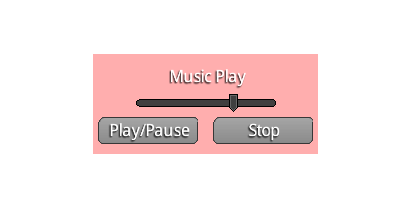
中间滑动条是调节音量的,左下是播放暂停键,右下是停止键。
另外Sound与Music类似。
libgdx学习记录15——音乐Music播放的更多相关文章
- libgdx学习记录18——Box2d物理引擎
libgdx封装了Box2D物理引擎,通过这个引擎能够模拟物理现实,使设计出的游戏更具有真实感. libgdx中,Box2d程序的大概过程: 1. 创建物理世界world,并设置重力加速度. 2. 创 ...
- libgdx学习记录2——文字显示BitmapFont
libgdx对中文支持不是太好,主要通过Hireo和ttf字库两种方式实现.本文简单介绍最基本的bitmapfont的用法. 代码如下: package com.fxb.newtest; import ...
- libgdx学习记录3——动画Animation
libgdx动画采用Animation实现,即通过帧动画实现. 代码如下: package com.fxb.newtest; import com.badlogic.gdx.ApplicationAd ...
- libgdx学习记录26——Polygon多边形碰撞检测
libgdx中Math封装了Polygon这个类,它是由多个定点进行描述实现的,在进行物体间的碰撞时,物体轮廓有时候是不规则的,这时候可以用一个多边形勾勒出其大概的轮廓,对其进行模拟. Polygon ...
- libgdx学习记录22——3d物体创建
libgdx是一个强大的游戏框架,不仅支持2d部分,同时还支持3d部分. libgdx的3d部分投影主要通过PerspectiveCamera实现. 物体的显示过程: 1. 创建远景相机,角度一般设为 ...
- libgdx学习记录20——多线程MultiThread资源处理
在libgdx中,一般的逻辑流程都在rende()函数中执行,这个函数是由opengl的渲染线程调用的,一般的图形显示和逻辑处理都在这个线程中. 一般情形下,在这个线程中处理就行了.但是当某些逻辑处理 ...
- libgdx学习记录19——图片动态打包PixmapPacker
libgdx中,opengl 1.x要求图片长宽必须为2的整次幂,一般有如下解决方法 1. 将opengl 1.x改为opengl 2.0.(libgdx 1.0版本后不支持1.x,当然不存在这个问题 ...
- libgdx学习记录17——照相机Camera
照相机在libgdx中的地位举足轻重,贯穿于整个游戏开发过程的始终.一般我们都通过Stage封装而间接使用Camera,同时我们也可以单独使用Camera以完成背景的移动.元素的放大.旋转等操作. C ...
- libgdx学习记录16——资源加载器AssetManager
AssetManager用于对游戏中的资源进行加载.当游戏中资源(图片.背景音乐等)较大时,加载时会需要较长时间,可能会阻塞渲染线程,使用AssetManager可以解决此类问题. 主要优点: 1. ...
随机推荐
- COCOMOII
一.COCOMOII是什么 cocomo是 COnstructive COst MOdel(建设性成本估算模型)的缩写.最早是由Dr. Barry Boehm在1981年提出.是一种精确的.易于使用的 ...
- .NET中低版本程序调用高版本DLL
在.NET项目开发中,有时需要对旧的程序进行二次开发,但是有些DLL是高版本的,如果对旧程序升级高版本,则需要改动的地方比较多,在项目比较急,开发时间短的情况下,可以通过下面方法让低版本程序调用高版本 ...
- Azure 门户中基于角色的访问控制入门
面向安全的公司应侧重于向员工提供他们所需的确切权限. 权限过多,可能会向攻击者公开帐户. 权限太少意味着员工无法有效地完成其工作. Azure 基于角色的访问控制 (RBAC) 可通过为 Azure ...
- VScode开发Vue项目,关闭eslint代码检查,以及相关配置
Vue初始化项目时如果不小心安装了js 语法检测 功能,撸码时一个空格不对就会各种报错 个人感觉这个语法检测功能很有点过于严格,用起来十分难受,所以果断关闭eslint,找到webpack.base. ...
- Character Sets: Migrating to utf8mb4 with pt_online_schema_change
David Berube | June 12, 2018 | Posted In: MySQL Modern applications often feature the use of data ...
- C# post json 匿名类 序列化
//第一步 建立HTTP请求对象 var httpWebRequest = (HttpWebRequest)WebRequest.Create(apiURL); httpWebRequest.Cont ...
- cat > file << EOF 与 cat > file << -
当我们在使用kickstart 的时候,会遇到写网卡配置文件的情况,这时候我们使用cat > file << EOF 命令等,可以从标准输入中接受输入并保存到 file 文件中. c ...
- October 31st, 2017 Week 44th Tuesday
No matter how hard the past is, you can always begin again. 不管过去有多么困难,你都可以重新开始. Honestly, I don't ag ...
- 2.python数据结构的性能分析
一.引言 - 现在大家对 大O 算法和不同函数之间的差异有了了解.本节的目标是告诉你 Python 列表和字典操作的 大O 性能.然后我们将做一些基于时间的实验来说明每个数据结构的花销和使用这些数据结 ...
- linux结束程序内存不会马上释放的解决方法
Linux下频繁读写文件时,内存资源被耗尽,当程序结束后,内存不会释放需要清除缓存.Linux缓存有dentry,buffer cache,page cache. 注:Dentry用来加速文件路径 ...