
3 differences between Savepoints and Checkpoints in Apache Flink
https://mp.weixin.qq.com/s/nQOxsZUZSiPi7Sx40mgwsA
20181104
3 differences between Savepoints and Checkpoints in Apache Flink
This episode of our Flink Friday Tip explains what Savepoints and Checkpoints are and examines the main differences between them in Apache Flink. In the following paragraphs, we explain what Savepoints are, when they should be used and give a side-by-side comparison on how they differ toCheckpoints.
What are Savepoints and Checkpoints in Apache Flink?
An Apache Flink Savepoint is a feature that allows you to take a “point-in-time” snapshot of your entire streaming application. This snapshot contains information about where you are in your input as well as information about all the positions of the sources and the state of the entire application. We can get a consistent snapshot of the entire state without stopping the application with a variant of the Chandy-Lamport algorithm. Savepoints contain two main elements:
First, Savepoints include a directory with (typically large) binary files that represent the entire state of the streaming application at the point of the Checkpoint/Savepoint image and
A (relatively small) metadata file that contains pointers (paths) to all files that are part of the Savepoint and are stored in your selected distributed file system or data storage.
Read our earlier blog post for a step-by-step guide on how to enable Savepoints in your streaming application.
All the above about Savepoints sound very familiar to what we explained about Checkpoints in Apache Flink in an earlier post. Checkpointing is Apache Flink’s internal mechanism to recover from failures, consisting of the copy of the application’s state and including the reading positions of the input. In case of a failure, Flink recovers an application by loading the application state from the Checkpoint and continuing from the restored reading positions as if nothing happened.
Read one of our earlier Flink Friday Tips for a step-by-step example of how Apache Flink manages Kafka Consumer offsets.
3 differences between Savepoints and Checkpoints in Apache Flink
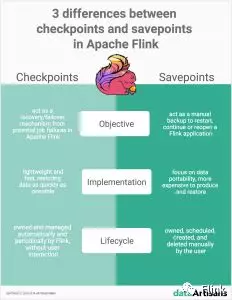
Checkpoints and Savepoints are two features quite unique to Apache Flink as a stream processing framework. Both Savepoints and Checkpoints might look similar in their implementation, however, the two features are different in the following 3 ways:
Objective: Conceptually, Flink’s Savepoints are different from Checkpoints in a similar way that backups are different from recovery logs in traditional database systems. Checkpoints’ primary objective is to act as a recovery mechanism in Apache Flink ensuring a fault-tolerant processing framework that can recover from potential job failures. Conversely, Savepoints’ primary goal is to act as the way to restart, continue or reopen a paused application after a manual backup and resume activity by the user.
Implementation: Checkpoints and Savepoints differ in their implementation. Checkpoints are designed to be lightweight and fast. They might (but don’t necessarily have to) make use of different features of the underlying state backend and try to restore data as fast as possible As an example, incremental Checkpoints with the RocksDB State backend use RocksDB’s internal format instead of Flink’s native format. This is used to speed up the checkpointing process of RocksDB that makes them the first instance of a more lightweight Checkpointing mechanism. On the contrary, Savepoints are designed to focus more on the portability of data and support any changes made to the job that make them slightly more expensive to produce and restore.
Lifecycle: Checkpoints are automatic and periodic in nature. They are owned, created and dropped automatically and periodically by Flink, without any user interaction, to ensure full recovery in case of an unexpected job failure. On the contrary, Savepoints are owned and managed (i.e. they are scheduled, created, and deleted) manually by the user.
When to use Savepoints in your streaming application?
Although a stream processing application processes data that is continuously produced (data “in-motion”), there are instances where an application might need to reprocess data that has been previously processed. Savepoints in Apache Flink allow you to do so in cases such as:
Deploying an updated version of your streaming application including a new feature, a bug fix, or a better machine learning model
Introducing A/B testing for your application, testing different versions of your program using the same source data streams, starting the test from the same point in time without sacrificing prior state
Rescaling your application in case more resources are necessary
Migrating your streaming applications to a new release of Apache Flink, or upgrading your application to a different cluster.
Sign up to an Apache Flink Public Training to get hands-on guidance on how to use Savepoints for cases such as above.
Conclusion
Checkpoints and Savepoints are two different features in Apache Flink that serve different needs to ensure consistency, fault-tolerance and make sure that the application state is persisted both in case of unexpected job failures (with Checkpoints) as well as in cases of upgrades, bug fixes, migrations or A/B testing (with Savepoints). The two features combined have you covered in different instances ensuring that your application’s state is persisted in different scenarios and circumstances.
To learn more about the different Apache Flink features and how to best utilize them, our Apache Flink Public Training can give you some hands-on examples of how to utilize them and build consistent, stateful streaming applications with Flink. Sign up to a public training near you below or contact us for more information.
Apache Flink 1.8-SNAPSHOT Documentation: Savepoints https://ci.apache.org/projects/flink/flink-docs-master/ops/state/savepoints.html
Savepoints
- What is a Savepoint? How is a Savepoint different from a Checkpoint?
- Assigning Operator IDs
- Operations
- F.A.Q
- Should I assign IDs to all operators in my job?
- What happens if I add a new operator that requires state to my job?
- What happens if I delete an operator that has state from my job?
- What happens if I reorder stateful operators in my job?
- What happens if I add or delete or reorder operators that have no state in my job?
- What happens when I change the parallelism of my program when restoring?
- Can I move the Savepoint files on stable storage?
What is a Savepoint? How is a Savepoint different from a Checkpoint?
A Savepoint is a consistent image of the execution state of a streaming job, created via Flink’s checkpointing mechanism. You can use Savepoints to stop-and-resume, fork, or update your Flink jobs. Savepoints consist of two parts: a directory with (typically large) binary files on stable storage (e.g. HDFS, S3, …) and a (relatively small) meta data file. The files on stable storage represent the net data of the job’s execution state image. The meta data file of a Savepoint contains (primarily) pointers to all files on stable storage that are part of the Savepoint, in form of absolute paths.
Conceptually, Flink’s Savepoints are different from Checkpoints in a similar way that backups are different from recovery logs in traditional database systems. The primary purpose of Checkpoints is to provide a recovery mechanism in case of unexpected job failures. A Checkpoint’s lifecycle is managed by Flink, i.e. a Checkpoint is created, owned, and released by Flink - without user interaction. As a method of recovery and being periodically triggered, two main design goals for the Checkpoint implementation are i) being as lightweight to create and ii) being as fast to restore from as possible. Optimizations towards those goals can exploit certain properties, e.g. that the job code doesn’t change between the execution attempts. Checkpoints are usually dropped after the job was terminated by the user (except if explicitly configured as retained Checkpoints).
In contrast to all this, Savepoints are created, owned, and deleted by the user. Their use-case is for planned, manual backup and resume. For example, this could be an update of your Flink version, changing your job graph, changing parallelism, forking a second job like for a red/blue deployment, and so on. Of course, Savepoints must survive job termination. Conceptually, Savepoints can be a bit more expensive to produce and restore and focus more on portability and support for the previously mentioned changes to the job.
Those conceptual differences aside, the current implementations of Checkpoints and Savepoints are basically using the same code and produce the same „format”. However, there is currently one exception from this, and we might introduce more differences in the future. The exception are incremental checkpoints with the RocksDB state backend. They are using some RocksDB internal format instead of Flink’s native savepoint format. This makes them the first instance of a more lightweight checkpointing mechanism, compared to Savepoints.
Assigning Operator IDs
It is highly recommended that you adjust your programs as described in this section in order to be able to upgrade your programs in the future. The main required change is to manually specify operator IDs via the uid(String) method. These IDs are used to scope the state of each operator.
DataStream<String> stream = env.

  // Stateful source (e.g. Kafka) with ID

  .addSource(new StatefulSource())

  .uid("source-id") // ID for the source operator

  .shuffle()

  // Stateful mapper with ID

  .map(new StatefulMapper())

  .uid("mapper-id") // ID for the mapper

  // Stateless printing sink

  .print(); // Auto-generated ID
If you don’t specify the IDs manually they will be generated automatically. You can automatically restore from the savepoint as long as these IDs do not change. The generated IDs depend on the structure of your program and are sensitive to program changes. Therefore, it is highly recommended to assign these IDs manually.
Savepoint State
You can think of a savepoint as holding a map of Operator ID -> State for each stateful operator:
Operator ID | State

------------+------------------------

source-id   | State of StatefulSource

mapper-id   | State of StatefulMapper
In the above example, the print sink is stateless and hence not part of the savepoint state. By default, we try to map each entry of the savepoint back to the new program.
Operations
You can use the command line client to trigger savepoints, cancel a job with a savepoint, resume from savepoints, and dispose savepoints.
With Flink >= 1.2.0 it is also possible to resume from savepoints using the webui.
Triggering Savepoints
When triggering a savepoint, a new savepoint directory is created where the data as well as the meta data will be stored. The location of this directory can be controlled by configuring a default target directory or by specifying a custom target directory with the trigger commands (see the :targetDirectory argument).
For example with a FsStateBackend or RocksDBStateBackend:
# Savepoint target directory

/savepoints/

# Savepoint directory

/savepoints/savepoint-:shortjobid-:savepointid/

# Savepoint file contains the checkpoint meta data

/savepoints/savepoint-:shortjobid-:savepointid/_metadata

# Savepoint state

/savepoints/savepoint-:shortjobid-:savepointid/..._metadatafile. Please follow FLINK-5778 for progress on lifting this restriction.Note that if you use the MemoryStateBackend, metadata and savepoint state will be stored in the _metadata file. Since it is self-contained, you may move the file and restore from any location.
Trigger a Savepoint
$ bin/flink savepoint :jobId [:targetDirectory]This will trigger a savepoint for the job with ID :jobId, and returns the path of the created savepoint. You need this path to restore and dispose savepoints.
Trigger a Savepoint with YARN
$ bin/flink savepoint :jobId [:targetDirectory] -yid :yarnAppIdThis will trigger a savepoint for the job with ID :jobId and YARN application ID :yarnAppId, and returns the path of the created savepoint.
Cancel Job with Savepoint
$ bin/flink cancel -s [:targetDirectory] :jobIdThis will atomically trigger a savepoint for the job with ID :jobid and cancel the job. Furthermore, you can specify a target file system directory to store the savepoint in. The directory needs to be accessible by the JobManager(s) and TaskManager(s).
Resuming from Savepoints
$ bin/flink run -s :savepointPath [:runArgs]This submits a job and specifies a savepoint to resume from. You may give a path to either the savepoint’s directory or the _metadata file.
Allowing Non-Restored State
By default the resume operation will try to map all state of the savepoint back to the program you are restoring with. If you dropped an operator, you can allow to skip state that cannot be mapped to the new program via --allowNonRestoredState (short: -n) option:
$ bin/flink run -s :savepointPath -n [:runArgs]Disposing Savepoints
$ bin/flink savepoint -d :savepointPathThis disposes the savepoint stored in :savepointPath.
Note that it is possible to also manually delete a savepoint via regular file system operations without affecting other savepoints or checkpoints (recall that each savepoint is self-contained). Up to Flink 1.2, this was a more tedious task which was performed with the savepoint command above.
Configuration
You can configure a default savepoint target directory via the state.savepoints.dir key. When triggering savepoints, this directory will be used to store the savepoint. You can overwrite the default by specifying a custom target directory with the trigger commands (see the :targetDirectory argument).
# Default savepoint target directory

state.savepoints.dir: hdfs:///flink/savepoints
If you neither configure a default nor specify a custom target directory, triggering the savepoint will fail.
F.A.Q
Should I assign IDs to all operators in my job?
As a rule of thumb, yes. Strictly speaking, it is sufficient to only assign IDs via the uid method to the stateful operators in your job. The savepoint only contains state for these operators and stateless operator are not part of the savepoint.
In practice, it is recommended to assign it to all operators, because some of Flink’s built-in operators like the Window operator are also stateful and it is not obvious which built-in operators are actually stateful and which are not. If you are absolutely certain that an operator is stateless, you can skip the uid method.
What happens if I add a new operator that requires state to my job?
When you add a new operator to your job it will be initialized without any state. Savepoints contain the state of each stateful operator. Stateless operators are simply not part of the savepoint. The new operator behaves similar to a stateless operator.
What happens if I delete an operator that has state from my job?
By default, a savepoint restore will try to match all state back to the restored job. If you restore from a savepoint that contains state for an operator that has been deleted, this will therefore fail.
You can allow non restored state by setting the --allowNonRestoredState (short: -n) with the run command:
$ bin/flink run -s :savepointPath -n [:runArgs]What happens if I reorder stateful operators in my job?
If you assigned IDs to these operators, they will be restored as usual.
If you did not assign IDs, the auto generated IDs of the stateful operators will most likely change after the reordering. This would result in you not being able to restore from a previous savepoint.
What happens if I add or delete or reorder operators that have no state in my job?
If you assigned IDs to your stateful operators, the stateless operators will not influence the savepoint restore.
If you did not assign IDs, the auto generated IDs of the stateful operators will most likely change after the reordering. This would result in you not being able to restore from a previous savepoint.
What happens when I change the parallelism of my program when restoring?
If the savepoint was triggered with Flink >= 1.2.0 and using no deprecated state API like Checkpointed, you can simply restore the program from a savepoint and specify a new parallelism.
If you are resuming from a savepoint triggered with Flink < 1.2.0 or using now deprecated APIs you first have to migrate your job and savepoint to Flink >= 1.2.0 before being able to change the parallelism. See the upgrading jobs and Flink versions guide.
Can I move the Savepoint files on stable storage?
The quick answer to this question is currently “no” because the meta data file references the files on stable storage as absolute paths for technical reasons. The longer answer is: if you MUST move the files for some reason there are two potential approaches as workaround. First, simpler but potentially more dangerous, you can use an editor to find the old path in the meta data file and replace them with the new path. Second, you can use the class SavepointV2Serializer as starting point to programmatically read, manipulate, and rewrite the meta data file with the new paths.
3 differences between Savepoints and Checkpoints in Apache Flink的更多相关文章
- apache flink源码挖坑 (未完待续)
Apache Flink 源码解读(一) By yyz940922原创 项目模块 (除去.git, .github, .idea, docs等): flink-annotations: flink ...
- Flink监控:Monitoring Apache Flink Applications
This post originally appeared on the Apache Flink blog. It was reproduced here under the Apache Lice ...
- Managing Large State in Apache Flink®: An Intro to Incremental Checkpointing
January 23, 2018- Apache Flink, Flink Features Stefan Richter and Chris Ward Apache Flink was purpos ...
- An Overview of End-to-End Exactly-Once Processing in Apache Flink (with Apache Kafka, too!)
01 Mar 2018 Piotr Nowojski (@PiotrNowojski) & Mike Winters (@wints) This post is an adaptation o ...
- Stream processing with Apache Flink and Minio
转自:https://blog.minio.io/stream-processing-with-apache-flink-and-minio-10da85590787 Modern technolog ...
- 《从0到1学习Flink》—— Apache Flink 介绍
前言 Flink 是一种流式计算框架,为什么我会接触到 Flink 呢?因为我目前在负责的是监控平台的告警部分,负责采集到的监控数据会直接往 kafka 里塞,然后告警这边需要从 kafka topi ...
- Flink入门(一)——Apache Flink介绍
Apache Flink是什么? 在当代数据量激增的时代,各种业务场景都有大量的业务数据产生,对于这些不断产生的数据应该如何进行有效的处理,成为当下大多数公司所面临的问题.随着雅虎对hadoop的 ...
- Apache Flink 整体介绍
前言 Flink 是一种流式计算框架,为什么我会接触到 Flink 呢?因为我目前在负责的是监控平台的告警部分,负责采集到的监控数据会直接往 kafka 里塞,然后告警这边需要从 kafka topi ...
- Apache Flink初接触
Apache Flink闻名已久,一直没有亲自尝试一把,这两天看了文档,发现在real-time streaming方面,Flink提供了更多高阶的实用函数. 用Apache Flink实现WordC ...
随机推荐
- makefile之include
"include"指示符告诉 make 暂停读取当前的 Makefile,而转去读取"include"指定的一个或者多个文件,完成以后再继续当前 Makefil ...
- http_load使用详解
1.什么是http_loadhttp_load是一款基于Linux平台的web服务器性能测试工具,用于测试web服务器的吞吐量与负载,web页面的性能. 2.http_load的安装1)下载地址wge ...
- SecureCRT配置自动保存日志(实用)
点“选项”---“全局选项”--“全局选项”--“默认会话”--“编辑默认设置”--“日志文件” 在“日志文件”中输入相应的参数就能达到这一效果. 比如你的日志文件放在的D:/SecureCRT/lo ...
- MySQL 找回密码
Windows: 1.关闭正在运行的MySQL. 2.打开DOS窗口,转到mysql\bin目录. 3.输入mysqld --skip-grant-tables回车.如果没有出现提示信息,那就对了. ...
- Unix系统编程()文件控制操作fcntl
fcntl系统调用对一个打开的文件描述符执行一系列的控制操作. int fcntl(int fd, int cmd, -) cmd参数所支持的操作范围很广 fcntl的第三个参数以省略号表示,意味着可 ...
- Java多线程之Lock的使用<转>
import java.util.concurrent.ExecutorService; import java.util.concurrent.Executors; import java.util ...
- ardunio
fritzing, arduino简易电路图制作软件
- WebIM技术---编写前端WebSocket组件
过去我们想要实现一个实时Web应用通常会考虑采用ajax轮循或者是long polling技术,但是因为频繁的建立http连接会带来多余的请求以及消息精准性的问题,让我们在实现实时Web应用时头疼不已 ...
- JobTracker作业启动过程分析
转自:http://blog.csdn.net/androidlushangderen/article/details/41356521 在Hadoop中,启动作业运行的方式有很多,可以用命令行格式把 ...
- 关于Cocos2d-x中两个场景之间参数的传递
两个场景之间,有的时候要进行参数传递,如果想通过实例化出一个场景,从而得到属性和方法是不对的想法 你有两个场景,第一场景是用户登录界面,第二场景则是你登录后的界面,你如何将用户登录的值传到第二个场景呢 ...