
Managing Large State in Apache Flink®: An Intro to Incremental Checkpointing
January 23, 2018- Apache Flink, Flink Features


Apache Flink was purpose-built for stateful stream processing. Let’s quickly review: what is state in a stream processing application? I defined state and stateful stream processing in a previous blog post, and in case you need a refresher, state is defined as memory in an application’s operators that stores information about previously-seen events that you can use to influence the processing of future events.
State is a fundamental, enabling concept in stream processing required for a majority of interesting use cases. Some examples highlighted in the Flink documentation:
- When an application searches for certain event patterns, the state stores the sequence of events encountered so far.
- When aggregating events per minute, the state holds the pending aggregates.
- When training a machine learning model over a stream of data points, the state holds the current version of the model parameters.
However, stateful stream processing is only useful in production environments if the state is fault tolerant. “Fault tolerance” means that even if there’s a software or machine failure, the computed end-result is accurate, with no data loss or double-counting of events.
Flink’s fault tolerance has always been a powerful and popular attribute of the framework, minimizing the impact of software or machine failure on your business and making it possible to guarantee exactly-once results from a Flink application.
Core to this is checkpointing, which is the mechanism Flink uses to make application state fault tolerant. A checkpoint in Flink is a global, asynchronous snapshot of application state and position in the input stream that’s taken on a regular interval and sent to durable storage (usually a distributed file system). In the event of a failure, Flink restarts an application using the most recently-completed checkpoint as a starting point.
Some Apache Flink users run applications with gigabytes or even terabytes of application state. These users have reported that with such large state, creating a checkpoint was often a slow and resource intensive operation, which is why in Flink 1.3 we introduced a new feature called ‘incremental checkpointing.’
Before incremental checkpointing, every single Flink checkpoint consisted of the full state of an application. We created the incremental checkpointing feature after we observed that writing the full state for every checkpoint was often unnecessary, as the state changes from one checkpoint to the next were rarely that large. Incremental checkpointing instead maintains the differences (or ‘delta’) between each checkpoint and stores only the differences between the last completed checkpoint and the current application state.
Incremental checkpoints can provide a significant performance improvement for jobs with a very large state. Implementation of the feature by a production user with terabytes of state shows a drop in checkpoint time from more than 3 minutes per checkpoint down to 30 seconds per checkpoint after implementing incremental checkpoints. This improvement is a result of not needing to transfer the full state to durable storage on each checkpoint.
How to Start
Currently, you can only use incremental checkpointing with a RocksDB state backend, and Flink uses RocksDB’s internal backup mechanism to consolidate checkpoint data over time. As a result, the incremental checkpoint history in Flink does not grow indefinitely, and Flink eventually consumes and prunes old checkpoints automatically.
To enable incremental checkpointing in your application, I recommend you read the the Apache Flink documentation on checkpointing for full details, but in summary, you enable checkpointing as normal and also enable incremental checkpointing in the constructor by setting the second parameter to true.
Java Example
|
1
2
|
StreamExecutionEnvironment env = StreamExecutionEnvironment.getExecutionEnvironment();
env.setStateBackend(new RocksDBStateBackend(filebackend, true));
|
Scala Example
|
1
2
|
val env = StreamExecutionEnvironment.getExecutionEnvironment()
env.setStateBackend(new RocksDBStateBackend(filebackend, true))
|
By default, Flink retains 1 completed checkpoint, so if you need a higher number, you can configure it with the following flag:
state.checkpoints.num-retained
How it Works
Flink’s incremental checkpointing uses RocksDB checkpoints as a foundation. RocksDB is a key-value store based on ‘log-structured-merge’ (LSM) trees that collects all changes in a mutable (changeable) in-memory buffer called a ‘memtable’. Any updates to the same key in the memtable replace previous values, and once the memtable is full, RocksDB writes it to disk with all entries sorted by their key and with light compression applied. Once RocksDB writes the memtable to disk it is immutable (unchangeable) and is now called a ‘sorted-string-table’ (sstable).
A ‘compaction’ background task merges sstables to consolidate potential duplicates for each key, and over time RocksDB deletes the original sstables, with the merged sstable containing all information from across all the other sstables.
On top of this, Flink tracks which sstable files RocksDB has created and deleted since the previous checkpoint, and as the sstables are immutable, Flink uses this to figure out the state changes. To do this, Flink triggers a flush in RocksDB, forcing all memtables into sstables on disk, and hard-linked in a local temporary directory. This process is synchronous to the processing pipeline, and Flink performs all further steps asynchronously and does not block processing.
Then Flink copies all new sstables to stable storage (e.g., HDFS, S3) to reference in the new checkpoint. Flink doesn’t copy all sstables that already existed in the previous checkpoint to stable storage but re-references them. Any new checkpoints will no longer reference deleted files because deleted sstables in RocksDB are always the result of compaction, and it eventually replaces old tables with an sstable that is the result of a merge. This how in Flink’s incremental checkpoints can prune the checkpoint history.
For tracking changes between checkpoints, the uploading of consolidated tables is redundant work. Flink performs the process incrementally, and typically adds only a small overhead, so we consider this worthwhile because it allows Flink to keep a shorter history of checkpoints to consider in a recovery.
(Click on the image below to open a full-size version in a new tab)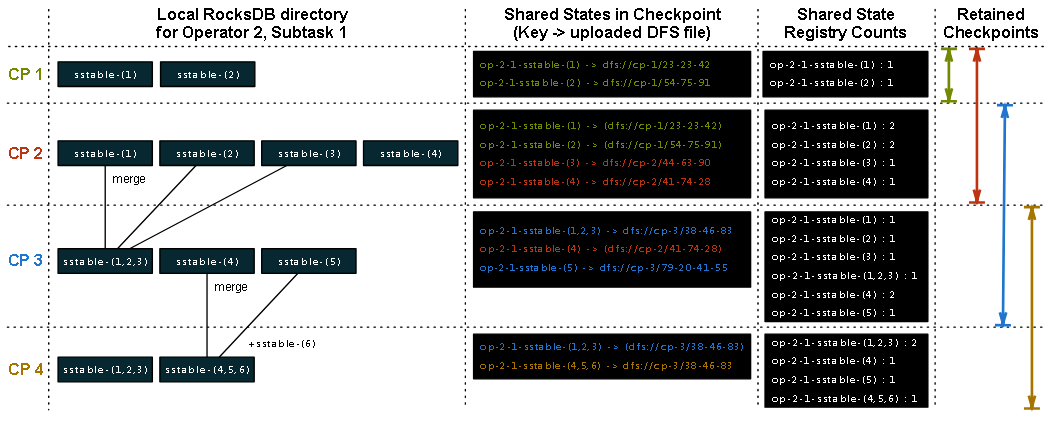
Take an example with a subtask of one operator that has a keyed state, and the number of retained checkpoints set at 2. The columns in the figure above show the state of the local RocksDB instance for each checkpoint, the files it references, and the counts in the shared state registry after the checkpoint completes.
For checkpoint ‘CP 1’, the local RocksDB directory contains two sstable files, and it considers these new and uploads them to stable storage using directory names that match the checkpoint name. When the checkpoint completes, Flink creates the two entries in the shared state registry and sets their counts to ‘1’. The key in the shared state registry is a composite of an operator, subtask, and the original sstable file name. The registry also keeps a mapping from the key to the file path in stable storage.
For checkpoint ‘CP 2’, RocksDB has created two new sstable files, and the two older ones still exist. For checkpoint ‘CP 2’, Flink adds the two new files to stable storage and can reference the previous two files. When the checkpoint completes, Flink increases the counts for all referenced files by 1.
For checkpoint ‘CP 3’, RocksDB’s compaction has merged sstable-(1), sstable-(2), and sstable-(3) into sstable-(1,2,3) and deleted the original files. This merged file contains the same information as the source files, with all duplicate entries eliminated. In addition to this merged file, sstable-(4) still exists and there is now a new sstable-(5) file. Flink adds the new sstable-(1,2,3) and sstable-(5) files to stable storage, sstable-(4) is re-referenced from checkpoint ‘CP 2’ and increases the counts for referenced files by 1. The older ‘CP 1’ checkpoint is now deleted as the number of retained checkpoints (2) has been reached. As part of this deletion, Flink decreases the counts for all files referenced ‘CP 1’, (sstable-(1) and sstable-(2)), by 1.
For checkpoint ‘CP-4’, RocksDB has merged sstable-(4), sstable-(5), and a new sstable-(6) into sstable-(4,5,6). Flink adds this new table to stable storage and references it together with sstable-(1,2,3), it increases the counts for sstable-(1,2,3) and sstable-(4,5,6) by 1 and then deletes ‘CP-2’ as the number of retained checkpoints has been reached. As the counts for sstable-(1), sstable-(2), and sstable-(3) have now dropped to 0, and Flink deletes them from stable storage.
Race Conditions and Concurrent Checkpoints
As Flink can execute multiple checkpoints in parallel, sometimes new checkpoints start before confirming previous checkpoints as completed. Because of this, Flink must consider which of the previous checkpoints to use as a basis for a new incremental checkpoint. Flink only references state from a checkpoint confirmed by the checkpoint coordinator so that it doesn’t unintentionally reference a deleted shared file.
Restoring Checkpoints and Performance Considerations
If you enable incremental checkpointing, there are no further configuration steps needed to recover your state in case of failure. If a failure occurs, Flink’s JobManager tells all tasks to restore from the last completed checkpoint, be it a full or incremental checkpoint. Each TaskManager then downloads their share of the state from the checkpoint on the distributed file system.
Though the feature can lead to a substantial improvement in checkpoint time for users with a large state, there are trade-offs to consider with incremental checkpointing. Overall, the process reduces the checkpointing time during normal operations but can lead to a longer recovery time depending on the size of your state. If the cluster failure is particularly severe and the Flink TaskManagers have to read from multiple checkpoints, recovery can be a slower operation than when using non-incremental checkpointing. You’ll need to plan for larger distributed storage to maintain the checkpoints and the network overhead to read from it.
There are some strategies for improving the convenience/performance trade-off, and I recommend you read the Flink documentation for more details.
Interested in learning more about checkpoints in Flink? Check out Stefan Richter’s Flink Forward Berlin 2017 talk “A Look at Flink’s Internal Data Structures and Algorithms for Efficient Checkpointing”.
And you might also enjoy our CTO Stephan Ewen’s Flink Forward San Francisco 2017 talk “Experiences Running Flink at Very Large Scale”.
Managing Large State in Apache Flink®: An Intro to Incremental Checkpointing的更多相关文章
- 3 differences between Savepoints and Checkpoints in Apache Flink
https://mp.weixin.qq.com/s/nQOxsZUZSiPi7Sx40mgwsA 20181104 3 differences between Savepoints and Chec ...
- Peeking into Apache Flink's Engine Room
http://flink.apache.org/news/2015/03/13/peeking-into-Apache-Flinks-Engine-Room.html Join Processin ...
- Flink监控:Monitoring Apache Flink Applications
This post originally appeared on the Apache Flink blog. It was reproduced here under the Apache Lice ...
- 腾讯大数据平台Oceanus: A one-stop platform for real time stream processing powered by Apache Flink
January 25, 2019Use Cases, Apache Flink The Big Data Team at Tencent In recent years, the increa ...
- Blink: How Alibaba Uses Apache Flink
This is a guest post from Xiaowei Jiang, Senior Director of Alibaba’s search infrastructure team. Th ...
- Stream processing with Apache Flink and Minio
转自:https://blog.minio.io/stream-processing-with-apache-flink-and-minio-10da85590787 Modern technolog ...
- Apache Flink 1.5.0 Release Announcement
Apache Flink: Apache Flink 1.5.0 Release Announcement https://flink.apache.org/news/2018/05/25/relea ...
- Apache Flink 介绍
原文地址:https://mp.weixin.qq.com/s?__biz=MzU2Njg5Nzk0NQ==&mid=2247483660&idx=1&sn=ecf01cfc8 ...
- An Overview of End-to-End Exactly-Once Processing in Apache Flink (with Apache Kafka, too!)
01 Mar 2018 Piotr Nowojski (@PiotrNowojski) & Mike Winters (@wints) This post is an adaptation o ...
随机推荐
- InstallShield Limited Edition使用说明
从Visual Studio 2012开始,微软就把自家原来的安装与部署工具彻底废掉了,转而让大家去安装使用第三方的打包工具“InstallShield Limited Edition for Vis ...
- 仓储模式Repository的选择与设计
首次接触仓储的概念来自Eric Evans 的经典著作<领域驱动设计-软件核心复杂性应对之道>,但书中没有具体实现.如何实现仓储模式,在我这几年的使用过程中也积累了一些具体的实施经验.根据 ...
- scrapy爬虫学习系列七:scrapy常见问题解决方案
1 常见错误 1.1 错误: ImportError: No module named win32api 官方参考:https://doc.scrapy.org/en/latest/faq.html# ...
- linux中文件的三种time(atime,mtime,ctime)
linux下文件有3个时间的,分别是atime,mtime,ctime.有些博友对这3个时间还是比较迷茫和困惑的,我整理了下,写下来希望对博友们有所帮助. 1 这三个time的含义 简名 全名 中文名 ...
- LeetCode专题-Python实现之第26题:Remove Duplicates from Sorted Array
导航页-LeetCode专题-Python实现 相关代码已经上传到github:https://github.com/exploitht/leetcode-python 文中代码为了不动官网提供的初始 ...
- 二进制安装部署kubernetes集群---超详细教程
本文收录在容器技术学习系列文章总目录 前言:本篇博客是博主踩过无数坑,反复查阅资料,一步步搭建完成后整理的个人心得,分享给大家~~~ 本文所需的安装包,都上传在我的网盘中,需要的可以打赏博主一杯咖啡钱 ...
- Lily_music 网页音乐播放器 -可搜索(附歌词联动播放效果解说)
博客地址:https://ainyi.com/59 写在前面 这是我今年(2018)年初的小项目,当时也是手贱,不想用别的播放器,想着做一个自己的网页播放器,有个歌曲列表.可关键词搜索.歌词滚动播放的 ...
- 【Angular专题】 (3)装饰器decorator,一块语法糖
目录 一. Decorator装饰器 二. Typescript中的装饰器 2.1 类装饰器 2.2 方法装饰器 2.3 访问器装饰器 2.4 属性装饰器 2.5 参数装饰器 三. 用ES5代码模拟装 ...
- 第43章 添加更多API端点 - Identity Server 4 中文文档(v1.0.0)
您可以向托管IdentityServer4的应用程序添加更多API端点. 您通常希望通过它们所托管的IdentityServer实例来保护这些API.这不是问题.只需将令牌验证处理程序添加到主机(请参 ...
- DSAPI HTTP监听服务端与客户端_指令版
前面介绍了DSAPI多功能组件编程应用-HTTP监听服务端与客户端的内容,这里介绍一个适用于更高效更快速的基于HTTP监听的服务端.客户端. 在本篇,你将见到前所未有的超简化超傻瓜式的HTTP监听服务 ...