
初学js之qq聊天实例
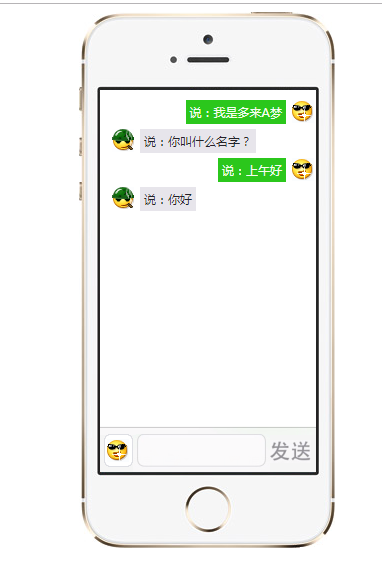
实现的功能为上图所示,但是每新发送的消息必须显示在最上面。
我实现了两版,样式有是一样的。我们直接看代码。
版本一:
<!DOCTYPE html>

<html lang="en">

<head>

    <meta charset="UTF-8">

    <meta name="viewport" content="width=device-width, initial-scale=1.0">

    <meta http-equiv="X-UA-Compatible" content="ie=edge">

    <title>Document</title>

    <style>

        *{

            margin: 0;

            padding: 0;

        }

        li{

            list-style: none;

        }

        .box{

            width: 253px;

            height: 535px;

            background: url('img/iPhone.png')no-repeat;

            margin: 0 auto;

            position: relative;

        }

        .content{

            position: absolute;

            width: 216px;

            height: 340px;

            top:78px;

            left: 21px;

            overflow: auto;

        }

        .send{

            position: absolute;

            width: 216px;

            height: 42px;

            bottom:74px;

            left: 21px;

            background-color: #EEEEEE;

            border-top: 1px solid #ccc;

        }

        .send a{

            position: absolute;

            top: 3px;

            left: 5px;

            text-decoration: none;

            text-align: center;

            line-height: 32px;

            width: 30px;

            height: 32px;

            border-radius: 5px;

            background-color: #fff;

            border: 1px solid #ccc;

        }

        .db{

            background: url('img/qq2.gif')no-repeat center;

        }

        .xl{

            background: url('img/qq1.gif')no-repeat center;

        }

        .send .inp1{

            position: absolute;

            top: 3px;

            left: 41px;

            width: 126px;

            height: 32px;

            border-radius: 5px;

            border: 1px solid #ccc;

        }

        .send span{

            position: absolute;

            top: 50%;

            right:0px;

            width: 40px;

            height: 32px;

            color: #999;

            margin-top: -16px;

            font: 600 16px/32px "微软雅黑";

            cursor: pointer;

        }

        .cont{

             padding: 10px 0;

             width: 100%;

        }

        .content div{

            display: block;

            clear: both;

        }

        .content .lis_lf{

            background: url('img/qq2.gif')no-repeat;

            float: left;

            margin: 5px 5px 0 5px;

        }

        .content .lis_rt{

            background: url('img/qq1.gif')no-repeat right;

            float: right;

            margin:5px 5px 0 5px;

        }

        .content .lis_lf span{

            display: inline-block;

            margin-left: 30px;

            word-break:break-all; width:100px;

            word-wrap:break-word;

            background-color: #e7e5eb;

            border-radius: 5px;

        }

        .content .lis_rt span{

            display: inline-block;

            margin-right: 30px;

            word-break:break-all; width:100px; overflow:auto;

            word-wrap:break-word;

            background-color: #2bc71c;

            border-radius: 5px;

        }

    </style>

    <script>

        window.onload = function(){

            var oContent =document.getElementById("content");

            var oL1 = oContent.getElementsByTagName("ol")[0];

            var oSend = document.getElementsByTagName("span")[0];

            var oInp1 = document.getElementById("inp1");

            var oA = document.getElementsByTagName("a")[0];

            var onOff = true;

            oA.onclick = function(){

                if(this.onOff){

                    oA.className = 'db';

                    this.onOff = false;

                }else{

                    oA.className = 'xl';

                    this.onOff = true;

                }

            };

            //发送消息

            oSend.onclick = function(){

                if(oInp1.value == "")

                {

                    alert("消息不能为空");

                }

                else

                    {

                    if(oA.onOff)

                    {

                        var Test = "<li class ='lis_rt'>" + "<span>"+oInp1.value+"</span>" + "</li>";

                        // oL1.innerHTML += Test;  //等价于 oL1.innerHTML = oL1.innerHTML + Test

                        oL1.innerHTML = Test + oL1.innerHTML;

                    }

                    else

                    {

                        var Test = "<li class ='lis_lf'>" + "<span>" + oInp1.value + "</span>" + "</li>";

                        oL1.innerHTML = Test + oL1.innerHTML;

                    }

                    oInp1.value = "";

                }

            };

        }

    </script>

</head>

<body>

    <div class="box">

        <div class="content" id="content">

            <ol class="cont reverse"></ol>

        </div>

        <div class="send">

            <a href="javascript:;" class="db"></a>

            <input class="inp1" type="text" value="" id="inp1">

            <span>发送</span>

        </div>

    </div>

</body>

</html>
版本二:
<!DOCTYPE html>

<html lang="en">

<head>

    <meta charset="UTF-8">

    <meta name="viewport" content="width=device-width, initial-scale=1.0">

    <meta http-equiv="X-UA-Compatible" content="ie=edge">

    <title>Document</title>

    <style>

        *{

            margin: 0;

            padding: 0;

        }

        li{

            list-style: none;

        }

        .box{

            width: 253px;

            height: 535px;

            background: url('img/iPhone.png')no-repeat;

            margin: 0 auto;

            position: relative;

        }

        .content{

            position: absolute;

            width: 216px;

            height: 340px;

            top:78px;

            left: 21px;

            overflow: auto;

        }

        .send{

            position: absolute;

            width: 216px;

            height: 42px;

            bottom:74px;

            left: 21px;

            background-color: #EEEEEE;

            border-top: 1px solid #ccc;

        }

        .send a{

            position: absolute;

            top: 3px;

            left: 5px;

            text-decoration: none;

            text-align: center;

            line-height: 32px;

            width: 30px;

            height: 32px;

            border-radius: 5px;

            background-color: #fff;

            border: 1px solid #ccc;

        }

        .db{

            background: url('img/qq2.gif')no-repeat center;

        }

        .xl{

            background: url('img/qq1.gif')no-repeat center;

        }

        .send .inp1{

            position: absolute;

            top: 3px;

            left: 41px;

            width: 126px;

            height: 32px;

            border-radius: 5px;

            border: 1px solid #ccc;

        }

        .send span{

            position: absolute;

            top: 50%;

            right:0px;

            width: 40px;

            height: 32px;

            color: #999;

            margin-top: -16px;

            font: 600 16px/32px "微软雅黑";

            cursor: pointer;

        }

        .cont{

             padding: 10px 0;

             width: 100%;

        }

        .content div{

            display: block;

            clear: both;

        }

        .content .lis_lf{

            background: url('img/qq2.gif')no-repeat;

            float: left;

            margin: 5px 5px 0 5px;

        }

        .content .lis_rt{

            background: url('img/qq1.gif')no-repeat right;

            float: right;

            margin:5px 5px 0 5px;

        }

        .content .lis_lf span{

            display: inline-block;

            margin-left: 30px;

            word-break:break-all; width:100px;

            word-wrap:break-word;

            background-color: #e7e5eb;

            border-radius: 5px;

        }

        .content .lis_rt span{

            display: inline-block;

            margin-right: 30px;

            word-break:break-all; width:100px; overflow:auto;

            word-wrap:break-word;

            background-color: #2bc71c;

            border-radius: 5px;

        }

    </style>

    <script>

        window.onload = function(){

            var oContent =document.getElementById("content");

            var oL1 = oContent.getElementsByTagName("ol")[0];

            var oSend = document.getElementsByTagName("span")[0];

            var oInp1 = document.getElementById("inp1");

            var oA = document.getElementsByTagName("a")[0];

            var onOff = true;

            // var num = 0;

            oA.onclick = function(){

                if(this.onOff){

                    oA.className = 'db';

                    this.onOff = false;

                }else{

                    oA.className = 'xl';

                    this.onOff = true;

                }

            };

            function fun(){

                //1.创建li

                var newItem = document.createElement("li");

                //2.在li里面创建span

                var newSpan = document.createElement("span");

                newItem.appendChild(newSpan);

                newSpan.innerHTML = oInp1.value;

                if (oInp1.value == ""){

                    alert("消息不能为空");

                }

                if(oA.onOff){

                    newItem.className = 'lis_rt';

                }else{

                    newItem.className = 'lis_lf';

                }

                oInp1.value = "";

                var list = document.getElementById("cont")

                list.insertBefore(newItem, list.childNodes[0]);

                //insertBefore 给某个元素前添加节点

            };

            oSend.onclick = function(){

                fun();

            }

        }

    </script>

</head>

<body>

    <div class="box">

        <div class="content" id="content">

            <ol class="cont" id="cont">

            </ol>

        </div>

        <div class="send">

            <a href="javascript:;" class="db"></a>

            <input class="inp1" type="text" value="" id="inp1">

            <span>发送</span>

        </div>

    </div>

</body>

</html>
初学js之qq聊天实例的更多相关文章
- 初学js之qq聊天展开实例
实现这样的效果. 直接看代码,html部分: <body> <div class="box"> <div class="lists" ...
- Js打开QQ聊天对话窗口
function openQQ() { var qq = $(this).attr('data-qq');//获取qq号 window.open('http://wpa.qq.com/msgrd?v= ...
- JS简单仿QQ聊天工具的制作
刚接触JS,对其充满了好奇,利用刚学到的一点知识,写了一个简单的仿QQ聊天的东西,其中还有很多的不足之处,有待慢慢提高. 功能:1.在输入框中输入内容,点击发送,即可在上方显示所输入内容. 2.点击‘ ...
- Nuxt+Vue聊天室|nuxt仿微信App界面|nuxt.js聊天实例
一.项目简述 nuxt-chatroom 基于Nuxt.js+Vue.js+Vuex+Vant+VPopup等技术构建开发的仿微信|探探App界面社交聊天室项目.实现了卡片式翻牌滑动.消息发送/emo ...
- Next.js+React聊天室|Next仿微信桌面端|next.js聊天实例
一.项目介绍 next-webchat 基于Next.js+React.js+Redux+Antd+RScroll+RLayer等技术构建的PC桌面端仿微信聊天项目.实现了消息/表情发送.图片/视频预 ...
- Svelte3聊天室|svelte+svelteKit仿微信聊天实例|svelte.js开发App
基于svelte3.x+svelteKit构建仿微信App聊天应用svelte-chatroom. svelte-chatroom 基于svelte.js+svelteKit+mescroll.js+ ...
- Svelte3.x网页聊天实例|svelte.js仿微信PC版聊天svelte-webchat
基于Svelte3+SvelteKit+Sass仿微信Mac界面聊天实战项目SvelteWebChat. 基于svelte3+svelteKit+sass+mescroll.js+svelte-lay ...
- 搭建QQ聊天通信的程序:(1)基于 networkcomms.net 创建一个WPF聊天客户端服务器应用程序 (1)
搭建QQ聊天通信的程序:(1)基于 networkcomms.net 创建一个WPF聊天客户端服务器应用程序 原文地址(英文):http://www.networkcomms.net/creating ...
- Socket实现仿QQ聊天(可部署于广域网)附源码(1)-简介
1.前言 本次实现的这个聊天工具是我去年c#程序设计课程所写的Socket仿QQ聊天,由于当时候没有自己的服务器,只能在机房局域网内进行测试,最近在腾讯云上买了一台云主机(本人学生党,腾讯云有个学生专 ...
随机推荐
- IE6、7下块级元素设置display:inline-block不换行的解决办法
使用背景 在实际的工作中,我们有的时候会把块元素设置为inline-block,这样做的目的有2个,一是块元素能够排列到一行,二是块元素就形成包裹性,能够自适应content area,而不必设置宽和 ...
- linux下安装redis和部署
转自简书:https://www.jianshu.com/p/bc84b2b71c1c 1.基础知识 redis是用C语言开发的一个开源的高性能键值对(key-value)数据库.它通过提供多种键值 ...
- Callback, Promise和Async/Await的对比
Callback, Promise和Async/Await的对比 Callback Hell getData1(function (data1) { console.log('我得到data1了') ...
- mui的上拉下载和下拉刷新
head部分(引入mui) <link href="./resources/css/mui.min.css" rel="stylesheet" /> ...
- 碎碎念css
块状元素单独占一行,但加上float变成跟着别人,有空就插!float让块级元素变行内元素
- redis空间键详解
前言 redis的空间键通知是在2.8.0版本以后加入的,客户端通过发布订阅的方式,订阅某个频道,接收通过某种方式影响redis中数据的事件. 目录: 1.空间键事件分类 2.如何启用redis的空间 ...
- 【MFC】可以换行的编辑框
在mfc中编辑框允许输入多行时,换行符被表示为<归位><换行>即“\r\n”,用ascii码表示为13 10 如果为编辑框中想要输入换行,就请将编辑框的属性: Auto HSc ...
- Android商城开发系列(十)—— 首页活动广告布局实现
在上一篇博客当中,我们讲了频道布局的实现,接下来我们讲解一下活动广告布局的实现,效果如下图: 这个是用viewpager去实现的,新建一个act_item.xml,代码如下所示: <?xml v ...
- 查看mysql表大小
//先进去MySQL自带管理库:information_schema //自己的数据库:dbwww58com_kuchecarlib //自己的表:t_carmodelparamvalue mysql ...
- 学习Rust Book之写Cargo配置文件
不知道为什么这个文件就是编译不过 [package] name = "hello_world" version = "0.0.1" author = " ...