
virtualbox+vagrant学习-3-Vagrant Share-2-HTTP Sharing
HTTP Sharing
Vagrant Share可以创建一个可公开访问的URL端点来访问在Vagrant环境中运行的HTTP服务器。这被称为“HTTP共享”,在使用Vagrant Share时默认启用。
因为这种共享模式创建了一个可公开访问的URL,所以访问方不需要安装Vagrant来查看你的环境。
这有许多有用的用例:你可以通过向internet公开你的Vagrant环境来测试webhook,你可以向客户、团队成员或经理等显示你的工作。
1.Usage使用
为了使用HTTP共享,可以简单地运行vagrant share命令:
userdeMBP:~ user$ vagrant share

Vagrant Share now defaults to using the `ngrok` driver.

The `classic` driver has been deprecated.

For more information about the `ngrok` driver, please

refer to the documentation:

  https://www.vagrantup.com/docs/share/

==> default: Detecting network information for machine...

The Vagrant environment you're attempting to share appears to

not be running. Please verify that it is running and try again.
这是因为virtualBox上的虚拟机挂起了,需要调用vagrant resume命令将其恢复,再运行vagrant share:
userdeMBP:~ user$ vagrant share

Vagrant Share now defaults to using the `ngrok` driver.

The `classic` driver has been deprecated.

For more information about the `ngrok` driver, please

refer to the documentation:

  https://www.vagrantup.com/docs/share/

==> default: Detecting network information for machine...

    default: Local machine address: 127.0.0.1

    default:

    default: Note: With the local address (127.0.0.1), Vagrant Share can only

    default: share any ports you have forwarded. Assign an IP or address to your

    default: machine to expose all TCP ports. Consult the documentation

    default: for your provider ('virtualbox') for more information.

    default:

Vagrant was unable to detect an HTTP port for your machine.

Because your machine appears to have no static IP associated with

it, Vagrant scans through your forwarded ports, looking for one

that responds to an HTTP request. Vagrant couldn't find any

functioning HTTP port!

There are a few options to fix this error:

  . Create a forwarded port pointing to your HTTP server inside

     your Vagrant machine.

  . Specify an HTTP port manually with `--http` to this command.

  . Assign a non-local address to your machine. This may or may

     not be possible depending on what provider you're using.

  . Make sure that the HTTP server is up and running within

     your machine. Vagrant share won't start until it is

     reachable.
这是因为vagrant share探测本地发现没有打开一个http服务端口, 无法实现共享。
因此打开了一个端口为80的服务器,并使用--http参数指明该端口:
userdeMBP:~ user$ vagrant share --http

Vagrant Share now defaults to using the `ngrok` driver.

The `classic` driver has been deprecated.

For more information about the `ngrok` driver, please

refer to the documentation:

  https://www.vagrantup.com/docs/share/

==> default: Detecting network information for machine...

    default: Local machine address: 127.0.0.1

    default:

    default: Note: With the local address (127.0.0.1), Vagrant Share can only

    default: share any ports you have forwarded. Assign an IP or address to your

    default: machine to expose all TCP ports. Consult the documentation

    default: for your provider ('virtualbox') for more information.

    default:

    default: Local HTTP port:

    default: Local HTTPS port: disabled

    default: Port:

==> default: Creating Vagrant Share session...

/opt/vagrant/embedded/gems/2.2./gems/vagrant-2.2./lib/vagrant/util/subprocess.rb::in `rescue in execute': No such file or directory - ngrok (Vagrant::Util::Subprocess::LaunchError)

    from /opt/vagrant/embedded/gems/2.2./gems/vagrant-2.2./lib/vagrant/util/subprocess.rb::in `execute'

    from /Users/user/.vagrant.d/gems/2.4./gems/vagrant-share-1.1./lib/vagrant-share/activate.rb::in `block in start_ngrok_proxy'
这个问题是因为你没有安装成功ngrox或者是没有将其放在正确的位置,导致vagrant没有能够成功找到它
安装本博客ngrok反向代理学习-1-简介所写将其安装下来,然后要记得将下载下来的ngrox可执行文件放在你本地的vagrant可执行文件所在的位置:
先查看vagrant所在的位置并打开:
userdeMBP:~ user$ which vagrant

/usr/local/bin/vagrant

userdeMBP:~ user$ open /usr/local/bin
然后将下载下来的ngrox可执行文件放到该bin目录下:
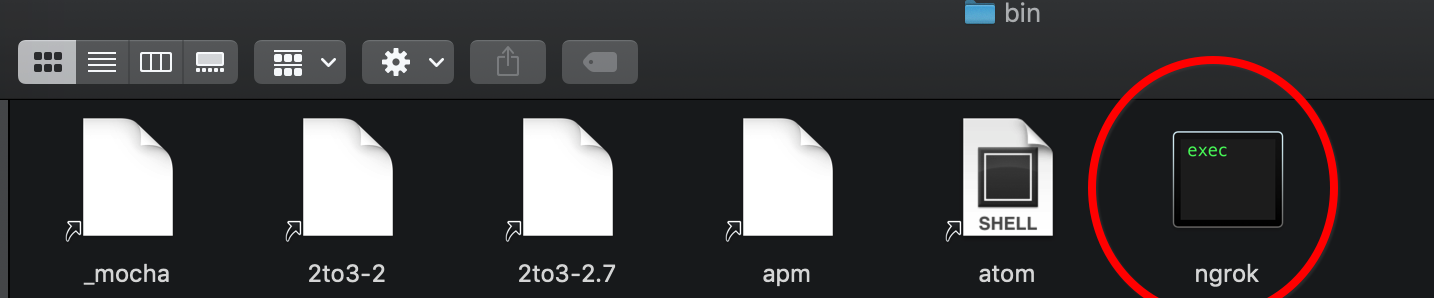
然后再运行就成功了:
userdeMBP:~ user$ vagrant share --http

Vagrant Share now defaults to using the `ngrok` driver.

The `classic` driver has been deprecated.

For more information about the `ngrok` driver, please

refer to the documentation:

  https://www.vagrantup.com/docs/share/

==> default: Detecting network information for machine...

    default: Local machine address: 127.0.0.1

    default:

    default: Note: With the local address (127.0.0.1), Vagrant Share can only

    default: share any ports you have forwarded. Assign an IP or address to your

    default: machine to expose all TCP ports. Consult the documentation

    default: for your provider ('virtualbox') for more information.

    default:

    default: Local HTTP port:

    default: Local HTTPS port: disabled

    default: Port:

==> default: Creating Vagrant Share session...

==> default: HTTP URL: http://51399c1d.ngrok.io

==> default:
然后打开http://localhost:4040网页:
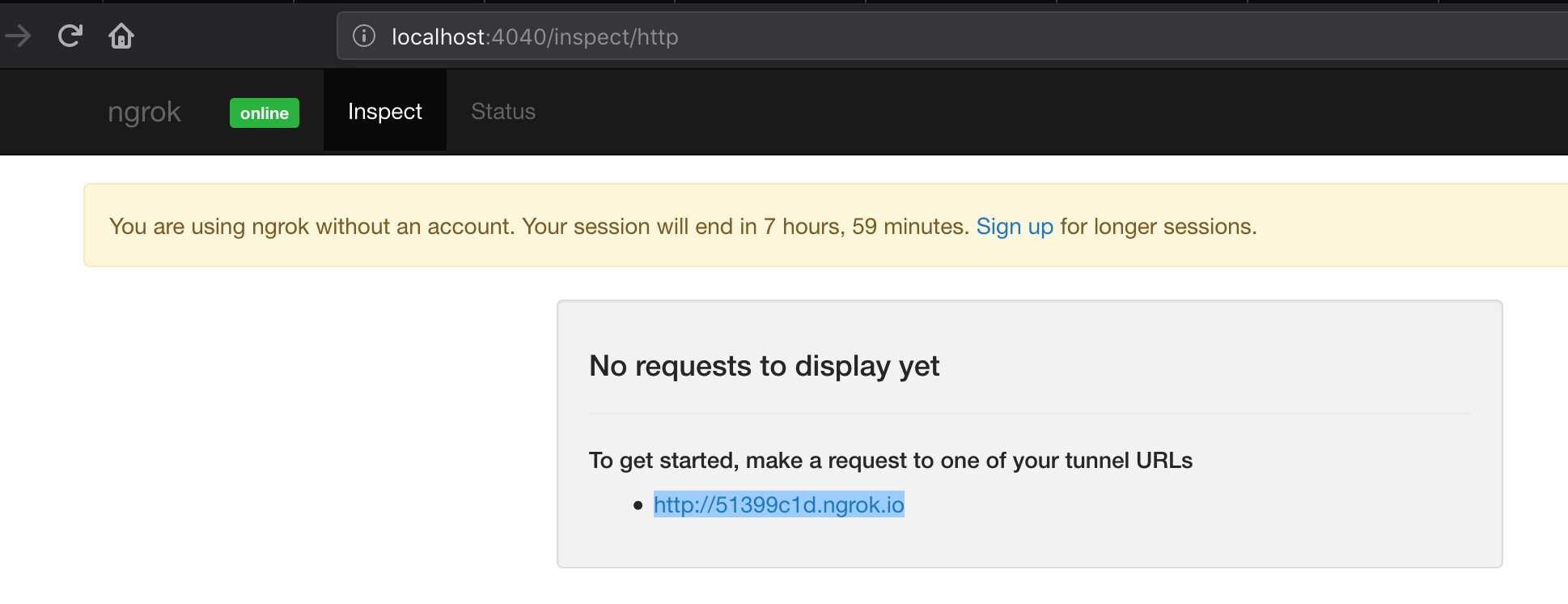
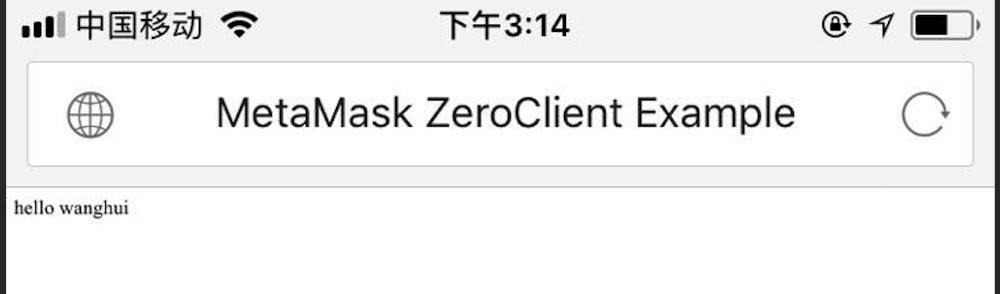
然后用手机登录http://51399c1d.ngrok.io网址,可见成功访问到了该80端口的网址:
然后http://localhost:4040页面出现详细的连接信息:
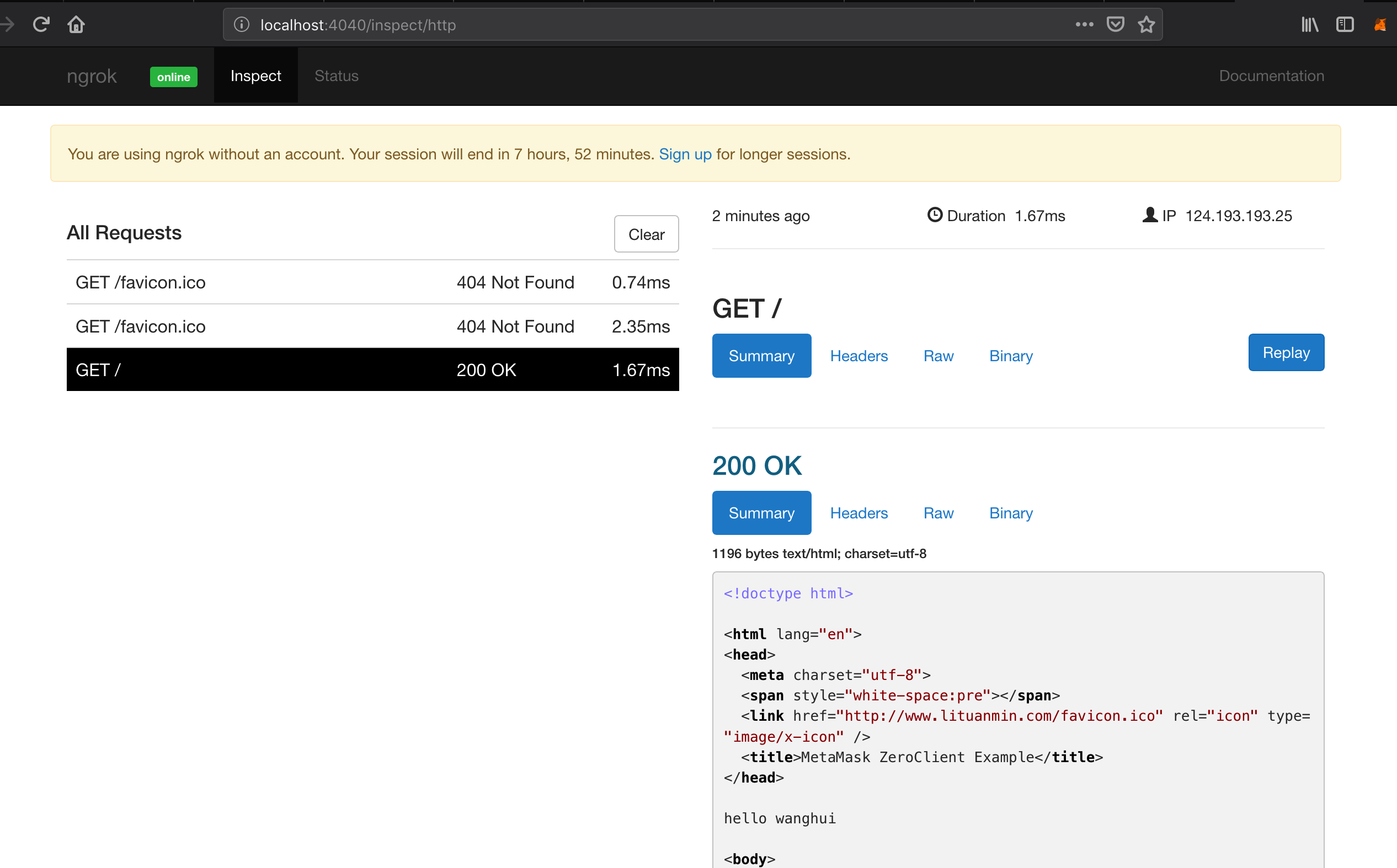
vagrant检测HTTP服务器在vagrant环境中运行的位置,并输出可用于访问此共享的端点。只要把这个URL(即上面的http://51399c1d.ngrok.io网址)给任何你想要分享它的人,他们就能访问你的vagrant环境!
如果vagrant在检测你的环境中的服务器端口时遇到困难,请使--http和/或--https标志来明确开启的端口。
该共享在vagrant share运行期间是可访问的。按Ctrl-C退出共享会话,即:
==> default: Creating Vagrant Share session...

==> default: HTTP URL: http://51399c1d.ngrok.io

==> default:

^C==> default: Halting Vagrant share!
⚠️任何人都可以访问这个URL,所以如果你正在共享敏感信息,请小心。
2.Disabling禁用
如果你想禁用公共可访问端点的创建,请使用--disable-http标志运行vagrant share。这将使用其他可用方法之一(如ssh等)共享你的环境,并且不会创建URL端点。
即不会去检测是否有http的服务端口正在打开:
userdeMBP:~ user$ vagrant share --disable-http

Vagrant Share now defaults to using the `ngrok` driver.

The `classic` driver has been deprecated.

For more information about the `ngrok` driver, please

refer to the documentation:

  https://www.vagrantup.com/docs/share/

==> default: Detecting network information for machine...

    default: Local machine address: 127.0.0.1

    default:

    default: Note: With the local address (127.0.0.1), Vagrant Share can only

    default: share any ports you have forwarded. Assign an IP or address to your

    default: machine to expose all TCP ports. Consult the documentation

    default: for your provider ('virtualbox') for more information.

    default:

    default: Local HTTP port: disabled  //可见没有检测当前正打开的80端口

    default: Local HTTPS port: disabled //ssh在默认情况下就是禁用的

    default: Port:

==> default: Creating Vagrant Share session...
当看完ssh后在运行一遍这个命令看结果
3.Missing Assets
共享的web应用程序必须使用相对路径来加载任何本地资产,如图像、样式表、javascript。
开发中的web应用程序将被远程访问。这意味着如果你有任何硬编码的资产(图像、样式表等)的URLs如 <img src="http://127.0.0.1/header.png">,它们将不会为那些访问你的共享的人加载这些资产
大多数web框架或工具包都有设置或帮助程序来生成相对路径。例如,如果你是WordPress开发人员,Root Relative URLs插件将自动为你完成这项工作。
相对于资产的url通常是一种最佳实践,所以无论如何你都应该这样做!
4.HTTPS (SSL)
vagrant share还可以公开可以通过SSL访问的SSL端口。创建HTTPS共享需要一个非免费的ngrok帐户。
在开发环境中,vagrant share默认情况下在端口443上查找任何SSL通信。如果找不到,则默认禁用SSL。
可以使用--disable-https标志显式禁用HTTPS共享。
virtualbox+vagrant学习-3-Vagrant Share-2-HTTP Sharing的更多相关文章
- virtualbox+vagrant学习-4-Vagrantfile-3-Minimum Vagrant Version
Minimum Vagrant Version 可以在Vagrantfile中指定一组vagrant版本需求,以强制人们使用带有Vagrantfile文件的vagrant特定版本.这可以帮助解决使用带 ...
- virtualbox+vagrant学习-2(command cli)-26-vagrant share命令
Share share命令初始化了一个vagrant share会话,允许你与世界上任何一个人共享vagrant环境,允许在几乎任何网络环境中直接在vagrant环境中进行协作. 你可以在本博客的vi ...
- virtualbox+vagrant学习-1-环境安装及vagrantfile的简单配置-Mac系统
在学习docker-machine时,发现需要使用到虚拟化平台,所以选择了使用virtualBox. 然后后面发现需要使用vagrant来在mac系统中作为虚拟机管理软件,所以下面将会简述我自己学习使 ...
- virtualbox+vagrant学习-3-Vagrant Share-3-SSH Sharing
SSH Sharing vagrant share通过向vagrant share提供--SSH标志,使远程SSH访问vagrant环境变得非常容易. 如果你想让同事访问你的SSH,以便对ops问题进 ...
- virtualbox+vagrant学习-3-Vagrant Share-4-Vagrant Connect
Vagrant Connect vagrant可以共享到vagrant环境的任何或每个端口,而不仅仅是SSH和HTTP.“vagrant connect”命令为连接人员提供一个静态IP,他们可以使用该 ...
- virtualbox+vagrant学习-2(command cli)-7-vagrant login命令
Login ⚠️该命令已经弃用了,别名为vagrant cloud auth login.看本博客的 格式: vagrant cloud auth login [options] 登录命令用于使用Ha ...
- virtualbox+vagrant学习-2(command cli)-2-vagrant cloud命令--有问题
Cloud https://www.vagrantup.com/docs/cli/cloud.html 命令: vagrant cloud 这是用来管理与vagrant相关的任何东西的命令. 该命令的 ...
- [转] vagrant学习笔记 - provision
[From] https://blog.csdn.net/54powerman/article/details/50684844 从字面上来看,provision是准备,实现的功能是在原生镜像的基础 ...
- vagrant学习笔记
什么是vagrant简而言之,vagrant就是一个用来管理虚拟机文件的工具为什么要使用vagra如果经常玩虚拟机的话,就会知道,当你需要新建一个虚拟环境的时候,总是要重复的安装操作系统,以及操作系统 ...
随机推荐
- mybatis循环生成前后缀:mapper.xml的<trim></trim>
*在mapper.xml中<trim prefix="(" suffix=")" suffixOverrides="," prefix ...
- FUzhou 1607 Greedy division---因子个数问题。
Problem 1607 Greedy division http://acm.fzu.edu.cn/problem.php?pid=1607 Accept: 402 Submit: 1463T ...
- 简单创建json格式文件
简单创建json格式文件 核心就两点: addProperty 添加属性(也就是加键值对) add是添加 另外的object对象 然后直接toString()输出 核心代码如下; public cla ...
- git使用总结(常用命令)
前言 写这篇文章的目的是让新手能够操作git管理自己的代码,可能你知道git的各种命令但是对其使用顺序并不熟,比如我.所以有必要整合一篇关于命令使用步骤的文章,图片用的人家的,也没询问让不让用,可能会 ...
- Math.random理解练习
<!doctype html> <html> <head> <meta charset="utf-8"> <title> ...
- 在生产环境中安全执行更新删除SQL脚本的技巧
今天在生产环境上解决问题,由于广发银行的管理制度是开发公司是不允许确生产环境的,所以我们只能把要更新的语句发给运营中心,由运营中心的投产人员执行,我们则在旁边看着:在他执行的时候发现了一个很有趣的技巧 ...
- CentOS7.4 + Hadoop2.7.5安装配置管理(伪分布式)
1. 规划 1.1. 机器列表 NameNode SecondaryNameNode DataNodes 192.168.1.80 192.168.1.80 192.168.1.80 1.2. ...
- Java实验案例(接口)
实验任务 任务一:设计实现发声接口 任务二:动物乐园 实验内容 任务一:设计实现发声接口 任务目的: 理解并掌握如何定义接口 掌握接口的实现方式 任务描述: 设计和实现一个Soundable接口,该接 ...
- OnCreateContextMenuListener接口简介
OnCreateContextMenuListener接口是用来处理上下文菜单显示事件的监听接口.该方法是定义和注册上下文菜单的另一种方式.该接口中事件处理的回调方法签名如下所示. public vo ...
- Android解析ActivityManagerService(一)AMS启动流程和AMS家族
前言 此前在Android系统启动流程.应用进程以及深入四大组件这三个系列文章中,都提及到了AMS,但都没有系统的来讲解它,本文就以AMS为主来进行讲解,其中会有一些知识点与这些系列文章有所重合,这里 ...