
[Laravel] 01 - Love beautiful code? We do too.
前言
一、良心资料
- 英文
Laravel 框架:https://laravel.com/
- 中文
二、简介
- 优势
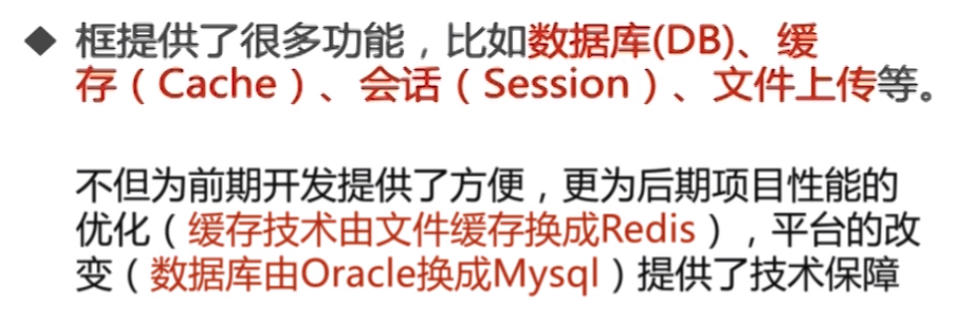
验证、路由、session、缓存、数据库迁移、单元测试等常见功能。
且 MVC模式。
- 版本
- 性价比
Ref:php7 vs java8 vs nodejs5 vs lua5.2 计算性能比较
三、安装与配置
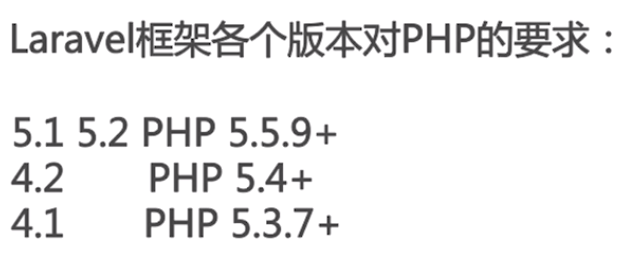
- 版本要求
- 安装 phpStorm
Ref: phpstorm的安装和破解
Ref: PhpStorm破解版及使用教程【有快捷键】
- 安装 php 7
Ref: Upgrade to PHP 7.x on Ubuntu 14.04 LTS
   php --version

   sudo apt-get update

   sudo add-apt-repository ppa:ondrej/php

   sudo apt-get install python-software-properties

   sudo apt-get update

   sudo apt-get install php7. # For PHP 7.0

   sudo apt-get install php7. # For PHP 7.1

   php --version
- 安装 Composer
Goto: https://getcomposer.org/download/
执行 Download Composer 的内容。
# 查看composer安装结果
lolo@lolo-UX303UB$ php composer.phar
- 配置 Laravel
当然,具体要求要看:https://laravel.com/docs/5.6
[1] 可能遇到的zip的安装问题:http://opencode.co.kr/php_tips/255, 解决方案:
# For php v7.

sudo apt-get install php7.-zip

# For php v7.

sudo apt-get install php7.-zip
[2] 配置没问题就可以成功安装laravel。
unsw@unsw-UX303UB$ php composer.phar global require "laravel/installer"
[3] 安装结果,多了vendor文件夹。
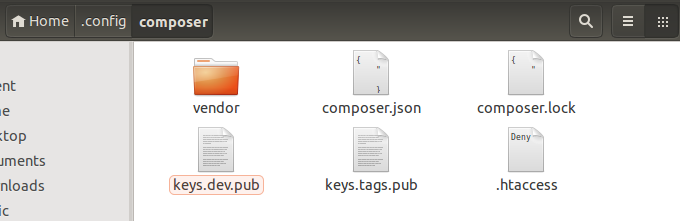
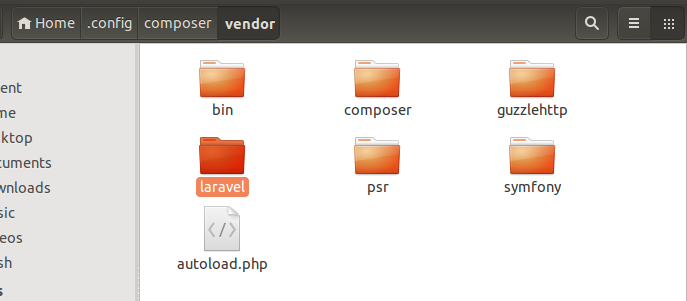
[4] 安装结果,有了laravel文件夹
四、第一个 Laravel 项目
8:34 / 20:25
sudo chmod -R  /var/www/html/

php composer.phar create-project --prefer-dist laravel/laravel /var/www/html/my_larvavel
注意,composer.phar 所在路径下运行上述命令才可以。
unsw@unsw-UX303UB$ php composer.phar create-project --prefer-dist laravel/laravel /var/www/html/my_larvavel

Installing laravel/laravel (v5.6.21)

  - Installing laravel/laravel (v5.6.21): Loading from cache

Created project in /var/www/html/my_larvavel

> @php -r "file_exists('.env') || copy('.env.example', '.env');"

Loading composer repositories with package information

Updating dependencies (including require-dev)

Package operations:  installs,  updates,  removals

  - Installing vlucas/phpdotenv (v2.4.0): Downloading (%)

  - Installing symfony/css-selector (v4.1.1): Downloading (%)

  - Installing tijsverkoyen/css-to-inline-styles (2.2.): Downloading (%)

  - Installing symfony/polyfill-php72 (v1.8.0): Downloading (%)

  - Installing symfony/polyfill-mbstring (v1.8.0): Loading from cache

  - Installing symfony/var-dumper (v4.1.1): Downloading (%)

  - Installing symfony/routing (v4.1.1): Downloading (%)

  - Installing symfony/process (v4.1.1): Loading from cache

  - Installing symfony/polyfill-ctype (v1.8.0): Loading from cache

  - Installing symfony/http-foundation (v4.1.1): Downloading (%)

  - Installing symfony/event-dispatcher (v4.1.1): Downloading (%)

  - Installing psr/log (1.0.): Downloading (%)

  - Installing symfony/debug (v4.1.1): Downloading (%)

  - Installing symfony/http-kernel (v4.1.1): Downloading (%)

  - Installing paragonie/random_compat (v2.0.15): Downloading (%)

  - Installing symfony/finder (v4.1.1): Downloading (%)

  - Installing symfony/console (v4.1.1): Loading from cache

  - Installing doctrine/lexer (v1.0.1): Downloading (%)

  - Installing egulias/email-validator (2.1.): Downloading (%)

  - Installing swiftmailer/swiftmailer (v6.0.2): Downloading (%)

  - Installing ramsey/uuid (3.7.): Downloading (%)

  - Installing psr/simple-cache (1.0.): Downloading (%)

  - Installing psr/container (1.0.): Downloading (%)

  - Installing symfony/translation (v4.1.1): Downloading (%)

  - Installing nesbot/carbon (1.25.): Downloading (%)

  - Installing monolog/monolog (1.23.): Downloading (%)

  - Installing league/flysystem (1.0.): Downloading (%)

  - Installing erusev/parsedown (1.7.): Downloading (%)

  - Installing dragonmantank/cron-expression (v2.2.0): Downloading (%)

  - Installing doctrine/inflector (v1.3.0): Downloading (%)

  - Installing laravel/framework (v5.6.26): Downloading (%)

  - Installing fideloper/proxy (4.0.): Downloading (%)

  - Installing nikic/php-parser (v4.0.2): Downloading (%)

  - Installing jakub-onderka/php-console-color (0.1): Downloading (%)

  - Installing jakub-onderka/php-console-highlighter (v0.3.2): Downloading (%)

  - Installing dnoegel/php-xdg-base-dir (0.1): Downloading (%)

  - Installing psy/psysh (v0.9.6): Downloading (%)

  - Installing laravel/tinker (v1.0.7): Downloading (%)

  - Installing fzaninotto/faker (v1.7.1): Downloading (%)

  - Installing hamcrest/hamcrest-php (v2.0.0): Downloading (%)

  - Installing mockery/mockery (1.1.): Downloading (%)

  - Installing filp/whoops (2.2.): Downloading (%)

  - Installing nunomaduro/collision (v2.0.3): Downloading (%)

  - Installing sebastian/version (2.0.): Downloading (%)

  - Installing sebastian/resource-operations (1.0.): Downloading (%)

  - Installing sebastian/object-reflector (1.1.): Downloading (%)

  - Installing sebastian/recursion-context (3.0.): Downloading (%)

  - Installing sebastian/object-enumerator (3.0.): Downloading (%)

  - Installing sebastian/global-state (2.0.): Downloading (%)

  - Installing sebastian/exporter (3.1.): Downloading (%)

  - Installing sebastian/environment (3.1.): Downloading (%)

  - Installing sebastian/diff (3.0.): Downloading (%)

  - Installing sebastian/comparator (3.0.): Downloading (%)

  - Installing phpunit/php-timer (2.0.): Downloading (%)

  - Installing phpunit/php-text-template (1.2.): Downloading (%)

  - Installing phpunit/php-file-iterator (2.0.): Downloading (%)

  - Installing theseer/tokenizer (1.1.): Downloading (%)

  - Installing sebastian/code-unit-reverse-lookup (1.0.): Downloading (%)

  - Installing phpunit/php-token-stream (3.0.): Downloading (%)

  - Installing phpunit/php-code-coverage (6.0.): Downloading (%)

  - Installing doctrine/instantiator (1.1.): Downloading (%)

  - Installing webmozart/assert (1.3.): Downloading (%)

  - Installing phpdocumentor/reflection-common (1.0.): Downloading (%)

  - Installing phpdocumentor/type-resolver (0.4.): Downloading (%)

  - Installing phpdocumentor/reflection-docblock (4.3.): Downloading (%)

  - Installing phpspec/prophecy (1.7.): Downloading (%)

  - Installing phar-io/version (1.0.): Downloading (%)

  - Installing phar-io/manifest (1.0.): Downloading (%)

  - Installing myclabs/deep-copy (1.8.): Downloading (%)

  - Installing phpunit/phpunit (7.2.): Downloading (%)

symfony/var-dumper suggests installing ext-intl (To show region name in time zone dump)

symfony/routing suggests installing doctrine/annotations (For using the annotation loader)

symfony/routing suggests installing symfony/config (For using the all-in-one router or any loader)

symfony/routing suggests installing symfony/dependency-injection (For loading routes from a service)

symfony/routing suggests installing symfony/expression-language (For using expression matching)

symfony/routing suggests installing symfony/yaml (For using the YAML loader)

symfony/event-dispatcher suggests installing symfony/dependency-injection ()

symfony/http-kernel suggests installing symfony/browser-kit ()

symfony/http-kernel suggests installing symfony/config ()

symfony/http-kernel suggests installing symfony/dependency-injection ()

paragonie/random_compat suggests installing ext-libsodium (Provides a modern crypto API that can be used to generate random bytes.)

symfony/console suggests installing symfony/lock ()

egulias/email-validator suggests installing ext-intl (PHP Internationalization Libraries are required to use the SpoofChecking validation)

ramsey/uuid suggests installing ircmaxell/random-lib (Provides RandomLib for use with the RandomLibAdapter)

ramsey/uuid suggests installing ext-libsodium (Provides the PECL libsodium extension for use with the SodiumRandomGenerator)

ramsey/uuid suggests installing ext-uuid (Provides the PECL UUID extension for use with the PeclUuidTimeGenerator and PeclUuidRandomGenerator)

ramsey/uuid suggests installing moontoast/math (Provides support for converting UUID to -bit integer (in string form).)

ramsey/uuid suggests installing ramsey/uuid-doctrine (Allows the use of Ramsey\Uuid\Uuid as Doctrine field type.)

ramsey/uuid suggests installing ramsey/uuid-console (A console application for generating UUIDs with ramsey/uuid)

symfony/translation suggests installing symfony/config ()

symfony/translation suggests installing symfony/yaml ()

monolog/monolog suggests installing aws/aws-sdk-php (Allow sending log messages to AWS services like DynamoDB)

monolog/monolog suggests installing doctrine/couchdb (Allow sending log messages to a CouchDB server)

monolog/monolog suggests installing ext-amqp (Allow sending log messages to an AMQP server (1.0+ required))

monolog/monolog suggests installing ext-mongo (Allow sending log messages to a MongoDB server)

monolog/monolog suggests installing graylog2/gelf-php (Allow sending log messages to a GrayLog2 server)

monolog/monolog suggests installing mongodb/mongodb (Allow sending log messages to a MongoDB server via PHP Driver)

monolog/monolog suggests installing php-amqplib/php-amqplib (Allow sending log messages to an AMQP server using php-amqplib)

monolog/monolog suggests installing php-console/php-console (Allow sending log messages to Google Chrome)

monolog/monolog suggests installing rollbar/rollbar (Allow sending log messages to Rollbar)

monolog/monolog suggests installing ruflin/elastica (Allow sending log messages to an Elastic Search server)

monolog/monolog suggests installing sentry/sentry (Allow sending log messages to a Sentry server)

league/flysystem suggests installing league/flysystem-aws-s3-v2 (Allows you to use S3 storage with AWS SDK v2)

league/flysystem suggests installing league/flysystem-aws-s3-v3 (Allows you to use S3 storage with AWS SDK v3)

league/flysystem suggests installing league/flysystem-azure (Allows you to use Windows Azure Blob storage)

league/flysystem suggests installing league/flysystem-cached-adapter (Flysystem adapter decorator for metadata caching)

league/flysystem suggests installing league/flysystem-eventable-filesystem (Allows you to use EventableFilesystem)

league/flysystem suggests installing league/flysystem-rackspace (Allows you to use Rackspace Cloud Files)

league/flysystem suggests installing league/flysystem-sftp (Allows you to use SFTP server storage via phpseclib)

league/flysystem suggests installing league/flysystem-webdav (Allows you to use WebDAV storage)

league/flysystem suggests installing league/flysystem-ziparchive (Allows you to use ZipArchive adapter)

league/flysystem suggests installing spatie/flysystem-dropbox (Allows you to use Dropbox storage)

league/flysystem suggests installing srmklive/flysystem-dropbox-v2 (Allows you to use Dropbox storage for PHP  applications)

laravel/framework suggests installing aws/aws-sdk-php (Required to use the SQS queue driver and SES mail driver (~3.0).)

laravel/framework suggests installing doctrine/dbal (Required to rename columns and drop SQLite columns (~2.6).)

laravel/framework suggests installing guzzlehttp/guzzle (Required to use the Mailgun and Mandrill mail drivers and the ping methods on schedules (~6.0).)

laravel/framework suggests installing league/flysystem-aws-s3-v3 (Required to use the Flysystem S3 driver (~1.0).)

laravel/framework suggests installing league/flysystem-cached-adapter (Required to use the Flysystem cache (~1.0).)

laravel/framework suggests installing league/flysystem-rackspace (Required to use the Flysystem Rackspace driver (~1.0).)

laravel/framework suggests installing league/flysystem-sftp (Required to use the Flysystem SFTP driver (~1.0).)

laravel/framework suggests installing nexmo/client (Required to use the Nexmo transport (~1.0).)

laravel/framework suggests installing pda/pheanstalk (Required to use the beanstalk queue driver (~3.0).)

laravel/framework suggests installing predis/predis (Required to use the redis cache and queue drivers (~1.0).)

laravel/framework suggests installing pusher/pusher-php-server (Required to use the Pusher broadcast driver (~3.0).)

laravel/framework suggests installing symfony/dom-crawler (Required to use most of the crawler integration testing tools (~4.0).)

laravel/framework suggests installing symfony/psr-http-message-bridge (Required to psr7 bridging features (~1.0).)

psy/psysh suggests installing ext-pdo-sqlite (The doc command requires SQLite to work.)

psy/psysh suggests installing hoa/console (A pure PHP readline implementation. You'll want this if your PHP install doesn't already support readline or libedit.)

filp/whoops suggests installing whoops/soap (Formats errors as SOAP responses)

sebastian/global-state suggests installing ext-uopz (*)

phpunit/php-code-coverage suggests installing ext-xdebug (^2.6.)

phpunit/phpunit suggests installing phpunit/php-invoker (^2.0)

phpunit/phpunit suggests installing ext-soap (*)

phpunit/phpunit suggests installing ext-xdebug (*)

Writing lock file

Generating optimized autoload files

> Illuminate\Foundation\ComposerScripts::postAutoloadDump

> @php artisan package:discover

Discovered Package: fideloper/proxy

Discovered Package: laravel/tinker

Discovered Package: nunomaduro/collision

Package manifest generated successfully.

> @php artisan key:generate

Application key [base64:qddbSfYhoK3ZKyRQSo4effaeR9ABBIwmA7GoyF3gQjg=] set successfully.
安装日志
Problem 1: requires ext-mbstring
sudo apt-get install php7.-mbstring
Problem 2: requires ext-dom
sudo apt-get install php7.-xml
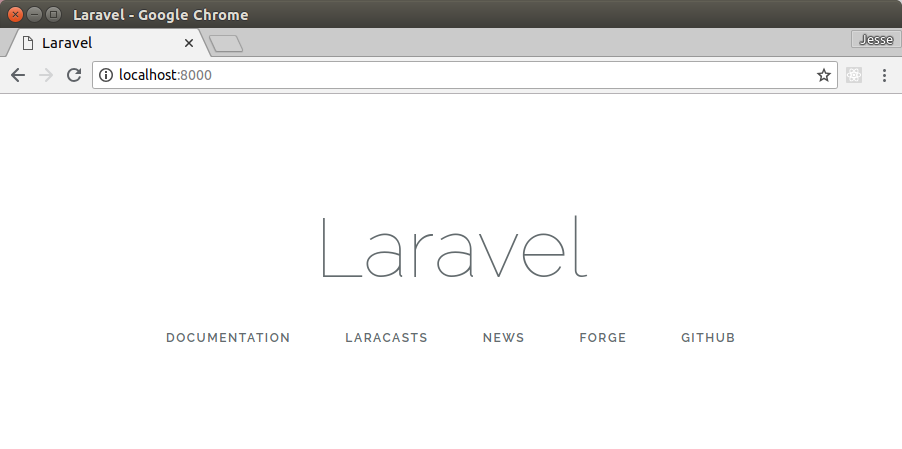
- 运行 Laravel 项目
lolo@lolo-UX303UB$ ls

app      bootstrap      composer.lock  database      phpunit.xml  readme.md  routes      storage  vendor

artisan  composer.json  config         package.json  public       resources  server.php  tests    webpack.mix.js

lolo@lolo-UX303UB$ php artisan serve

Laravel development server started: <http://127.0.0.1:8000>

[Sun Jul   :: ] 127.0.0.1: []: /favicon.ico
五、框架基本思路
框架执行过程,以及显示Hello world的过程。
app       -- Https 业务逻辑

          -- Http/routes.php【返回 (1) view --> resources/views/welcome.blade.php】

bootstrap -- 框架启动,自动加载

          -- autoload.php【加载 (1) /../vendor/autoload.php】

          -- app.php【实例化 (2) app and then return $app】

config    -- 配置文件,such as cache.

database -- 数据库相关资源

public    -- 静态资源, such as pic.

          -- index.php【加载 (1) /../bootstrap/autoload.php then (2) app.php】

resources -- 视图以及原始的资源文件,views就是mvc中的v

          -- views/welcome.blade.php【显示的首页 (2) html内容】

storage   -- 编译后的模板文件等。

tests     -- 单元测试。

vendor    -- 依赖模块
项目配置
一、常见包管理器
Java:        Maven

NodeJS:      NPM

Objective-C: CocoaPods

PHP:         PEAR
However,
Composer 是依赖管理工具,不是包管理器。
Install,
Goto: [Laravel] 01 - Love beautiful code? We do too.
二、使用 composer
- 创建composer.json
$ composer init
开始生成并配置:composer.json
- 查看要安装的包
有么?$ composer search monolog
版本?$ composer show monolog/monolog
列出所有相关信息,包括版本:$ composer show -- all monolog/monolog
- 包设置并安装
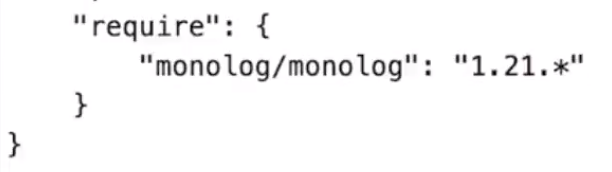
$ composer install
vendor 所有composer安装的目录,monolog就在里面。
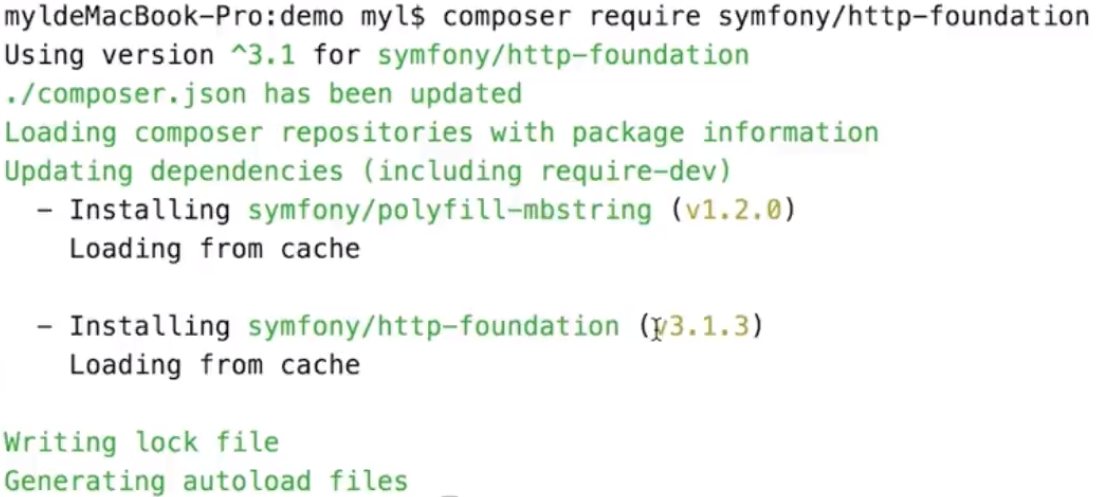
- 自动安装依赖
composer require:自动安装相关的依赖,如下所示。
三、使用 Laravel
- 安装Laravel
因为laravel本质就是个“包”。
$ composer search laravel
- 生成Laravel项目
有三种方式:
$ php composer.phar create-project --prefer-dist laravel/laravel laravel01
$ laravel new laravel02
$ laravel new test --dev
四、Artisan 控制台
- 一个命令行工具
[1] 生成一个新项目
$ laravel new laravel53
localhost:8888/laravel53/public/
[2] 打开项目by PhpStorm
[3] 命令行进入项目主路径
[4] 查看有哪些命令:
$ php artisan
$ php artisan list
$ php artisan help migrate
- 命令行的使用
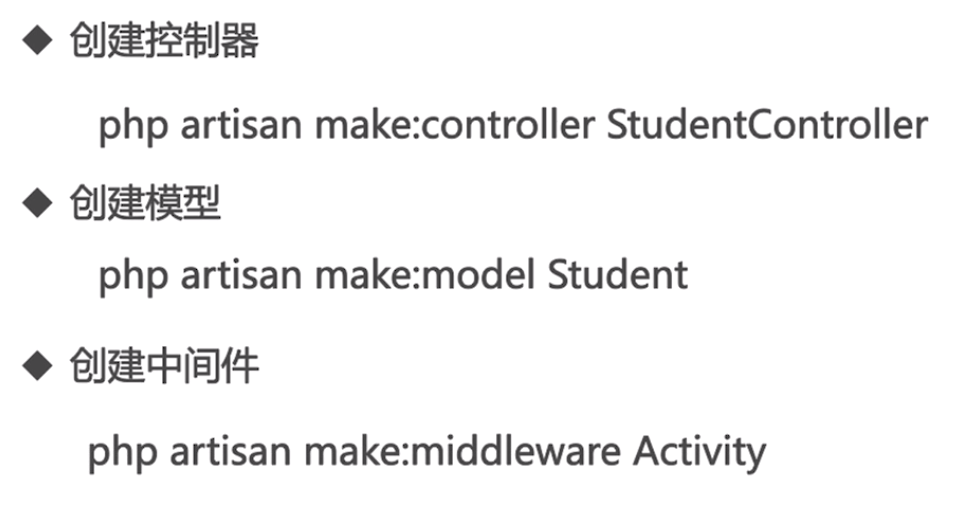
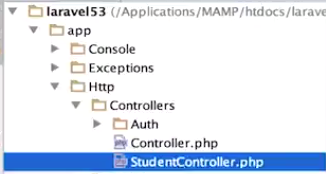
例如:创建控制器的效果,生成了StduentController.php
[Laravel] 01 - Love beautiful code? We do too.的更多相关文章
- laravel.01.一些细节
0:参考1,参考2,参考3,参考4,参考5 1.读取项目的配置文件内容,比如app.php下的name属性,用config('app.name','default-value'); 2.读取.ENV文 ...
- [Code::Blocks] Install wxWidgets & openCV
The open source, cross platform, free C++ IDE. Code::Blocks is a free C++ IDE built to meet the most ...
- [Laravel] 14 - REST API: Laravel from scratch
前言 一.基础 Ref: Build a REST API with Laravel API resources Goto: [Node.js] 08 - Web Server and REST AP ...
- 本人SW知识体系导航 - Programming menu
将感悟心得记于此,重启程序员模式. js, py, c++, java, php 融汇之全栈系列 [Full-stack] 快速上手开发 - React [Full-stack] 状态管理技巧 - R ...
- 简简单单搞掂恼人的Laravel 5安装
想折腾下Laravel 5了.Laravel是这世界上最好且没有之一的语言──PHP──的众多框架中的一个,是我比较感兴趣的PHP Web Framework. 但是安装Laravel可不是件容易的事 ...
- laravel/laravel和laravel/framework有何区别?
在安装laravel的时候,我们一般是download github上的laravel/laravel,随后执行composer install,在这个过程中,你会发现composer其中的一项工作是 ...
- Laravel Cheat 表 http://cheats.jesse-obrien.ca/#
Laravel Cheat Sheet Toggle Code Comments PDF Version Github Laravel 3 Docs Laravel 4 Docs Artisan ph ...
- 【搜索引擎Jediael开发4】V0.01完整代码
截止目前,已完成如下功能: 1.指定某个地址,使用HttpClient下载该网页至本地文件 2.使用HtmlParser解释第1步下载的网页,抽取其中包含的链接信息 3.下载第2步的所有链接指向的网页 ...
- Learning from the CakePHP source code - Part I
最近开始痛定思痛,研究cakephp的源码. 成长的路上从来没有捷径,没有小聪明. 只有傻傻的努力,你才能听到到成长的声音. 下面这篇文章虽然过时了,但是还是可以看到作者的精神,仿佛与作者隔着时空的交 ...
随机推荐
- FCKEditor在IE10下的不兼容问题解决方法
环境介绍:FCKEditor 版本 2.x.x 问题:IE10 下FCKEditor不兼容,显示不出来 关键词:不同于其他方法之处是第一个关键点,其他网友的正则表达式不对 解放方法:(可以直接< ...
- VMware内CentOS7虚拟机硬盘扩容
转自:https://blog.csdn.net/Wang_Xin_SH/article/details/77872885 简介 CentOS7虚拟机原硬盘空间只分配了10GB,需要扩容到20GB. ...
- (转)Unity3D - 动作动画忽略timeScale
转自:http://blog.csdn.net/ynnmnm/article/details/46866347 最近在调战斗时的动画与特效,Unity3D对加/减速提供了Time.timeScale支 ...
- 操作argc, argv的经典写法
[问题] 我在看boost源代码的时候看到如下的代码, template<class charT> basic_command_line_parser<charT>:: bas ...
- 浅谈压缩感知(十七):测量矩阵之有限等距常数RIC的计算
有限等距常数(RestrictedIsometry Constant, RIC)是与有限等距性质(Restricted IsometryProperty, RIP)紧密结合在一起的一个参数. 一.RI ...
- MySQL中的insert ignore into, replace into用法总结
MySQL replace into 有三种形式: 1. replace into tbl_name(col_name, ...) values(...) 2. replace into tbl_na ...
- Series转化为DataFrame数据
out=groupby_sum.ix[:'to_uid','sum(diamonds)']使用ix在提取数据的时候,out的数据类型通常为<class 'pandas.core.series.S ...
- [Python]编码声明:是coding:utf-8还是coding=urf-8呢
推荐: #!/usr/bin/env python3 # -*- coding: utf-8 -*- 我们知道在Python源码的头文件中要声明编码方式,如果你不只是会用到ascii码,很多人都写得都 ...
- Android--保持加速度传感器在屏幕关闭后运行(收集)
由于写论文需要,需要用手机加速度采集数据,关于android加速度传感器的介绍网上一抓一大把,但大多都是大同小异,跟官网文档差不多.自己写了个取加速度传感器的APK,发现数据有点不对劲,原理屏幕一关后 ...
- Swift 与 C 语言混合编程
前言 作为一种可与 Objective-C 相互调用的语言,Swift 也具有一些与 C 语言的类型和特性,如果你的代码有需要,Swift 也提供了和常见的 C 代码结构混合编程的编程方式. 1.基本 ...