
【angular5项目积累总结】列表多选样式框(1)
憋不住想说一下:angular坑太多,各种教程各种不完整,官网还只是简单的画饼充饥,没办法只有自己研究自己总结,便于以后提高工作效率。
第一种:
view
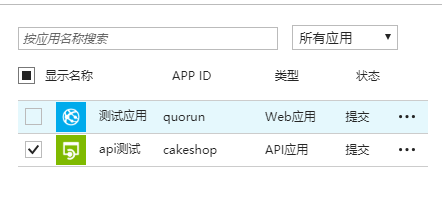
code
list.css
:host {

    display: flex;

    width: 100%;

    border-left: 1px solid #ccc;

}

.fxs-contextMenu {

    width: 125px;

    margin-left: -115px;

}

.ext-ad-appslist-image {

    height: 30px;

    width: 30px;

    display: inline-block;

    vertical-align: middle;

    padding: 0px 10px;

}

.search-select {

    white-space: nowrap;

    overflow: hidden;

    text-overflow: ellipsis;

    border-width: 1px;

    border-style: solid;

    color: inherit;

    display: inline-block;

    padding: 2px 5px 2px 2px;

    min-height: 15px;

    border-color: #bbb;

    background-color: #fff;

    color: #252525;

    width: 26.5%;

}

.search-input {

    width: 65%;

    padding: 4px;

}

.fxs-grid-selection-cell-wrapper {

    display: inline-block;

    vertical-align: middle;

}

.fxc-grid2 table thead tr th a {

    line-height: 34px;

}

.fxc-grid2.fxc-grid-sorting a.fxc-sortable {

    height:38px;

}

.azc-checkboxElementContainer {

    display: flex;

    width: 17px;

    float: left;

    margin-top: 9px;

}

.checkbox-pointer {

   cursor: pointer;

}
list.html
<panel-component [menuItems]="menuItems" headerTitle="Web 应用列表" initWidth="450px" (closeEvent)="onClose()">
<div class="ext-hubs-browse-grid-parent" style="margin:20px;height:100%;" (click)="activeContextMenu(null,false,null,null)">
<!--查询-->
<div class="ext-hubs-browse-resourcefilter fxc-base fxc-resourcefilter">
<div class="fxc-resourcefilter-summary-filters">
<div class="fxc-base msportalfx-form-formelement azc-textField fxc-TextField fxc-resourcefilter-visible fxc-resourcefilter-filter">
<div class="azc-formElementContainer">
<div class="azc-formElementContainer azc-formElementSubLabelContainer">
<div class="fxc-base azc-control azc-editableControl azc-validatableControl azc-inputbox azc-textBox azc-validatableControl-none" data-canfocus="true" data-editable="true">
<div class="azc-inputbox-wrapper azc-textBox-wrapper" tabindex="-1" style="outline: none">
<input [(ngModel)]="searchName" (keyup)="loadWebApp()" aria-describedby="2a5d6185-45de-4683-a402-5c36596aa0a1" aria-inval aria-label="按名称筛选..."
aria-multiline="false" class="azc-input azc-formControl azc-validation-border search-input"
placeholder="按应用名称搜索" spellcheck="false" type="text">
<select class="search-select" [(ngModel)]="searchCategory" (change)="loadWebApp()">
<option value="0">所有应用</option>
<option *ngFor="let category of lstCategory" [value]='category.key'>{{category.value}}</option>
</select>
</div>
</div>
</div>
</div>
</div>
</div>
</div>
<!--列表信息-->
<div class="ext-hubs-browse-grid fxc-base fxs-grid-focus fxc-grid-sorting fxc-grid-scrolling fxc-grid-resizing fxs-grid-selection fxc-grid-contextMenu fxc-grid-grouping fxc-grid2 azc-control fxc-grid-verticalScroll">
<div class="fxc-grid-container azc-br-muted">
<div class="fxc-grid-tableContainer azc-br-muted" style="padding-top: 42px;">
<div class="fxc-grid-tableScrollContainer azc-br-muted">
<table class="fxc-grid-tableHeader fxs-grid-multiselection" data-grid-activation="true" style="width: calc(100% - 17px);">
<thead>
<tr>
<th class="fxc-grid-sorting-header fxc-grid-column-header " style="width:35%;">
<div class="fxc-grid-header-wrapper">
<div class="azc-checkboxElementContainer checkbox-pointer" (click)="onAllCheck()">
<div class="fxc-base azc-control azc-editableControl azc-validatableControl azc-checkBox azc-input azc-validatableControl-none">
<span class="azc-fill-text azc-validation-border">
<svg focusable="false" class="azc-checkBox-svg azc-check-svg" version="1.1" xmlns="http://www.w3.org/2000/svg'" xlink="http://www.w3.org/1999/xlink" x="0px" y="0px" width="11px" height="11px" viewBox="0 0 16 16" enable-background="new 0 0 16 16" space="preserve" style="visibility: hidden;" [ngStyle]="{'visibility':isAllChecked?'':'hidden'}">
<path d="M0.6 8.9L0.1 8.3C0 8.1 0 7.9 0.1 7.7l1.5-1.4c0.1-0.1 0.2-0.1 0.3-0.1 0.1 0 0.2 0 0.3 0.1l4.2 4.5 7.3-9.3c0.1-0.1 0.2-0.1 0.3-0.1 0.1 0 0.2 0 0.2 0.1l1.7 1.3c0.1 0.1 0.1 0.1 0.1 0.2 0 0.1 0 0.2-0.1 0.3L6.6 15.2 0.6 8.9z"></path>
</svg>
<svg focusable="false" class="azc-checkBox-svg azc-indeterminate-svg" version="1.1" xmlns="http://www.w3.org/2000/svg" xmlns:xlink="http://www.w3.org/1999/xlink" x="0px" y="0px" width="12px" height="12px" enable="" background="new 0 0 24 24" space="preserve" [ngStyle]="{'visibility':isHasChecked?'':'hidden'}">
<rect x="1px" y="1px" width="9" height="9"></rect>
</svg>
</span>
</div>
</div>
<a aria-sort="none" class="fxc-sortable fxc-none" style="width: 70%;">
<span class="fxc-grid-headerlabel">显示名称</span>
</a>
<div class="fxc-grid-resizableColumn-handle">
<div class="fxc-grid-resizableColumn-handle-line azc-bg-muted">
</div>
</div>
</div>
</th>
<th class="fxc-grid-sorting-header fxc-grid-column-header " style="width:25%;">
<div class="fxc-grid-header-wrapper">
<a aria-sort="none" class="fxc-sortable fxc-none">
<span class="fxc-grid-headerlabel">App ID</span>
</a>
<div class="fxc-grid-resizableColumn-handle">
<div class="fxc-grid-resizableColumn-handle-line azc-bg-muted">
</div>
</div>
</div>
</th>
<th class="fxc-grid-sorting-header fxc-grid-column-header " style="width:20%;">
<div class="fxc-grid-header-wrapper">
<a aria-sort="none" class="fxc-sortable fxc-none">
<span class="fxc-grid-headerlabel">类型</span>
</a>
<div class="fxc-grid-resizableColumn-handle">
<div class="fxc-grid-resizableColumn-handle-line azc-bg-muted">
</div>
</div>
</div>
</th>
<th class="fxc-grid-sorting-header fxc-grid-column-header " style="width:16%;">
<div class="fxc-grid-header-wrapper">
<a aria-sort="none" class="fxc-sortable fxc-none">
<span class="fxc-grid-headerlabel">状态</span>
</a>
<div class="fxc-grid-resizableColumn-handle">
<div class="fxc-grid-resizableColumn-handle-line azc-bg-muted">
</div>
</div>
</div>
</th>
</tr>
</thead>
</table>
<div class="fxc-grid-tableContent" style="height:calc(100% - 120px); position: relative; overflow-x: hidden;">
<table class="fxc-grid-full fxs-grid-multiselection" data-grid-activation="true" style="position: absolute;">
<tbody class="fxc-grid-groupdata ">
<tr class="fxc-grid-row fxs-portal-focus fxs-portal-hover" [ngClass]="{'fxs-portal-selected':app.isSelected}" *ngFor="let app of lstApp;let i = index" (click)="onOpenDetailById(app.id,i)">
<td class="fxc-grid-cell azc-br-muted" style="width:33%;">
<div class="azc-vivaControl">
<div class="fxs-grid-selection-cell-wrapper fxs-portal-border azc-fill-text checkbox-pointer" (click)="onCheck(i,$event)">
<div class="fxs-grid-selection-cell-check">
<div class="fx-grid-formatters-svg">
<span class="fx-grid-formatters-svgicon" style="height: 11px; width: 11px;">
<svg height="100%" width="100%" aria-hidden="true" role="presentation" focusable="false" [ngStyle]="{'visibility':app.isChecked?'':'hidden'}">
<use xmlns:xlink="http://www.w3.org/1999/xlink" xlink:href="#FxSymbol0-0c2"></use>
</svg>
</span>
</div>
</div>
</div>
<img *ngIf="app.category == 1" class="ext-ad-appslist-image" alt="应用程序图标" src="https://gallery.windowsazure.cn/artifact/20161101/Microsoft.WebSite.2.2.0/Icons/Small.png">
<!--<img *ngIf="app.category == 2" class="ext-ad-appslist-image" alt="应用程序图标" src="https://gallery.windowsazure.cn/artifact/20161101/Microsoft.Zumo.1.0.21/Icons/Small.png">-->
<img *ngIf="app.category == 2" class="ext-ad-appslist-image" alt="应用程序图标" src="https://gallery.windowsazure.cn/artifact/20161101/Microsoft.ApiApp.1.0.1/Icons/Small.png">
<span data-bind="text: value" class="msportalfx-text-ellipsis">{{app.displayName}}</span>
</div>
</td>
<td class="fxc-grid-cell azc-br-muted" style="width:25%;">
<div class="azc-grid-cellContent">{{app.name}}</div>
</td>
<td class="fxc-grid-cell azc-br-muted" style="width:16%;">
<div class="azc-grid-cellContent">{{getDictLabel(lstCategory,app.category)}}</div>
</td>
<td class="fxc-grid-cell azc-br-muted" style="width:16%;" align="center">
<div class="azc-grid-cellContent">{{getDictLabel(lstAppStatus,(app.status + 1))}}</div>
</td>
<td class="fxc-grid-contextMenuShortcut-cell azc-br-muted">
<a (click)="activeContextMenu($event,true,i,app)" class="msportalfx-inherit-color fxs-portal-svg" href="javascript:;" role="button" title="单击以打开上下文菜单" tabindex="0">
<svg height="100%" width="100%" aria-hidden="true" role="presentation" focusable="false"><use xmlns:xlink="http://www.w3.org/1999/xlink" xlink:href="#FxSymbol0-013"></use></svg>
</a>
</td>
</tr> </tbody>
</table> </div>
</div> </div> </div>
<div aria-hidden="true" class="fxs-hide-accessible-label">
</div>
<div class="azc-resize azc-resize-shrink">
<div class="azc-resize-content" style="width: 200%; min-width: 1px; height: 200%; min-height: 1px;">
</div> </div>
<div class="azc-resize azc-resize-grow">
<div class="azc-resize-content" style="width: 517px; height: 518px;">
</div> </div>
<div class="fxs-commands-contextMenu fxs-contextMenu fxs-popup fxs-portal-bg-txt-br" [ngClass]="{'fxs-contextMenu-active' : isActiveMenu}" [ngStyle]="{'top.px': menuTop,'left.px': menuLeft}">
<ul role="menu" class="fxs-contextMenu-itemList" data-bind="foreach: { data: commands, afterRender: afterRender }, attr: { 'aria-label': ariaLabel }" aria-label="上下文菜单">
<li role="menuitem" class="fxs-contextMenu-item fxs-portal-hover" tabindex="0" aria-posinset="1" aria-setsize="1" (click)="onOpenDetail()">
<div class="fxs-contextMenu-text fxs-portal-text msportalfx-text-ellipsis" data-bind="text: text">查看</div>
</li>
<li role="menuitem" class="fxs-contextMenu-item fxs-portal-hover" tabindex="0" aria-posinset="1" aria-setsize="1" (click)="removeCurApp()">
<div class="fxs-contextMenu-text fxs-portal-text msportalfx-text-ellipsis" data-bind="text: text">删除</div>
</li>
</ul>
</div>
</div>
</div>
</panel-component>
<router-outlet></router-outlet>
list.ts
import { Component } from '@angular/core';

import { Router, ActivatedRoute } from '@angular/router';

import { AppStoreService } from '../service/appStoreService'

import { CommonService } from '../../providers/commonService';

@Component({

    selector: 'all-app',

    templateUrl: './allApp.html',

    styleUrls: ['./allApp.css']

})

export class AllApp {

    constructor(

        private router: Router,

        private actRouter: ActivatedRoute,

        private appStoreService: AppStoreService,

        private comService: CommonService) {

         this.subscribeUpdate(comService);

    }

    lstApp: any;

    lstCategory: any;

    lstAppStatus: any;

    searchName: string;

    searchCategory: any = 0;

    isActiveMenu: boolean = false;

    menuTop: any;

    menuLeft: any;

    currIndex: any;

    currApp: any;

    isAllChecked: boolean = false;

    isHasChecked: boolean = false;

    parentUrl: string;

    menuItems: any = [

        { title: "应用注册", icon: "#FxSymbol0-010", event: this.regWebApp.bind(this) },

        { title: "应用审核", icon: "#FxSymbol0-077", event: this.auditWebApp.bind(this) },

        { title: "刷新", icon: "#FxSymbol0-0c4", event: this.loadWebApp.bind(this) },

    ]

    ngOnInit(): void {

        this.actRouter.parent.params.subscribe((params) => {

            this.parentUrl = this.router.url;

            this.loadWebApp();

        });

        this.appStoreService.GetCategoryList((rtv) => {

            this.lstCategory = rtv;

        });

        this.appStoreService.GetAppSatus((rtv) => {

            this.lstAppStatus = rtv;

        });

    }

    loadWebApp() {

        this.appStoreService.AllApp(this.searchName, this.searchCategory,(result) => {

            this.lstApp = result;

        })

    }

    onClose() {

        this.router.navigate(['/home'], {});

    }

    activeContextMenu(event: any, isActive: boolean,index: any,app: any) {

        this.isActiveMenu = isActive;

        if (event) {

            this.menuLeft = event.pageX - 20;

            this.menuTop = event.pageY - 10;

            event.stopPropagation();

        }

        this.currIndex = index;

        this.currApp = app;

    }

    removeCurApp() {

        let _this = this;

        this.currApp.id && this.appStoreService.DeleteApp(this.currApp.id, (result) => {

            _this.loadWebApp()

        })

    }

    getDictLabel(dict: any, key: any) {

        if (dict && dict.length > 0) {

            let curItem = dict.filter(item => { return item.key == key });

            return curItem.length > 0 ? curItem[0].value : '';

        }

    }

    regWebApp() {

        this.router.navigate([this.parentUrl +'/create'], {});

    }

    onOpenDetail() {

        this.currApp.id && this.router.navigate([this.parentUrl + '/' + this.currApp.id]);

    }

    onOpenDetailById(id: string, index: any) {

        this.lstApp.map((app, i) => i == index ? app.isSelected = true : app.isSelected = false);

        id && this.router.navigate([this.parentUrl + '/' + id]);

    }

    subscribeUpdate(comService: CommonService) {

        this.comService.notifyObservable$.subscribe(data => {

            if (data == 'refreshWebApp') {

                this.loadWebApp();

            }

        }, error => {

            console.log(`subscribe error:${error}`)

        })

    }

    auditWebApp() {

        this.router.navigate([this.parentUrl + '/regAudit']);

    }

    onAllCheck() {

        this.isAllChecked = !this.isAllChecked;

        this.lstApp.map(app => app.isChecked = this.isAllChecked);

        this.isHasChecked = false;

    }

    onCheck(index: any,event: any) {

        this.lstApp[index].isChecked = !this.lstApp[index].isChecked;

        let isAllCheck = this.lstApp.every(app => { return app.isChecked == true });

        isAllCheck ? this.isAllChecked = true : this.isAllChecked = false;

        let isHasCheck = this.lstApp.some(app => { return app.isChecked == true });

        isHasCheck && !isAllCheck ? this.isHasChecked = true : this.isHasChecked = false;

        event && event.stopPropagation();

    }

}
【angular5项目积累总结】列表多选样式框(1)的更多相关文章
- 【angular5项目积累总结】列表多选样式框(2)
view code list.css :host { display: flex; width: 100%; border-left: 1px solid #ccc; font: normal 12p ...
- 【angular5 项目积累总结】项目公共样式
main.css @font-face { font-family: 'wf_segoe-ui_normal'; src: local('Segoe UI'),url('../fonts/segoe- ...
- 【angular5项目积累总结】遇到的一些问题以及解决办法
1.项目中字符串特别是\r\n,替换成br之后,在页面换行无法生效? 答:绑定元素 innerHTML. <div class="panel-body" [innerHTML ...
- 【angular5项目积累总结】消息订阅服务
code import { Injectable } from '@angular/core'; import { Subject } from 'rxjs/Subject'; @Injectable ...
- 【angular5项目积累总结】优秀组件以及应用实例
1.手机端 图片预览组件 组件:sideshow 效果图:(预览图全屏 且可以左右移动) code: <div class="row ui-app-s ...
- 【angular5项目积累总结】表单复杂校验
view code form.css :host { display: flex; width: 100%; height:100%; border-left:1px solid #ccc; } .i ...
- 【angular5项目积累总结】侧栏菜单 navmenu
View Code import { Component, OnInit } from '@angular/core'; import { HttpClient } from '@angular/co ...
- 【angular5项目积累总结】avatar组件
View Code import { Component, HostListener, ElementRef } from '@angular/core'; import { Adal4Service ...
- 【angular5项目积累总结】breadcrumb面包屑组件
view code <div class="fxs-breadcrumb-wrapper" aria-label="Navigation history" ...
随机推荐
- 纸壳CMS3.0中的规则引擎,表达式计算
纸壳CMS3.0中的规则引擎,用于计算通用表达试结果.通常业务逻辑总是复杂多变的,使用这个规则引擎可以灵活的修改计算表达式. IRuleManager IRuleManager,是使用规则引擎的主要接 ...
- sql server中的 trimtrailingblanks
使用sp_help 查出 发现有个这个属性, 如何修改呢? SET ANSI_PADDING ONAlter Table Sys_users_History Alter column PveSit ...
- 2018-2019-2 20165219《网络对抗技术》Exp4 恶意代码分析
基础问题回答 实验目的 监控系统的运行状态,看有没有可疑的程序在运行 分析一个恶意软件,就分析Exp2或Exp3中生成后门软件:分析工具尽量使用原生指令或sysinternals,systracer套 ...
- 关于gcd和exgcd的一点心得,保证看不懂(滑稽)
网上看了半天……还是没把欧几里得算法和扩展欧几里得算法给弄明白…… 然后想了想自己写一篇文章好了…… 参考文献:https://www.cnblogs.com/hadilo/p/5914302.htm ...
- BruteXSS(汉化版)
BruteXSS是一个非常强大和快速的跨站点脚本暴力注入.它用于暴力注入一个参数.该BruteXSS从指定的词库加载多种有效载荷进行注入并且使用指定的载荷和扫描检查这些参数很容易受到XSS漏洞.得益于 ...
- [CSS3] 各种角度的三角形绘制
#triangle-up { width:; height:; border-left: 50px solid transparent; border-right: 50px solid transp ...
- Oauth2.0 整合springCloud的Zuul 解决关键BUG 报错信息:Principal must not be null
不清楚Oauth2.0 的 可以查看我前几篇博文 2018.4.8 补充 我出现这个原因:是我在资源服务器使用了 如下图所示 Principal Oauth2.0 提供的获取用户信息的方法 使其找到相 ...
- (一)Python装饰器的通俗理解
在学习Python的过程中,我相信有很多人和我一样,对Python的装饰器一直觉得很困惑,我也是困惑了好久,并通过思考和查阅才能略有领悟,我希望以下的内容会对你有帮助,我也努力通过通俗的方式使得对Py ...
- google Agent
一句话:改HOSTS文件 有时候要查看appengine.google.com的后台,但死活上不去,怎么办?还是那个老办法: 1.在cmd下Ping www.google.com.hk,获得IP地址, ...
- iOS -- UILabel的常见使用
UILabel是iOS开发经常用到的一个控件,主要用于显示文字.下面记录一些常用的UIlabel的使用. 先定义:UILabel *label = [[UILabel alloc]initWithFr ...