
爬虫系列(八) 用requests实现天气查询
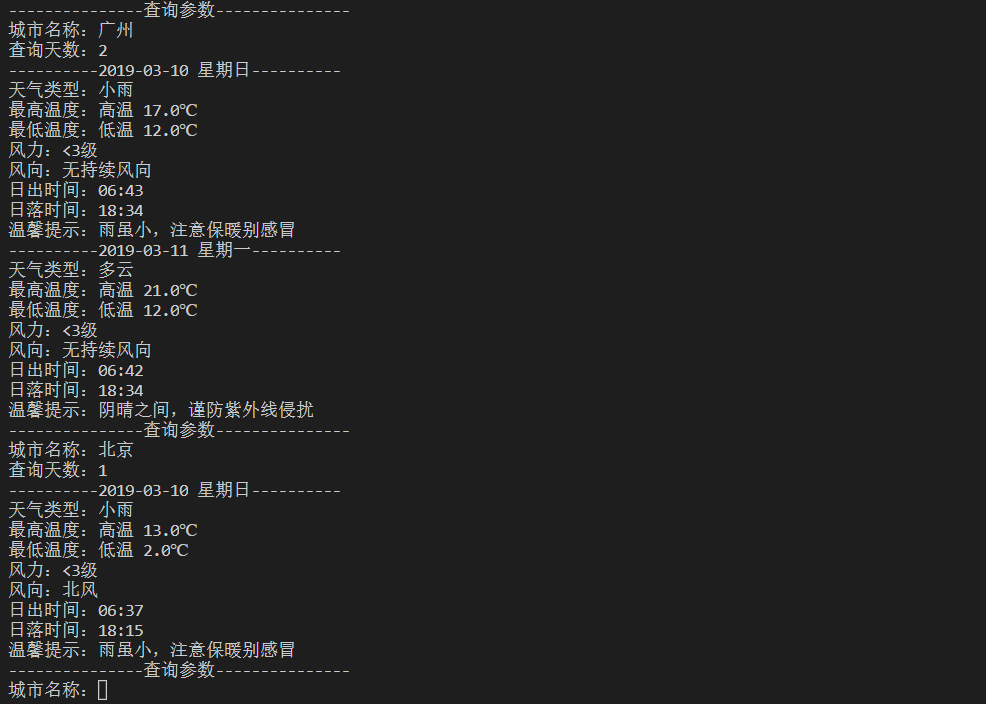
这篇文章我们将使用 requests 调用天气查询接口,实现一个天气查询的小模块,下面先贴上最终的效果图
1、接口分析
虽然现在网络上有很多免费的天气查询接口,但是有很多网站都是需要注册登陆的,过程比较繁琐
几经艰辛,博主终于找到一个不用注册可以直接使用的天气查询接口,以下是该接口的使用说明:
接口查询格式:
https://www.sojson.com/open/api/weather/json.shtml?city={cityName}
其中 cityName 为待查询城市的名称,可以直接使用中文
接口返回数据:
>>> import requests

>>> import pprint # 用于格式化打印字典类型数据

>>> url = 'https://www.sojson.com/open/api/weather/json.shtml?city=广州'

>>> response = requests.get(url)

>>> pprint.pprint(response.json())

{'city': '广州',

 'count': 7,

 'data': {'forecast': [{'aqi': 69.0,

                        'date': '19日星期日',

                        'fl': '<3级',

                        'fx': '无持续风向',

                        'high': '高温 32.0℃',

                        'low': '低温 26.0℃',

                        'notice': '带好雨具,别在树下躲雨',

                        'sunrise': '06:04',

                        'sunset': '18:57',

                        'type': '雷阵雨'},

                       {'aqi': 77.0,

                        'date': '20日星期一',

                        'fl': '<3级',

                        'fx': '无持续风向',

                        'high': '高温 32.0℃',

                        'low': '低温 26.0℃',

                        'notice': '带好雨具,别在树下躲雨',

                        'sunrise': '06:04',

                        'sunset': '18:56',

                        'type': '雷阵雨'},

                       {'aqi': 97.0,

                        'date': '21日星期二',

                        'fl': '<3级',

                        'fx': '无持续风向',

                        'high': '高温 32.0℃',

                        'low': '低温 26.0℃',

                        'notice': '带好雨具,别在树下躲雨',

                        'sunrise': '06:04',

                        'sunset': '18:55',

                        'type': '雷阵雨'},

                       {'aqi': 84.0,

                        'date': '22日星期三',

                        'fl': '<3级',

                        'fx': '无持续风向',

                        'high': '高温 33.0℃',

                        'low': '低温 26.0℃',

                        'notice': '带好雨具,别在树下躲雨',

                        'sunrise': '06:05',

                        'sunset': '18:54',

                        'type': '雷阵雨'},

                       {'aqi': 76.0,

                        'date': '23日星期四',

                        'fl': '<3级',

                        'fx': '无持续风向',

                        'high': '高温 33.0℃',

                        'low': '低温 26.0℃',

                        'notice': '带好雨具,别在树下躲雨',

                        'sunrise': '06:05',

                        'sunset': '18:53',

                        'type': '雷阵雨'}],

          'ganmao': '极少数敏感人群应减少户外活动',

          'pm10': 54.0,

          'pm25': 24.0,

          'quality': '良',

          'shidu': '99%',

          'wendu': '26',

          'yesterday': {'aqi': 70.0,

                        'date': '18日星期六',

                        'fl': '<3级',

                        'fx': '无持续风向',

                        'high': '高温 32.0℃',

                        'low': '低温 26.0℃',

                        'notice': '带好雨具,别在树下躲雨',

                        'sunrise': '06:03',

                        'sunset': '18:58',

                        'type': '雷阵雨'}},

 'date': '20180819',

 'message': 'Success !',

 'status': 200}

>>> # 若传入的参数无法识别,则只会返回 message,所以我们可以根据 message 判断请求是否成功

>>> url = 'https://www.sojson.com/open/api/weather/json.shtml?city=错误'

>>> response = requests.get(url)

>>> pprint.pprint(response.json())

{'message': 'Check the parameters.'}
2、完整代码
import requests

def weather(cityName):

    url = 'https://www.sojson.com/open/api/weather/json.shtml?city=' + str(cityName)

    response = requests.get(url)

    result = response.json()

    if result['message']=='Success !' :

        return result['data']

    else:

        return None

if __name__ == '__main__':

    while True :

        cityName = input('城市名称:')

        result = weather(cityName)

        if result == None :

            print('查询错误!')

        else:

            print('---------------Processing---------------')

            print('------------------------------')

            print('温度:',result['wendu'])

            print('湿度:',result['shidu'])

            print('PM10:',result['pm10'])

            print('PM2.5:',result['pm25'])

            print('空气质量:',result['quality'])

            print('感冒提醒:',result['ganmao'])

            print('------------------------------')

            for item in result['forecast']:

                print('日期:',item['date'])

                print('风力:',item['fl'])

                print('风向:',item['fx'])

                print('最高温:',item['high'])

                print('最低温:',item['low'])

                print('温馨提醒:',item['notice'])

                print('日出时间:',item['sunrise'])

                print('日落时间:',item['sunset'])

                print('天气:',item['type'])

                print('------------------------------')

            print('---------------Finished---------------')
2019-03-10 更新:
由于原来的接口有所改变,所以重新写文更新一下博客
现有接口查询格式:
http://t.weather.sojson.com/api/weather/city/{city_code}
其中,city_code 为城市代号
可以通过链接 http://cdn.sojson.com/_city.json 查看
可以通过链接 http://cdn.sojson.com/_city.json?attname= 下载
具体可以参考 https://www.sojson.com/blog/305.html
接口返回数据格式:
>>> import requests

>>> import pprint # 用于格式化打印字典类型数据

>>> url = 'http://t.weather.sojson.com/api/weather/city/101280101'

>>> response = requests.get(url)

>>> pprint.pprint(response.json())

{'cityInfo': {'city': '广州市',

              'cityId': '101280101',

              'parent': '广东',

              'updateTime': '18:24'},

 'data': {'forecast': [{'aqi': 20.0,

                        'date': '10',

                        'fl': '<3级',

                        'fx': '无持续风向',

                        'high': '高温 17.0℃',

                        'low': '低温 12.0℃',

                        'notice': '雨虽小,注意保暖别感冒',

                        'sunrise': '06:43',

                        'sunset': '18:34',

                        'type': '小雨',

                        'week': '星期日',

                        'ymd': '2019-03-10'},

                       {'aqi': 36.0,

                        'date': '11',

                        'fl': '<3级',

                        'fx': '无持续风向',

                        'high': '高温 21.0℃',

                        'low': '低温 12.0℃',

                        'notice': '阴晴之间,谨防紫外线侵扰',

                        'sunrise': '06:42',

                        'sunset': '18:34',

                        'type': '多云',

                        'week': '星期一',

                        'ymd': '2019-03-11'},

                       {'aqi': 58.0,

                        'date': '12',

                        'fl': '<3级',

                        'fx': '无持续风向',

                        'high': '高温 23.0℃',

                        'low': '低温 13.0℃',

                        'notice': '愿你拥有比阳光明媚的心情',

                        'sunrise': '06:41',

                        'sunset': '18:35',

                        'type': '晴',

                        'week': '星期二',

                        'ymd': '2019-03-12'},

                       {'aqi': 73.0,

                        'date': '13',

                        'fl': '<3级',

                        'fx': '无持续风向',

                        'high': '高温 22.0℃',

                        'low': '低温 14.0℃',

                        'notice': '阴晴之间,谨防紫外线侵扰',

                        'sunrise': '06:40',

                        'sunset': '18:35',

                        'type': '多云',

                        'week': '星期三',

                        'ymd': '2019-03-13'},

                       {'aqi': 65.0,

                        'date': '14',

                        'fl': '<3级',

                        'fx': '无持续风向',

                        'high': '高温 20.0℃',

                        'low': '低温 14.0℃',

                        'notice': '记得随身携带雨伞哦',

                        'sunrise': '06:39',

                        'sunset': '18:36',

                        'type': '中雨',

                        'week': '星期四',

                        'ymd': '2019-03-14'},

                       {'aqi': 42.0,

                        'date': '15',

                        'fl': '<3级',

                        'fx': '无持续风向',

                        'high': '高温 21.0℃',

                        'low': '低温 14.0℃',

                        'notice': '阴晴之间,谨防紫外线侵扰',

                        'sunrise': '06:38',

                        'sunset': '18:36',

                        'type': '多云',

                        'week': '星期五',

                        'ymd': '2019-03-15'},

                       {'date': '16',

                        'fl': '<3级',

                        'fx': '无持续风向',

                        'high': '高温 22.0℃',

                        'low': '低温 15.0℃',

                        'notice': '阴晴之间,谨防紫外线侵扰',

                        'sunrise': '06:37',

                        'sunset': '18:36',

                        'type': '多云',

                        'week': '星期六',

                        'ymd': '2019-03-16'},

                       {'date': '17',

                        'fl': '<3级',

                        'fx': '无持续风向',

                        'high': '高温 23.0℃',

                        'low': '低温 16.0℃',

                        'notice': '阴晴之间,谨防紫外线侵扰',

                        'sunrise': '06:36',

                        'sunset': '18:37',

                        'type': '多云',

                        'week': '星期日',

                        'ymd': '2019-03-17'},

                       {'date': '18',

                        'fl': '<3级',

                        'fx': '东北风',

                        'high': '高温 22.0℃',

                        'low': '低温 17.0℃',

                        'notice': '雨虽小,注意保暖别感冒',

                        'sunrise': '06:35',

                        'sunset': '18:37',

                        'type': '小雨',

                        'week': '星期一',

                        'ymd': '2019-03-18'},

                       {'date': '19',

                        'fl': '<3级',

                        'fx': '东南风',

                        'high': '高温 25.0℃',

                        'low': '低温 19.0℃',

                        'notice': '雨虽小,注意保暖别感冒',

                        'sunrise': '06:34',

                        'sunset': '18:38',

                        'type': '小雨',

                        'week': '星期二',

                        'ymd': '2019-03-19'},

                       {'date': '20',

                        'fl': '<3级',

                        'fx': '东北风',

                        'high': '高温 25.0℃',

                        'low': '低温 17.0℃',

                        'notice': '雨虽小,注意保暖别感冒',

                        'sunrise': '06:33',

                        'sunset': '18:38',

                        'type': '小雨',

                        'week': '星期三',

                        'ymd': '2019-03-20'},

                       {'date': '21',

                        'fl': '<3级',

                        'fx': '北风',

                        'high': '高温 18.0℃',

                        'low': '低温 15.0℃',

                        'notice': '雨虽小,注意保暖别感冒',

                        'sunrise': '06:32',

                        'sunset': '18:38',

                        'type': '小雨',

                        'week': '星期四',

                        'ymd': '2019-03-21'},

                       {'date': '22',

                        'fl': '<3级',

                        'fx': '东北风',

                        'high': '高温 20.0℃',

                        'low': '低温 16.0℃',

                        'notice': '雨虽小,注意保暖别感冒',

                        'sunrise': '06:31',

                        'sunset': '18:39',

                        'type': '小雨',

                        'week': '星期五',

                        'ymd': '2019-03-22'},

                       {'date': '23',

                        'fl': '<3级',

                        'fx': '东风',

                        'high': '高温 23.0℃',

                        'low': '低温 18.0℃',

                        'notice': '雨虽小,注意保暖别感冒',

                        'sunrise': '06:30',

                        'sunset': '18:39',

                        'type': '小雨',

                        'week': '星期六',

                        'ymd': '2019-03-23'},

                       {'date': '24',

                        'fl': '<3级',

                        'fx': '东南风',

                        'high': '高温 26.0℃',

                        'low': '低温 21.0℃',

                        'notice': '雨虽小,注意保暖别感冒',

                        'sunrise': '06:29',

                        'sunset': '18:39',

                        'type': '小雨',

                        'week': '星期日',

                        'ymd': '2019-03-24'}],

          'ganmao': '各类人群可自由活动',

          'pm10': 22.0,

          'pm25': 15.0,

          'quality': '优',

          'shidu': '81%',

          'wendu': '15',

          'yesterday': {'aqi': 20.0,

                        'date': '09',

                        'fl': '3-4级',

                        'fx': '北风',

                        'high': '高温 17.0℃',

                        'low': '低温 13.0℃',

                        'notice': '出门最好穿雨衣,勿挡视线',

                        'sunrise': '06:44',

                        'sunset': '18:33',

                        'type': '大雨',

                        'week': '星期六',

                        'ymd': '2019-03-09'}},

 'date': '20190310',

 'message': 'Success !',

 'status': 200,

 'time': '2019-03-10 19:00:00'}
完整代码:
需要比之前的多一个步骤,就是将城市名字映射为城市代号进行查询
import json

import requests

def readFile():

    with open('_city.json','r',encoding='UTF-8') as f:

        data = json.load(f)

    return data

def getCode(data,city_name):

    result = [item['city_code'] for item in data if item['city_name'] == str(city_name)]

    if result:

        city_code = result[0]

    else:

        city_code = None

    return city_code

def getWeather(city_code):

    url = 'http://t.weather.sojson.com/api/weather/city/' + str(city_code)

    response = requests.get(url)

    content = response.json()

    if content['message']=='Success !' :

        result = content['data']

    else:

        result = None

    return result

def showResult(result,day):

    for i in range(day):

        print('----------' + result['forecast'][i]['ymd'] + ' ' + result['forecast'][i]['week'] + '----------')

        print('天气类型:' + result['forecast'][i]['type'])

        print('最高温度:' + result['forecast'][i]['high'])

        print('最低温度:' + result['forecast'][i]['low'])

        print('风力:' + result['forecast'][i]['fl'])

        print('风向:' + result['forecast'][i]['fx'])

        print('日出时间:' + result['forecast'][i]['sunrise'])

        print('日落时间:' + result['forecast'][i]['sunset'])

        print('温馨提示:' + result['forecast'][i]['notice'])

if __name__ == '__main__':

    data = readFile()

    while True :

        print('---------------查询参数---------------')

        city_name = input('城市名称:')

        city_code = getCode(data,city_name)

        if not city_code:

            print('输入错误,请重新输入')

            continue

        result = getWeather(city_code)

        if not result:

            print('查询错误,请重新输入')

            continue

        day = input('查询天数:')

        if not day.isdigit():

            print('查询天数必须是数字,请重新输入')

            continue

        if not 0 <= int(day) <= 15:

            print('查询天数必须小于十五天,请重新输入')

            continue

        showResult(result,int(day))
【爬虫系列相关文章】
爬虫系列(八) 用requests实现天气查询的更多相关文章
- 爬虫系列(十) 用requests和xpath爬取豆瓣电影
这篇文章我们将使用 requests 和 xpath 爬取豆瓣电影 Top250,下面先贴上最终的效果图: 1.网页分析 (1)分析 URL 规律 我们首先使用 Chrome 浏览器打开 豆瓣电影 T ...
- 爬虫系列(十一) 用requests和xpath爬取豆瓣电影评论
这篇文章,我们继续利用 requests 和 xpath 爬取豆瓣电影的短评,下面还是先贴上效果图: 1.网页分析 (1)翻页 我们还是使用 Chrome 浏览器打开豆瓣电影中某一部电影的评论进行分析 ...
- 爬虫系列4:Requests+Xpath 爬取动态数据
爬虫系列4:Requests+Xpath 爬取动态数据 [抓取]:参考前文 爬虫系列1:https://www.cnblogs.com/yizhiamumu/p/9451093.html [分页]:参 ...
- 爬虫系列3:Requests+Xpath 爬取租房网站信息并保存本地
数据保存本地 [抓取]:参考前文 爬虫系列1:https://www.cnblogs.com/yizhiamumu/p/9451093.html [分页]:参考前文 爬虫系列2:https://www ...
- 爬虫系列2:Requests+Xpath 爬取租房网站信息
Requests+Xpath 爬取租房网站信息 [抓取]:参考前文 爬虫系列1:https://www.cnblogs.com/yizhiamumu/p/9451093.html [分页]:参考前文 ...
- 爬虫系列1:Requests+Xpath 爬取豆瓣电影TOP
爬虫1:Requests+Xpath 爬取豆瓣电影TOP [抓取]:参考前文 爬虫系列1:https://www.cnblogs.com/yizhiamumu/p/9451093.html [分页]: ...
- PYTHON 爬虫笔记八:利用Requests+正则表达式爬取猫眼电影top100(实战项目一)
利用Requests+正则表达式爬取猫眼电影top100 目标站点分析 流程框架 爬虫实战 使用requests库获取top100首页: import requests def get_one_pag ...
- python爬虫(八) requests库之 get请求
requests库比urllib库更加方便,包含了很多功能. 1.在使用之前需要先安装pip,在pycharm中打开: 写入pip install requests命令,即可下载 在github中有关 ...
- 爬虫系列(七) requests的基本使用
一.requests 简介 requests 是一个功能强大.简单易用的 HTTP 请求库,可以使用 pip install requests 命令进行安装 下面我们将会介绍 requests 中常用 ...
随机推荐
- 设计模式C++实现——外观模式
模式定义: 外观模式提供了一个统一的接口,用来訪问子系统中的一群接口.外观定义了一个高层接口,让子系统更easy使用. 模式结构: watermark/2/text/aHR0cDovL2Jsb2cuY ...
- 深入理解Java和MySQL乱码问题
近期我们使用tomcat和MySQL搭建了一个Java Webserver,并将游戏的server逻辑部署在该server上. 游戏上线后不久,我们发现数据库中出现了大量的乱码.这是个很严重的问题,因 ...
- hive学习路线
hive学习路线图:
- (OK) Installing Quagga—zebra—configure—make—CentOS7
-------------------Installing Quagga # tar xzf quagga-0.99.21mr2.2.tar.gz # cd quagga-0.99.21mr2.2 / ...
- 关于FrameBuffer【转】
本文转载自:http://blog.csdn.net/ganxingming/article/details/764482 一.FrameBuffer的原理 FrameBuffer 是出现在 2.2. ...
- 【POJ 2676】 Sudoku
[题目链接] http://poj.org/problem?id=2676 [算法] 深度优先搜索 [代码] #include <algorithm> #include <bitse ...
- nodejs windows环境安装
相信对于很多关注javascript发展的同学来说,nodejs已经不是一个陌生的词眼.有关nodejs的相关资料网上已经铺天盖地.由于它的高并发特性,造就了其特殊的应用地位. 国内目前关注最高,维护 ...
- [转]"RDLC"报表-参数传递及主从报表
本文转自:http://www.cnblogs.com/yjmyzz/archive/2011/09/19/2180940.html 今天继续学习RDLC报表的“参数传递”及“主从报表” 一.先创建D ...
- xhtml1-transitional.dtd
<!-- Extensible HTML version 1.0 Transitional DTD This is the same as HTML 4 Transitional except ...
- 【Codeforces】Codeforces Round #373 (Div. 2) -C
C. Efim and Strange Grade Efim just received his grade for the last test. He studies in a special sc ...