
opencv学习之路(26)、轮廓查找与绘制(五)——最小外接矩形
一、简介

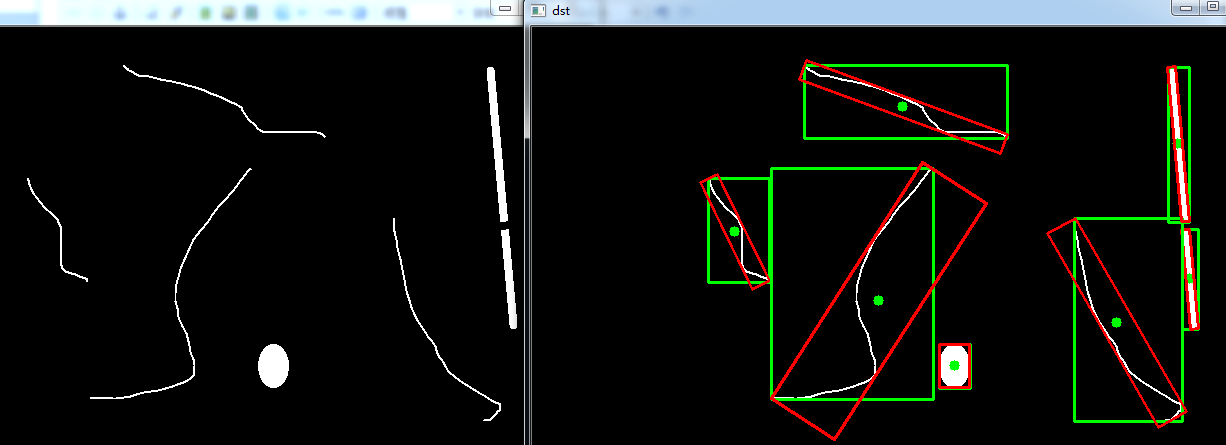
二、轮廓最小外接矩形的绘制
 #include "opencv2/opencv.hpp"

 using namespace cv;

 void main()

 {

     //轮廓最小外接矩形的绘制

     Mat srcImg = imread("E://00.png");

     Mat dstImg = srcImg.clone();

     cvtColor(srcImg, srcImg, CV_BGR2GRAY);

     threshold(srcImg, srcImg, , , CV_THRESH_BINARY); //二值化

     imshow("threshold", srcImg);

     vector<vector<Point>> contours;

     vector<Vec4i> hierarcy;

     findContours(srcImg, contours, hierarcy, CV_RETR_EXTERNAL, CV_CHAIN_APPROX_NONE);

     vector<Rect> boundRect(contours.size());  //定义外接矩形集合

     vector<RotatedRect> box(contours.size()); //定义最小外接矩形集合

     Point2f rect[];

     for(int i=; i<contours.size(); i++)

     {

         box[i] = minAreaRect(Mat(contours[i]));  //计算每个轮廓最小外接矩形

         boundRect[i] = boundingRect(Mat(contours[i]));

         circle(dstImg, Point(box[i].center.x, box[i].center.y), , Scalar(, , ), -, );  //绘制最小外接矩形的中心点

         box[i].points(rect);  //把最小外接矩形四个端点复制给rect数组

         rectangle(dstImg, Point(boundRect[i].x, boundRect[i].y), Point(boundRect[i].x + boundRect[i].width, boundRect[i].y + boundRect[i].height), Scalar(, , ), , );

         for(int j=; j<; j++)

         {

             line(dstImg, rect[j], rect[(j+)%], Scalar(, , ), , );  //绘制最小外接矩形每条边

         }

     }

     imshow("dst", dstImg);

     waitKey();

 }
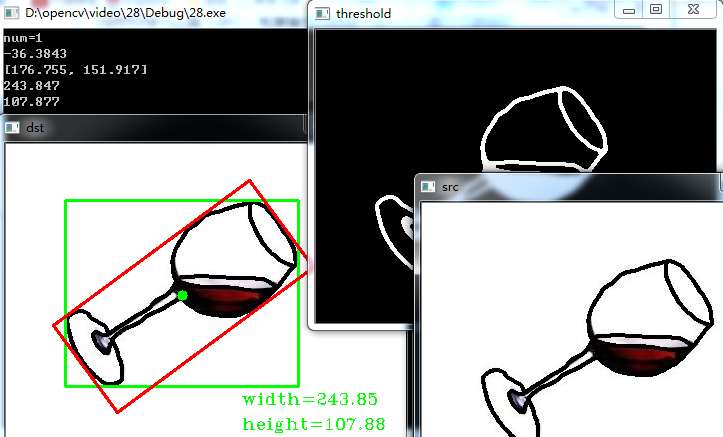
三、粗略计算物体像素长宽
 #include "opencv2/opencv.hpp"

 #include<iostream>

 using namespace std;

 using namespace cv;

 void main()

 {

     Mat srcImg = imread("E://cup.jpg");

     imshow("src", srcImg);

     Mat dstImg = srcImg.clone();

     medianBlur(srcImg, srcImg, );

     GaussianBlur(srcImg, srcImg, Size(, ), , );

     cvtColor(srcImg, srcImg, CV_BGR2GRAY);

     threshold(srcImg, srcImg, , , CV_THRESH_BINARY_INV); //INV是因为背景白色,物体黑色,需要反转一下

     imshow("threshold", srcImg);

     vector<vector<Point>> contours;

     vector<Vec4i> hierarcy;

     findContours(srcImg, contours, hierarcy, CV_RETR_EXTERNAL, CV_CHAIN_APPROX_NONE);

     cout<<"num="<<contours.size()<<endl;

     vector<Rect> boundRect(contours.size());

     vector<RotatedRect> box(contours.size());

     Point2f rect[];

     for(int i=; i<contours.size(); i++)

     {

         box[i] = minAreaRect(Mat(contours[i]));

         boundRect[i] = boundingRect(Mat(contours[i]));

         cout<<box[i].angle<<endl;

         cout<<box[i].center<<endl;

         cout<<box[i].size.width<<endl;

         cout<<box[i].size.height<<endl;

         circle(dstImg, Point(box[i].center.x, box[i].center.y), , Scalar(, , ), -, );

         //绘制外接矩形和    最小外接矩形(for循环)

         rectangle(dstImg, Point(boundRect[i].x, boundRect[i].y), Point(boundRect[i].x + boundRect[i].width, boundRect[i].y + boundRect[i].height), Scalar(, , ), , );

         box[i].points(rect);//把最小外接矩形四个端点复制给rect数组

         for(int j=; j<; j++)

         {

             line(dstImg, rect[j], rect[(j+)%], Scalar(, , ), , );

         }

         char width[], height[];

         sprintf(width, "width=%0.2f", box[i].size.width);

         sprintf(height, "height=%0.2f", box[i].size.height);

         putText(dstImg, width, Point(, ), CV_FONT_HERSHEY_COMPLEX_SMALL, 0.85, Scalar(, , ));

         putText(dstImg, height, Point(, ), CV_FONT_HERSHEY_COMPLEX_SMALL, 0.85, Scalar(, , ));

     }

     imshow("dst", dstImg);

     waitKey();

 }
四、倾斜物体矫正提取
 #include "opencv2/opencv.hpp"

 #include<iostream>

 using namespace std;

 using namespace cv;

 void main()

 {

     Mat srcImg = imread("E://qrcode.jpg");

     imshow("src", srcImg);

     Mat dstImg = srcImg.clone();

     GaussianBlur(srcImg, srcImg, Size(, ), , );

     cvtColor(srcImg, srcImg, CV_BGR2GRAY);

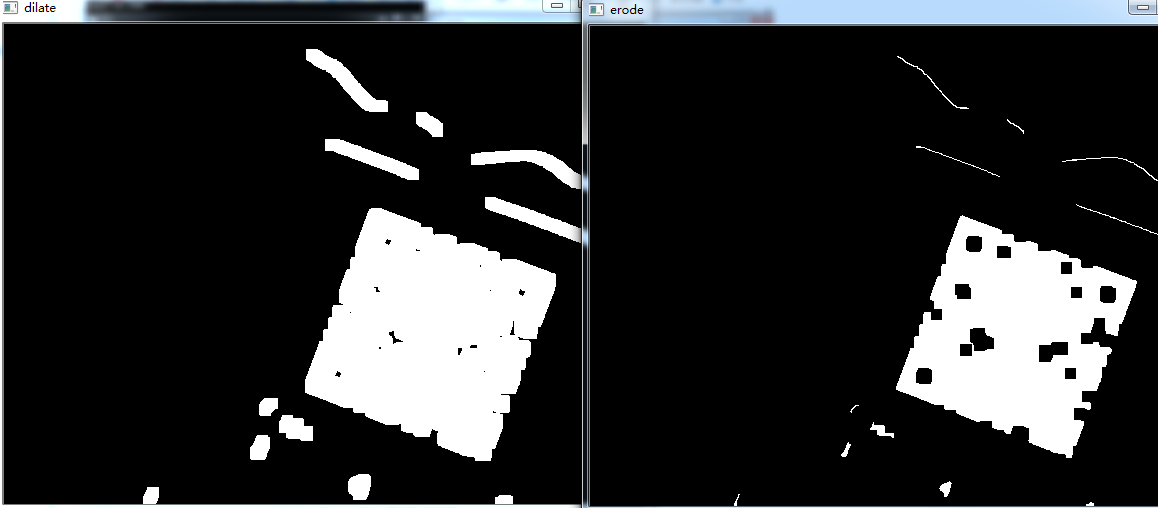
     Canny(srcImg, srcImg, , );//因为原图比较复杂,所以需要将canny的值调大,去除不想要的成分

     //threshold(srcImg, srcImg, 100, 255, CV_THRESH_BINARY_INV); //二值化也可以实现canny效果,不过在本例中杂絮较多

     imshow("canny", srcImg);

     Mat element = getStructuringElement(MORPH_RECT, Size(, ), Point(-, -)); //定义结构元素

     dilate(srcImg, srcImg, element); //膨胀

     imshow("dilate", srcImg);

     erode(srcImg, srcImg, element);

     imshow("erode", srcImg);

     vector<vector<Point>> contours;

     vector<Vec4i> hierarcy;

     findContours(srcImg, contours, hierarcy, CV_RETR_TREE, CV_CHAIN_APPROX_NONE);

     vector<Rect> boundRect(contours.size());

     vector<RotatedRect> box(contours.size());

     Point2f rect[];

     for(int i=; i<contours.size(); i++)

     {

         box[i] = minAreaRect(Mat(contours[i]));

         boundRect[i] = boundingRect(Mat(contours[i]));

         if(box[i].size.width <  || box[i].size.height<)//筛选

             continue;

         rectangle(dstImg, Point(boundRect[i].x, boundRect[i].y), Point(boundRect[i].x + boundRect[i].width, boundRect[i].y + boundRect[i].height), Scalar(, , ), , );

         circle(dstImg, Point(box[i].center.x, box[i].center.y), , Scalar(, , ), -, );

         box[i].points(rect);

         for(int j=; j<; j++)

         {

             line(dstImg, rect[j], rect[(j+)%], Scalar(, , ), , );

         }

         float angle;

         cout<<"angle="<<box[i].angle<<endl;

         angle = box[i].angle;

         char width[], height[];

         sprintf(width, "width=%0.2f", box[i].size.width);

         sprintf(height, "height=%0.2f", box[i].size.height);

         putText(dstImg, width, Point(, ), CV_FONT_HERSHEY_COMPLEX_SMALL, 0.85, Scalar(, , ));

         putText(dstImg, height, Point(, ), CV_FONT_HERSHEY_COMPLEX_SMALL, 0.85, Scalar(, , ));

         imshow("temp", dstImg);

         //利用仿射变换进行旋转        另一种方法,透视变换

         if (< abs(angle) && abs(angle)<=)

             angle = angle;//负数,顺时针旋转

         else if (< abs(angle) && abs(angle)<)

             angle =  -  abs(angle);//正数,逆时针旋转

         Point2f center = box[i].center;  //定义旋转中心坐标

         double angle0 = angle;

         double scale = ;

         Mat roateM = getRotationMatrix2D(center, angle0, scale);  //获得旋转矩阵,顺时针为负,逆时针为正

         warpAffine(dstImg, dstImg, roateM, dstImg.size()); //仿射变换

         //保存二维码

         int x0=, y0=, w0=, h0=;

         x0 = boundRect[i].x;

         y0 = boundRect[i].y;

         w0 = boundRect[i].width;

         h0 = boundRect[i].height;

         Mat ROI = dstImg(Rect(x0, y0, w0, h0));

         imwrite("F://1.jpg", ROI);

     }

     imshow("dst", dstImg);

     waitKey();

 }



opencv学习之路(26)、轮廓查找与绘制(五)——最小外接矩形的更多相关文章
- Opencv绘制最小外接矩形、最小外接圆
Opencv中求点集的最小外结矩使用方法minAreaRect,求点集的最小外接圆使用方法minEnclosingCircle. minAreaRect方法原型: RotatedRect minAre ...
- Opencv 最小外接矩形合并拼接
前一篇画出了最小外接矩形,但是有时候画出来的矩形由于中间像素干扰或者是其他原因矩形框并不是真正想要的 如图1是一个信号的雨图,被矩形框分割成了多个小框: 需要合并矩形框达到的效果: 主要思想: 扫描两 ...
- Opencv 图片边缘检测和最小外接矩形
#include "core/core.hpp" #include "highgui/highgui.hpp" #include "imgproc/i ...
- opencv学习之路(25)、轮廓查找与绘制(四)——正外接矩形
一.简介 二.外接矩形的查找绘制 #include "opencv2/opencv.hpp" using namespace cv; void main() { //外接矩形的查找 ...
- opencv学习之路(23)、轮廓查找与绘制(二)——访问轮廓每个点
一.简介 二.画出每个轮廓的每个点 #include "opencv2/opencv.hpp" using namespace cv; void main() { Mat src= ...
- opencv学习之路(22)、轮廓查找与绘制(一)
一.简介 图2 二.代码 #include"opencv2/opencv.hpp" #include<iostream> using namespace std; us ...
- opencv学习之路(29)、轮廓查找与绘制(八)——轮廓特征属性及应用
一.简介 HSV颜色空间(hue色调,saturation饱和度,value亮度) 二.HSV滑动条 #include "opencv2/opencv.hpp" #include ...
- opencv学习之路(37)、运动物体检测(二)
一.运动物体轮廓椭圆拟合及中心 #include "opencv2/opencv.hpp" #include<iostream> using namespace std ...
- opencv学习之路(36)、运动物体检测(一)
一.简介 二.背景减法 图片说明 #include "opencv2/opencv.hpp"using namespace cv; void main() { Mat img1 = ...
随机推荐
- Redis 主从配置(Windows版)
安装从库 1.复制一份 Redis 文件,当做从库. 2.修改从库文件中 redis.windows.conf 的端口号. 3.安装服务,需要重新设置名称.然后去服务中,开启“redis6380”(此 ...
- 创建dblink
创建dblinkcreate database link user1_Link_app--dblink名称----connect to ehl_app ----远程数据库名称----identifie ...
- Web 自动化测试
Selenium 名字的来源 在这里,我还想说一下关于 Selenium 名字的来源,很有意思的 : > : Selenium 的中文名为 “ 硒 ” ,是一种化学元素的名字,它 对 汞 ( M ...
- Java 中的 IO 与 socket 编程 [ 复习 ]
一.Unix IO 与 IPC Unix IO:Open-Read or Write-Close IPC:open socket - receive and send to socket - clos ...
- elk-logstash-kibana(三)
一.修改logstash.yml unzip logstash-6.3.2 vim config/logstash.yml #添加:检查所有ip http.host: "0.0.0.0&qu ...
- Oracle课程档案,第三天
count(*):有多少行,对行做统计 count(x):列.... sum:和 avg:平均值 min:求最小值 max:求最大值 distinct:取出重复的值 count:计数 group by ...
- RDLC报表刷新问题
使用RDLC做报表,当数据源发生改变时重新绑定数据发现报表没有变化,跟踪时发现数据绑定已经正确执行,前端也显示了加载过程,但内容未刷新. 在代码中使用了 ReportViewer1.LocalRepo ...
- FakeGame 集成总结
1.64位支持(目前编译不过); 2.Dx9? 2.以何种方式提供(源码?工程版本(VS2005还是其他)): 3.是否可以连接TC的服务器进行调试? TDR编解码失败: 不同目录下存在a.lib的不 ...
- ES6 迭代器
Iterator Iterator 是 ES6 引入的一种新的遍历机制,迭代器有两个核心概念: 迭代器是一个统一的接口,它的作用是使各种数据结构可被便捷的访问,它是通过一个键为Symbol.itera ...
- jmeter将JDBC Request查询出的数据作为下一个接口的参数
现在有一个需求,从数据库tieba_info表查出rank小于某个值的username和count(*),然后把所有查出来的username和count(*)作为参数值,用于下一个接口. tieba_ ...