
[Unity工具]CSV工具类
参考链接:
https://www.cnblogs.com/lulianqi/p/6385503.html
http://blog.csdn.net/paul342/article/details/22800137
说明:
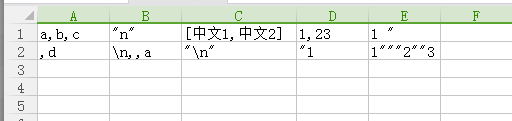
1.写入一个单元格时,如果含有逗号,则需要将整个字段用双引号括起来;如果里面还有双引号就替换成两个双引号。
2.写入一行时,末尾要加上\r\n作为行分隔符。
3.读取时,也要根据上面的写入规则进行解析。
代码如下:
 using System;

 using System.Collections.Generic;

 using System.IO;

 using System.Text;

 public class CSVTool {

     private static char _csvSeparator = ',';

     private static bool _trimColumns = false;

     //获取一个单元格的写入格式

     public static string GetCSVFormat(string str)

     {

         string tempStr = str;

         if (str.Contains(","))

         {

             if (str.Contains("\""))

             {

                 tempStr = str.Replace("\"", "\"\"");

             }

             tempStr = "\"" + tempStr + "\"";

         }

         return tempStr;

     }

     //获取一行的写入格式

     public static string GetCSVFormatLine(List<string> strList)

     {

         string tempStr = "";

         for (int i = ; i < strList.Count - ; i++)

         {

             string str = strList[i];

             tempStr = tempStr + GetCSVFormat(str) + ",";

         }

         tempStr = tempStr + GetCSVFormat(strList[strList.Count - ]) + "\r\n";

         return tempStr;

     }

     //解析一行

     public static List<string> ParseLine(string line)

     {

         StringBuilder _columnBuilder = new StringBuilder();

         List<string> Fields = new List<string>();

         bool inColumn = false;  //是否是在一个列元素里

         bool inQuotes = false;  //是否需要转义

         bool isNotEnd = false;  //读取完毕未结束转义

         _columnBuilder.Remove(, _columnBuilder.Length);

         //空行也是一个空元素,一个逗号是2个空元素

         if (line == "")

         {

             Fields.Add("");

         }

         // Iterate through every character in the line

         for (int i = ; i < line.Length; i++)

         {

             char character = line[i];

             // If we are not currently inside a column

             if (!inColumn)

             {

                 // If the current character is a double quote then the column value is contained within

                 // double quotes, otherwise append the next character

                 inColumn = true;

                 if (character == '"')

                 {

                     inQuotes = true;

                     continue;

                 }

             }

             // If we are in between double quotes

             if (inQuotes)

             {

                 if ((i + ) == line.Length)//这个字符已经结束了整行

                 {

                     if (character == '"') //正常转义结束,且该行已经结束

                     {

                         inQuotes = false;

                         continue;     //当前字符不用添加,跳出后直结束后会添加该元素

                     }

                     else //异常结束,转义未收尾

                     {

                         isNotEnd = true;

                     }

                 }

                 else if (character == '"' && line[i + ] == _csvSeparator) //结束转义,且后面有可能还有数据

                 {

                     inQuotes = false;

                     inColumn = false;

                     i++; //跳过下一个字符

                 }

                 else if (character == '"' && line[i + ] == '"') //双引号转义

                 {

                     i++; //跳过下一个字符

                 }

                 else if (character == '"') //双引号单独出现(这种情况实际上已经是格式错误,为了兼容可暂时不处理)

                 {

                     throw new Exception("格式错误,错误的双引号转义");

                 }

                 //其他情况直接跳出,后面正常添加

             }

             else if (character == _csvSeparator)

                 inColumn = false;

             // If we are no longer in the column clear the builder and add the columns to the list

             if (!inColumn) //结束该元素时inColumn置为false,并且不处理当前字符,直接进行Add

             {

                 Fields.Add(_trimColumns ? _columnBuilder.ToString().Trim() : _columnBuilder.ToString());

                 _columnBuilder.Remove(, _columnBuilder.Length);

             }

             else // append the current column

                 _columnBuilder.Append(character);

         }

         // If we are still inside a column add a new one (标准格式一行结尾不需要逗号结尾,而上面for是遇到逗号才添加的,为了兼容最后还要添加一次)

         if (inColumn)

         {

             if (isNotEnd)

             {

                 _columnBuilder.Append("\r\n");

             }

             Fields.Add(_trimColumns ? _columnBuilder.ToString().Trim() : _columnBuilder.ToString());

         }

         else  //如果inColumn为false,说明已经添加,因为最后一个字符为分隔符,所以后面要加上一个空元素

         {

             Fields.Add("");

         }

         return Fields;

     }

     //读取文件

     public static List<List<string>> Read(string filePath, Encoding encoding)

     {

         List<List<string>> result = new List<List<string>>();

         string content = File.ReadAllText(filePath, encoding);

         string[] lines = content.Split(new string[] { "\r\n" }, StringSplitOptions.RemoveEmptyEntries);

         for (int i = ; i < lines.Length; i++)

         {

             List<string> line = ParseLine(lines[i]);

             result.Add(line);

         }

         return result;

     }

     //写入文件

     public static void Write(string filePath, Encoding encoding, List<List<string>> result)

     {

         StringBuilder builder = new StringBuilder();

         for (int i = ; i < result.Count; i++)

         {

             List<string> line = result[i];

             builder.Append(GetCSVFormatLine(line));

         }

         File.WriteAllText(filePath, builder.ToString(), encoding);

     }

     //打印

     public static void Debug(List<List<string>> result)

     {

         for (int i = ; i < result.Count; i++)

         {

             List<string> line = result[i];

             for (int j = ; j < line.Count; j++)

             {

                 UnityEngine.Debug.LogWarning(line[j]);

             }

         }

     }

 }
测试:

[Unity工具]CSV工具类的更多相关文章
- CSV工具类
分享自己昨天写的CSV工具类, 主要实现解析CSV格式, 直接上代码 #region private /// <summary> /// 从sr当前位置解析一个栏位 /// </su ...
- Unity自动打包工具
转载 https://blog.csdn.net/ynnmnm/article/details/36774715 最开始有写打包工具的想法,是因为看到<啪啪三国>王伟峰分享的一张图,他们有 ...
- 多测师讲解常用的测试工具分为10类_高级讲师肖sir
我们将常用的测试工具分为10类. 1. 测试管理工具 2. 接口测试工具 3. 性能测试工具 4. C/S自动化工具 5.白盒测试工具 6.代码扫描工具 7.持续集成工具 8.网络测试工具 9.app ...
- 使用工厂方法模式设计能够实现包含加法(+)、减法(-)、乘法(*)、除法(/)四种运算的计算机程序,要求输入两个数和运算符,得到运算结果。要求使用相关的工具绘制UML类图并严格按照类图的设计编写程序实
2.使用工厂方法模式设计能够实现包含加法(+).减法(-).乘法(*).除法(/)四种运算的计算机程序,要求输入两个数和运算符,得到运算结果.要求使用相关的工具绘制UML类图并严格按照类图的设计编写程 ...
- 1、使用简单工厂模式设计能够实现包含加法(+)、减法(-)、乘法(*)、除法(/)四种运算的计算机程序,要求输入两个数和运算符,得到运算结果。要求使用相关的工具绘制UML类图并严格按照类图的设计编写程
1.使用简单工厂模式设计能够实现包含加法(+).减法(-).乘法(*).除法(/)四种运算的计算机程序,要求输入两个数和运算符,得到运算结果.要求使用相关的工具绘制UML类图并严格按照类图的设计编写程 ...
- Atitit s2018.5 s5 doc list on com pc.docx Acc 112237553.docx Acc baidu netdisk.docx Acc csdn 18821766710 attilax main num.docx Atiitt put post 工具 开发工具dev tool test.docx Atiitt 腾讯图像分类相册管家.docx
Atitit s2018.5 s5 doc list on com pc.docx Acc 112237553.docx Acc baidu netdisk.docx Acc csdn 1882 ...
- 在ArcEngine中使用Geoprocessing工具-执行工具
转自原文在ArcEngine中使用Geoprocessing工具-执行工具 来解析一下Geoprocessor类的Execute方法,他有两种重载,Execute(IGPProcess, ITrack ...
- Unity C# CSV文件解析与加载(已更新移动端处理方式)
在游戏开发过程中,经常要用到Excel编辑各类数据,如果可以直接用Excel支持的文件格式来读取数据,修改将非常便捷. Excel支持导出CSV类型的文件,这类文件不仅可以用Excel直接打开修改,即 ...
- C#操作CSV存取类
using System; using System.Collections.Generic; using System.Linq; using System.Text; using System.D ...
随机推荐
- String的疑问
ss[]//var ss:String; 和 Pointer(ss)^ 是不是一个意思呢? 答:不是. ss[]表示第一个字符.如:ss:='abc' 则表示]=Length(ss); Pointer ...
- Hadoop hbase集群断电数据块被破坏无法启动
集群机器意外断电重启,导致hbase 无法正常启动,抛出reflect invocation异常,可能是正在执行的插入或合并等操作进行到一半时中断,导致部分数据文件不完整格式不正确或在hdfs上blo ...
- 《JavaScript设计模式与开发》笔记 4.闭包
1.变量的作用域 2.变量的生存周期 3.闭包更多作用 1.封装变量 2.延续局部变量寿命 4.闭包和面向对象设计 5.闭包和内存管理 1.变量的作用域 var func = function(){ ...
- Maven Gradle 区别
Maven面临的挑战 软件行业新旧交替的速度之快往往令人咂舌,不用多少时间,你就会发现曾经大红大紫的技术已经成为了昨日黄花,当然,Maven也不会例外.虽然目前它基本上是Java构建的事实标准,但我们 ...
- webGL之three.js入门4--ThreeJS Editor入门篇
因为工作需要,要看threejs editor的源码,顺便记录过程. github下载的源码目录是这样的 但是editor和其他文件夹内的内容的关联的,我需要将其独立出来并且编辑editor. 进入e ...
- win10和ubuntu16.04双系统Geom Error
报错信息: Geom Error Reboot and Select proper Boot device or Insert Boot Media in selected Boot device a ...
- 生成当前目录文件的xml描述
需求场景:例如需要在当前目录下把相关文件组织成xml文件去描述.通常在组织项目中的升级文件时候可能会用到. 代码示例: using System; using System.Collections.G ...
- 我的Netty笔记
pom.xml <project xmlns="http://maven.apache.org/POM/4.0.0" xmlns:xsi="http://www.w ...
- python之路——5
王二学习python的笔记以及记录,如有雷同,那也没事,欢迎交流,wx:wyb199594 复习 1. 列表操作 增 append insert extend 删 remove pop clear d ...
- [UE4]认识CanvasPanelSlot,Construct Object From Class动态创建UI控件
Canvas Panel Slot是UserWidget的Canvas Panel组件容器内的组件特有的属性. 只有放置在Canvas Panel容器内才会有Canvas Panel Slot属性 可 ...