
三、thymeleaf模板引擎构建前台html, 后台使用 ModelAndView 和 Model 模型
项目源码:https://github.com/y369q369/springBoot.git -> thymeleaf
私聊QQ: 1486866853
1.pom.xml中依赖jar包(注意加红字段)
<?xml version="1.0" encoding="UTF-8"?>

<project xmlns="http://maven.apache.org/POM/4.0.0" xmlns:xsi="http://www.w3.org/2001/XMLSchema-instance"

    xsi:schemaLocation="http://maven.apache.org/POM/4.0.0 http://maven.apache.org/xsd/maven-4.0.0.xsd">

    <modelVersion>4.0.0</modelVersion>

    <parent>

        <groupId>org.springframework.boot</groupId>

        <artifactId>spring-boot-starter-parent</artifactId>

        <version>2.1.3.RELEASE</version>

        <relativePath/> <!-- lookup parent from repository -->

    </parent>

    <groupId>MVC</groupId>

    <artifactId>springbootMVC</artifactId>

    <version>0.0.1-SNAPSHOT</version>

    <name>springbootMVC</name>

    <description>Demo project for Spring Boot</description>

    <properties>

        <java.version>1.8</java.version>

    </properties>

    <dependencies>
<dependency>
<groupId>org.springframework.boot</groupId>
<artifactId>spring-boot-starter</artifactId>
</dependency>
        <!-- thymeleaf模板依赖 -->

        <dependency>

            <groupId>org.springframework.boot</groupId>

            <artifactId>spring-boot-starter-thymeleaf</artifactId>

        </dependency>

        <!-- web依赖 :包含内置tomcat和spring的web依赖  -->

        <dependency>

            <groupId>org.springframework.boot</groupId>

            <artifactId>spring-boot-starter-web</artifactId>

        </dependency>

    </dependencies>

    <build>

        <plugins>

            <plugin>

                <groupId>org.springframework.boot</groupId>

                <artifactId>spring-boot-maven-plugin</artifactId>

            </plugin>

        </plugins>

    </build>

</project>
2.在 src/main/resources 新建 templates 目录 和 application.yml(替代application.properties, 在springBoot项目中如果两者都有会先加载application.yml, 然后再加载 application.properties 覆盖yml文件, 建议只留 yml文件)
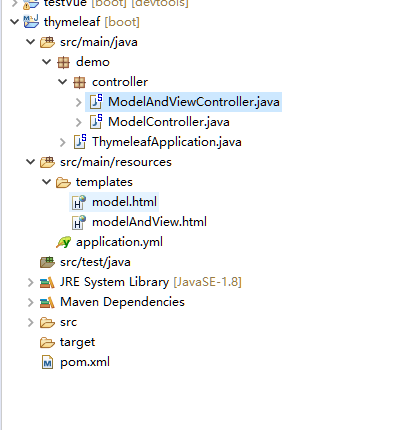
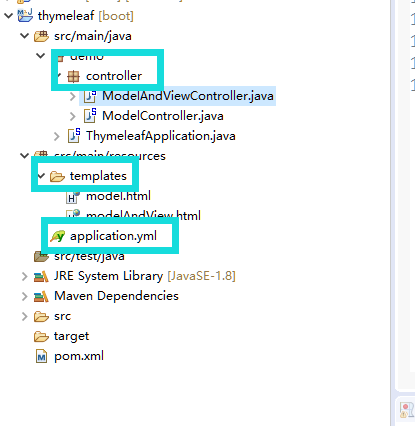
application.yml 的配置内容(注意:spring.thymeleaf.mode: LEGACYHTML5,解除html的书写规范)
server:

  #springBoot内置tomact的端口号

  port: 8086

  servlet:

    #springBoot项目的前缀名

    context-path: /thymeleaf

spring:

  # thymeleaf 模板引擎配置

  thymeleaf:
   # 不设置缓存

    cache: false

    # thymeleaf模板 解除严格约束(对html5没有结束符的标签解决)

    mode: LEGACYHTML5

    # thymeleaf修饰的动态页面 自定义根目录(springBoot默认的动态页面存放文件夹就是templates)

    prefix: classpath:/templates/
3. ModelAndView的数据模型 : 在 src/main/java 新建 controller 文件夹,在新建 ModelAndViewController.java 类, 在templates目录下新建对应的 modelAndView.html
3.1 ModelAndViewController.java
package demo.controller;

import java.util.Map;

import org.springframework.stereotype.Controller;

import org.springframework.web.bind.annotation.GetMapping;

import org.springframework.web.bind.annotation.RequestMapping;

import org.springframework.web.servlet.ModelAndView;

/**

  * @author GrassPrince

  * @time   2019年3月23日 -下午9:01:57

  * @description:测试ModelAndView的模型

  */

@RequestMapping("/ModelAndView")

@Controller

public class ModelAndViewController {

	//测试new ModelAndView(String viewName)构造方法

	@GetMapping("/modelAndView1")

	public ModelAndView modelAndView1() {

		//new ModelAndView("/modelAndView")和new ModelAndView("modelAndView")都可以

//		return new ModelAndView("/modelAndView");

		return new ModelAndView("modelAndView");

		//重定向的地址注意,完全地址且前面需要加/

//		return new ModelAndView("redirect:/ModelAndView/modelAndView2");

	}

	//测试ModelAndView(String viewName, String modelName, Object modelObject)构造方法

	@GetMapping("/modelAndView2")

	public ModelAndView modelAndView2() {

		return new ModelAndView("/modelAndView", "model2", "modelObject  2");

	}

	//测试ModelAndView(String viewName, @Nullable Map<String, ?> model)构造方法

	@GetMapping("/modelAndView3")

	public ModelAndView modelAndView3(Map<String, Object> map) {

		map.put("map1", "obj 1");

		map.put("map2", "obj 2");

		return new ModelAndView("modelAndView", map);

	}

	//测试addObject(String attributeName, @Nullable Object attributeValue)

	//	  addObject(Object attributeValue)方法

	@GetMapping("/modelAndView4")

	public ModelAndView modelAndView4() {

		ModelAndView mav = new ModelAndView();

		//设置返回的url

		mav.setViewName("modelAndView");

		//变量名, 变量值

		mav.addObject("obj1", "modelObject  4");

		// 变量值(变量名为变量值的所属类的类名)

		mav.addObject("modelObject  5");

		return mav;

	}

}
3.2 modelAndView.html
<!DOCTYPE html>

<html xmlns:th="http://www.thymeleaf.org" >

	<head>

		<title>测试ModelAndView</title>

		<meta name="keywords" content="keyword1,keyword2,keyword3"/>

	    <meta name="description" content="this is my page"/>

	    <meta name="content-type" content="text/html; charset=UTF-8"/>

	</head>

	<body>

		<div style="padding-top : 100px; text-align: center;">

			<p>Hello ModelAndView</p>

			<!-- 接收model2 -->

			<p th:text="${model2}"></p>

			<!-- 接收map,拼接的字符串用' -->

			<p th:text="${map1 +', '+ map2}"></p>

			<!-- 接收obj,拼接的字符串用' -->

			<p th:text="${obj1 +', '+ string}"></p>

		</div>

	</body>

</html>
3.3 启动项目下的 DemoApplication.java (myeclipse2018右击,Run As / Debug As -> Spring Boot App)
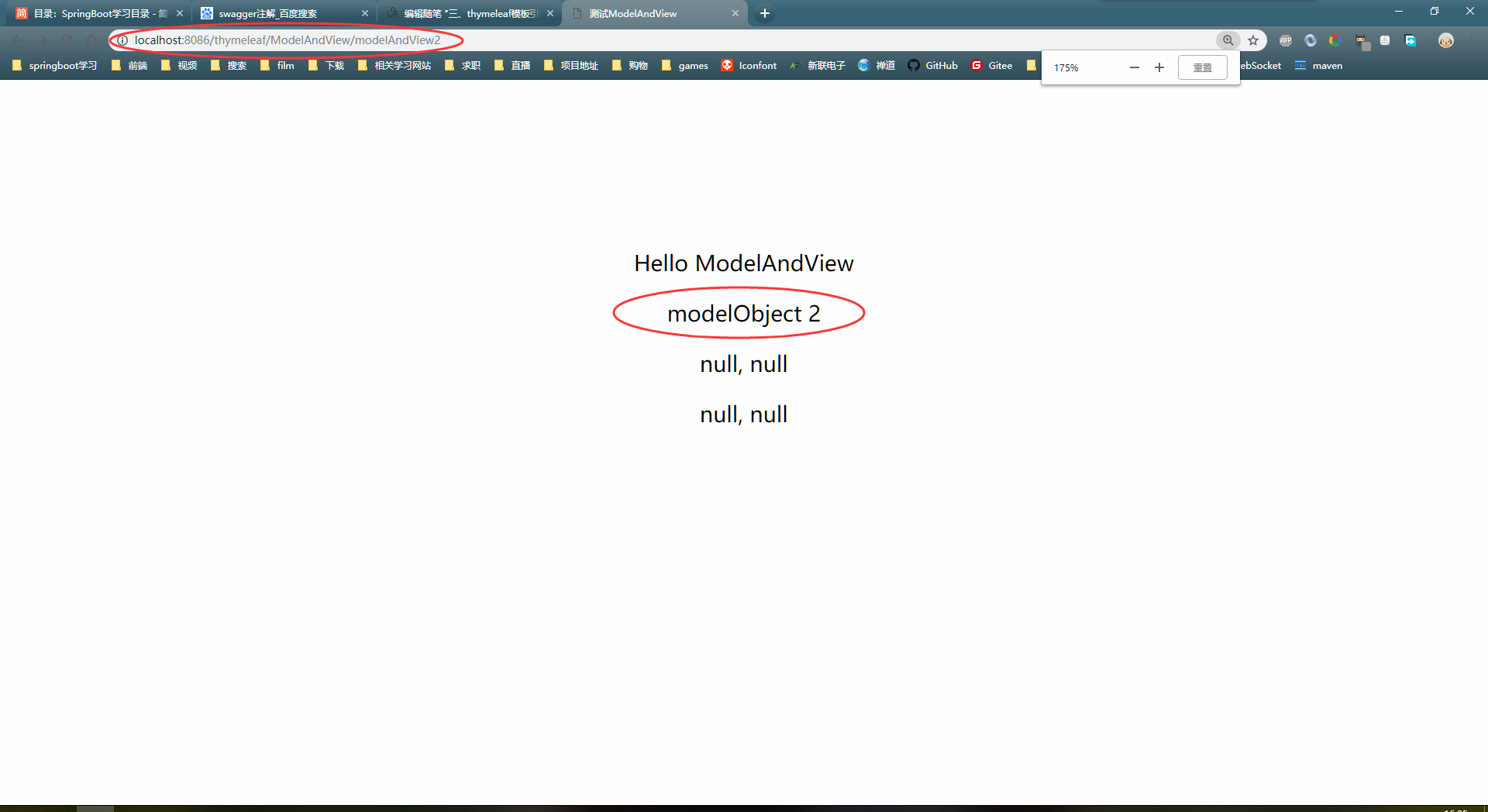
浏览器地址栏输入 : http://localhost:8086/thymeleaf/ModelAndView/modelAndView2 , 页面显示如下
4.Model数据模型 ,在 controller 文件夹下新建 ModelController.java 类, 在 templates 目录下新建 model.html
4.1 ModelController.java
package demo.controller;

import java.util.HashMap;

import java.util.Map;

import org.springframework.stereotype.Controller;

import org.springframework.ui.Model;

import org.springframework.web.bind.annotation.GetMapping;

import org.springframework.web.bind.annotation.RequestMapping;

/**

  * @author GrassPrince

  * @time   2019年3月24日 -上午12:15:05

  * @description:Model的使用,Model必须在方法参数中定义

  */

@RequestMapping("/Model")

@Controller

public class ModelController {

	//测试重定向

	@GetMapping("/model4")

	public String model4(Model model) {

		return "redirect:https://www.baidu.com";

	}

	//测试addAttribute(Object attributeValue)方法

	@GetMapping("/model1")

	public String model1(Model model) {

		// 对象值, 对象名为对象值所属类型

		model.addAttribute("addAttribute(Object attributeValue)");

		return "model";

	}

	//测试addAttribute(String attributeName, @Nullable Object attributeValue)方法

	@GetMapping("/model2")

	public String model2(Model model) {

		//  对象名,对象值

		model.addAttribute("content", "addAttribute(String attributeName, @Nullable Object attributeValue)");

		return "model";

	}

	//测试addAllAttributes(Map<String, ?> attributes)方法

	@GetMapping("/model3")

	public String model3(Model model) {

		Map<String, Object> map = new HashMap<String, Object>();

		map.put("map", "addAllAttributes(Map<String, ?> attributes)");

		model.addAllAttributes(map);

		return "model";

	}

}
4.2 model.html
<!DOCTYPE html>

<html xmlns:th="http://www.thymeleaf.org" >

	<head>

		<title>测试Model</title>

		<meta name="keywords" content="keyword1,keyword2,keyword3"/>

	    <meta name="description" content="this is my page"/>

	    <meta name="content-type" content="text/html; charset=UTF-8"/>

	</head>

	<body>

		<div style="padding-top : 100px; text-align: center;">

			<p>Hello Model</p>

			<!-- 测试model的addAttribute(Object attributeValue)方法 -->

			<p th:text="${string}"></p>

			<!-- 测试model的addAttribute(String attributeName, @Nullable Object attributeValue)方法 -->

			<p th:text="${content}"></p>

			<!-- 测试model的addAllAttributes(Map<String, ?> attributes)方法 -->

			<p th:text="${map}"></p>

		</div>

	</body>

</html>
4.3 启动项目下的 DemoApplication.java (myeclipse2018右击,Run As / Debug As -> Spring Boot App)
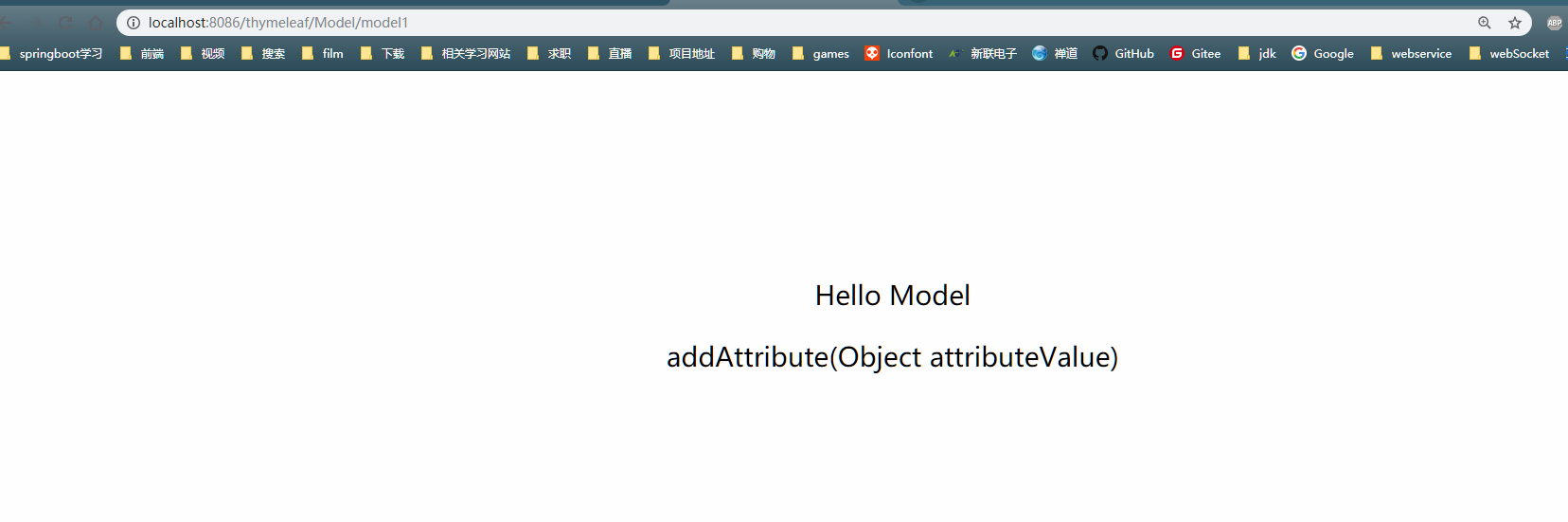
浏览器地址栏输入 : http://localhost:8086/thymeleaf/Model/model1, 页面显示如下
三、thymeleaf模板引擎构建前台html, 后台使用 ModelAndView 和 Model 模型的更多相关文章
- UndertowServer+SpringMVC+Thymeleaf模板引擎构建轻量级的web项目
这两周需要写一个页面来请求另一个服务中的接口,服务器采用了超轻量级的undertow,模板引擎采用的是Thymeleaf,在寻找页面资源位置这个地方难住了我.下面分享一下,这方面的代码. Spring ...
- 狂神说SpringBoot11:Thymeleaf模板引擎
狂神说SpringBoot系列连载课程,通俗易懂,基于SpringBoot2.2.5版本,欢迎各位狂粉转发关注学习. 微信公众号:狂神说(首发) Bilibili:狂神说Java(视频) 未经作 ...
- (二)SpringBoot基础篇- 静态资源的访问及Thymeleaf模板引擎的使用
一.描述 在应用系统开发的过程中,不可避免的需要使用静态资源(浏览器看的懂,他可以有变量,例:HTML页面,css样式文件,文本,属性文件,图片等): 并且SpringBoot内置了Thymeleaf ...
- spring boot: thymeleaf模板引擎使用
spring boot: thymeleaf模板引擎使用 在pom.xml加入thymeleaf模板依赖 <!-- 添加thymeleaf的依赖 --> <dependency> ...
- (二)SpringBoot2.0基础篇- 静态资源的访问及Thymeleaf模板引擎的使用
一.描述 在应用系统开发的过程中,不可避免的需要使用静态资源(浏览器看的懂,他可以有变量,例:HTML页面,css样式文件,文本,属性文件,图片等): 并且SpringBoot内置了Thymeleaf ...
- Spring Boot2(五):使用Spring Boot结合Thymeleaf模板引擎使用总结
一.Thymeleaf概述 一般来说,常用的模板引擎有JSP.Velocity.Freemarker.Thymeleaf . SpringBoot推荐的 Thymeleaf – 语法更简单,功能更强大 ...
- Thymeleaf模板引擎的使用
Thymeleaf模板引擎的使用 1.模板引擎 JSP.Velocity.Freemarker.Thymeleaf 2.springboot推荐使用Thymeleaf模板引擎 特点:语法更简单,功能更 ...
- SpringBoot:2.SpringBoot整合Thymeleaf模板引擎渲染web视图
在Web开发过程中,Spring Boot可以通过@RestController来返回json数据,那如何渲染Web页面?Spring Boot提供了多种默认渲染html的模板引擎,主要有以下几种: ...
- Thymeleaf 模板引擎简介
目录 Thymeleaf 模板引擎 官方文档下载 Hello World 新建应用 后台控制器 前端页面 浏览器访问测试 Thymeleaf 模板引擎1.Thymeleaf 是 Web 和独立环境的现 ...
随机推荐
- VS2012及VS2013连接SQL2008提示 Could not load file or assembly 'Microsoft.SqlServer.Management.Sdk.Sfc'
今天用同学的电脑,出现了这个错误.使用vs2012中的sqldatasoure控件,连接数据库.用的数据库是2008R2.已成功. 出现这样的错误. 解决办法: 安装以下三个组件: 安装顺序:SQLS ...
- amaze ui 滚动监听
引入 此框架的css js 前提还要有jquery http://amazeui.org/javascript/scrollspy 然后看这个链接里的各种动画 运用方法就是 在你想要有动 ...
- 关于django用户登录认证中的cookie和session
最近弄django的时候在用户登录这一块遇到了困难,网上的资料也都不完整或者存在缺陷. 写这篇文章的主要目的是对一些刚学django的新手朋友提供一些帮助.前提是你对django中的session和c ...
- Python 验证线程是数据共享的
import os import time from threading import Thread # from multiprocessing import Process #通过对全局变量的修改 ...
- 在Java中用 . 深层访问JSON数据
本文介绍Java中解析JSON的一种方法,可以让我们在Java程序中也用x.x.x的形式访问JSON数据中的值. 代码大部分来源非本人,本人在源代码基础上加以修改以使正常运行. 代码: // 将提取方 ...
- Spring源码学习笔记1
1.Spring中最核心的两个类 1)DefaultListableBeanFactory XmlBeanFactory继承自DefaultListableBeanFactory,DefaultLis ...
- 常用vi编辑器命令
对于VI的命令行,不需要特意的去记忆,写下来,让要用到的时候能找到就行 游标控制 h 游标向左移 j 游标向下移 k 游标向上移 l (or spacebar) 游标向右移 w 向前移动一个单词 b ...
- 【转载】 “强化学习之父”萨顿:预测学习马上要火,AI将帮我们理解人类意识
原文地址: https://yq.aliyun.com/articles/400366 本文来自AI新媒体量子位(QbitAI) ------------------------------- ...
- MATLAB实现Brovey图像融合
自定义函数: function BF=Brovey_fuse(Hyperspectral_image,High_resolution_image) x0=imread(Hyperspectral_im ...
- Web 建站技术中,HTML、HTML5、XHTML、CSS、SQL、JavaScript、PHP、ASP.NET、Web Services 是什么(转)
Web 建站技术中,HTML.HTML5.XHTML.CSS.SQL.JavaScript.PHP.ASP.NET.Web Services 是什么?修改 建站有很多技术,如 HTML.HTML5.X ...