
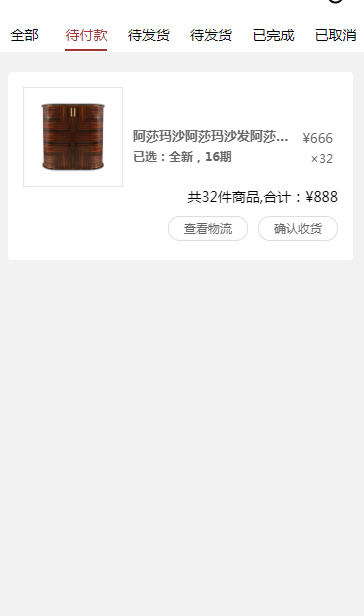
小程序tab切换 点击左右滑动
wxml
<scroll-view scroll-x="true" class="navbar-box">

  <block wx:for="{{recordMain}}" wx:for-index="idx" wx:for-item="navItem" wx:key="idx">

    <view class="nav-item  " data-current="{{idx}}" bindtap="switchNav">

      <text class="{{currentTab == idx ? 'active' : ''}}">{{navItem.title}}</text>

    </view>

  </block>

</scroll-view>

<swiper style="margin-top:80rpx;height:{{winHeight - 40}}px;" class="tab-box" current="{{currentTab}}" duration="" data-current="{{idx}}" bindchange="switchTab">

  <swiper-item style="height:100%;overflow-y:scroll" wx:for="{{[0,1,2,3,4,5]}}" wx:for-item="tabItem" wx:for-index="idx" wx:key="idx" class="tab-cnetent">

    <block wx:for="{{tabContent}}"  wx:key=" " bindtap='myOrderDetails'>

      <!-- 列表 -->

      <view class='listBox'>

          <view class='listTop'>

            <image src='{{item.goodsImg}}' class='goodsImg'></image>

            <view class='infor'>

              <view class=''>

                <text class='name'>{{item.name}}</text>

                <text class='price'>¥{{item.price}}</text>

              </view>

              <view class=''>

                <text class='choose'>{{item.choose}}</text>

                <text class='number'>×{{item.number}}</text>

              </view>

            </view>

          </view>

          <view class='listBottom'>

            <view>共{{item.number}}件商品,合计:¥{{item.allPrice}}</view>

            <view class='status'>

              <button>查看物流</button>

              <button>确认收货</button>

            </view>

          </view>

      </view>

    </block>

  </swiper-item>

</swiper>
wxss
::-webkit-scrollbar {

  width: ;

  height: ;

  color: transparent;

}

.navbar-box {

  height: 70rpx;

  line-height: 70rpx;

  position: fixed;

  top: 0rpx;

  background: white

}

.nav-item {

  display: inline-block;

  width: 16.6%;

  text-align: center;

}

.nav-item text {

  padding-bottom: 10rpx;

}

page {

  background: #f2f2f2;

  font-size: 28rpx;

}

.active {

  color: #a53533;

  border-bottom: 4rpx solid #a53533;

  box-sizing: border-box;

}

.menu {

  font-size: 28rpx;

  width: %;

  /* overflow-x: scroll; */

  border-bottom: 20rpx solid #f2f2f2;

  padding: 30rpx 30rpx 0rpx 30rpx;

  box-sizing: border-box;

  display: flex;

  justify-content: space-between;

  position: fixed;

  top: 0rpx;

  z-index: ;

  background: white;

}

.chooseNav {

  padding-bottom: 10rpx;

}

.listBox {

  padding: 30rpx;

  width: calc(% - 60rpx);

  margin-left: 30rpx;

  margin-top: 30rpx;

  background: white;

  box-sizing: border-box;

  border-radius: 8rpx;

}

.listTop {

  display: flex;

  justify-content: space-between;

}

.goodsImg {

  width: 200rpx;

  height: 200rpx;

  margin-right: 20rpx;

}

.infor {

  flex: ;

  margin-top: 80rpx;

  font-size: 26rpx;

  color: #;

}

.infor view {

  width: %;

  display: flex;

  justify-content: space-between;

}

.infor view:nth-of-type() {

  font-size: 24rpx;

}

.name, .choose {

  font-weight: ;

  display: inline-block;

  overflow: hidden;

  text-overflow: ellipsis;

  white-space: nowrap;

  width: 320rpx;

}

.price, .number {

  padding: 5rpx 10rpx;

  box-sizing: border-box;

}

.listBottom {

  text-align: right;

}

button::after {

  border: none;

}

.status button {

  display: inline-block;

  background: white;

  border: 1px solid #dedede;

  border-radius: 66rpx;

  font-size: 24rpx;

  margin-left: 20rpx;

  color: #;

  padding: 0rpx 30rpx;

  box-sizing: border-box;

  height: 50rpx;

  line-height: 45rpx;

  margin-top: 20rpx;

}
wxjs
Page({

  data: {

    recordMain: [

      {

        title: "全部"

      },

      {

        title: "待付款"

      },

      {

        title: "待发货"

      },

      {

        title: "待发货"

      }, {

        title: "已完成"

      },

      {

        title: "已取消"

      },

    ],

    tabContent: [

      {

        goodsImg: '/img/goods.png',

        name: '阿莎玛沙阿莎玛沙发阿莎玛沙发阿莎玛沙发阿莎玛沙莎玛沙发发',

        price: "",

        choose: '已选:全新,16期',

        number: '',

        allPrice: ''

      },

    ],

    currentTab: ,

    navScrollLeft: ,

    winWidth: ,

    winHeight: ,

  },

  // 事件处理函数

  onLoad: function () {

    var that = this;

    /** 获取系统信息*/

    wx.getSystemInfo({

      success: function (res) {

        that.setData({

          winWidth: res.windowWidth,

          winHeight: res.windowHeight,

        });

      }

    });

  },

  // 滑动事件

  // 点击标题切换当前页时改变样式

  switchNav:function(e) {

    console.log(e.currentTarget.dataset.current)

    var that = this

    var cur = e.currentTarget.dataset.current;

    if (that.data.currentTab == cur) {

      return false;

    } else {

      that.setData({

        currentTab: cur

      })

    }

  },

  // 滚动切换标签样式

  switchTab: function(e) {

    console.log(e)

    var that = this;

    that.setData({

      currentTab: e.detail.current

    });

    if (e.detail.current == ) {

      console.log()

    }

    else if (e.detail.current == ) {

      console.log()

    }

    else if (e.detail.current == ) {

      console.log()

    }

    else if (e.detail.current == ) {

      console.log()

    }

    else if (e.detail.current == ) {

      console.log()

    }

    else if (e.detail.current == ) {

      console.log()

    }

  }

})
小程序tab切换 点击左右滑动的更多相关文章
- 微信小程序tab切换,可滑动切换,导航栏跟随滚动实现
简介 看到今日头条小程序页面可以滑动切换,而且tab导航条也会跟着滚动,点击tab导航,页面滑动,切导航栏也会跟着滚动,就想着要怎么实现这个功能 像商城类商品类目如果做成左右滑动切换类目用户体验应该会 ...
- 根据id来实现小程序tab切换,
本例根据绑定id来实现tab切换,但本例仍有缺陷,用for循环数据,无法实现切换.如有大神能够有更好方法,欢迎留言更正 WXML: <view class="tab"> ...
- 小程序——Tab切换
<view class="body"> <view class="nav bc_white"> <view class=" ...
- 小程序tab切换代码
<!--index.wxml--> <view class="container"> <view class="navtap" & ...
- 微信小程序Tab选项卡切换大集合
代码地址如下:http://www.demodashi.com/demo/14028.html 一.前期准备工作 软件环境:微信开发者工具 官方下载地址:https://mp.weixin.qq.co ...
- 小程序TAB列表切换内容动态变化,scrollview高度根据内容动态获取
滑动tab选项卡 一.在小程序里面tab选项卡是用的是自带的swiper组件,下面直接上代码 <view class="container"> <view cla ...
- 微信小程序关于tabbar点击切换数据不刷新问题
微信小程序中经常遇到的需求就是我提交了一个表单或者进行了一个操作,需要在我的个人中心页面中实时显示出来,但是小程序中的tabbar切换类似于tab切换 并不会进行页面刷新请求 所以总是会造成一些数据更 ...
- 微信小程序tab(swiper)切换
<- wxml -> <view class="youhui"> <view ' bindtap='toggle'> 未使用 </view ...
- 微信小程序-tab标签栏实现教程
一.摘要 tab栏(标签切换栏)是app中常见的一种交互方式,它可以承载更多的内容,同时又兼顾友好体验的优点.但在小程序中,官方并没有为咱们提供现成的组件.因此我们程序员展现才艺的时候到了(其实市面上 ...
随机推荐
- PureMVC 官方文档翻译(一)
最近在学习PureMVC框架,感觉最权威的还是阅读官方文档,顺便翻译了下全当记笔记了. PureMVC概览 这篇文档他讨论PureMVC框架的类和接口,使用UML来阐述它们的角色.职责和协作. Pur ...
- PIL模块
处理图片的模块 打开图片 im=Image.open("1.png") 创建字体对象 先要字体文件 font = ImageFont.truetype('C:\\WINDOWS\\ ...
- 关于MySQL中的自联结的通俗理解
关于MySQL中的自联结的通俗理解 前言:最近在通过SQL必知必会这本书学习MySQL的基本使用,在学习中也或多或少遇到了点问题,我也正好分享给大家,我的这篇博客用到的所有表格的代码都是来自SQL必知 ...
- 移动App专项测试
移动App测试实战—专项测试 转自:http://www.51testing.com/html/58/n-3713758.html 我们在进行了手工的功能测试之后,也开发了一些自动化测试用例,并且做了 ...
- 1064 - You have an error in your SQL syntax; check the manual that corresponds to your MySQL server version for the right syntax to use near 'groups)VALUES('1','hh','hh@163.com','Boss')' at line 1
mysql8.0版本 在已存在的表里插入一条数据 insert INTO api_user(id,username,email,groups)VALUES('1','hh','hh@163.com', ...
- 类与对象 && 继承
以下是本人的对类与对象.继承的一些理解,如有错误之处万望谅解,如有朋友愿意指正,十分乐意,万分感谢! 类与对象 类与对象是学习编程的基础(大概吧),那么何为类?何为对象呢? 一.简 ...
- rabbitMq及安装、fanout交换机-分发(发布/订阅)
<dependency> <groupId>com.rabbitmq</groupId> <artifactId& ...
- nodejs笔记之流(stream)
nodejs的stream有四种流类型: 可读:Readable可写:Writable可读可写:Duplex操作被写入数据,然后读出结果:Transform常用事件:data:有数据可读时触发end: ...
- Docker+Teamcity+Maven+SVN搭建持续集成环境
这是使用Jenkins作为CI/CD工具,Teamcity的作用是相同的.
- 【题解】Luogu CF817F MEX Queries
原题传送门 817,我突然想到了某8位质数 这题珂以说是珂朵莉树的模板 三个操作都肥肠简单,前两个区间赋值,第三个区间0变1,1变0 每次输出从头开始扫描就行(我忘了珂朵莉树的性质,竟然还动态维护最左 ...