
小程序tab切换代码
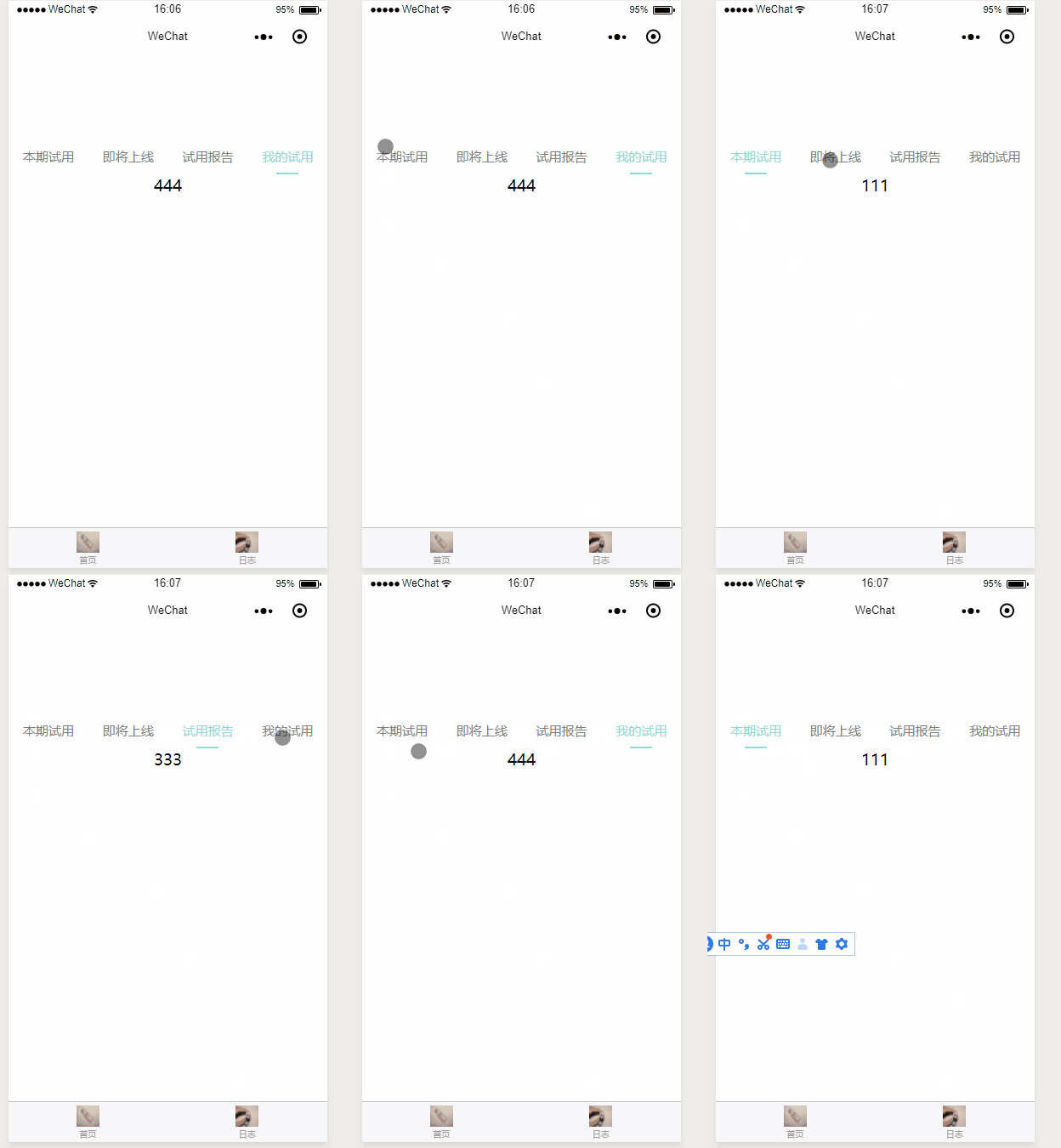
<!--index.wxml-->

<view class="container">

  <view class="navtap" >

    <a data-current="{{setting.current.key}}" bindtap="clickcurrent" style="color:{{currentSelect.key == 'current'?mainColor:oldcolor}};">

      <text>本期试用</text>

      <text class="activeline" style="background-color:{{currentSelect.key == 'current'?mainColor:whiteColor}};"></text>

    </a>

    <a data-current="{{setting.trailer.key}}" bindtap="clickcurrent" style="color:{{currentSelect.key == 'trailer'?mainColor:oldcolor}};">

      <text>即将上线</text>

      <text class="activeline" style="background-color:{{currentSelect.key == 'trailer'?mainColor:whiteColor}};"></text>

    </a>

    <a data-current="{{setting.report.key}}" bindtap="clickcurrent" style="color:{{currentSelect.key == 'report'?mainColor:oldcolor}};">

      <text>试用报告</text>

      <text class="activeline" style="background-color:{{currentSelect.key == 'report'?mainColor:whiteColor}};"></text>

    </a>

    <a data-current="{{setting.mytry.key}}" bindtap="clickcurrent" style="color:{{currentSelect.key == 'mytry'?mainColor:oldcolor}};">

      <text>我的试用</text>

      <text class="activeline" style="background-color:{{currentSelect.key == 'mytry'?mainColor:whiteColor}};"></text>

    </a>

  </view>

  <block wx:if="{{currentSelect.key == 'current'}}">

  </block>

  <block wx:if="{{currentSelect.key == 'trailer'}}">

  </block>

  <block wx:if="{{currentSelect.key == 'report'}}">

  </block>

  <block wx:if="{{currentSelect.key == 'mytry'}}">

  </block>

</view>
js
//index.js

//获取应用实例

const app = getApp()

Page({

  data: {

    motto: '首页',

    setting: {

      current: {

        key: "current",

      },

      trailer: {

        key: "trailer"

      },

      report: {

        key: "report"

      },

      mytry: {

        key: "mytry"

      }

    },

    mainColor: '#91d8d2',

    oldcolor: 'grey'

  },

  currentSelect: {},

  onLoad: function () {

     this.setData({

       'currentSelect.key': 'current'

     })

  },

  clickcurrent: function (event) {

    var that = this

    that.setData({

      'currentSelect.key':event.currentTarget.dataset.current

    })

  }

})
wxss
/**index.wxss**/

.navtap{

    width:%;

    height:40px;

    text-align:center;

    display:flex;

    font-size:15px;

    color:#;

    background-color:#fff;

}

.navtap a{

    flex:;

    color:#;

    line-height:38px;

}

.activeline{

    width:26px;

    height:2px;

    background-color:#fff;

    display:block;

    margin: auto;

}

.navtap a {

    flex:;

    color:#;

    line-height:38px;

}
小程序tab切换代码的更多相关文章
- 微信小程序tab切换,可滑动切换,导航栏跟随滚动实现
简介 看到今日头条小程序页面可以滑动切换,而且tab导航条也会跟着滚动,点击tab导航,页面滑动,切导航栏也会跟着滚动,就想着要怎么实现这个功能 像商城类商品类目如果做成左右滑动切换类目用户体验应该会 ...
- 根据id来实现小程序tab切换,
本例根据绑定id来实现tab切换,但本例仍有缺陷,用for循环数据,无法实现切换.如有大神能够有更好方法,欢迎留言更正 WXML: <view class="tab"> ...
- 小程序tab切换 点击左右滑动
wxml <scroll-view scroll-x="true" class="navbar-box"> <block wx:for=&qu ...
- 小程序——Tab切换
<view class="body"> <view class="nav bc_white"> <view class=" ...
- 微信小程序Tab选项卡切换大集合
代码地址如下:http://www.demodashi.com/demo/14028.html 一.前期准备工作 软件环境:微信开发者工具 官方下载地址:https://mp.weixin.qq.co ...
- PHP小程序后端支付代码亲测可用
小程序后端支付代码亲测可用 <?php namespace Home\Controller; use Think\Controller; class WechatpayController ex ...
- 小程序TAB列表切换内容动态变化,scrollview高度根据内容动态获取
滑动tab选项卡 一.在小程序里面tab选项卡是用的是自带的swiper组件,下面直接上代码 <view class="container"> <view cla ...
- 微信小程序tab(swiper)切换
<- wxml -> <view class="youhui"> <view ' bindtap='toggle'> 未使用 </view ...
- 微信小程序开发---各代码文件简介
根据上一文,已建立QuickStart 项目,该项目系本人毕设部分内容,所以记录以便以后查阅 开发小程序就必须了解小程序项目目录结构和文件作用,接下来就根据我现在自学得到的知识把这些记录下来. 一.目 ...
随机推荐
- 学习到目前,自己封装的db类和pdo类
DB封装类 <?php class DBDA { public $host = "localhost"; public $uid = "root"; pu ...
- C#基础 - 定义变量,输入输出
本节课主要讲解C#的发展历史及部分C#语言基础, 主要内容有:控制台程序的创建,输出,输入,定义变量,变量赋值,值覆盖,值拼接,值 打印,两种数据类型,整形类型转换 本节重点难点:定义变量 ...
- mysql(函数,存储过程,事务,索引)
函数 MySQL中提供了许多内置函数: 内置函数 一.数学函数 ROUND(x,y) 返回参数x的四舍五入的有y位小数的值 RAND() 返回0到1内的随机值,可以通过提供一个参数(种子)使RAND( ...
- Android NDK 同时编译多个模块
|-test |---Android.mk |---Application.mk |---sub1 |------Android.mk |------main.c |---sub2 |------An ...
- Ubuntu armhf 版本国内源
Ubuntu armhf 版本国内源: deb http://mirrors.ustc.edu.cn/ubuntu-ports/ xenial main multiverse restricted u ...
- Warning | 3719 | 'utf8' is currently an alias for the character set UTF8MB3, but will be an alias for UTF8MB4 in a future release. Please consider using UTF8MB4 in order to be unambiguous.
MySQL的“utf8”实际上不是真正的UTF-8.“utf8”只支持每个字符最多三个字节,而真正的UTF-8是每个字符最多四个字节. MySQL一直没有修复这个bug,他们在2010年发布了一个叫作 ...
- Spring Boot 2发送邮件手把手图文教程
原文:http://www.itmuch.com/spring-boot/send-email/ 本文基于:Spring Boot 2.1.3,理论支持Spring Boot 2.x所有版本. 最近有 ...
- 容器自动化(一):docker基础(上)
一,Docker简介,功能特性与应用场景 1.1 Docker简介 Docker是一个开源的应用容器引擎,让开发者可以打包他们的应用以及依赖包到一个可移植的容器中,然后发布到任何流行的Linux机器上 ...
- Scala配置环境变量Linux
1.下载.上传并解压scala-2.11.6.tgz 2.配置环境变量vim /etc/profile 增加如下代码: export SCALA_HOME=/usr/scala/scala-2.11. ...
- ES6中let、const和var的区别
一.let 1.基本用法 ES6 新增了let命令,用来声明变量. let 的用法类似于 var,但所声明的变量只在 let 命令所在的代码块内有效(一个“{}”相当于一个代码块) { let a = ...