
turtle库的学习
Turtle库是Python语言中一个很流行的绘制图像的函数库,想象一个小乌龟,在一个横轴为x、纵轴为y的坐标系原点,(0,0)位置开始,它根据一组函数指令的控制,在这个平面坐标系中移动,从而在它爬行的路径上绘制了图形。
1 安装turtle
Python2安装命令:
pip install turtule
Python3安装命令:
pip3 install turtle
因为turtle库主要是在Python2中使用的,所以安装的时候可能会提示错误:
Command "python setup.py egg_info" failed with error code 1
解决方法请参考这里码客社区的《Python3安装turtle提示错误:https://oomake.com/question/178949》。
2 基础概念
2.1 画布(canvas)
画布就是turtle为我们展开用于绘图区域, 我们可以设置它的大小和初始位置。
常用的画布方法有两个:screensize()和setup()。
(1)turtle.screensize(canvwidth=None, canvheight=None, bg=None)
参数分别为画布的宽(单位像素), 高, 背景颜色
如:
turtle.screensize(800, 600, "green")

turtle.screensize() #返回默认大小(400, 300)
(2)turtle.setup(width=0.5, height=0.75, startx=None, starty=None)
参数:
- width, height: 输入宽和高为整数时, 表示像素; 为小数时, 表示占据电脑屏幕的比例
- (startx, starty): 这一坐标表示 矩形窗口左上角顶点的位置, 如果为空,则窗口位于屏幕中心
如:
turtle.setup(width=0.6, height=0.6)

turtle.setup(width=800, height=800, startx=100, starty=100)
2.2 画笔
在画布上,默认有一个坐标原点为画布中心的坐标轴, 坐标原点上有一只面朝x轴正方向小乌龟。
这里我们描述小乌龟时使用了两个词语:标原点(位置),面朝x轴正方向(方向),turtle绘图中, 就是使用位置方向描述小乌龟(画笔)的状态
(1)画笔的属性
画笔有颜色、画线的宽度等属性。
1) turtle.pensize() :设置画笔的宽度;
2) turtle.pencolor() :没有参数传入返回当前画笔颜色;传入参数设置画笔颜色,可以是字符串如"green", "red",也可以是RGB 3元组。
    >>> pencolor('brown')

    >>> tup = (0.2, 0.8, 0.55)

    >>> pencolor(tup)

    >>> pencolor()

    '#33cc8c'
3) turtle.speed(speed) :设置画笔移动速度,画笔绘制的速度范围[0,10]整数, 数字越大越快
(2)绘图命令
操纵海龟绘图有着许多的命令,这些命令可以划分为3种:运动命令,画笔控制命令和全局控制命令
画笔运动命令:
| 命令 | 说明 |
|---|---|
| turtle.forward(distance) | 向当前画笔方向移动distance像素长 |
| turtle.backward(distance) | 向当前画笔相反方向移动distance像素长度 |
| turtle.right(degree) | 顺时针移动degree° |
| turtle.left(degree) | 逆时针移动degree° |
| turtle.pendown() | 移动时绘制图形,缺省时也为绘制 |
| turtle.goto(x,y) | 将画笔移动到坐标为x,y的位置 |
| turtle.penup() | 移动时不绘制图形,提起笔,用于另起一个地方绘制时用 |
| turtle.speed(speed) | 画笔绘制的速度范围[0,10]整数 |
| turtle.circle() | 画圆,半径为正(负),表示圆心在画笔的左边(右边)画圆 |
画笔控制命令:
| 命令 | 说明 |
|---|---|
| turtle.pensize(width) | 绘制图形时的宽度 |
| turtle.pencolor() | 画笔颜色 |
| turtle.fillcolor(colorstring) | 绘制图形的填充颜色 |
| turtle.color(color1, color2) | 同时设置pencolor=color1, fillcolor=color2 |
| turtle.filling() | 返回当前是否在填充状态 |
| turtle.begin_fill() | 准备开始填充图形 |
| turtle.end_fill() | 填充完成; |
| turtle.hideturtle() | 隐藏箭头显示; |
| turtle.showturtle() | 与hideturtle()函数对应 |
全局控制命令
| 命令 | 说明 |
|---|---|
| turtle.clear() | 清空turtle窗口,但是turtle的位置和状态不会改变 |
| turtle.reset() | 清空窗口,重置turtle状态为起始状态 |
| turtle.undo() | 撤销上一个turtle动作 |
| turtle.isvisible() | 返回当前turtle是否可见 |
| stamp() | 复制当前图形 |
| turtle.write(s[,font=("font-name",font_size,"font_type")]) | 写文本,s为文本内容,font是字体的参数,里面分别为字体名称,大小和类型;font为可选项, font的参数也是可选项 |
3 绘图举例
3.41绘制谢尔宾斯基三角形
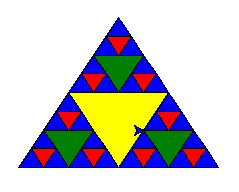
# coding: utf-8

import turtle

def draw_triangle(points, color, t):

    t.fillcolor(color)

    t.up()

    t.goto(points[0][0], points[0][1])

    t.down()

    t.begin_fill()

    t.goto(points[1][0], points[1][1])

    t.goto(points[2][0], points[2][1])

    t.goto(points[0][0], points[0][1])

    t.end_fill()

def get_mid(point1, point2):

    return (point1[0] + point2[0]) / 2, (point1[1] + point2[1]) / 2

def sierpinski(points, degree, t):

    color_map = ['blue', 'red', 'green', 'yellow', 'violet', 'orange', 'white',]

    draw_triangle(points, color_map[degree], t)

    if degree > 0:

        sierpinski([points[0], get_mid(points[0], points[1]), get_mid(points[0], points[2])], degree - 1, t)

        sierpinski([points[1], get_mid(points[0], points[1]), get_mid(points[1], points[2])], degree - 1, t)

        sierpinski([points[2], get_mid(points[0], points[2]), get_mid(points[1], points[2])], degree - 1, t)

if __name__ == "__main__"

    t = turtle.Turtle()

    t.speed(5)

    win = turtle.Screen()

    points = [[-100, -50], [0, 100], [100, -50]]

    sierpinski(points, 3, t)

    win.exitonclick()
turtle库的学习的更多相关文章
- Turtle库的学习积累
1.什么是turtle库 Python的Turtle库是一个直观有趣的图形绘制函数库,Turtle英文翻译过来是乌龟的意思,在绘图时可以想象成一只乌龟在移动. 2.绘图坐标体系 海龟的移动方向 3.绘 ...
- python中关于turtle库的学习笔记
一.基础概念 1.画布:画布就是turtle为我们展开用于绘图区域, 我们可以设置它的大小和初始位置.常用的画布方法有两个:screensize()和setup(). (1)turtle.screen ...
- turtle库的学习笔记
(1)turtle使用pen来绘制图形 pendown() 放下画笔,移动到指定点后继续绘制 penup() 提起画笔,用于另起一个地方绘制时使用 pensize(width) 设置画笔线条 ...
- turtle库笔记
turtle库是学习python的一个重要数据库,在当下是一个很有趣流行的绘制图像的数据库,她把画笔想象为一只小乌龟在爬行,让小乌龟在一个以横轴为x,纵轴为y的画布上行驶,并且会有多样的行驶角度,速度 ...
- Python turtle库学习笔记
1.简介 Python的turtle库的易操作,对初学者十分友好.对于初学者来说,刚学编程没多久可以写出许多有趣的可视化东西,这是对学习编程极大的鼓舞,可以树立对编程学习的信心.当然turtle本身也 ...
- python学习(二)之turtle库绘图
今天是三月七号,也就是女生节,或者女神节.不知道你是不是有自己喜欢的女孩子,在这里你可以用turtle库绘制一朵玫瑰花,送给你喜欢的姑娘.(拉到最后有惊喜哦)但在画这朵玫瑰花之前,先来一个基础的图形, ...
- [Python学习笔记] turtle库的基本使用
turtle库常用函数 引入turtle模块 import turtle turtle的绘图窗体 #setup()设置窗口大小及位置#setup()可省略turtle.setup(width,heig ...
- Turtle库学习笔记
一.Turtle库是Python语言中一个很流行的绘制图像的函数库,想象一个小乌龟,在一个横轴为x.纵轴为y的坐标系原点,(0,0)位置开始,它根据一组函数指令的控制,在这个平面坐标系中移动,从而在它 ...
- Python学习之turtle库和蟒蛇绘制程序
Python的函数库 Python语言与C语言Java类似,可以大量使用外部函数库包含在安装包中的函数库:. 比如math, random, turtle等其他函数库,其他函数库用户根据代码需求自行安 ...
随机推荐
- JUC--volatiley&CAS
public class VolatileTest { public static void main(String[] args) { ThreadDemo td = new ThreadDemo( ...
- 在线激活win10、win8/8.1和office2019、2016、2013等的kms激活工具
在线激活win10.win8/8.1和office2019.2016.2013等的kms激活工具 MicroKMS神龙版能激活win10.win8/8.1.win7以及server2008/2012/ ...
- js-图片预加载
//图片预加载 //闭包模拟局部作用于 (function($){ function Preload(imgs,options){ this.imgs = (typeof imgs === 'st ...
- 【玩转开源】制作Docker镜像
做嵌入式方向经常会遇到的一个问题,就是编译环境安装,如果换电脑,再重新安装环境是一个比较费时的事情,这个时候可以自己制作一个Docker镜像,然后把编译环境在Docker镜像里面配置好,以后同步环境就 ...
- C++中的const总结
CONST 一.符号常量 声明: const 类型说明符 常量名 = 常量值: const float PI = 3.1415927; //可以交换const与float的位置 符号常量在声明时一定要 ...
- ASP.NET Core快速入门学习笔记(第2章:配置管理)
课程链接:http://video.jessetalk.cn/course/explore 良心课程,大家一起来学习哈! 任务9:配置介绍 命令行配置 Json文件配置 从配置文件文本到c#对象实例的 ...
- iOS 中文转拼音
- (NSString * ) chineseToPinyin:(NSString *) chinese{ CFStringRef hanzi = (__bridge CFStringRef)(chi ...
- [linux]使用curl进行GET、POST和网页调试
以前在win下开发的时候,习惯用的调试工具是谷歌自带控制台和postman,谷歌控制台比较方便,但不能对请求进行重发,post虽然很好用,但是感觉还是有点'大'.在linux下,其实完全没有那么麻烦, ...
- HDU - 6054 sa + 树状数组套线段树
因为强制在线所以只能转成序列上的问题然后树套树了... #include<bits/stdc++.h> #define LL long long #define LD long doubl ...
- mapreduce项目中加入combiner
combiner相当于是一个本地的reduce,它的存在是为了减少网络的负担,在本地先进行一次计算再叫计算结果提交给reduce进行二次处理. 现在的流程为: 对于combiner我们有这些理解: M ...