
[Spring cloud 一步步实现广告系统] 3. 网关路由
Zuul(Router and Filter)
WIKI: 传送门
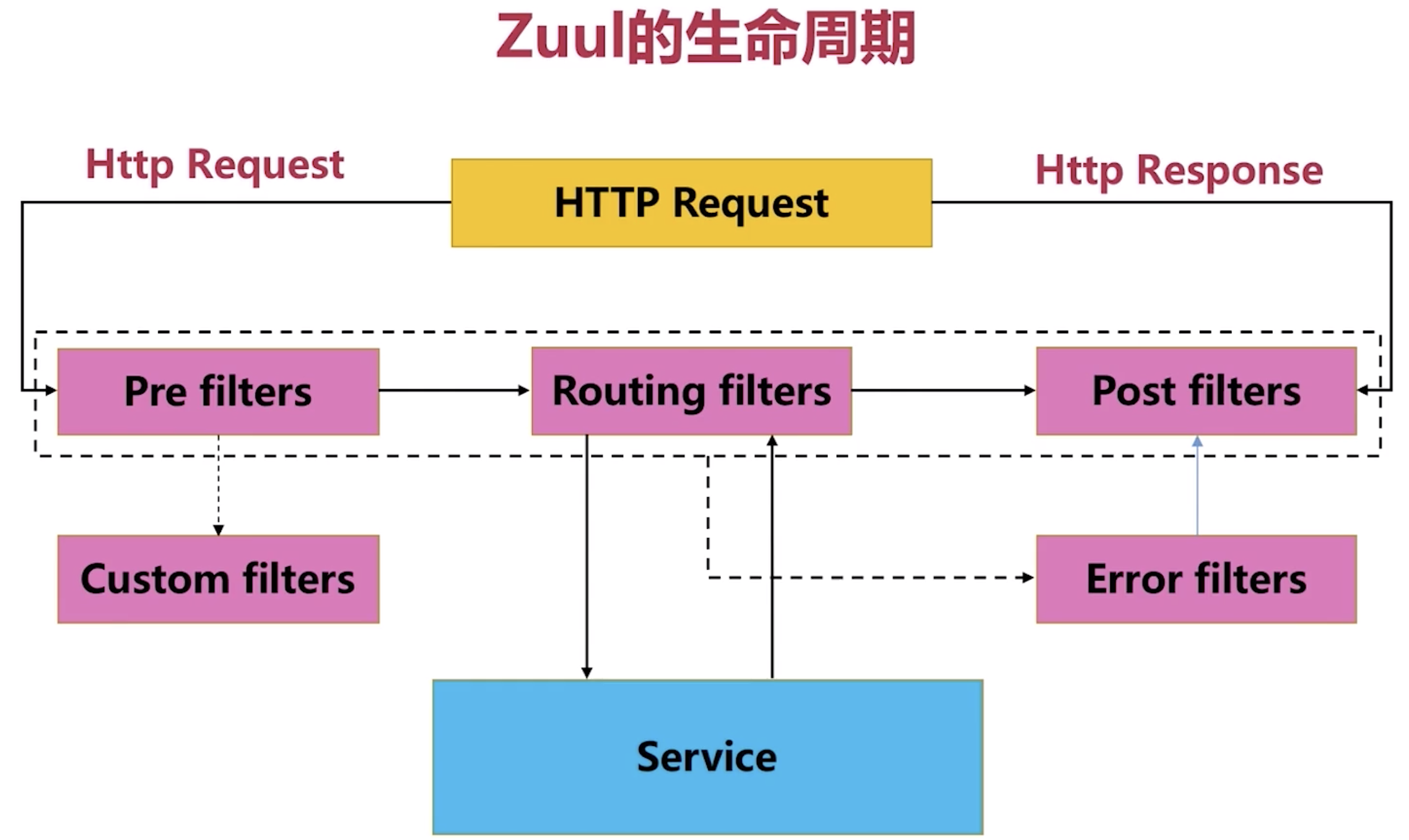
作用
- 认证,鉴权(Authentication/Security)
- 预判(Insights)
- 压力测试(Stress Testing)
- 灰度/金丝雀测试(Canary Testing)
- 动态路由(Dynamic Routing)
- 服务迁移(Service Migration)
- 降低负载(Load Shedding)
- 静态响应处理(Static Response handling)
- 主动/主动交换管理(Active/Active traffic management)
关键配置:
The configuration property
zuul.host.maxTotalConnectionsandzuul.host.maxPerRouteConnections, which default to 200 and 20 respectively.
创建mscx-ad-zuul
三步曲创建法:
添加依赖
    <dependencies>

        <dependency>

            <groupId>org.springframework.cloud</groupId>

            <artifactId>spring-cloud-starter-netflix-zuul</artifactId>

        </dependency>

        <dependency>

            <groupId>org.springframework.cloud</groupId>

            <artifactId>spring-cloud-starter-netflix-eureka-client</artifactId>

        </dependency>

    </dependencies>
加注解
@SpringCloudApplication

@EnableZuulProxy //启用网关

public class GatewayApplication {

    public static void main(String[] args) {

        SpringApplication.run(GatewayApplication.class, args);

    }

}
改配置
spring:

  application:

    name: ad-gateway-zuul

server:

  port: 1111

eureka:

  client:

    service-url:

      defaultZone: http://server1:7777/eureka/,http://server2:8888/eureka/,http://server3:9999/eureka/

  instance:

    hostname: ad-gateway-zuul

zuul:

  ignored-services: '*' # 过滤所有请求,除了下面routes中声明过的服务

  routes:

    sponsor: #在路由中自定义服务路由名称

      path: /ad-sponsor/**

      serviceId: mscx-ad-sponsor #微服务name

      strip-prefix: false

    search: #在路由中自定义服务路由名称

      path: /ad-search/**

      serviceId: mscx-ad-search #微服务name

      strip-prefix: false

  prefix: /gateway/api

  strip-prefix: false #不对 prefix: /gateway/api 设置的路径进行截取,默认转发会截取掉配置的前缀
过滤器编写
我们来编写一个记录请求时间周期的过滤器,根据Filter的三种类型:Pre filters,routing filters 和Post filters,我们需要定义2个filter,用来记录开始和结束时间,很明显,我们需要实现Pre & Post2个过滤器。
@Slf4j

@Component

public class PreRequestFilter extends ZuulFilter {

    @Override

    public String filterType() {

        // pre filter

        return FilterConstants.PRE_TYPE;

    }

    @Override

    public int filterOrder() {

        return 0;

    }

    @Override

    public boolean shouldFilter() {

        return true;

    }

    @Override

    public Object run() throws ZuulException {

        //获取当前请求的请求上下文

        RequestContext requestContext = RequestContext.getCurrentContext();

        //记录请求进入时间

        requestContext.set("api_request_time", System.currentTimeMillis());

        return null;

    }

}

---

@Slf4j

@Component

public class AccessLogFilter extends ZuulFilter {

    @Override

    public String filterType() {

        return FilterConstants.POST_TYPE;

    }

    @Override

    public int filterOrder() {

        //需要最后一个执行的filter

        return FilterConstants.SEND_RESPONSE_FILTER_ORDER - 1;

    }

    @Override

    public boolean shouldFilter() {

        return true;

    }

    @Override

    public Object run() throws ZuulException {

        RequestContext requestContext = RequestContext.getCurrentContext();

        HttpServletRequest request = requestContext.getRequest();

        log.info("Request \"{}\" spent : {} seconds.", request.getRequestURI(),

                (System.currentTimeMillis() - Long.valueOf(requestContext.get("api_request_time").toString())) / 1000);

        return null;

    }

}
Gateway
后续更新---
做一个好人。
[Spring cloud 一步步实现广告系统] 3. 网关路由的更多相关文章
- [Spring cloud 一步步实现广告系统] 19. 监控Hystrix Dashboard
在之前的18次文章中,我们实现了广告系统的广告投放,广告检索业务功能,中间使用到了 服务发现Eureka,服务调用Feign,网关路由Zuul以及错误熔断Hystrix等Spring Cloud组件. ...
- [Spring cloud 一步步实现广告系统] 21. 系统错误汇总
广告系统学习过程中问题答疑 博客园 Eureka集群启动报错 Answer 因为Eureka在集群启动过程中,会连接集群中其他的机器进行数据同步,在这个过程中,如果别的服务还没有启动完成,就会出现Co ...
- [Spring cloud 一步步实现广告系统] 2. 配置&Eureka服务
父项目管理 首先,我们在创建投放系统之前,先看一下我们的工程结构: mscx-ad-sponsor就是我们的广告投放系统.如上结构,我们需要首先创建一个Parent Project mscx-ad 来 ...
- [Spring cloud 一步步实现广告系统] 22. 广告系统回顾总结
到目前为止,我们整个初级广告检索系统就初步开发完成了,我们来整体回顾一下我们的广告系统. 整个广告系统编码结构如下: mscx-ad 父模块 主要是为了方便我们项目的统一管理 mscx-ad-db 这 ...
- [Spring cloud 一步步实现广告系统] 7. 中期总结回顾
在前面的过程中,我们创建了4个project: 服务发现 我们使用Eureka 作为服务发现组件,学习了Eureka Server,Eureka Client的使用. Eureka Server 加依 ...
- [Spring cloud 一步步实现广告系统] 1. 业务架构分析
什么是广告系统? 主要包含: 广告主投放广告的<广告投放系统> 媒体方(广告展示媒介-)检索广告用的<广告检索系统> 广告计费系统(按次,曝光量等等) 报表系统 Etc. 使用 ...
- [Spring cloud 一步步实现广告系统] 13. 索引服务编码实现
上一节我们分析了广告索引的维护有2种,全量索引加载和增量索引维护.因为广告检索是广告系统中最为重要的环节,大家一定要认真理解我们索引设计的思路,接下来我们来编码实现索引维护功能. 我们来定义一个接口, ...
- [Spring cloud 一步步实现广告系统] 6. Service实现&Zuul配置&Test
DAO层设计实现 这里我们使用Spring DATA JPA来实现数据库操作,当然大家也可以使用Mybatis,都是一样的,我们依然以用户表操作为例: /** * AdUserRepository f ...
- [Spring cloud 一步步实现广告系统] 12. 广告索引介绍
索引设计介绍 在我们广告系统中,为了我们能更快的拿到我们想要的广告数据,我们需要对广告数据添加类似于数据库index一样的索引结构,分两大类:正向索引和倒排索引. 正向索引 通过唯一键/主键生成与对象 ...
随机推荐
- Ajax之调用一言网站API接口
Ajax的作用,主要是实现局部刷新. 通过老大哥告知,Ajax接口可以使用一言网站的,所以自己就练了一下子. 本文所有用到的接口都来自一言网站:https://hitokoto.cn/api 通过网站 ...
- JQuery 表单textarea控制字数
/** *textarea 字数限制 *obj textarea * maxlength 限制的最大字数 */ function textarealength(obj,maxlength){ var ...
- 二维码生成插件qrious
1.qrious是基于canvas的纯JS二维码生成插件 1.1什么是二维码 二维码又称QR Code,QR全称Quick Response,是一个近几年来移动设备上超流行的一种编码方式,它比传统的B ...
- Linux7 64安装 oracle 11g Error in invoking target 'agent nmhs' of makefile
在makefile中添加链接libnnz11库的参数修改$ORACLE_HOME/sysman/lib/ins_emagent.mk,将$(MK_EMAGENT_NMECTL)修改为:$(MK_EMA ...
- sqlalchemy 执行原生sql语句
from contextlib import contextmanager from sqlalchemy import create_engine, ForeignKey from sqlalche ...
- Oracle - exp实战
一.概述 exp/imp是oracle中的一个逻辑导出和导入工具,假想一个场景,当我们使用exp命令在对用户进行导出的时候,如果该用户中的某些表的数据有修改,或表结构进行了修改,或者表被删除,那么我们 ...
- 三大框架知识点比较(Angular, Vue, React)
点击左键 => 拖拽图片 => 新标签页查看图片 => 放大拖拽查阅
- English:2019100401_Suffix"ery"
Ax_introduction source a Frech mean to "state,quality,act,place where etc" 1)After the ver ...
- 极客必备 Chrome 浏览器插件
本文微信公众号「AndroidTraveler」首发. 自己平时使用的最多的就是 Chrome 浏览器,因此本文主要分享自己添加的一些扩展程序. 介绍扩展程序的时候也是以我本人的实际使用为主,有些功能 ...
- 华为网络设备修改console密码
user-interface con 0set authentication password cipher 新密码 有的版本为 <FW> system-view[FW] user-int ...