
SpringBoot的 HelloWorld
SpringBoot HelloWorld
功能需求
浏览器发送hello请求,服务器接收请求并处理,相应HelloWorld字符串
1.创建一个maven工程;(jar)
2.导入SpringBoot相关依赖
<parent>

    <groupId>org.springframework.boot</groupId>

    <artifactId>spring-boot-starter-parent</artifactId>

    <version>1.5.9.RELEASE</version>

</parent>

<dependencies>

    <dependency>

        <groupId>org.springframework.boot</groupId>

        <artifactId>spring-boot-starter-parent</artifactId>

    </dependency>

</dependencies>
3.编写一个主程序,启动SpringBoot应用
/**

 * @SpringBootApplication 标注一个主程序类,说明这是一个SpringBoot 应用

 **/

@SpringBootApplication

public class HelloWorldMainApplication {

    public static void main(String[] args) {

        //启动Spring应用

        SpringApplication.run(HelloWorldMainApplication.class,args);

    }

}
4.编写相关的Controller、Service
@Controller

public class HelloController {

    @ResponseBody

    @RequestMapping("/hello")

    public String hello(){

        return "HelloWorld!";

    }

}
5.运行主程序测试
6. 简化部署
<!--    这个插件可以将应用打包成一个可执行的jar包-->

    <build>

        <plugins>

            <plugin>

                <groupId>org.springframework.boot</groupId>

                <artifactId>spring-boot-maven-plugin</artifactId>

            </plugin>

        </plugins>

    </build>
将这个应用打成jar包(自带tomcat),直接使用java -jar的命令进行执行
7.探究HalloWorld
1.POM文件
1.父项目
<parent>

    <groupId>org.springframework.boot</groupId>

    <artifactId>spring-boot-starter-parent</artifactId>

    <version>1.5.9.RELEASE</version>

</parent>

它的父项目是

	<parent>

		<groupId>org.springframework.boot</groupId>

		<artifactId>spring-boot-dependencies</artifactId>

		<version>1.5.9.RELEASE</version>

		<relativePath>../../spring-boot-dependencies</relativePath>

	</parent>

	真正管理Spring Boot应用里面的所有依赖版本;
Spring Boot版本仲裁中心(spring-boot-dependencies);
以后我们导入依赖默认是不需要些版本的;(没有在dependencies里面管理的依赖自然需要声明)
2.启动器starter
<dependency>

    <groupId>org.springframework.boot</groupId>

    <artifactId>spring-boot-starter-web</artifactId>

</dependency>
spring-boot-starter-web:
spring-boot-starter:spring-boot场景启动器;
spring-boot-starter-web帮我们导入了web模块正常运行所依赖的组件;
Spring Boot将所有功能场景都抽取出来,做成一个个的starters(启动器),只需要在项目里面引入这些starter相关场景的所有依赖都会导入进来
2.主程序类,主入口类
/**

 * @SpringBootApplication 标注一个主程序类,说明这是一个SpringBoot 应用

 **/

@SpringBootApplication

public class HelloWorldMainApplication {

    public static void main(String[] args) {

        //启动Spring应用

        SpringApplication.run(HelloWorldMainApplication.class,args);

    }

}
@SpringBootApplication:Spring Boot 应用标注在某个类上说明这个类是SpringBoot的主配置类,SpringBoot就应该运行这个类的方法来启动SpringBoot应用;
@Target({ElementType.TYPE})

@Retention(RetentionPolicy.RUNTIME)

@Documented

@Inherited

@SpringBootConfiguration

@EnableAutoConfiguration

@ComponentScan(

    excludeFilters = {@Filter(

    type = FilterType.CUSTOM,

    classes = {TypeExcludeFilter.class}

), @Filter(

    type = FilterType.CUSTOM,

    classes = {AutoConfigurationExcludeFilter.class}

)}

)

public @interface SpringBootApplication {
1.@SpringBootConfiguration:Spring Boot的配置类;
标注在某个类上,表示这是一个SpringBoot的配置类
包含@Configuration:配置类上来标注这个注解;
配置类就是以往的配置文件;将配置文件替换成配置类,使用该注解才能让springboot知道这是个配置类,配置类也是容器中的一个组件:@Component
2.@EnableAutoConfiguration:开启自动配置功能
以前我们需要配置的东西,Springboot帮我们自动配置;
@AutoConfigurationPackage

@Import({EnableAutoConfigurationImportSelector.class})

public @interface EnableAutoConfiguration {
@AutoConfigurationPackage:自动配置包
@Import({Registrar.class}):Spring的底层注解@Import,给容器中导入一个组件;导入的组件由{Registrar.class}来决定
将主配置类(@SpringBootApplication标注的类)的所在包以及所有子包里面的所有组件扫描到Spring容器中
@Import({EnableAutoConfigurationImportSelector.class})
给容器中导入组件
EnableAutoConfigurationImportSelector:导入哪些组件的选择器,将所有需要导入的组件以全类名返回,这些组件就会被添加到容器中
会给容器中导入96个自动配置类(xxxAutoConfigration):就是容器中导入这个场景需要的所有组件,并配置好这些组件;有了自动配置类,免去了我们手动编写配置注入功能组件等的工作;
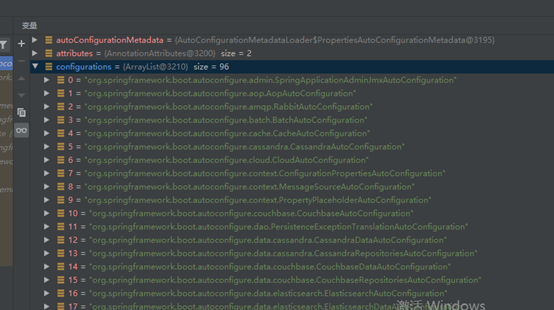
获取Configurations主要使用了
SpringFactoriesLoader.loadFactoryNames(EnableAutoConfigurationr.class, classLoader);
从类路径下获取 META-INF/spring.factories 资源文件(spring-boot-autoconfigure-1.5.9.RELEASE中),获取EnableAutoConfigurationr指定的值(如上图),将这些值作为自动配置类导入到容器中,自动配置类就生效了,即自动配置。
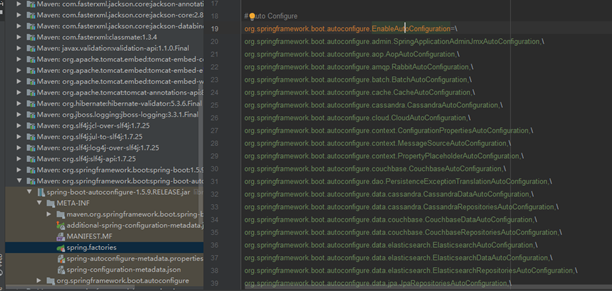
以前我们需要自己配置的东西,自动配置类都帮我们完成了。(eg.WebMvcAutoConfiguration)
@bean添加组件
//WebMvcAutoConfiguration

@Bean   //RequestMapping

@Primary

public RequestMappingHandlerMapping requestMappingHandlerMapping() {

 @Bean   //视图解析器

 @ConditionalOnMissingBean

 public InternalResourceViewResolver defaultViewResolver() {

 .....
J2EE的整体整合解决方案和自动配置都在spring-boot-autoconfigure-x.x.x.RELEASE.jar下的org.springframework.boot.autoconfigure中
SpringBoot的 HelloWorld的更多相关文章
- springboot之HelloWorld
简介 为了简化开发Spring的复杂度,Spring提供了SpringBoot可以快速开发一个应用,这里就简单介绍下SpringBoot如何快速开发一个J2EE应用 HelloWorld 首先在gra ...
- SpringBoot学习helloworld
这几天开始学习springBoot记录一下(Hello World) pom.xml <project xmlns="http://maven.apache.org/POM/4.0.0 ...
- SpringBoot的HelloWorld 应用及解释
参考链接: Spring Data JPA - Reference Documentation Spring Data JPA--参考文档 中文版 纯洁的微笑:http://www.ityouknow ...
- [一]SpringBoot 之 HelloWorld
(1)新建一个Maven Java工程 (2)在pom.xml文件中添加Spring BootMaven依赖 2.1在pom.xml中引入spring-boot-start-parent spring ...
- SpringBoot入门学习(一): Idea 创建 SpringBoot 的 HelloWorld
创建项目: 项目结构: 程序启动入口: 正式开始: package com.example.demo; import org.springframework.boot.SpringApplicatio ...
- redis整合springboot的helloworld
引入依赖 compile 'org.springframework.boot:spring-boot-starter-data-redis' 使用redis有两种方法 1.Jedis Jedis je ...
- SpringBoot——探究HelloWorld【三】
前言 前面我们写了helloworld的一个,这里我们对他进行分析 探究 那么下面就开始我们的探究之旅吧,首先从POM文件来,在POM文件中我们导入了项目所需要的依赖 POM文件 父项目 <pa ...
- spring-boot的helloWorld详解
1.运行环境 开发工具:intellij idea JDK版本:1.8 项目管理工具:Maven 3.2.5 2.Maven Plugin管理 pom.xml配置代码: <project xml ...
- eclipse springboot运行helloworld错误: 找不到或无法加载主类 xxx.xxx.xxx
这个错误,在网上搜找了好久,说是什么jar包冲突,什么环境配置,我经过验证均是正确的,javac java java -version 都没问题,环境变量也OK,各种解释均没有能够解决我的问题,最后好 ...
随机推荐
- hex文件格式总结
hex文件格式总结 文章目录 hex文件格式总结 什么是hex文件? 文件格式 指令类型(Record type) 校验和 :04 02B0 00 92020008 AE :04 0000 05 08 ...
- YOLOV4所用到的一些tricks
原文链接:http://arxiv.org/abs/2004.10934 整体框架 Bag of Freebies(BoF) & Bag of Specials (BoS) B ...
- JavaWeb实战:报价计算系统(layui+tomcat+cookie实现)
JavaWeb实战:报价计算系统(layui+tomcat+cookie实现) 系统概述: 该系统是文物物流公司的一个小功能模块,用于帮助用户计算运费.点击查看实际效果 系统文档: 添加展品: 在表单 ...
- CF#633C Spy Syndrome 2 DP+二分+hash
Spy Syndrome 2 题意 现在对某个英文句子,进行加密: 把所有的字母变成小写字母 把所有的单词反过来 去掉单词之间的空格 比如:Kira is childish and he hates ...
- Java语言简介、基础组成、封装、继承、多态、抽象类、内部类、接口
目录 Java简介 Java语言基础组成 面向对象 对象 封装 构造函数 this关键字 static(静态关键字) 主函数 静态什么时候用呢? 面向对象(数组工具对象建立) 设计模式 继承 成员变量 ...
- 设计模式之GOF23享元模式
享元模式FlyWeight 场景:如果有很多个完全相同或者相似的对象,可以节省内存资源 核心: 享元模式以共享的方式高效地支持大量细粒对象的重用 享元对象做到共享的关键是区分了内部状态和外部状态: 内 ...
- etcd实现服务发现
前言 etcd环境安装与使用文章中介绍了etcd的安装及v3 API使用,本篇将介绍如何使用etcd实现服务发现功能. 服务发现介绍 服务发现要解决的也是分布式系统中最常见的问题之一,即在同一个分布式 ...
- python实现边缘提取
1. 题目描述 安装opencv环境,实现边缘提取 2. 实现过程 1. 安装opencv+python环境 2. 打开图片 3. 将图片二值化 4. 提取边缘 5. 显示图片 3. 运行结果 ...
- QQ恢复解散后的群聊或删除后的好友的方法
今天有一个群被一个管理员乱踢人,之后将群解散. 事后几分钟我在想有没有什么方法可以重新恢复的方法,之后进入了QQ的官网进行查找. 本来以为没希望了,但是奇迹发生了. 原来真的可以恢复! 恢复的详情: ...
- PAT 1028 List Sorting (25分) 用char[],不要用string
题目 Excel can sort records according to any column. Now you are supposed to imitate this function. In ...