
simmon effect : build the funcion of trail list
#the real experiment for simon effect

#load the library which is our need

import pygame

import sys

import random

from pygame.locals import *

pygame.init()

win = pygame.display.set_mode((800,600),DOUBLEBUF|HWSURFACE)

left = (200,300)

right = (600,300)

red  =(255,0,0)

blue = (0,0,255)

black = (0,0,0)

#wait for the pressed key

def wait4key(duration,key_list):

    """the function is to wait for subject to press the right key , and the experient will continue untill the\

subject press the key

duration : the time which is the subject wait to press the key ,if the time is too long ,the experiment will\

continue automaticly.

key_list: the key which the subject need to press to continue the experiment, and the key_list must \

be a list such as [K_A,K_/]"""

    fake_bool =False

    time_out = False

    #empty the event before

    pygame.event.clear()

    #use for count the time

    start_time = pygame.time.get_ticks()

    #if the subject does not press the right key, he will in the while loop all the time untill the duration is exhausted

    while  not (fake_bool or time_out):

        end_time = pygame.time.get_ticks()

        #if the duration is too long , the experiment will continue

        if end_time - start_time > duration:

            time_out = True

        #if subject press the right key ,the experimet will continue

        for i in pygame.event.get():

            if i.type ==KEYDOWN:

                if i.key in key_list:

                    #prepare for the result of the function

                    response_time = pygame.time.get_ticks()

                    key_name = pygame.key.name(i.key)

                    #if has the right key ,the loop will quit

                    fake_bool = True

    #in the end, if subject press the key ,we will collect the time , and the name of the key

    if fake_bool:

        return start_time, response_time, key_name

    #the purpose of the next line is stay the same with the result

    else:

        return start_time, None, None

#experiment for 10 times

#creat the list

#L mean left ,R mean right , RE mean the color red, BL mean the color blue

lis = [ ["L","RE","Z"],

        ["L","BL","/"],

        ["R","RE","Z"],

        ["R","BL","/"]]

#creat a function to ran one trial

def one_trial_list(pars):

#the parameters must be a list which contains the location, color ,right response of the stimuli and the the sequence of the element of parameters should not change"""

    global left

    global right

    global red

    global blue

    global black

    loc,col,ress=pars

    if loc =="L":

        pos = left

    if loc =="R":

        pos = right

    if col =="BL":

        color = red

    if col == "RE":

        color = blue

    win.fill(black)

    pygame.draw.circle(win,color,pos,20,0)

    pygame.display.flip()

    result = wait4key(2000,[K_z,K_SLASH])

    print(result)

#random our lis which contains four trails

lis1 = lis*2

random.shuffle(lis1)

#run four trials

for i in lis1:

    one_trial_list(i)

    #when one trail end ,fill the window black again

    win.fill(black)

    pygame.display.flip()

    pygame.time.delay(500)

pygame.quit()

sys.exit()
another function to improve our experiment
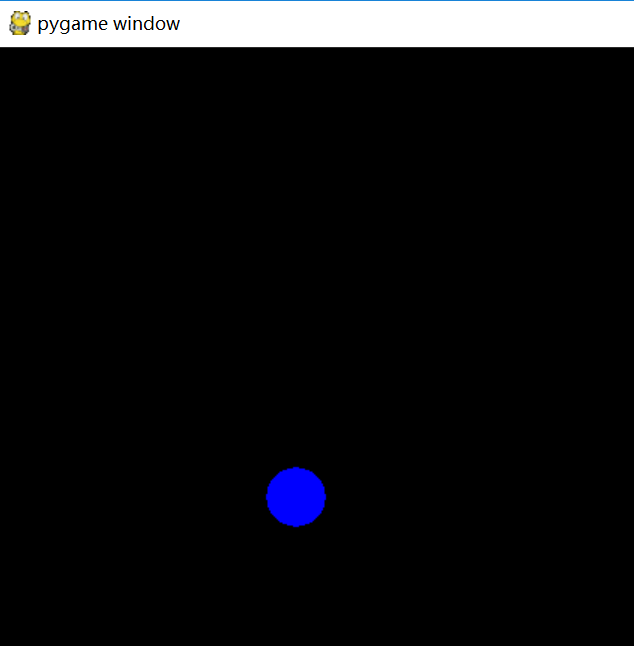
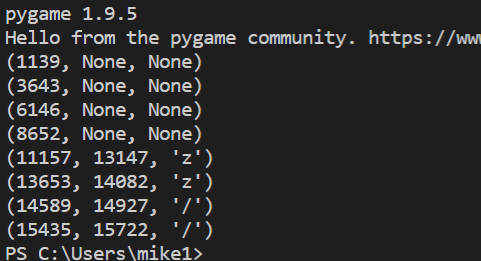
the result
simmon effect : build the funcion of trail list的更多相关文章
- the simmon effect(in psychology) :build the function of subject_information(modify the experiment programme),before we begin the experiment
#the real experiment for simon effect #load the library which is our need import pygame import sys i ...
- simmon effect(psychology experiment) : this time, we add file_function who can creat a file in the window which contains our result
#the real experiment for simon effect #load the library which is our need import pygame import sys i ...
- 【转】Beginning Game Programming v2.0
Beginning Game Programming v2.0 Last Updated 8/19/18 Greetings everyone, welcome to the ground up re ...
- The `android.dexOptions.incremental` property is deprecated and it has no effect on the build process.
编译报错:The android.dexOptions.incremental property is deprecated and it has no effect on the build pro ...
- Android Studio升级到3.1.4后打开旧项目警告:The `android.dexOptions.incremental` property is deprecated and it has no effect on the build process.
现象截图 问题原因&解决方案 在build.gralde中,对Android开发过程中突破的方法数的限制,做了如下解决配置: dexOptions { incremental true jav ...
- simon effect (psychology experiment ) : build the function of wait4key()
## #the real experiment for simon effect #load the library which is our need import pygame import sy ...
- GooglePlay 首页效果----tab的揭示效果(Reveal Effect) (1)
GooglePlay 首页效果----tab的揭示效果(Reveal Effect) (1) 前言: 无意打开GooglePlay app来着,然后发现首页用了揭示效果,连起来用着感觉还不错. 不清楚 ...
- Material Design Reveal effect(揭示效果) 你可能见过但是叫不出名字的小效果
Material Design Reveal effect(揭示效果) 你可能见过但是叫不出名字的小效果 前言: 每次写之前都会来一段(废)话.{心塞...} Google Play首页两个tab背景 ...
- Build Instructions (Windows) – The Chromium Projects
转自:http://121.199.54.6/wordpress/?p=1156 原始地址:http://www.chromium.org/developers/how-tos/build-instr ...
随机推荐
- Elasticsearch与中文分词配置
一. elasticsearch on windows 1.下载地址: https://www.elastic.co/cn/downloads/elasticsearch 如果浏览器下载文件慢,建议使 ...
- 20200120--python学习第12天
今日内容 函数中高级(闭包/高价函数) 内置函数 内置模块(.py文件) 内容回顾 函数基础概念 a.函数基本结构 def func(arg): return arg v1 = func(123) b ...
- 038.Python关于TCP黏包问题
黏包现象 1 黏包现象演示 服务端 #服务端 import socket sk = socket.socket() # 注册主机到网络 sk.bind( ("127.0.0.1", ...
- MSSqlServer访问远程数据库
--第一部分(要点)--永久访问方式(需对访问远程数据库进行经常性操作)时设置链接数据库Exec sp_addlinkedserver 'MyLinkServer','','SQLOLEDB','远程 ...
- kakfa+zookeeper集群搭建
1:下载对应安装包 zookeeper-3.4.14.tar.gz:链接:https://pan.baidu.com/s/19_eYsv5r9bg0AKv3TzjpZQ 提取码:ik8a kaf ...
- 设置ssh远程其他主机登录显示提示信息
文件及路径: /etc/motd 实例: [root@A-client ~]# ssh -p 22 test@10.0.0.2 test@10.0.0.2's password: Last login ...
- 7个有用的JS技巧
就如其他的编程语言一样,JavaScript也具有许多技巧来完成简单和困难的任务. 一些技巧已广为人知,而有一些技巧也会让你耳目一新. 让我们来看看今天可以开始使用的七个JavaScript技巧吧! ...
- Vue中你可能认为是bug的情况原来是这样的
前言 我们知道Vue框架剧本双向数据绑定功能,在我们使用方便的同时,还有一些细节问题我们并不知道,接下来一起探讨一些吧 双向数据绑定 js变量改变影响页面 页面改变影响js变量 Vue2是如何做到数据 ...
- 十天学会CS之操作系统——进程管理01
进程管理01 进程的概念 进程是计算机中一个非常重要的概念,在整个计算机发展历史中,操作系统中程序运行机制的演变按顺序大致可以分为: 单道程序:通常是指每一次将一个或者一批程序(一个作业)从磁盘加载进 ...
- AndroidStudio修改默认C盘配置文件夹(.android.gradle.AndroidStudio)以及修改后避免踩的坑
场景 AndroidStudio下载安装教程(图文教程): https://blog.csdn.net/BADAO_LIUMANG_QIZHI/article/details/103672471 在上 ...