
the simmon effect(in psychology) :build the function of subject_information(modify the experiment programme),before we begin the experiment
#the real experiment for simon effect

#load the library which is our need

import pygame

import sys

import random

from pygame.locals import *

#creat the subject information function

def sub_info():

    sub_ID = input("please input your number: ")

    sub_name = input("please input your name: ")

    sub_male = input("please input your male: ")

    sub_age = input("please input your age: ")

    return sub_ID, sub_name,sub_male,sub_age

#the variable result will be a tuple

result = sub_info()

#turn the tuple to a list

result = list(result)

pygame.init()

win = pygame.display.set_mode((800,600),DOUBLEBUF|HWSURFACE)

left = (200,300)

right = (600,300)

red  =(255,0,0)

blue = (0,0,255)

black = (0,0,0)

#wait for the pressed key

def wait4key(duration,key_list):

    """the function is to wait for subject to press the right key , and the experient will continue untill the\

subject press the key

duration : the time which is the subject wait to press the key ,if the time is too long ,the experiment will\

continue automaticly.

key_list: the key which the subject need to press to continue the experiment, and the key_list must \

be a list such as [K_A,K_/]"""

    fake_bool =False

    time_out = False

    #empty the event before

    pygame.event.clear()

    #use for count the time

    start_time = pygame.time.get_ticks()

    #if the subject does not press the right key, he will in the while loop all the time untill the duration is exhausted

    while  not (fake_bool or time_out):

        end_time = pygame.time.get_ticks()

        #if the duration is too long , the experiment will continue

        if end_time - start_time > duration:

            time_out = True

        #if subject press the right key ,the experimet will continue

        for i in pygame.event.get():

            if i.type ==KEYDOWN:

                if i.key in key_list:

                    #prepare for the result of the function

                    response_time = pygame.time.get_ticks()

                    key_name = pygame.key.name(i.key)

                    #if has the right key ,the loop will quit

                    fake_bool = True

    #in the end, if subject press the key ,we will collect the time , and the name of the key

    if fake_bool:

        return start_time, response_time, key_name

    #the purpose of the next line is stay the same with the result

    else:

        return start_time, None, None

#experiment for 10 times

#creat the list

#L mean left ,R mean right , RE mean the color red, BL mean the color blue

lis = [ ["L","RE","Z"],

        ["L","BL","/"],

        ["R","RE","Z"],

        ["R","BL","/"]]

#creat a function to ran one trial

def one_trial_list(pars):

#the parameters must be a list which contains the location, color ,right response of the stimuli and the the sequence of the element of parameters should not change"""

    global left

    global right

    global red

    global blue

    global black

    loc,col,ress=pars

    if loc =="L":

        pos = left

    if loc =="R":

        pos = right

    if col =="BL":

        color = red

    if col == "RE":

        color = blue

    win.fill(black)

    pygame.draw.circle(win,color,pos,20,0)

    pygame.display.flip()

    result1 = wait4key(2000,[K_z,K_SLASH])

    #turn the result1 which is the result of the wait4key function to a list

    result1 = list(result1)

    print(result + result1)

#random our lis which contains four trails

lis1 = lis*2

random.shuffle(lis1)

#run four trials

for i in lis1:

    one_trial_list(i)

    #when one trail end ,fill the window black again

    win.fill(black)

    pygame.display.flip()

    pygame.time.delay(500)

pygame.quit()

sys.exit()
the function sub_info is the function which is added based on the last experiment programme
the result is
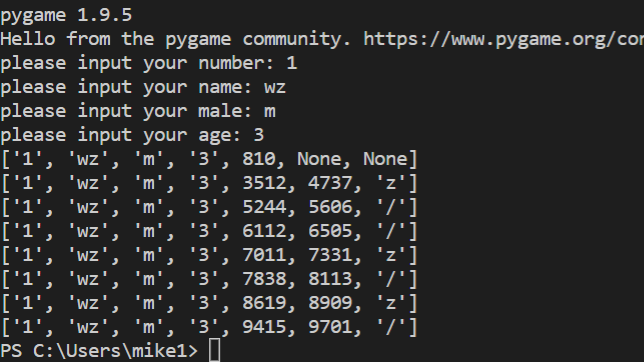
we also change the print result
what we need to pay attention is that:
we turn the result such as result1,result to a list and then compile them to a single list ,then print it
the simmon effect(in psychology) :build the function of subject_information(modify the experiment programme),before we begin the experiment的更多相关文章
- The `android.dexOptions.incremental` property is deprecated and it has no effect on the build process.
编译报错:The android.dexOptions.incremental property is deprecated and it has no effect on the build pro ...
- simon effect (psychology experiment ) : build the function of wait4key()
## #the real experiment for simon effect #load the library which is our need import pygame import sy ...
- simmon effect(psychology experiment) : this time, we add file_function who can creat a file in the window which contains our result
#the real experiment for simon effect #load the library which is our need import pygame import sys i ...
- simmon effect : build the funcion of trail list
#the real experiment for simon effect #load the library which is our need import pygame import sys i ...
- Android Studio升级到3.1.4后打开旧项目警告:The `android.dexOptions.incremental` property is deprecated and it has no effect on the build process.
现象截图 问题原因&解决方案 在build.gralde中,对Android开发过程中突破的方法数的限制,做了如下解决配置: dexOptions { incremental true jav ...
- fn project 打包Function
Option 1 (recommended): Use the fn cli tool We recommend using the fn cli tool which will handle a ...
- PostgreSQL function examples
warehouse_db=# CREATE TABLE warehouse_tbl(warehouse_id INTEGER NOT NULL,warehouse_name TEXT NOT NULL ...
- Mysql ERROR 1418 (HY000): This function has none of DETERMINISTIC, NO SQL, or READS SQL DATA
ERROR 1418 (HY000): This function has none of DETERMINISTIC, NO SQL, or READS SQL DATA in its declar ...
- verilog中的function用法与例子
函数的功能和任务的功能类似,但二者还存在很大的不同.在 Verilog HDL 语法中也存在函数的定义和调用. 1.函数的定义 函数通过关键词 function 和 endfunction 定义,不允 ...
随机推荐
- Go语言实现:【剑指offer】二叉树中和为某一值的路径
该题目来源于牛客网<剑指offer>专题. 输入一颗二叉树的跟节点和一个整数,打印出二叉树中结点值的和为输入整数的所有路径.路径定义为从树的根结点开始往下一直到叶结点所经过的结点形成一条路 ...
- javascript Math对象 常用数字操作方法
var t='1.2'; parseInt(t) parseFloat(t)//1.2 Number(1.2)//1.2强制转换为数字 2.向上取整,有小数就整数部分加1 js: Math.ceil( ...
- tomcat 多端口 多容器 多域名 配置
先强调一个原则: server下面可以有多个service,用于配置不同监听端口 service下面可以有多个Host,用于配置该端口下的不同域名 Host里可以包含多个Context,用于配置该端口 ...
- 编译安装php依赖软件libiconv-1.14报错及其解决办法
make && make install报如下错误: ./stdio.h:1010:1: 错误:‘gets’未声明(不在函数内) _GL_WARN_ON_USE (gets, &quo ...
- Android O 8.0 奥利奥
Android O 8.0 奥利奥 1.画中画, 2.智能文本选择(Smart Text Selection), 3.notification dots, 4.自动填写(Auto-Fill) 4. ...
- vue element 表头添加斜线
<template> <div class="app-container"> <el-table :data="tableData3&quo ...
- vue-cli项目传到服务器后打不开的问题
1.vue-cli项目执行dev可以打开网站,直接点击文件或发布后却打不开的问题 webpack.prod.conf.js: output: { ....... publicPath:'./' ...
- C#设计模式学习笔记:(12)代理模式
本笔记摘抄自:https://www.cnblogs.com/PatrickLiu/p/7814004.html,记录一下学习过程以备后续查用. 一.引言 今天我们要讲结构型设计模式的第七个模式,也是 ...
- ASP.NET Core MVC学习笔记
最近由于疫情紧张,遂在家办公,在领导的带领下,学习了一下.Net Core MVC. 一,构建web应用 1.选择c#-所有平台-web 找到ASP.NET Core web应用程序 2.项目命名之 ...
- ES6 - 基础学习(5): 数值扩展
二进制和八进制数值表示法 ES6提供了二进制和八进制数值的新写法,分别前缀 0b(或0B). 0o(或0O)然后跟上二进制.八进制值即可. 二进制(Binary)表示法新写法:前缀 0b 或 0B. ...