
simmon effect(psychology experiment) : this time, we add file_function who can creat a file in the window which contains our result
#the real experiment for simon effect

#load the library which is our need

import pygame

import sys

import random

from pygame.locals import *

#creat the subject information function

def sub_info():

    sub_ID = input("please input your number: ")

    sub_name = input("please input your name: ")

    sub_male = input("please input your male: ")

    sub_age = input("please input your age: ")

    return sub_ID, sub_name,sub_male,sub_age

#the variable result will be a tuple

result = sub_info()

#turn the tuple to a list

result = list(result)

pygame.init()

win = pygame.display.set_mode((800,600),DOUBLEBUF|HWSURFACE)

left = (200,300)

right = (600,300)

red  =(255,0,0)

blue = (0,0,255)

black = (0,0,0)

#wait for the pressed key

def wait4key(duration,key_list):

    """the function is to wait for subject to press the right key , and the experient will continue untill the\

subject press the key

duration : the time which is the subject wait to press the key ,if the time is too long ,the experiment will\

continue automaticly.

key_list: the key which the subject need to press to continue the experiment, and the key_list must \

be a list such as [K_A,K_/]"""

    fake_bool =False

    time_out = False

    #empty the event before

    pygame.event.clear()

    #use for count the time

    start_time = pygame.time.get_ticks()

    #if the subject does not press the right key, he will in the while loop all the time untill the duration is exhausted

    while  not (fake_bool or time_out):

        end_time = pygame.time.get_ticks()

        #if the duration is too long , the experiment will continue

        if end_time - start_time > duration:

            time_out = True

        #if subject press the right key ,the experimet will continue

        for i in pygame.event.get():

            if i.type ==KEYDOWN:

                if i.key in key_list:

                    #prepare for the result of the function

                    response_time = pygame.time.get_ticks()

                    key_name = pygame.key.name(i.key)

                    #if has the right key ,the loop will quit

                    fake_bool = True

    #in the end, if subject press the key ,we will collect the time , and the name of the key

    if fake_bool:

        return start_time, response_time, key_name

    #the purpose of the next line is stay the same with the result

    else:

        return start_time, None, None

#experiment for 10 times

#creat the list

#L mean left ,R mean right , RE mean the color red, BL mean the color blue

lis = [ ["L","RE","Z"],

        ["L","BL","/"],

        ["R","RE","Z"],

        ["R","BL","/"]]

#creat a function to ran one trial

#the list for store our result

lis2 = []

def one_trial_list(pars):

#the parameters must be a list which contains the location, color ,right response of the stimuli and the the sequence of the element of parameters should not change"""

    global left

    global right

    global red

    global blue

    global black

    global result

    loc,col,ress=pars

    if loc =="L":

        pos = left

    if loc =="R":

        pos = right

    if col =="BL":

        color = red

    if col == "RE":

        color = blue

    win.fill(black)

    pygame.draw.circle(win,color,pos,20,0)

    pygame.display.flip()

    result1 = wait4key(2000,[K_z,K_SLASH])

    #turn the result1 which is the result of the wait4key function to a list

    result1 = list(result1)

    #join two list and then give it to a new variable

    result2 = result + result1

    #turn the list to a string and add a space to the end

    #we need to turn the element of result2 to string type, because some element are int

    resul_map = map(str,result2)

    result2 = ",".join(resul_map) + "\n"

    print(result2)2

    return result2

#random our lis which contains four trails

lis1 = lis*2

random.shuffle(lis1)

#run four trials and write our  result to a new file

#open a file

with open("C:/Users/mike1/Desktop/simmon_result.txt","w",encoding = "utf-8") as f1:

    for i in lis1:

        result4 = one_trial_list(i)

        #write every result to the file

        f1.write(result4)

        #when one trail end ,fill the window black again

        win.fill(black)

        pygame.display.flip()

        pygame.time.delay(500)

    pygame.quit()

sys.exit()
the result
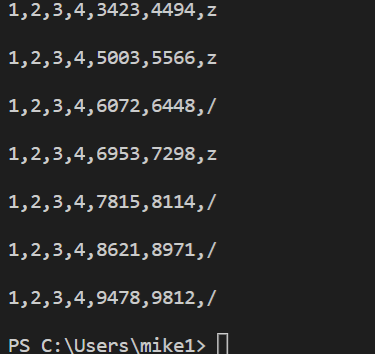
we also creat a file in the window

simmon effect(psychology experiment) : this time, we add file_function who can creat a file in the window which contains our result的更多相关文章
- simon effect (psychology experiment ) : build the function of wait4key()
## #the real experiment for simon effect #load the library which is our need import pygame import sy ...
- the simmon effect(in psychology) :build the function of subject_information(modify the experiment programme),before we begin the experiment
#the real experiment for simon effect #load the library which is our need import pygame import sys i ...
- simmon effect : build the funcion of trail list
#the real experiment for simon effect #load the library which is our need import pygame import sys i ...
- How can I add a new user as sudoer using the command line?
Two ways to use sudo command for a standard user account: First, If you want to use sudo command for ...
- FreeHttp (a fiddler add in to temper the http)
introduction FreeHttp is a Fiddler plugin. With FreeHttp you can modify the request or response mess ...
- 2 Add Two Numbers
// Java public ListNode addTwoNumbers(ListNode l1, ListNode l2) { return add(l1, l2, false); } priva ...
- How to add alias on Mac(It's common for most system)
Since these files are hidden you will have to do an ls -a to list them. If you don't have one you ca ...
- Your project is not referencing the ".NETPortable,Version=v4.5,Profile=Profile259" framework. Add a reference to ".NETPortable,Version=v4.5,Profile=Profile259" in the "frameworks" section of your proj
i want to add nuget packages to my portable class library project , then i add a project.json to my ...
- git add详解
git add . :他会监控工作区的状态树,使用它会把工作时的所有变化提交到暂存区,包括文件内容修改(modified)以及新文件(new),但不包括被删除的文件. git add -u :他仅监控 ...
随机推荐
- thinkphp远程执行漏洞的本地复现
thinkphp远程执行漏洞的本地复现 0X00漏洞简介 由于ThinkPHP5 框架控制器名 没有进行足够的安全监测,导致在没有开启强制路由的情况下,可以伪装特定的请求可以直接Getshell(可以 ...
- OSPFv3与OSPFv2协议的比较
From: http://blog.sina.com.cn/s/blog_61bd83dc0100la2u.html OSPFv3与OSPFv2协议的比较 OSPF是一种链路状态路由协议.它具有标 ...
- jquery + ajax 提交数据报错
报错 Forbidden (CSRF token missing or incorrect.): /account/test/ [20/Oct/2016 18:10:44] "POST /a ...
- HTML,Css,JavaScript之间的关系
简述HTML,Css,JavaScript 网页设计思路是把网页分成三个层次,即:结构层(HTML).表示层(CSS).行为层(Javascript). 1.HTML(超文本标记语言 Hyper Te ...
- macos常用命令备查
常用命令 open . : 命令行打开文件夹 文件编辑 ps: 从一般模式进编辑模式,只需按i.I.a.A.o.O.r和R中某个键即可.当进入编辑模式时,在屏幕尾部会显示INSERT或REPLACE字 ...
- 为什么你精通CRUD,却搞不懂数据库的基本原理?
原创声明 本文作者:黄小斜 转载请务必在文章开头注明出处和作者. 本文思维导图
- .NET代码混淆工具NET Reactor - 初学者系列-学习者系列文章
这几天无事,除了看书,然后就倒腾原来的代码.想起.NET的代码混淆工具软件,所以今天就讲讲这个.NET代码混淆工具. .NET代码混淆工具软件,以前有了解和找过,但是当时需求不大,所以找了下就搁置了. ...
- C语言三(2)
多重 if...else....else 结构 语法: if(条件1) { 语句1; } else if(条件2) { 语句2; } else if(条件3) { 语句3; } else { 语句N; ...
- HTML——label标签
最近在做将input[type="file"] 改变其样式时,发现label的巨大潜力,特此记录一下. 1, label标签的作用 (1)为input元素定义标注(标记) (2)不 ...
- JS中this的几种情况
1.给元素的某个事件行为绑定方法,事件触发,方法执行,此时方法中的this一般都是当前元素本身: <div id="div"></div> div.oncl ...