
simon effect (psychology experiment ) : build the function of wait4key()
##

#the real experiment for simon effect

#load the library which is our need

import pygame

import sys,random

from pygame.locals import *

pygame.init()

win = pygame.display.set_mode((800,600),DOUBLEBUF|HWSURFACE)

left = (200,300)

right = (600,300)

red  =(255,0,0)

blue = (0,0,255)

black = (0,0,0)

#wait for the pressed key

def wait4key(duration,key_list):

    """the function is to wait for subject to press the right key , and the experient will continue untill the\

subject press the key

duration : the time which is the subject wait to press the key ,if the time is too long ,the experiment will\

continue automaticly.

key_list: the key which the subject need to press to continue the experiment, and the key_list must \

be a list such as [K_A,K_/]"""

    fake_bool =False

    time_out = False

    #empty the event before

    pygame.event.clear()

    #use for count the time

    start_time = pygame.time.get_ticks()

    #if the subject does not press the right key, he will in the while loop all the time untill the duration is exhausted

    while  not (fake_bool or time_out):

        end_time = pygame.time.get_ticks()

        #if the duration is too long , the experiment will continue

        if end_time - start_time > duration:

            time_out = True

        #if subject press the right key ,the experimet will continue

        for i in pygame.event.get():

            if i.type ==KEYDOWN:

                if i.key in key_list:

                    #prepare for the result of the function

                    response_time = pygame.time.get_ticks()

                    key_name = pygame.key.name(i.key)

                    #if has the right key ,the loop will quit

                    fake_bool = True

    #in the end, if subject press the key ,we will collect the time , and the name of the key

    if fake_bool:

        return start_time, response_time, key_name

    #the purpose of the next line is stay the same with the result

    else:

        return start_time, None, None

#experiment for 10 times

for i in range(10):

    r1 = random.choice([0,1])

    if r1 == 0:

        pos = left

    else:

        pos = right

    r2 = random.choice([0,1])

    if r2 == 0:

        color = red

    else:

        color = blue

    win.fill(black)

    pygame.draw.circle(win,color,pos,20,0)

    pygame.display.flip()

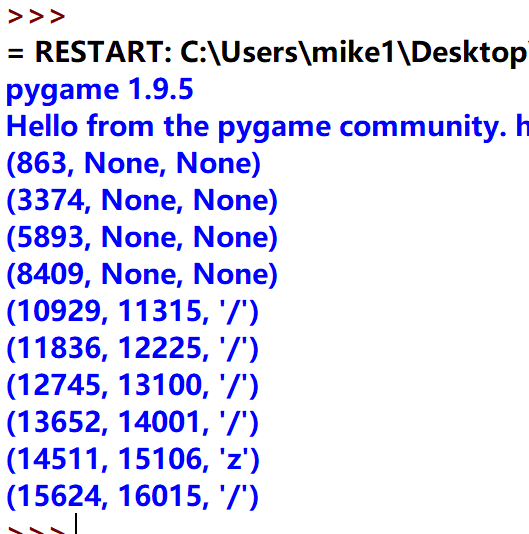
    result = wait4key(2000,[K_z,K_SLASH])

    print(result)

    #when subject press the key , we will black the window for 0.5 seconds until next stimuli appears

    win.fill(black)

    pygame.display.flip()

    pygame.time.delay(500)

the result include the stilmuli start time ,the suject response time , and the key subject pressed
simon effect (psychology experiment ) : build the function of wait4key()的更多相关文章
- simmon effect(psychology experiment) : this time, we add file_function who can creat a file in the window which contains our result
#the real experiment for simon effect #load the library which is our need import pygame import sys i ...
- the simmon effect(in psychology) :build the function of subject_information(modify the experiment programme),before we begin the experiment
#the real experiment for simon effect #load the library which is our need import pygame import sys i ...
- The `android.dexOptions.incremental` property is deprecated and it has no effect on the build process.
编译报错:The android.dexOptions.incremental property is deprecated and it has no effect on the build pro ...
- Android Studio升级到3.1.4后打开旧项目警告:The `android.dexOptions.incremental` property is deprecated and it has no effect on the build process.
现象截图 问题原因&解决方案 在build.gralde中,对Android开发过程中突破的方法数的限制,做了如下解决配置: dexOptions { incremental true jav ...
- simmon effect : build the funcion of trail list
#the real experiment for simon effect #load the library which is our need import pygame import sys i ...
- fn project 打包Function
Option 1 (recommended): Use the fn cli tool We recommend using the fn cli tool which will handle a ...
- cvpr2015papers
@http://www-cs-faculty.stanford.edu/people/karpathy/cvpr2015papers/ CVPR 2015 papers (in nicer forma ...
- jquery-jsrender使用
JsRender是一款基于jQuery的JavaScript模版引擎 特点: · 简单直观 · 功能强大 · 可扩展的 · 快如闪电 jsrender使用比较简单,本文简单结束一些常用的 使用过程 ...
- [转载] google mock cookbook
原文: https://code.google.com/p/googlemock/wiki/CookBook Creating Mock Classes Mocking Private or Prot ...
随机推荐
- Jdk14 都要出了,Jdk9 的新特性还不了解一下?
Java 9 中最大的亮点是 Java 平台模块化的引入,以及模块化 JDK.但是 Java 9 还有很多其他新功能,这篇文字会将重点介绍开发人员特别感兴趣的几种功能. 这篇文章也是 Java 新特性 ...
- java 自学简单框架(反射+注解)
1.先定义一个学生类 2.再定义一个teacher类(这个是为了练习多个注解,自己练习可以 不写这个) 3.再定义个一个学生老师类(这个是为了最终调用上面的那个学生类做准备) 4.下面开始真正的写框架 ...
- CentOS7重置密码
#在vmlinuz段最后添加rd.break Ctrl+X启动 rd.break #在linux16/linux/linuxefi所在参数行尾添加以下内容 init=/bin/sh #此时,可使用mo ...
- 一键安装php5.6.40脚本(LAMP环境)
#!/bin/bash #安装依赖软件 yum -y install libxml2-devel curl-devel libjpeg libjpeg-devel libpng libpng-deve ...
- 大数相加-----杭电acm1002
#include<stdio.h> #include<string.h> int main() { ], ch2[]; ], num2[]; ; scanf("%d& ...
- drf序列化大总结
目录 一.APIView的请求生命周期 二.序列化组件 视图类中使用序列化 Meta配置类中的配置 自定义校验规则 入库方法 自定义字段 如果有群改操作 重(难)点 三.视图家族 四.路由组件 五.权 ...
- log4j2 springboot 特点与使用方法
Apache Log4j2 is an upgrade to Log4j that provides significant improvements over its predecessor, Lo ...
- 配置nginx代理服务器访问tomcat服务
nginx原配置文件如下: #user nobody; worker_processes ; #error_log logs/error.log; #error_log logs/error.log ...
- vue-cli搭建vue项目(单页面应用)
1.全局安装vue-cli 2.创建项目: vue init webpack test test是项目名称,会在当前工作目录下新建一个test文件夹 接下来会手动选择一些配置 除了Setup unit ...
- Linux运维---1.磁盘相关知识
一 磁盘物理结构 (1) 盘片:硬盘的盘体由多个盘片叠在一起构成. 在硬盘出厂时,由硬盘生产商完成了低级格式化(物理格式化),作用是将空白的盘片(Platter)划分为一个个同圆心.不同半径的磁道(T ...