
Entity Framework Tutorial Basics(41):Multiple Diagrams
Multiple Diagrams in Entity Framework 5.0
Visual Studio 2012 provides a facility to split the design time visual representation of the Entity Data Model. This means that you can have multiple diagrams for one Entity Data Model.
You can create a new diagram in multiple ways:
- Add a new diagram and drag and drop entities from Model Browser
- Move entities from an existing diagram to a new diagram
1. Add a new diagram and drag and drop entities from Model Browser:
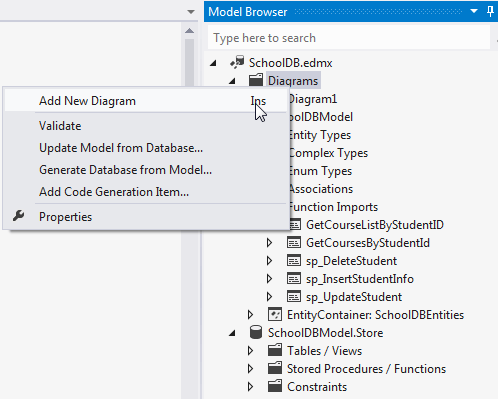
You can add a new diagram by right clicking on the Diagrams node of the model browser and selecting 'Add New Diagram':
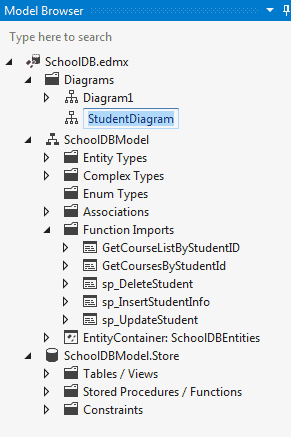
You can rename the diagram, for example: StudentDiagram to include all student related entities:
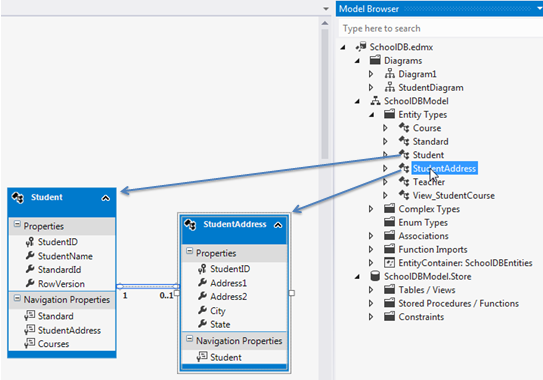
Now, you can drag and drop Student and StudentAddress entities to this new diagram:
2. Move entities from existing diagram to new diagram:
You can also move entities from an existing diagram to a new diagram. For example, if you want to move Teacher and Course entities to a new diagram, then select those entities in an existing diagram and right click and select 'Move to New Diagram' from the context menu:
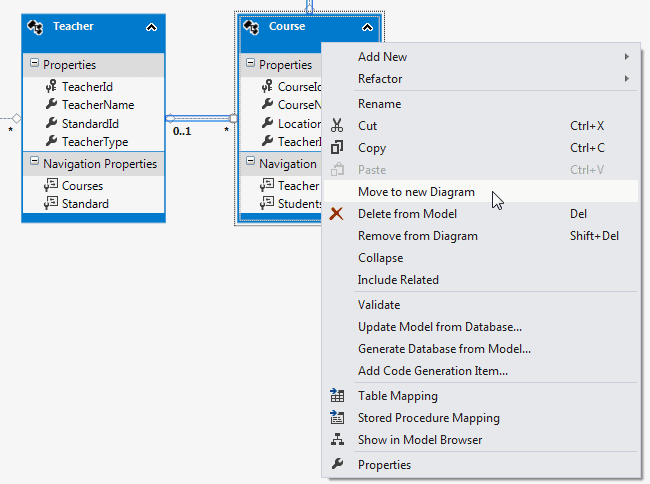
It will create a new diagram and move Teacher and Course entities to a new diagram as shown below:
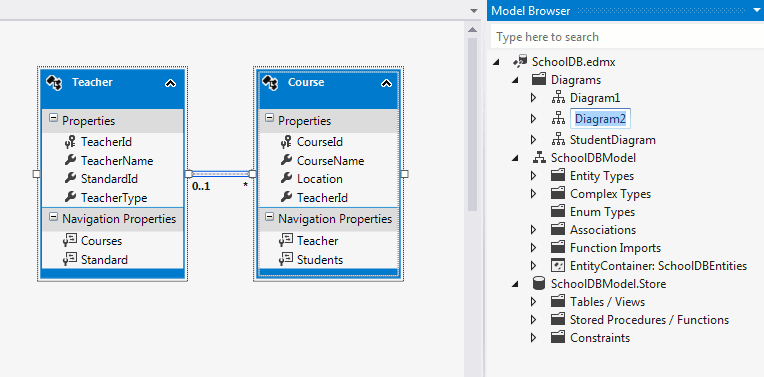
So, in this way you can create a new diagram from an existing diagram.
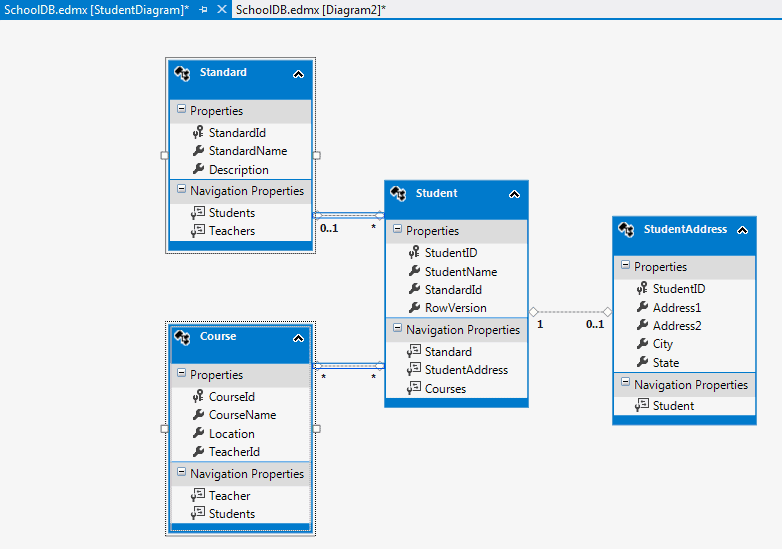
You can also include the related entities of a particular entity. For example, right click on Student entity → select 'Include Related'. Standard and Course entities will also be included, because Student has their reference property:
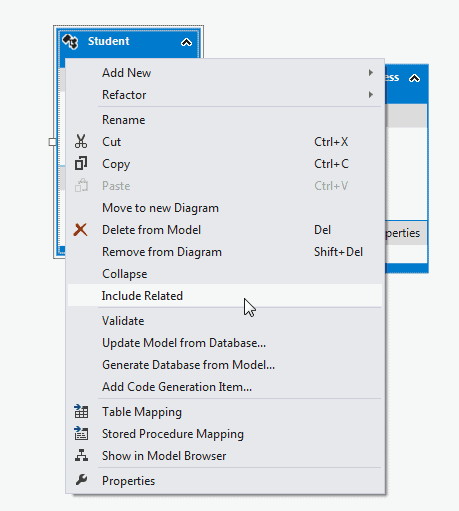
This will include Standard and Course entity as shown below.
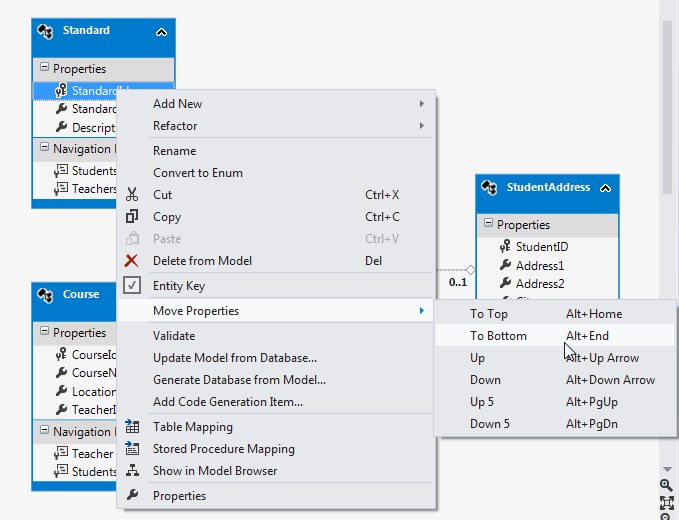
Additionally, you can also move properties up or down by right clicking on the property → select Move Property → select UP/Down etc. as shown below:
Difference between delete and remove entity:
You can remove the entity from the diagram by right clicking on entity and selecting 'Remove from diagram'.
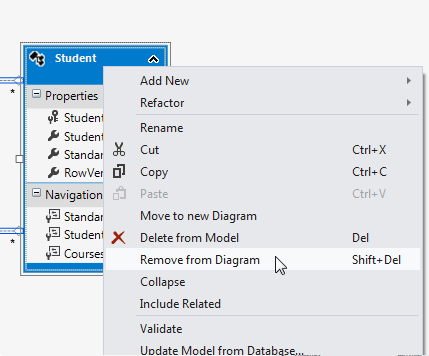
Remove from Diagram will only remove the entity from the diagram whereas 'Delete from Model' will delete the entity from the EDM. So you won't be able to use that entity at all.
Entity Framework Tutorial Basics(41):Multiple Diagrams的更多相关文章
- Entity Framework Tutorial Basics(1):Introduction
以下系列文章为Entity Framework Turial Basics系列 http://www.entityframeworktutorial.net/EntityFramework5/enti ...
- Entity Framework Tutorial Basics(4):Setup Entity Framework Environment
Setup Entity Framework Environment: Entity Framework 5.0 API was distributed in two places, in NuGet ...
- Entity Framework Tutorial Basics(43):Download Sample Project
Download Sample Project: Download sample project for basic Entity Framework tutorials. Sample projec ...
- Entity Framework Tutorial Basics(42):Colored Entity
Colored Entity in Entity Framework 5.0 You can change the color of an entity in the designer so that ...
- Entity Framework Tutorial Basics(37):Lazy Loading
Lazy Loading: One of the important functions of Entity Framework is lazy loading. Lazy loading means ...
- Entity Framework Tutorial Basics(36):Eager Loading
Eager Loading: Eager loading is the process whereby a query for one type of entity also loads relate ...
- Entity Framework Tutorial Basics(34):Table-Valued Function
Table-Valued Function in Entity Framework 5.0 Entity Framework 5.0 supports Table-valued functions o ...
- Entity Framework Tutorial Basics(33):Spatial Data type support in Entity Framework 5.0
Spatial Data type support in Entity Framework 5.0 MS SQL Server 2008 introduced two spatial data typ ...
- Entity Framework Tutorial Basics(32):Enum Support
Enum in Entity Framework: You can now have an Enum in Entity Framework 5.0 onwards. EF 5 should targ ...
随机推荐
- dubbox下载编译运行demo
最近公司要搞微服务改造,拿了一个小项目开刀,找来找去,还是偏向当当的dubbox作为分布式服务框架.这里介绍下怎么一条龙跑起一个demo. 1.下载代码 因为代码放在github上,所以我们直接用Ec ...
- Tomcat设置欢迎页问题
今天下载了tomat9,配置到eclipse后拉起来,想跑个欢迎页看看是否起好了,随手写了个index.jsp放到项目Struts2的WebContent根目录下,直接打开网页输入http://loc ...
- 浅谈FPGA的选型
工欲善其事必先利其器,开发FPGA的第一步,当然是选择一片符合设计需求的芯片. 器件特色 选片第一个关注的应该是FPGA器件的专用资源. 例如是否需要高速接口,如果需要的话,需要多少个通道,各个通道需 ...
- CAN总线扩展数据帧介绍
在扩展CAN 数据帧中,紧随SOF 位的是32 位的仲裁字段.仲裁字段的前11 位为29 位标识符的最高有效位(Most Significant bit,MSb)(基本lD) .紧随这11 位的是替代 ...
- php-fpm使用
/usr/local/php/sbin/php-fpm --help -c <path>|<file> Look for php.ini file in this direc ...
- 使用CMake生成sln项目和VS工程遇到的问题
用vs运行cmake后的工程 参考:http://zhidao.baidu.com/link?url=AZRxI0jGDzo6Pikk68qylee0g7leXbpbZGiVuyiijWbd8scUK ...
- 【转】Jmeter Http请求界面解释
一个HTTP请求有着许多的配置参数,下面将详细介绍: 名称:本属性用于标识一个取样器,建议使用一个有意义的名称. 注释:对于测试没有任何作用,仅用户记录用户可读的注释信息. 服务器名称或IP :HTT ...
- java代码做repeat次运算,从键盘输入几个数,比最值
总结:今天这个题目有点灵活,因为它不但要求输出结果,还要进行几次相同的输入,不退出循环 import java.util.Scanner; //从键盘一次输入更多的数,然后把每一次的数进行---可比较 ...
- 洛谷 P3302 [SDOI2013]森林 Lebal:主席树 + 启发式合并 + LCA
题目描述 小Z有一片森林,含有N个节点,每个节点上都有一个非负整数作为权值.初始的时候,森林中有M条边. 小Z希望执行T个操作,操作有两类: Q x y k查询点x到点y路径上所有的权值中,第k小的权 ...
- AngularJS:过滤器
ylbtech-AngularJS:过滤器 1.返回顶部 1. AngularJS 过滤器 过滤器可以使用一个管道字符(|)添加到表达式和指令中. AngularJS 过滤器 AngularJS 过滤 ...