
Entity Framework Tutorial Basics(42):Colored Entity
Colored Entity in Entity Framework 5.0
You can change the color of an entity in the designer so that it would be easy to see related groups of entities in the designer from Visual Studio 2012 onwards. To change the color of an entity, select entity in the designer → go to property window (press F4) → change the Fill Color property. For example:
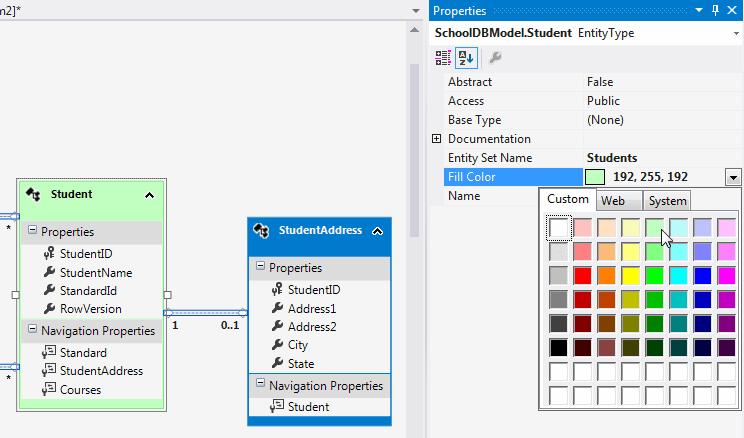
To change the color of multiple entities at once, select multiple entities and change Fill Color from the property window:
Additionally, you can also change the property format of entities to either Display name or Display name and type. Right click on designer → select 'Scalar Property format' → select 'Display Name and Type':

Properties will be displayed with its type as shown below:
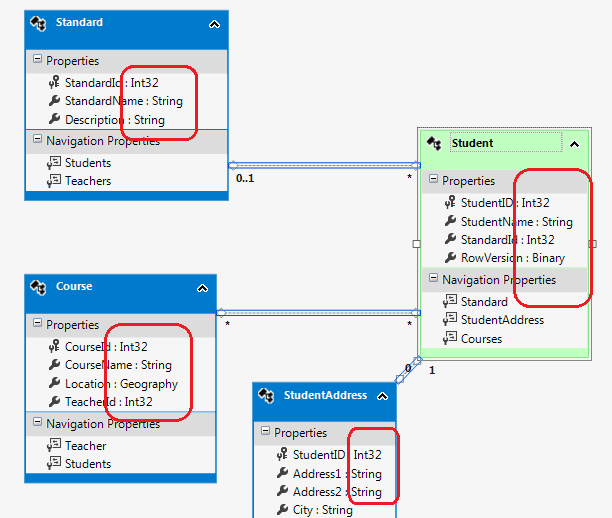
This way, you can change the color and display of entities in the EDM designer.
Entity Framework Tutorial Basics(42):Colored Entity的更多相关文章
- Entity Framework Tutorial Basics(4):Setup Entity Framework Environment
Setup Entity Framework Environment: Entity Framework 5.0 API was distributed in two places, in NuGet ...
- Entity Framework Tutorial Basics(27):Update Entity Graph
Update Entity Graph using DbContext: Updating an entity graph in disconnected scenario is a complex ...
- Entity Framework Tutorial Basics(5):Create Entity Data Model
Create Entity Data Model: Here, we are going to create an Entity Data Model (EDM) for SchoolDB datab ...
- Entity Framework Tutorial Basics(26):Add Entity Graph
Add Entity Graph using DbContext: Adding entity graph with all new entities is a simple task. We can ...
- Entity Framework Tutorial Basics(40):Validate Entity
Validate Entity You can write custom server side validation for any entity. To accomplish this, over ...
- Entity Framework Tutorial Basics(1):Introduction
以下系列文章为Entity Framework Turial Basics系列 http://www.entityframeworktutorial.net/EntityFramework5/enti ...
- Entity Framework Tutorial Basics(32):Enum Support
Enum in Entity Framework: You can now have an Enum in Entity Framework 5.0 onwards. EF 5 should targ ...
- Entity Framework Tutorial Basics(31):Migration from EF 4.X
Migration from Entity Framework 4.1/4.3 to Entity Framework 5.0/6.0 To migrate your existing Entity ...
- Entity Framework Tutorial Basics(20):Persistence in Entity Framework
Persistence in Entity Framework There are two scenarios when persisting an entity using EntityFramew ...
随机推荐
- [BZOJ5133][CodePlus2017年12月]白金元首与独舞
bzoj luogu 题意 给你一个\(n*m\)的网格,每个位置上有一个箭头指向上或下或左或右.有些位置上还没有箭头,现在要求你在这些没有箭头的位置上填入箭头,使得从网格的任意一个位置开始,都可以沿 ...
- timer用作timestamp及其他
niosii中使用时间戳是很有用的,可以查看代码的执行时间是多少,在使用timestamp的过程中遇到一些问题现在做一下记录. 1.硬件部分构建软核没什么,就加一个timer就行了,加完之后自动获得基 ...
- verilog中function的使用
函数的功能和任务的功能类似,但二者还存在很大的不同.在 Verilog HDL 语法中也存在函数的定义和调用. 1.函数的定义 函数通过关键词 function 和 endfunction 定义,不允 ...
- matlab的fda工具使用方法
MATLAB中用FDATool设计滤波器及使用 该文章讲述了MATLAB中用FDATool设计滤波器及使用. 1. 在Matlab中键入fdatool运行Filter Design and Analy ...
- LA2797 Monster Trap
题意 PDF 分析 可以考虑建图,跑迷宫. 然后以线段端点,原点,和无穷大点建图,有边的条件是两点连线和墙没有交点. 但是对两个线段的交点处理就会有问题,所以把线段延长.另外还需要判断延长后在墙上,舍 ...
- 9 闭包——《Swift3.0从入门到出家》
8 闭包 Swift语言中可以使用一块独立代码块替代函数的定义,称独立的代码块为闭包 闭包格式为: {(参数列表)->返回值类型 in 执行语句 } 例子: <1>使用闭包实 ...
- numpy之通用函数ufunc
通用函数-元素级数组函数 通用函数(ufunc)是一种对ndarray执行元素级运算的函数. 一元ufunc import numpy as np arr = np.arange(-10,10,2) ...
- 第15篇 PSR-04 规范
1. Overview This PSR describes a specification for autoloading classes from file paths. It is fully ...
- .Net 框架实现AOP(动态代理实现AOP,本文为翻译)
在上一节,我们将静态实现AOP,但是对于一个大型项目,要想为每个类,每个方法都去实现AOP ,进行日志记录和权限验证似乎是不可能的. 即使可能对于成百上千个类维护,也是很难维护.所以今天的主题就是如标 ...
- 三级联动第二种方法 三级联动数据.js
var data = { '0':{2:'北京',25:'天津',24:'上海',31:'重庆',130000:'河北省',140000:'山西省',150000:'内蒙古自治区',210000:'辽 ...