
使用 MVVM Toolkit Source Generators
关于 MVVM Toolkit
最近 .NET Community Toolkit 发布了 8.0.0 preview1,它包含了从 Windows Community Toolkit 迁移过来的以下组件:
CommunityToolkit.Common
CommunityToolkit.Mvvm
CommunityToolkit.Diagnostics
CommunityToolkit.HighPerformance
其中 CommunityToolkit.Mvvm 又名 MVVM Toolkit ,它是一个现代化、快速以及模块化的 MVVM 库。Nuget 安装脚本为:
Install-Package CommunityToolkit.Mvvm -Version 8.0.0-preview1
MVVM Toolkit source generators
Source Generators 是一项 C# 编译器功能,使 C# 开发人员能够在编译用户代码时进行检查,并动态生成新的 C# 源文件,以添加到用户的编译中。 通过这种方式,你的代码可以在编译过程中运行并检查你的程序以生成与其余代码一起编译的其他源文件。
新版本的 MVVM Toolkit 包含一个全新的 source generators,现在它是一个增量生成器,性能将会提升很多。这篇文章将简单介绍一下它的功能。
命令
在 MVVM 模式中,命令的写法让人有点烦恼。这是 MVVM Toolkit 中的通常写法:
private IRelayCommand _displayCommand;

IRelayCommand DisplayCommand => _displayCommand ??= new RelayCommand(new Action(Display), () => HasName);

private void Display()

{

}
首先,代码就不少。另外,_displayCommand 和 DisplayCommand、Display() 是写在一起好呢,还是按字段、属性、函数的排序分别放在代码里的不同位置呢?又或者索性用 Partial 类分别放在不同的文件?
用 source generators 就没这些烦恼了,命令的定义可以简化成这样:
[ICommand(CanExecute = nameof(HasName))]

private void Display()

{

}
通过添加 ICommandAttribute,source generators 可以根据 Display() 这个函数名正确地生成 DisplayCommand 及对应的初始化代码。此外,还可以通过它的 CanExecute 属性指定将 ICommand 的 CanExecute 关联到对应的属性。
属性
属性也有和命令一样的烦恼,通常来说 MVVM 模式中的属性的写法如下:
private string name;

public string Name

{

    get => name;

    set => SetProperty(ref name, value);

}
其实还好,不会太多。但如果是这样呢:
 private string _surname;

 public string Surname

 {

     get

     {

         return _surname;

     }

     set

     {

         if (!EqualityComparer<string>.Default.Equals(_surnam

         {

             _surname = value;

             OnPropertyChanged();

             OnPropertyChanged(nameof(FullName));

             OnPropertyChanged(nameof(HasName));

             DisplayCommand.NotifyCanExecuteChanged();

         }

     }

 }

 public string FullName => $"{Name} {Surname}";

 public bool HasName => !string.IsNullOrWhiteSpace(FullName);
这时候 source generators 的作用就可以很明显,因为它只需要下面的代码就可以自动产生与上面等价的代码:
[ObservableProperty]

[AlsoNotifyChangeFor(nameof(FullName), nameof(HasName))]

[AlsoNotifyCanExecuteFor(nameof(DisplayCommand))]

private string _surname;

public string FullName => $"{Name} {Surname}";

public bool HasName => !string.IsNullOrWhiteSpace(FullName);
从这段代码可以看到有三个 Attribute 起了作用:
ObservableProperty:自动为 _name 属性生成对应的属性。
AlsoNotifyChangeFor:属性值修改时同时触发 FullName 和 HasName 这两个属性的 PropertyChanged 事件。
AlsoNotifyCanExecuteFor:属性值修改时同时通知 DisplayCommand 执行它的 NotifyCanExecuteChanged()。
注入到现有类
一般来说,MVVM Toolkit source generators 需要在 ObservableObject 的派生类中使用,例如:
public partial class TestModel: ObservableObject
但如果你的类已经继承了其它类,MVVM Toolk source generators 也允许你使用它的功能,方法是添加上 INotifyPropertyChangedAttribute,代码如下:
[INotifyPropertyChanged]

public partial class TestModel: Behaviour
INotifyPropertyChangedAttribute 会自动生成实现 INotifyPropertyChanged 的代码,而无需更改基类。不过遗憾的是,INotifyPropertyChangedAttribute 目前只能在未实现 INotifyPropertyChanged 接口的类中使用,即下面这种代码不能编译通过:
[INotifyPropertyChanged]

public partial class TestModel: ObservableObject
成果
使用了 source generators 可以大幅减少代码,下面这图直观展示了减少的代码量。
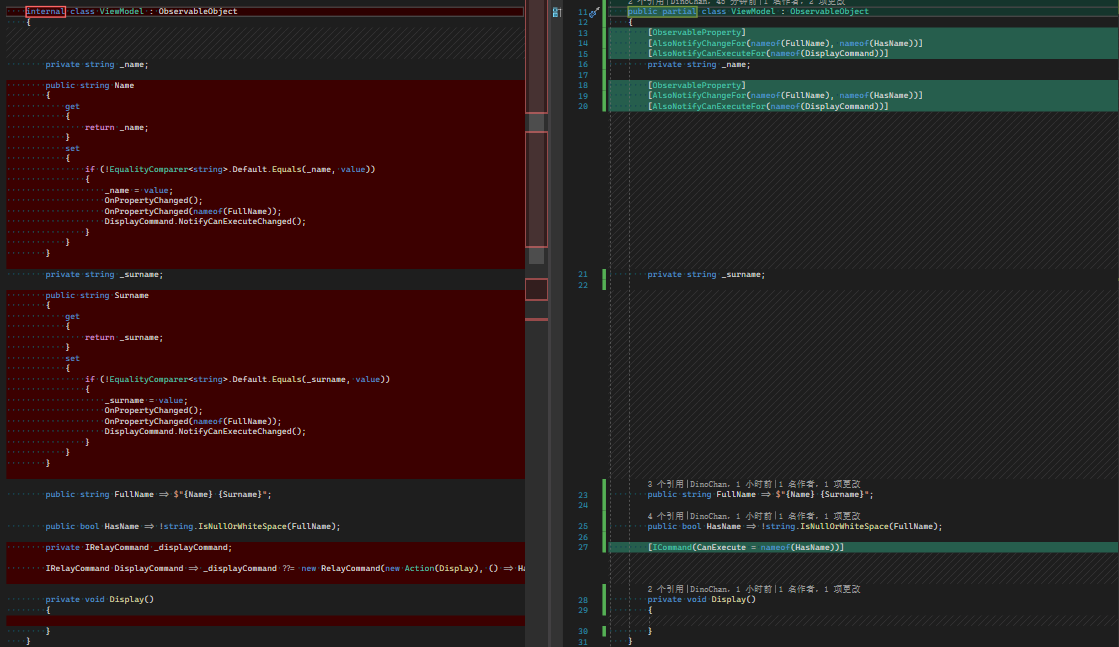
如果需要查看自动生成的代码,可以在分析器的 CommunityToolkit.Mvvm.SourceGenerators 节点里找到:

一些小问题
MVVM Toolkit source generators 可以重构你的代码,但代价是什么?
首先,部分功能需要 C# 8.0 以上,所以编译时可能会看到这条错误:
The source generator features from the MVVM Toolkit require consuming projects to set the C# language version to at least C# 8.0
解决方法是在项目文件的 PropertyGroup 节点里添加这段指明 C# 的版本:
<LangVersion>9.0</LangVersion>
另外,MVVM Toolkit source generators 还需要 Visual Studio 2022 才可以使用。
还有一点,我还没找到为生成的属性添加注释的方法,这对一些难以理解的属性来说十分致命,只好用回传统方法来处理这种属性。
最后,没有 CodeLens,没法直观看到属性的引用、修改等信息,用起来不是很顺手。
最后
从上面的例子来看,无论从代码量、可维护性、可阅读性来看,source generators 都有巨大的优势,但在现阶段,MVVM Toolkit source generators 用起来还是有不少小问题,不能完全代替原生写法。不过这是个很符合 80/20 原则的工具:它可以让用户用 20% 的投入解决了 80% 的问题。
其它更多的内容,请参考 Github 或其它文档:
https://github.com/CommunityToolkit/dotnet
https://github.com/CommunityToolkit/dotnet/releases/tag/v8.0.0-preview1
https://docs.microsoft.com/zh-cn/windows/communitytoolkit/mvvm/introduction
使用 MVVM Toolkit Source Generators的更多相关文章
- 基于 Source Generators 做个 AOP 静态编织小实验
0. 前言 上接:用 Roslyn 做个 JIT 的 AOP 作为第二篇,我们基于Source Generators做个AOP静态编织小实验. 内容安排如下: source generators 是什 ...
- .NET初探源代码生成(Source Generators)
前言 Source Generators顾名思义代码生成器,可进行创建编译时代码,也就是所谓的编译时元编程,这可让一些运行时映射的代码改为编译时,同样也加快了速度,我们可避免那种昂贵的开销,这是有价值 ...
- [WPF] 使用 MVVM Toolkit 构建 MVVM 程序
1. 什么是 MVVM Toolkit 模型-视图-视图模型 (MVVM) 是用于解耦 UI 代码和非 UI 代码的 UI 体系结构设计模式. 借助 MVVM,可以在 XAML 中以声明方式定义 UI ...
- A Complete List of .NET Open Source Developer Projects
http://scottge.net/2015/07/08/a-complete-list-of-net-open-source-developer-projects/?utm_source=tuic ...
- WPF MVVM使用prism4.1搭建
WPF MVVM使用prism4.1搭建 MVVM即Model-View-ViewModel,MVVM模式与MVP(Model-View-Presenter)模式相似,主要目的是分离视图(View)和 ...
- Windows Community Toolkit 4.0 - DataGrid - Part03
概述 在上面一篇 Windows Community Toolkit 4.0 - DataGrid - Part02 中,我们针对 DataGrid 控件的 Utilities 部分做了详细分享.而在 ...
- Windows Community Toolkit 4.0 - DataGrid - Part02
概述 在上面一篇 Windows Community Toolkit 4.0 - DataGrid - Part01 中,我们针对 DataGrid 控件的 CollectionView 部分做了详细 ...
- Windows Community Toolkit 4.0 - DataGrid - Part01
概述 在上面一篇 Windows Community Toolkit 4.0 - DataGrid - Overview 中,我们对 DataGrid 控件做了一个概览的介绍,今天开始我们会做进一步的 ...
- Windows Community Toolkit 4.0 - DataGrid - Overview
概述 Windows Community Toolkit 4.0 于 2018 月 8 月初发布:Windows Community Toolkit 4.0 Release Note. 4.0 版本相 ...
随机推荐
- 【LeetCode】701. Insert into a Binary Search Tree 解题报告(Python & C++)
作者: 负雪明烛 id: fuxuemingzhu 个人博客: http://fuxuemingzhu.cn/ 目录 题目描述 题目大意 解题方法 日期 题目地址:https://leetcode.c ...
- Discrete Logging(poj2417)
Discrete Logging Time Limit: 5000MS Memory Limit: 65536K Total Submissions: 5120 Accepted: 2319 ...
- 1137 - Expanding Rods
1137 - Expanding Rods PDF (English) Statistics Forum Time Limit: 0.5 second(s) Memory Limit: 32 M ...
- 汇编MMX实现图片淡入淡出核心代码
计算机组成课程个人作业 参考: https://blog.csdn.net/yangjianqiao0/article/details/69388595 https://blog.csdn.net/d ...
- 看完这篇 Linux 权限后,通透了!
我们在使用 Linux 的过程中,或多或少都会遇到一些关于使用者和群组的问题,比如最常见的你想要在某个路径下执行某个指令,会经常出现这个错误提示 . permission denied 反正我大概率见 ...
- [opencv]二维码识别开发流程及问题复盘总结
项目复盘总结 开发需求: 在桌面机器人(向下俯视)摄像头拍摄到的图像中做条形码识别与二维码识别. 条形码在图像固定位置,二维码做成卡片的形式在固定区域内随意摆放. 开发环境及相关库:ubuntu 18 ...
- CSS基础 装饰 元素本身隐藏和显示效果及案例
1.visibility:hidden; 2.display: none: 区别: 1.visibility:hidden 隐藏元素本身,且在网页中 占位置 2.display:none; 隐藏元素本 ...
- JSch Algorithm negotiation fail
https://stackoverflow.com/questions/30846076/jsch-algorithm-negotiation-fail As you can see, the ser ...
- vue3.0+vite项目搭建
npm init vite-app <project-name> cd <project-name> 根据控制台的提示执行: npm install / yarn npm ru ...
- Educational Codeforces Round 117 (Rated for Div. 2)
Educational Codeforces Round 117 (Rated for Div. 2) A. Distance https://codeforces.com/contest/1612/ ...