
yb课堂 视频详情页模块开发《三十八》
CourseDetail基础模块开发
CourseDetail模块开发,拆分组件
- CourseDetail.vue
- Header.vue
- Course.vue
- Tab.vue
- Summary.vue
- Calalog
创建文件夹
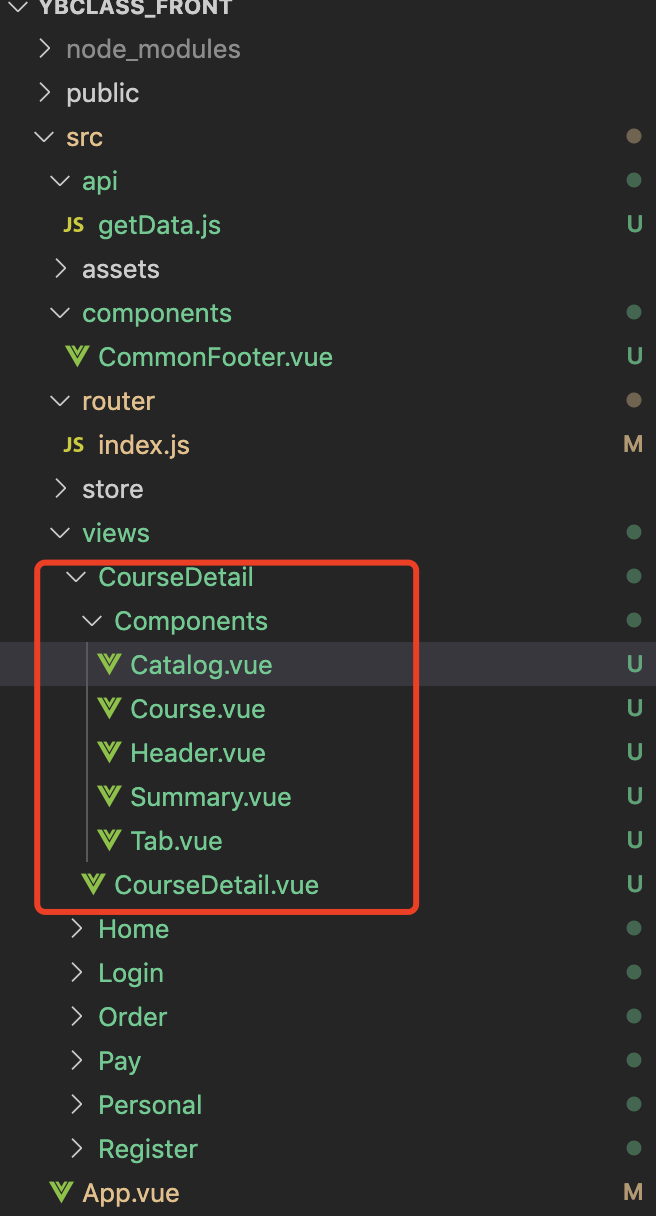
CourseDetail开发
<template>

  <div>

    <!--视频顶部组件-->

    <detail-header :videoInfo="videoInfo"></detail-header>

    <!-- 视频详情组件 -->

    <detail-course :videoInfo="videoInfo"></detail-course>

    <!--视频tab简介组件-->

    <detail-tab :videoInfo="videoInfo" :chapterList="chapterList"></detail-tab>

    <!--底部立即购买-->

    <footer>

      <router-link :to="{path:'/pay',query:{video_id:this.$route.query.video_id}}" class="user_buy">

        <button>立刻购买</button>

      </router-link>

    </footer>

  </div>

</template>

<script>

//引入组件

import DetailHeader from "./Components/Header";

import DetailCourse from "./Components/Course";

import DetailTab from "./Components/Tab";

import { getVideoDetail } from "@/api/getData.js";

export default {

  //注册组件

  components: {

    DetailHeader,

    DetailCourse,

    DetailTab

  },

  data() {

    return {

      //视频信息

      videoInfo: {},

      chapterList: []

    };

  },

  methods: {

    //获取视频详情

    async getDetail(vid) {

      try {

        const result = await getVideoDetail(vid);

        if (result.data.code == 0) {

          this.videoInfo = result.data.data;

          this.chapterList = result.data.data.chapter_list;

        }

      } catch (error) {

        console.log(error);

      }

    }

  },

  mounted() {

    //渲染之后拿到数据

    this.getDetail(this.$route.query.video_id);

    console.log(this.$route.query.video_id);

  }

};

</script>

<style lang="scss" scoped>

//底部

footer {

  // fixed固定在底部

  position: fixed;

  bottom: 0;

  width: 100%;

  padding: 8px 0;

  background-color: #fff;

  z-index: 999;

  box-shadow: 0 -2px 4px 0 rgba(0, 0, 0, 0.05);

}

//设置购买按钮样式

button {

  display: block;

  color: #fff;

  margin: 0 auto;

  background-color: #d93f30;

  height: 34px;

  line-height: 34px;

  border-radius: 17px;

  width: 80%;

  border: none;

  font-size: 15px;

  text-align: center;

}

</style>
Header开发
<template>

  <div>

    <header>

      <div class="header">

          <span @click="$router.back(-1)"><i class="cubeic-back"/></span>

          <div class="title">

              {{videoInfo.title}}

          </div>

      </div>

    </header>

  </div>

</template>

<script>

export default {

  props: {

    videoInfo: {

      type: Object,

      required: true

    }

  }

};

</script>

<style lang="scss" scoped>

.header {

  display: flex; //flex左右布局

  background-color: #07111b;

  padding: 10px 20px;

  color: #fff;

}

// 返回箭头

.cubeic-back {

  color: #fff;

  margin-right: 5px;

}

//视频标题

.title {

  font-size: 16px;

  width: 80%;

  //超出省略

  text-overflow: ellipsis;

  overflow: hidden;

  white-space: nowrap;

}

</style>
Summary开发
<template>

  <div>

    <img class="summary" :src="videoInfo.summary" />

  </div>

</template>

<script>

export default {

  props: {

    videoInfo: {

      type: Object,

      required: true

    }

  }

};

</script>

<style lang="scss" scoped>

.summary {

  width: 100%;

  padding-bottom: 50px;

  margin: 15px 0;

}

</style>
Course开发
<template>

  <div class="c_wapper">

      <div class="course">

          <div class="l_img">

              <img :src="videoInfo.cover_img" :title="videoInfo.title"/>

          </div>

          <div class="r_txt">

              <div class="txt">

                  <span>综合评分:</span>

                  <p>{{videoInfo.point}}</p>

              </div>

              <div class="txt">

                  <span>价格:</span>

                  <p>¥{{videoInfo.price/100}}</p>

              </div>

          </div>

      </div>

  </div>

</template>

<script>

export default {

  //从父组件传值

  props: {

    videoInfo: {

      type: Object,

      required: true

    }

  }

};

</script>

<style lang="scss" scoped>

//包裹层

.c_wrapper {

  padding: 0 14px;

}

//视频信息包裹层

.course {

  margin: 14px 0;

  display: flex; //设置flex,左右布局

}

//视频左边图⽚层

.l_img {

  height: 88px;

  margin-right: 14px;

  & img {

    height: 100%;

    border-radius: 15px;

  }

}

// 视频右边⽂字包裹层

.r_txt {

  padding: 6px 0;

  font-size: 12px;

  flex: 1; //设置1可⾃动伸缩占⽤剩余空间

}

//每⾏⽂字层(综合评分、价格)

.txt {

  // 设置flex让⽂字两端对⻬

  display: flex;

  justify-content: space-between;

  line-height: 16px;

  & p {

    text-align: center;

    width: 40%;

    color: #3bb149;

  }

  & i {

    color: #666;

    font-weight: bolder;

    width: 60%;

    & span {

      color: #2b333b;

      font-size: 12px;

    }

  }

}

</style>
tab动态组件开发
不同组件之间的动态切换:https://cn.vuejs.org/v2/guide/components-dynamic-async.html
组件的过渡:https://cn.vuejs.org/v2/guide/transitions.html#ad
Tab开发
<template>

  <div>

      <cube-tab-bar v-model="selectedLabel" show-slider>

          <cube-tab v-for="item in tabs" :label="item.label" :key="item.label">

          </cube-tab>

      </cube-tab-bar>

      <component :videoInfo="videoInfo" :chapterList="chapterList" :is='selectedLabel==="简介"?"Summary":"Catalog"'>

      </component>

  </div>

</template>

<script>

import Summary from "./Summary";

import Catalog from "./Catalog";

export default {

  components: {

    Summary,

    Catalog

  },

  props: {

    videoInfo: {

      type: Object,

      required: true

    },

    chapterList: {

      type: Array,

      required: true

    }

  },

  data() {

    return {

      selectedLabel: "简介",

      tabs: [

        {

          label: "简介"

        },

        {

          label: "目录"

        }

      ]

    };

  }

};

</script>
Catalog开发
<template>
<div class="cate_box">
<div>
<ul class="content" v-for="(item,index) in chapterList" :key="item.id">
<h1>第{{index+1}}章 {{item.title}}</h1>
<li class="sub_cate" v-for="(subitem,subindex) in chapterList[index].episode_List" :key="subitem.id">
<span class="sub_title">{{index+1}}-{{subindex+1}} {{subitem.title}}</span>
</li>
</ul>
</div>
</div>
</template>
<script>
export default {
props: {
chapterList: {
type: Array,
required: true
}
}
};
</script>
<style lang="scss" scoped>
// ⽬录包裹层设置边距
.cate_box {
padding: 0 15px 50px;
background-color: #fff;
margin: 15px 0;
}
//每⼀章包裹层
.content {
padding: 10px;
// 章标题
& h1 {
font-size: 16px;
width: 100%;
margin-bottom: 15px;
font-weight: bolder;
// 设置章标题过⻓,超过⾏宽度省略隐藏
text-overflow: ellipsis;
overflow: hidden;
white-space: nowrap;
}
}
//集包裹层
.sub_cate {
font-size: 12px;
padding: 10px 0;
//集标题
.sub_title {
// 设置集标题过⻓,超过⾏宽度省略隐藏
display: block;
text-overflow: ellipsis;
overflow: hidden;
white-space: nowrap;
}
}
</style>
yb课堂 视频详情页模块开发《三十八》的更多相关文章
- NeHe OpenGL教程 第三十八课:资源文件
转自[翻译]NeHe OpenGL 教程 前言 声明,此 NeHe OpenGL教程系列文章由51博客yarin翻译(2010-08-19),本博客为转载并稍加整理与修改.对NeHe的OpenGL管线 ...
- Java进阶(三十八)快速排序
Java进阶(三十八)快速排序 前言 有没有既不浪费空间又可以快一点的排序算法呢?那就是"快速排序"啦!光听这个名字是不是就觉得很高端呢. 假设我们现在对"6 1 2 7 ...
- 《手把手教你》系列技巧篇(三十八)-java+ selenium自动化测试-日历时间控件-下篇(详解教程)
1.简介 理想很丰满现实很骨感,在应用selenium实现web自动化时,经常会遇到处理日期控件点击问题,手工很简单,可以一个个点击日期控件选择需要的日期,但自动化执行过程中,完全复制手工这样的操作就 ...
- SQL注入之Sqli-labs系列第三十八关、第三十九关,第四十关(堆叠注入)
0x1 堆叠注入讲解 (1)前言 国内有的称为堆查询注入,也有称之为堆叠注入.个人认为称之为堆叠注入更为准确.堆叠注入为攻击者提供了很多的攻击手段,通过添加一个新 的查询或者终止查询,可以达到修改数据 ...
- 微信小程序把玩(三十八)获取设备信息 API
原文:微信小程序把玩(三十八)获取设备信息 API 获取设备信息这里分为四种, 主要属性: 网络信息wx.getNetWorkType, 系统信息wx.getSystemInfo, 重力感应数据wx. ...
- 【FastDev4Android框架开发】打造QQ6.X最新版本号側滑界面效果(三十八)
转载请标明出处: http://blog.csdn.net/developer_jiangqq/article/details/50253925 本文出自:[江清清的博客] (一).前言: [好消息] ...
- Deep learning:三十八(Stacked CNN简单介绍)
http://www.cnblogs.com/tornadomeet/archive/2013/05/05/3061457.html 前言: 本节主要是来简单介绍下stacked CNN(深度卷积网络 ...
- Android UI开发第二十八篇——Fragment中使用左右滑动菜单
Fragment实现了Android UI的分片管理,尤其在平板开发中,好处多多.这一篇将借助Android UI开发第二十六篇——Fragment间的通信. Android UI开发第二十七篇——实 ...
- bp(net core)+easyui+efcore实现仓储管理系统——入库管理之二(三十八)
abp(net core)+easyui+efcore实现仓储管理系统目录 abp(net core)+easyui+efcore实现仓储管理系统——ABP总体介绍(一) abp(net core)+ ...
- android音视频点/直播模块开发
音视频 版权声明:本文为博主原创文章,未经博主允许不得转载. 前言 随着音视频领域的火热,在很多领域(教育,游戏,娱乐,体育,跑步,餐饮,音乐等)尝试做音视频直播/点播功能,那么作为开发一个小白, ...
随机推荐
- .NET6 Minimal API 集成Autofac
前提 集成Autofac前需要先添加两个依赖包 可以通过 NuGet 进行安装,使用以下命令: dotnet add package Autofac dotnet add package Autofa ...
- uniapp 微信支付,小程序支付,支付宝支付问题汇总
背景介绍 uni-app 可以转微信小程序或直接打包 APP ,支付模块使用统一方法 uni.requestPayment 但是不同平台参数不同容易出现混淆错乱. 相关网站 uni-app 统一支付: ...
- 上位机开发福利!快速掌握.NET中的Modbus通信
安装nuget包 Wesky.Net.OpenTools 1.0.8或以上版本.支持.net framework 4.6以上版本,以及所有.net core以及以上版本引用. 开发一个简单的Winf ...
- C# Linq、Lambda表达式树动态构建、合并条件扩展方法
前言 日常开发时,使用Linq和EF经常会在存在多条件查询,或者说动态条件查询时,便存在合并表达式树的情况.基于这种情况结合一些资料,写了个扩展类,代码如下: 代码实现 /// <summary ...
- vue绑定对象,绑定的值不改变的问题
在使用vue结合elmentui的table组件,对数组绑定,需要编辑数组里一些属性的值.我的情况是,需要在打开这个表时,根据条件插入一些对象到table里,经测试,到这里是没问题的,可以显示新插入的 ...
- 一文搞懂 MySQL 日志
前言 MySQL 的日志记录了运行的各种信息,是 MySQL 事务.性能.数据容灾.异常排查等的基础.本文将介绍 MySQL 一些关键日志的作用和原理. MySQL InnoDB 引擎重要的三个日志: ...
- iOS 处理HLS视频流
一.HLS介绍 HLS是苹果主导的音视频传输协议,其主要的格式是一个索引文件(M3U8)+ ts分片的视频文件. HLS的优势是iOS系统天然支持,通过Http 80传输,规避了常规的防火墙问题. 视 ...
- 中国十大IT技术社区,你都知道哪些?
中国5大新型IT技术社区与5大传统IT技术社区,你都知道哪些? 社区是聚集一类具有相同爱好或者相同行业的群体,IT技术社区就是聚集了IT行业内的技术人,在技术社区可以了解到行业的最新进展,学习最前沿的 ...
- uview 滑动切换
```html <template> <view class="content"> <!-- <u-row justify="spac ...
- Python3基本语法(新)
目录 基本语法 输出print() 格式化输出 标识符 import关键字 保留字(关键字) 注释 多行注释 1.单引号(''') 2.双引号(""") 缩进 空行 同一 ...