
Direct2D 第2篇 绘制椭圆
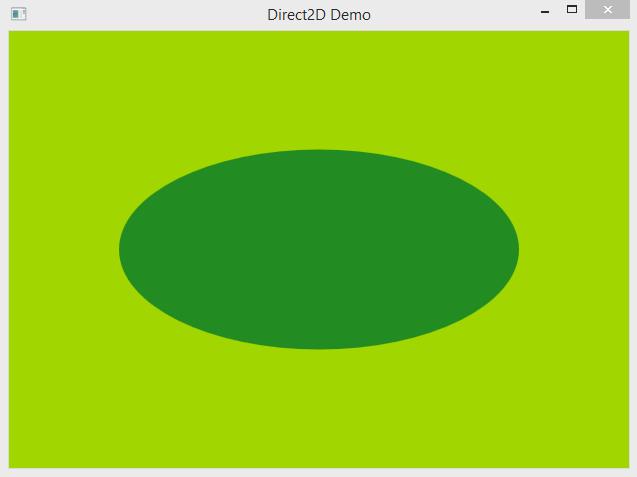
#include <windows.h>

#include <d2d1.h>

#include <d2d1helper.h>

#include <dwrite.h>

#pragma comment(lib, "dwrite.lib")

#pragma comment(lib, "d2d1.lib")

HINSTANCE g_hinst;

HWND g_hwnd;

ID2D1Factory * g_factory;

ID2D1HwndRenderTarget * g_render_target;

ID2D1SolidColorBrush  * g_brush;

void OnSize(LPARAM lparam)

{

	if(g_render_target)

		g_render_target->Resize(D2D1::SizeU(LOWORD(lparam),HIWORD(lparam)));

}

bool AppInit()

{

	D2D1CreateFactory(D2D1_FACTORY_TYPE_SINGLE_THREADED, &g_factory);

	RECT rc;

	GetClientRect(g_hwnd, &rc);

	g_factory->CreateHwndRenderTarget(

		D2D1::RenderTargetProperties(),

		D2D1::HwndRenderTargetProperties(g_hwnd, D2D1::SizeU(rc.right - rc.left, rc.bottom - rc.top)	),

		&g_render_target);

	g_render_target->CreateSolidColorBrush(D2D1::ColorF(D2D1::ColorF::ForestGreen), &g_brush);

	return true;

}

void OnPaint()

{

	if(!g_render_target)

		return;

	g_render_target->BeginDraw();

	// Clear Background

	g_render_target->Clear(D2D1::ColorF(0.63, 0.84, 0.00));

	// Draw Ellipse

	D2D1_SIZE_F size = g_render_target->GetSize();

	D2D1_ELLIPSE ellipse;

	ellipse.point = D2D1::Point2F(size.width/2.0, size.height/2.0);

	ellipse.radiusX = 200;

	ellipse.radiusY =100;

	g_render_target->FillEllipse(&ellipse, g_brush);//绘制图形

	g_render_target->EndDraw();

}

void OnDestroy()

{

	g_brush->Release();

	g_render_target->Release();

	g_factory->Release();

}

LRESULT CALLBACK WndProc(HWND hwnd, UINT msg, WPARAM wparam, LPARAM lparam)

{

	switch(msg)

	{

	case WM_PAINT:

		OnPaint();

		break;

	case WM_SIZE:

		OnSize(lparam);

		break;

	case WM_DESTROY:

		OnDestroy();

		PostQuitMessage(0);

		break;

	default:

		return DefWindowProc(hwnd, msg, wparam, lparam);

	}

	return 0;

}

int WINAPI WinMain(HINSTANCE hinst, HINSTANCE hPrevInstance, LPSTR lpCmdLine, int nCmdShow)

{

	WNDCLASSEX wc;

	MSG msg;

	memset(&wc,0,sizeof(wc));

	wc.cbSize = sizeof(WNDCLASSEX);

	wc.lpfnWndProc = WndProc;

	wc.hInstance = hinst;

	wc.hCursor = LoadCursor(NULL, IDC_ARROW);

	wc.hbrBackground = (HBRUSH)(COLOR_WINDOW+1);

	wc.lpszClassName = "WindowClass";

	wc.hIcon = LoadIcon(NULL, IDI_APPLICATION);

	wc.hIconSm = LoadIcon(NULL, IDI_APPLICATION);

	if(!RegisterClassEx(&wc))

	{

		MessageBox(NULL, "Window Registration Failed!","Error!",MB_ICONEXCLAMATION|MB_OK);

		return 0;

	}

	g_hinst = hinst;

	g_hwnd = CreateWindowEx(WS_EX_CLIENTEDGE,"WindowClass","Direct2D Demo",WS_VISIBLE|WS_OVERLAPPEDWINDOW,

		CW_USEDEFAULT,

		CW_USEDEFAULT,

		640,

		480,

		NULL, NULL, hinst, NULL);

	if(g_hwnd == NULL)

	{

		MessageBox(NULL, "Window Creation Failed!","Error!",MB_ICONEXCLAMATION|MB_OK);

		return 0;

	}

	if(!AppInit())

	{

		MessageBox(NULL, "Application Initialisation Failed !","Error",MB_ICONEXCLAMATION|MB_OK);

		return 0;

	}

	while(GetMessage(&msg, NULL, 0, 0) > 0)

	{

		TranslateMessage(&msg);

		DispatchMessage(&msg);

	}

	return msg.wParam;

}
Direct2D 第2篇 绘制椭圆的更多相关文章
- Direct2D 第6篇 绘制多种风格的线条
原文:Direct2D 第6篇 绘制多种风格的线条 上图是使用Direct2D绘制的线条,Direct2D在效率上比GDI/GDI+要快几倍,GDI/GDI+绘图是出了名的"慢", ...
- Direct2D 第5篇 绘制图像
原文:Direct2D 第5篇 绘制图像 我加载的图像是一张透明底PNG图像,背景使用渐变的绿色画刷 #include <windows.h> #include <d2d1.h> ...
- Direct2D 第3篇 绘制文字
原文:Direct2D 第3篇 绘制文字 #include <windows.h> #include <d2d1.h> #include <d2d1helper.h> ...
- 如何使用canvas绘制椭圆,扩展非chrome浏览器中的ellipse方法
这篇博文主要针对浏览器中绘制椭圆的方法扩展.在网上搜索了很多,发现他们绘制椭圆的方式都有缺陷.其中有压缩法,计算法,贝塞尔曲线法等多种方式.但是都不能很好的绘制出椭圆.所有我就对这个绘制椭圆的方式进行 ...
- asp.net GDI+ 绘制椭圆 ,弧线,扇形
using System; using System.Collections.Generic; using System.Linq; using System.Web; using System.We ...
- HTML5 Canvas中绘制椭圆的几种方法
1.canvas自带的绘制椭圆的方法 ellipse(x, y, radiusX, radiusY, rotation, startAngle, endAngle, anticlockwise)是后来 ...
- CAD参数绘制椭圆(com接口)
在CAD设计时,需要绘制椭圆,用户可以设置椭圆的基本属性. 主要用到函数说明: _DMxDrawX::DrawEllipse 绘制椭圆.详细说明如下: 参数 说明 DOUBLE dCenterX 椭圆 ...
- CAD参数绘制椭圆(网页版)
在CAD设计时,需要绘制椭圆,用户可以设置椭圆的基本属性. 主要用到函数说明: _DMxDrawX::DrawEllipse 绘制椭圆.详细说明如下: 参数 说明 DOUBLE dCenterX 椭圆 ...
- Direct2D 第4篇 渐变画刷
原文:Direct2D 第4篇 渐变画刷 #include <windows.h> #include <d2d1.h> #include <d2d1helper.h> ...
随机推荐
- Luogu P3007 [USACO11JAN]大陆议会The Continental Cowngress
P3007 [USACO11JAN]大陆议会The Continental Cowngress 题意 题意翻译 简述:给出\(n\)个法案,\(m\)头牛的意见,每头牛有两个表决格式为"支持 ...
- 验证sll证书与密钥
$crtParse = openssl_x509_parse($ssl_content); //$ssl_content 证书内容 .crt文件内容 if (!$crtParse) { return ...
- hdu2516
hdu2516斐波那契博弈,也是一堆博弈的一种,第一个人第一次可以拿任意多,但是不能取完,第二个人拿至少一个,但不能超过上一个人拿的两倍 #include<iostream> #inclu ...
- Ionic 左侧菜单(登录主页详情demo)
1.项目结构 2.截图效果展示 3.主要js 代码 $stateProvider .state('app', { url: "/app", abstract: tru ...
- jeecms 前台拦截器的研究与改造
jeecms 前台拦截器的研究与改造 2013年12月24日 15:23:35 xinfei0803 阅读数 3511 jeecms出发点是面向大众的,具有前台开发性,也就是说,即时是未登录(游客 ...
- javascript中json对象与json字符串
var data = "{'name':'张山','age':20}"; //转换字符串为json对象: var jsondata = JSON.parse(data); //转换 ...
- MyBatis配置文件(五)--objectFactory对象工厂
我们在使用MyBatis执行查询语句的时候,通常都会有一个返回类型,这个是在mapper文件中给sql增加一个resultType(或resultMap)属性进行控制.resultType和resul ...
- Spring Boot 容器选择 Undertow 而不是 Tomcat Spring Boot 内嵌容器Unde
Spring Boot 内嵌容器Undertow参数设置 配置项: # 设置IO线程数, 它主要执行非阻塞的任务,它们会负责多个连接, 默认设置每个CPU核心一个线程 # 不要设置过大,如果过大,启动 ...
- goland设置go build的工作目录
- centos7.6 安装jdk1.8
1. 下载 jdk-8u211-linux-x64.tar.gz文件. 2. 创建/opt/soft目录,# cd /opt, # mkdir soft, #tar -zxvf jdk-8u211- ...