
Android 实现卫星菜单(精简版)
MainActivity.java
public class MainActivity extends AppCompatActivity {

    private ArcDemo mArc;

    private ListView mListView;

    private List<String> mData;

    private ArrayAdapter mAdapter;

    @Override

    protected void onCreate(Bundle savedInstanceState) {

        super.onCreate(savedInstanceState);

        setContentView(R.layout.activity_main);

        mArc = (ArcDemo) findViewById(R.id.view_arc);

        mArc.setOnSubItemClickListener(new ArcDemo.onSubItemClickListener() {

            @Override

            public void onItemClick(View view, int position) {

                Toast.makeText(MainActivity.this, "position" + position, Toast.LENGTH_SHORT).show();

            }

        });

        initListView();

    }

    private void initListView() {

        mListView = (ListView) findViewById(R.id.listview);

        mData = new ArrayList<String>();

        for (int i = 'A'; i <= 'z'; i++) {

            mData.add((char) i + "");

        }

        mAdapter = new ArrayAdapter<String>(

                MainActivity.this, android.R.layout.simple_list_item_1, mData);

        mListView.setAdapter(mAdapter);

        mListView.setOnScrollListener(new AbsListView.OnScrollListener() {

            @Override

            public void onScrollStateChanged(AbsListView view, int scrollState) {

            }

            @Override

            public void onScroll(AbsListView view, int firstVisibleItem, int visibleItemCount, int totalItemCount) {

                if (mArc.isOpen()) {

                    mArc.subItemAnim();

                }

            }

        });

    }

}
ArcDemo.java
public class ArcDemo extends ViewGroup {

    private View mButton;

    private BStatus mBStatus = BStatus.STATUS_CLOSE;

    private onSubItemClickListener onListener;

    public enum BStatus {

        STATUS_OPEN, STATUS_CLOSE

    }

    //子菜单点击接口

    public interface onSubItemClickListener {

        void onItemClick(View view, int position);

    }

    public void setOnSubItemClickListener(onSubItemClickListener mListener) {

        this.onListener = mListener;

    }

    public ArcDemo(Context context) {

        super(context);

//        this(context, null);

    }

    public ArcDemo(Context context, AttributeSet attrs) {

        super(context, attrs);

//        this(context, attrs, 0);

    }

    public ArcDemo(Context context, AttributeSet attrs, int defStyleAttr) {

        super(context, attrs, defStyleAttr);

    }

    @Override

    protected void onMeasure(int widthMeasureSpec, int heightMeasureSpec) {

        int count = getChildCount();

        for (int i = 0; i < count; i++) {

            measureChild(getChildAt(i), widthMeasureSpec, heightMeasureSpec);

        }

        super.onMeasure(widthMeasureSpec, heightMeasureSpec);

    }

    //添加布局,就是所要显示的控件View

    @Override

    protected void onLayout(boolean changed, int l, int t, int r, int b) {

        if (changed) {

            //主菜单按钮

            onMainButton();

            //子菜单按钮

            onSubItemButton();

        }

    }

    //获取主菜单按钮

    private void onMainButton() {

        mButton = getChildAt(0);

        mButton.setOnClickListener(new OnClickListener() {

            @Override

            public void onClick(View v) {

                //主菜单动画

                Animation rotateAnim = AnimationUtils.loadAnimation(getContext(), R.anim.anim);

                mButton.startAnimation(rotateAnim);

                //子菜单动画

                subItemAnim();

            }

        });

        int l, t, r = 0, b = 0;

        int mWidth = mButton.getMeasuredWidth();

        int mHeight = mButton.getMeasuredHeight();

        l = getMeasuredWidth() - mWidth;

        t = getMeasuredHeight() - mHeight;

        mButton.layout(l, t, getMeasuredWidth(), getMeasuredHeight());

    }

    //获取子菜单按钮

    private void onSubItemButton() {

        int count = getChildCount();

        for (int i = 0; i < count - 1; i++) {

            View childView = getChildAt(i + 1);

            //开始时不呈现子菜单

            childView.setVisibility(View.GONE);

            int radius = 350;

            int cl, ct, cr, cb;

            cr = (int) (radius * Math.sin(Math.PI / 2 / (count - 2) * i));

            cb = (int) (radius * Math.cos(Math.PI / 2 / (count - 2) * i));

            int cWidth = childView.getMeasuredWidth();

            int cHeight = childView.getMeasuredHeight();

            cl = getMeasuredWidth() - cWidth - cr;

            ct = getMeasuredHeight() - cHeight - cb;

            //layout(l,t,r,b);前两参数决定位置,后两参数决定大小

            //参数(1,t)为View控件的左上角坐标

            // (r-l,b-t)为View控件大小,r-l为控件宽度,b-t为控件高度

            childView.layout(cl, ct, getMeasuredWidth() - cr, getMeasuredHeight() - cb);

        }

    }

    //子菜单散开回笼动画

    public void subItemAnim() {

        int count = getChildCount();

        for (int i = 0; i < count - 1; i++) {

            final View cView = getChildAt(i + 1);

            //点击主菜单后,子菜单就立刻呈现,否则后面的动画无法完成

            cView.setVisibility(VISIBLE);

            int radius = 350;

            int l, t, r, d;

            r = (int) (radius * Math.sin(Math.PI / 2 / (count - 2) * i));

            d = (int) (radius * Math.cos(Math.PI / 2 / (count - 2) * i));

//            int cWidth = cView.getMeasuredWidth();

//            int cHeight = cView.getMeasuredHeight();

//

//            l = getMeasuredWidth() - cWidth - r;

//            t = getMeasuredHeight() - cHeight - d;

            AnimationSet set = new AnimationSet(true);

            Animation tranAnim = null;

            if (mBStatus == BStatus.STATUS_CLOSE) {

                //散开动画

                tranAnim = new TranslateAnimation(r, 0, d, 0);

                cView.setClickable(true);

                cView.setFocusable(true);

            } else {

                //回笼动画

                tranAnim = new TranslateAnimation(0, r, 0, d);

                cView.setClickable(false);

                cView.setFocusable(false);

            }

            tranAnim.setDuration(300);

//            tranAnim.setFillAfter(true);  //让最后一帧的动画不消失

            tranAnim.setStartOffset(100 * i / count);

            tranAnim.setAnimationListener(new Animation.AnimationListener() {

                @Override

                public void onAnimationStart(Animation animation) {

                }

                @Override

                public void onAnimationEnd(Animation animation) {

                    if (mBStatus == BStatus.STATUS_CLOSE) {

                        cView.setVisibility(GONE);

                    }

                }

                @Override

                public void onAnimationRepeat(Animation animation) {

                }

            });

            Animation rotateAnim = new RotateAnimation(

                    0, 360, Animation.RELATIVE_TO_SELF, 0.5f, Animation.RELATIVE_TO_SELF, 0.5f);

            rotateAnim.setDuration(300);

//            rotateAnim.setFillAfter(false);

            set.addAnimation(rotateAnim);

            set.addAnimation(tranAnim);

            cView.startAnimation(set);

            //散开后子菜单的点击监听事件

            final int pos = i + 1;

            cView.setOnClickListener(new OnClickListener() {

                @Override

                public void onClick(View v) {

                    if (onListener != null) {

                        onListener.onItemClick(cView, pos);

                    }

                    //散开后点击子菜单动画

                    subItemClickAnim(pos - 1);

                    changStatus();

                }

            });

        }

        changStatus();

    }

    //监听子菜单状态改变

    private void changStatus() {

        mBStatus = (mBStatus == BStatus.STATUS_CLOSE ? BStatus.STATUS_OPEN : BStatus.STATUS_CLOSE);

    }

    //散开后点击子菜单动画

    private void subItemClickAnim(int pos) {

        int count = getChildCount();

        for (int i = 0;i<count-1;i++) {

            View cView = getChildAt(i+1);

            if(i == pos) {

                //变大,变透明

                cView.startAnimation(toBig());

            }

            else {

                //变小,变透明

                cView.startAnimation(toSmall());

            }

            cView.setClickable(false);

            cView.setFocusable(false);

        }

    }

    //变大,变透明

    private Animation toBig(){

        Animation big = AnimationUtils.loadAnimation(getContext(), R.anim.bigalpha);

        return big;

    }

    //变小,变透明

    private Animation toSmall(){

        Animation small = AnimationUtils.loadAnimation(getContext(),R.anim.smallalpha);

        return small;

    }

    //给ListView调用

    public boolean isOpen() {

        return mBStatus == BStatus.STATUS_OPEN;

    }

}
activity_main.xml
<RelativeLayout xmlns:android="http://schemas.android.com/apk/res/android"

    xmlns:tools="http://schemas.android.com/tools"

    android:layout_width="match_parent"

    android:layout_height="match_parent"

    tools:context=".MainActivity">

    <ListView

        android:id="@+id/listview"

        android:layout_width="match_parent"

        android:layout_height="match_parent"/>

    <my.com.example.x550v.view.ArcDemo

        android:id="@+id/view_arc"

        android:layout_width="match_parent"

        android:layout_height="match_parent">

        <RelativeLayout

            android:layout_width="wrap_content"

            android:layout_height="wrap_content"

            android:background="@drawable/composer_button">

            <ImageView

                android:layout_width="wrap_content"

                android:layout_height="wrap_content"

                android:layout_centerInParent="true"

                android:src="@drawable/composer_icn_plus" />

        </RelativeLayout>

        <ImageView

            android:layout_width="wrap_content"

            android:layout_height="wrap_content"

            android:src="@drawable/composer_camera" />

        <ImageView

            android:layout_width="wrap_content"

            android:layout_height="wrap_content"

            android:src="@drawable/composer_with" />

        <ImageView

            android:layout_width="wrap_content"

            android:layout_height="wrap_content"

            android:src="@drawable/composer_thought" />

        <ImageView

            android:layout_width="wrap_content"

            android:layout_height="wrap_content"

            android:src="@drawable/composer_music" />

        <ImageView

            android:layout_width="wrap_content"

            android:layout_height="wrap_content"

            android:src="@drawable/composer_place" />

        <ImageView

            android:layout_width="wrap_content"

            android:layout_height="wrap_content"

            android:src="@drawable/composer_sleep" />

    </my.com.example.x550v.view.ArcDemo>

</RelativeLayout>
anim.xml
<set xmlns:android="http://schemas.android.com/apk/res/android">

    <rotate

        android:duration="300"

        android:fromDegrees="0"

        android:toDegrees="360"

        android:pivotX="50%"

        android:pivotY="50%"/>

</set>
bigalpha.xml
<!--android:fillAfter="true"得加,取动画结束后的最后一帧-->

<set xmlns:android="http://schemas.android.com/apk/res/android"

    android:fillAfter="true">

    <alpha

        android:duration="200"

        android:fromAlpha="1"

        android:toAlpha="0"/>

    <scale

        android:duration="200"

        android:fromXScale="1"

        android:fromYScale="1"

        android:toXScale="3"

        android:toYScale="3"

        android:pivotX="50%"

        android:pivotY="50%" />

</set>
smallalpha.xml
<!--android:fillAfter="true"得加,取动画结束后的最后一帧-->

<set xmlns:android="http://schemas.android.com/apk/res/android"

    android:fillAfter="true">

    <alpha

        android:duration="200"

        android:fromAlpha="1"

        android:toAlpha="0"/>

    <scale

        android:duration="200"

        android:fromXScale="1"

        android:fromYScale="1"

        android:toXScale="0"

        android:toYScale="0"

        android:pivotX="50%"

        android:pivotY="50%" />

</set>
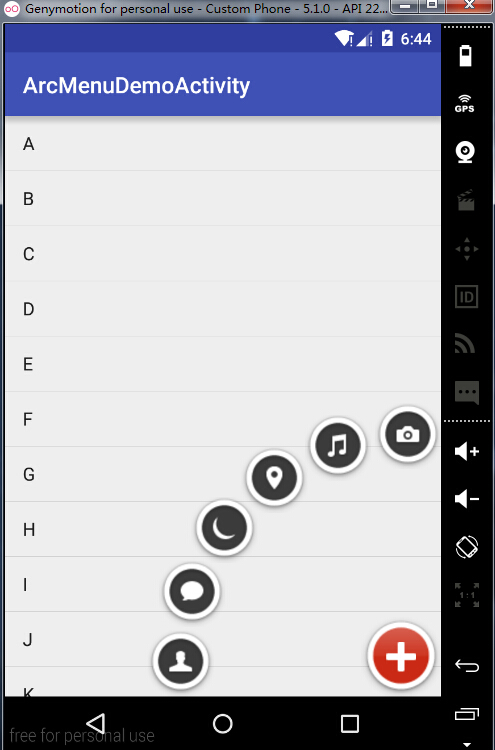
运行效果:
Android 实现卫星菜单(精简版)的更多相关文章
- Android之卫星菜单的实现
卫星菜单是现在一个非常受欢迎的“控件”,很多Android程序员都趋之若鹜,预览如下图.传统的卫星菜单是用Animation实现的,需要大量的代码,而且算法极多,一不小心就要通宵Debug.本帖贴出用 ...
- Android 实现卫星菜单
步骤:一:自定义ViewGroup 1.自定义属性 a.attr.xml b.在布局文件中使用activity_main.xml c.在自定义控件中进行读取 2.onMeasure 3.onLayou ...
- android 实现自定义卫星菜单
看了hyman老师的视频,听起来有点迷糊,所以就想把实现卫星菜单的实现总结一下.长话短说,下面总结一下: 一.自定义ViewGroup1).自定义属性文件 属性的定义: <attr name=& ...
- 迅雷X v10.1.29.698-免安装SVIP去广告精简版+骨头版+便携版+手雷+Mac精简版
迅雷X 10.1版本开始,采用Electron软件框架完全重写了迅雷主界面.使用新框架的迅雷X可以完美支持2K.4K等高清显示屏,界面中的文字渲染也更加清晰锐利.新框架的界面绘制.事件处理等方面比老框 ...
- VMware10.06精简版安装后台运行
VMware10.06精简版安装时会出现一个安装功能选择菜单,里面有一条后台运行必选功能,一般人会跳过条.当你打算在服务器上用vmware时,一定要安装后台运行服务,否则你无法换出正在运行的后台虚拟机 ...
- 电脑公司最新GHOST WIN7系统32,64位优化精简版下载
系统来自系统妈:http://www.xitongma.com 电脑公司最新GHOST win7系统32位优化精简版V2016年3月 系统概述 电脑公司ghost win7 x86(32位)万能装机版 ...
- webview页面和壳通信的库(精简版)
// PG精简版 (function() { var PG = { iosBridge: null, callbackId: 0, callbacks: [], commandQueue: [], c ...
- 【新提醒】N820 N821 android 4.2 V1.1版 - 大V综合交流区 - 360官方论坛
http://bbs.360safe.com/forum.php?mod=viewthread&tid=3088815&extra=page%3D1%26filter%3Dtypeid ...
- 【转】Android 开发规范(完结版)
摘要 1 前言 2 AS 规范 3 命名规范 4 代码样式规范 5 资源文件规范 6 版本统一规范 7 第三方库规范 8 注释规范 9 测试规范 10 其他的一些规范 1 前言 为了有利于项目维护.增 ...
随机推荐
- salt-ssh
1.生产---测试--开发 salt-runners salt-run manage.status#显示当前up或down的minion salt-run manage.down salt-run m ...
- js如何判断一组数字是否连续,得到一个临时数组[[3,4],[13,14,15],[17],[20],[22]];
var arrange = function(arr){ var result = [], temp = []; arr.sort(function(source, dest){ return sou ...
- Backbone源码分析-Backbone架构+流程图
作者:nuysoft/高云/nuysoft@gmail.com 声明:本文为原创文章,如需转载,请注明来源并保留原文链接. Backbone0.9.1源码分析分析系列 jQuery1.6.1源码分析系 ...
- [CareerCup] 8.2 Call Center 电话中心
8.2 Imagine you have a call center with three levels of employees: respondent, manager, and director ...
- Arduino智能小车制作报告
Arduino智能小车制作报告 制作成员:20135224陈实 20135208贺邦 20135207王国伊 前提: Arduino,是一个开源的单板机控制器,采用了基于开放源代码的软硬件平台,构 ...
- iOS项目重构日记
如何重构 首先,要对程序的一般架构烂熟于心,尤其是MVC,这是基本.还有就是分离存储和网络请求的逻辑. 对于一些常用的控件尽量分离复用,设置开关函数,适当的时候开启,不要的时候关闭,有必要的话还可以 ...
- java个人总结
20145230<Java程序设计>课程总结 每周读书笔记链接汇总 20145230<java程序设计>第0周学习总结:http://www.cnblogs.com/kobe2 ...
- 集DDD,TDD,SOLID,MVVM,DI,EF,Angularjs等于一身的.NET(C#)开源可扩展电商系统–Virto Commerce
今天一大早来看到园友分享的福利<分享一个前后端分离方案源码-前端angularjs+requirejs+dhtmlx 后端asp.net webapi>,我也来分享一个吧.以下内容由笔者写 ...
- T4模板根据DB生成实体类
1.前言 为什么会有这篇文章了,最近看到了一些框架,里面要写的代码太多了,故此就想偷懒,要是能写出一个T4模板,在数据库添加表后,根据模板就可以自动生成了类文件了,这样多好,心动不如行动.记得使用T4 ...
- Bootstrap系列 -- 25. 下拉菜单分割线
在Bootstrap框架中的下拉菜单还提供了下拉分隔线,假设下拉菜单有两个组,那么组与组之间可以通过添加一个空的<li>,并且给这个<li>添加类名“divider”来实现添加 ...