
Rhel7.4系统部署cobbler
cobbler安装
一、系统信息:
[root@openstack ~]# cat /etc/redhat-release
Red Hat Enterprise Linux Server release 7.4 (Maipo)
[root@openstack ~]# uname -r
3.10.0-693.el7.x86_64
[root@openstack ~]# ifconfig ens33 |awk -F "[ :]+" 'NR==2 {print $3}'
192.168.209.7
[root@openstack ~]# systemctl stop firewalld
[root@openstack ~]# systemctl disable firewalld
[root@openstack ~]# systemctl status firewalld
● firewalld.service - firewalld - dynamic firewall daemon
Loaded: loaded (/usr/lib/systemd/system/firewalld.service; disabled; vendor preset: enabled)
Active: inactive (dead)
Docs: man:firewalld(1)
[root@openstack ~]# getenforce
Disabled
二、开始安装cobbler
1、安装依赖包
[root@openstack ~]# yum -y install epel-release
[root@openstack ~]# yum -y install cobbler cobbler-web dhcp tftp-server pykickstart httpd
2、启动相关服务
[root@openstack ~]# systemctl start cobblerd
[root@openstack ~]# systemctl enable cobblerd
[root@openstack ~]# systemctl enable httpd
[root@openstack ~]# systemctl start httpd
3、检查配置是否有问题
[root@openstack ~]# cobbler check
The following are potential configuration items that you may want to fix:
1 : The 'server' field in /etc/cobbler/settings must be set to something other than localhost, or kickstarting features will not work. This should be a resolvable hostname or IP for the boot server as reachable by all machines that will use it.
2 : For PXE to be functional, the 'next_server' field in /etc/cobbler/settings must be set to something other than 127.0.0.1, and should match the IP of the boot server on the PXE network.
3 : SELinux is enabled. Please review the following wiki page for details on ensuring cobbler works correctly in your SELinux environment:
https://github.com/cobbler/cobbler/wiki/Selinux
4 : change 'disable' to 'no' in /etc/xinetd.d/tftp
5 : some network boot-loaders are missing from /var/lib/cobbler/loaders, you may run 'cobbler get-loaders' to download them, or, if you only want to handle x86/x86_64 netbooting, you may ensure that you have installed a *recent* version of the syslinux package installed and can ignore this message entirely. Files in this directory, should you want to support all architectures, should include pxelinux.0, menu.c32, elilo.efi, and yaboot. The 'cobbler get-loaders' command is the easiest way to resolve these requirements.
6 : change 'disable' to 'no' in /etc/xinetd.d/rsync
7 : debmirror package is not installed, it will be required to manage debian deployments and repositories
8 : The default password used by the sample templates for newly installed machines (default_password_crypted in /etc/cobbler/settings) is still set to 'cobbler' and should be changed, try: "openssl passwd -1 -salt 'random-phrase-here' 'your-password-here'" to generate new one
9 : fencing tools were not found, and are required to use the (optional) power management features. install cman or fence-agents to use them
Restart cobblerd and then run 'cobbler sync' to apply changes.
按照提示解决问题:
问题一:
[root@openstack ~]# sed -i 's/^server: 127.0.0.1/server: 192.168.209.7/' /etc/cobbler/settings # 修改server的ip地址为本机ip
问题二:
[root@openstack ~]# sed -i 's/^next_server: 127.0.0.1/next_server: 192.168.209.7/' /etc/cobbler/settings # TFTP Server 的IP地址
问题四:
[root@openstack ~]# vim /etc/xinetd.d/tftp
# default: off
# description: The tftp server serves files using the trivial file transfer \
# protocol. The tftp protocol is often used to boot diskless \
# workstations, download configuration files to network-aware printers, \
# and to start the installation process for some operating systems.
service tftp
{
disable = no
socket_type = dgram
protocol = udp
wait = yes
user = root
server = /usr/sbin/in.tftpd
server_args = -B 1380 -v -s /var/lib/tftpboot
per_source = 11
cps = 100 2
flags = IPv4
}
问题5:
[root@openstack ~]# cobbler get-loaders # 下载缺失的文件
问题6:
[root@openstack ~]# systemctl enable rsyncd
[root@openstack ~]# systemctl start rsyncd
问题8:
[root@tiandong68 ~]# openssl passwd -1 -salt thunder thunder 8
$1$thunder$XsMPVXOj.YfZ3A66jbr5a1
[root@openstack ~]# vim /etc/cobbler/settings
101 default_password_crypted: "$1$123456$wOSEtcyiP2N/IfIl15W6Z0"
问题7和9不用处理,问题三把selinux设置为disable就可以了。
重启cobbler然后再次check
[root@openstack ~]# systemctl restart cobblerd.service
[root@openstack ~]# cobbler check 这两个问题可以暂时忽略
The following are potential configuration items that you may want to fix:
1 : debmirror package is not installed, it will be required to manage debian deployments and repositories
2 : fencing tools were not found, and are required to use the (optional) power management features. install cman or fence-agents to use them
Restart cobblerd and then run 'cobbler sync' to apply changes.
4、配置cobbler dhcp
修改cobbler配置
[root@openstack ~]# vim /etc/cobbler/settings
242 manage_dhcp: 1
修改/etc/cobbler/dhcp.template文件
subnet 192.168.209.0 netmask 255.255.255.0 {
option routers 192.168.209.254 ;
option domain-name-servers 119.29.29.29;
option subnet-mask 255.255.255.0;
range dynamic-bootp 192.168.209.100 192.168.209.254;
default-lease-time 21600;
max-lease-time 43200;
next-server $next_server;
重启cobbler并同步配置,修改完dhcp必须sync同步配置
[root@openstack ~]# systemctl restart cobblerd.service
[root@openstack ~]# cobbler sync
[root@openstack ~]# netstat -lnup|grep dhcp
udp 0 0 0.0.0.0:67 0.0.0.0:* 4665/dhcpd
5、导入镜像:
[root@openstack ~]# mount /dev/sr0 /mnt/
mount: /dev/sr0 写保护,将以只读方式挂载
[root@openstack ~]# cobbler import --path=/mnt --name=Centos-7.4 --arch=x86_64 # cobbler导入镜像
# --path 镜像路径
# --name 为安装源定义一个名字
# --arch 指定安装源是32位、64位、ia64, 目前支持的选项有: x86│x86_64│ia64
# 安装源的唯一标示就是根据name参数来定义,本例导入成功后,安装源的唯一标示就是:CentOS-7.4-x86_64
镜像导入成功后查看:
[root@openstack ~]# cobbler list
distros:
Centos-7.4-x86_64
test
profiles:
Centos-7.4-x86_64
test
systems:
repos:
images:
mgmtclasses:
packages:
files:
导入的镜像存储的位置:
[root@openstack ~]# cd /var/www/cobbler/ks_mirror/
[root@openstack ks_mirror]# ll
总用量 0
dr-xr-xr-x 9 root root 288 7月 11 2017 Centos-7.4-x86_64
drwxr-xr-x. 2 root root 100 1月 9 21:11 config
6、导入kickstarts配置文件
[root@openstack ~]# cd /var/lib/cobbler/kickstarts/
[root@openstack kickstarts]# vim Centos-7.4-x86_64.cfg
#platform=x86, AMD64, or Intel EM64T
#version=DEVEL
# Install OS instead of upgrade
install
# Keyboard layouts
keyboard 'us'
# Root password
#rootpw --iscrypted $1$m1pE0DG6$vALBphGGynqvUzfJaWZ6U1
# Use network installation
url --url="$tree"
# System language
lang en_US
# Firewall configuration
firewall --disabled
# System authorization information
auth --useshadow --passalgo=sha512
# Use graphical install
graphical
firstboot --disable
# SELinux configuration
selinux --disabled
# Network information
network --bootproto=dhcp --device=eth0
network --bootproto=dhcp --device=eth1
# Reboot after installation
reboot
# System timezone
timezone Asia/Shanghai
# System bootloader configuration
bootloader --location=mbr
# Clear the Master Boot Record
zerombr
# Partition clearing information
clearpart --all --initlabel
#Disk partitioning information
part /boot --fstype xfs --size 1024 --ondisk sda
#Oracle:part swap --size 16384 --ondisk sda
part swap --size 2048 --ondisk sda
part / --fstype xfs --size 1 --grow --ondisk sda
%packages
@base
@core
@compat-libraries
@debugging
@development
@gnome-desktop
@X Window System
%end
修改默认指定的配置文件为我们编译的
[root@openstack ~]# cobbler profile edit --name Centos-7.4-x86_64 --kickstart=/var/lib/cobbler/kickstarts/Centos7.4-x86_64.cfg # 编辑profile,修改ks文件为我们刚刚上传的Centos7.2-x86_64.cfg
[root@openstack ~]# cobbler profile edit --name Centos-7.4-x86_64 --kopts='net.ifnames=0 biosdevname=0'
# 修改安装系统的内核参数,在CentOS7系统有一个地方变了,就是网卡名变成eno16777736这种形式,但是为了运维标准化,我们需要将它变成我们常用的eth0,因此使用上面的参数。但要注意是CentOS7才需要上面的步骤,CentOS6不需要。
[root@openstack ~]# cobbler profile report --name=Centos-7.4-x86_64
Name : Centos-7.4-x86_64
TFTP Boot Files : {}
Comment :
DHCP Tag : default
Distribution : Centos-7.4-x86_64
Enable gPXE? : 0
Enable PXE Menu? : 1
Fetchable Files : {}
Kernel Options : {'biosdevname': '0', 'net.ifnames': '0'}
Kernel Options (Post Install) : {}
Kickstart : /var/lib/cobbler/kickstarts/Centos-7.4-x86_64.cfg
Kickstart Metadata : {}
Management Classes : []
Management Parameters : <<inherit>>
Name Servers : []
Name Servers Search Path : []
Owners : ['admin']
Parent Profile :
Internal proxy :
Red Hat Management Key : <<inherit>>
Red Hat Management Server : <<inherit>>
Repos : []
Server Override : <<inherit>>
Template Files : {}
Virt Auto Boot : 1
Virt Bridge : xenbr0
Virt CPUs : 1
Virt Disk Driver Type : raw
Virt File Size(GB) : 5
Virt Path :
Virt RAM (MB) : 512
Virt Type : kvm
同步:
[root@openstack ~]# cobbler sync
[root@openstack ~]#systemctl restart rsyncd
[root@openstack ~]#systemctl restart cobblerd
[root@openstack ~]#systemctl restart httpd
新建一个虚拟机:
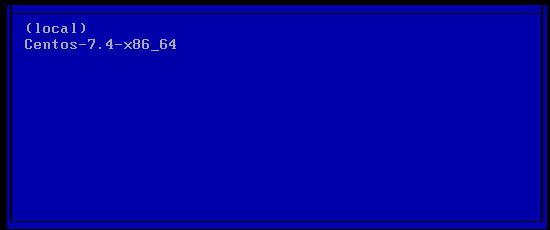
完成了。
Rhel7.4系统部署cobbler的更多相关文章
- 基于CentOS7系统部署cobbler批量安装系统(week3_day5_part1)-技术流ken
前言 cobbler是一个可以实现批量安装系统的Linux应用程序.它有别于pxe+kickstart,cobbler可以实现同个服务器批量安装不同操作系统版本. 系统环境准备及其下载cobbler ...
- 末学者笔记--Centos7系统部署cobbler批量安装系统
[前言]: cobbler是一个可以实现批量安装系统的Linux应用程序.它有别于pxe+kickstart,cobbler可以实现同个服务器批量安装不同操作系统版本. 系统环境准备及其下载cob ...
- 006-(成功环境记录)基于Centos7系统部署cobbler批量安装系统
1.1 cobbler简介 Cobbler是一个Linux服务器安装的服务,可以通过网络启动(PXE)的方式来快速安装.重装物理服务器和虚拟机,同时还可以管理DHCP,DNS等. Cobbler可以使 ...
- 基于centos7系统部署cobbler
准备环境和下载cobbler 一,系统准备 虚拟机下要添加两个网卡.一个仅主机对内提供cobbler服务,一个桥接用来通外网 系统版本为:CentOS 7.5 内网ip :169.254.1.6 # ...
- 运维自动化之系统部署 cobbler(三)
cobbler 介绍 Cobbler: 快速网络安装linux操作系统的服务,支持众多的Linux发行版:Red Hat.Fedora.CentOS.Debian.Ubuntu和SuSE,也可以支持网 ...
- 基于Centos7系统部署cobbler批量安装系统
前言 cobbler是一个可以实现批量安装系统的Linux应用程序.它有别于pxe+kickstart,cobbler可以实现同个服务器批量安装不同操作系统版本 系统环境的准备及下载cobbler 一 ...
- centos7系统部署cobbler批量安装系统
系统环境: 一.开启两个网卡.一个仅主机模式,一个桥接模式,主机模式对内提供cobbler服务 [root@localhost ~]# ip a 1: lo: <LOOPBACK,UP,LOWE ...
- 部署cobbler服务器
部署cobbler服务器 1.准备环境使用nat或者仅主机模式,不要使用桥接模式,方式获取的IP不是自己的 2. 配置yum源[epel]name=epelenabled=1gpgcheck=0bas ...
- liunx系统部署
Linux系统安装与基本配置 =======================================内容提要:获取Linux 常用发行版的方式DELL/HP/IBM 服务器介绍DELL/HP/ ...
随机推荐
- 优化方法总结以及Adam存在的问题(SGD, Momentum, AdaDelta, Adam, AdamW,LazyAdam)
优化方法总结以及Adam存在的问题(SGD, Momentum, AdaDelta, Adam, AdamW,LazyAdam) 2019年05月29日 01:07:50 糖葫芦君 阅读数 455更多 ...
- Callable和Future的区别
Callable 在Java中,创建线程一般有两种方式,一种是继承Thread类,一种是实现Runnable接口.然而,这两种方式的缺点是在线程任务执行结束后,无法获取执行结果.我们一般只能采用共享变 ...
- 用于Linq的去重 Distinct
/// <summary> /// 用于Linq的去重,扩展方法需要放到静态类中 /// </summary> ...
- Advanced Installer 开始-程序那里增加,快捷方式、卸载软件、官方网站
. 这个是效果.
- vue-cli之加载ico文件
vue-cli之加载ico文件 vue-cli加载ico文件需要在vue.config.js设置ico加载,代码如下: module.exports = { publicPath: process.e ...
- 将二维数组转换成一维数组(基于reduce)
reduce:不改变原数组,返回一个新的数组.就是遍历数组元素,从头开始,依次往下,第一个参数是上一次的返回值,第二个参数是下一个数组元素,首次的时候第一个和第二个参数分别是 array[0], a ...
- HTML的标签简单概括
段落标签 <p></p> 属性 说明 值 align 对其方式 left(默认).right.center 水平线 <hr /> 属性 说明 值 width ...
- c#如何使用MemoryStream和BinaryFormatter进行对象的序列化和返序列化
1 下面是我写的一个序列化的类 public static class ObjSerialize { /// <summary> /// 将对象数组obj序列化,内存中的缓冲区的数据序列化 ...
- 支持向量机通俗导论 ——理解SVM的三层境界 总结
1.什么是支持向量机(SVM) 所谓支持向量机,顾名思义,分为两部分了解:一,什么是支持向量(简单来说,就是支持或支撑平面上把两类类别划分开来的超平面的向量点):二,这里的“机(machine,机器) ...
- 3.Bacula Client安装配置
1. Bacula Client安装配置 1.1. linux客户端安装 1.1.1. 安装依赖包 yum install libacl libacl-devel 1.1.2. Clien ...