
关于.net导出数据到excel/word【占位符替换】
1】excel的占位符替换
效果如图
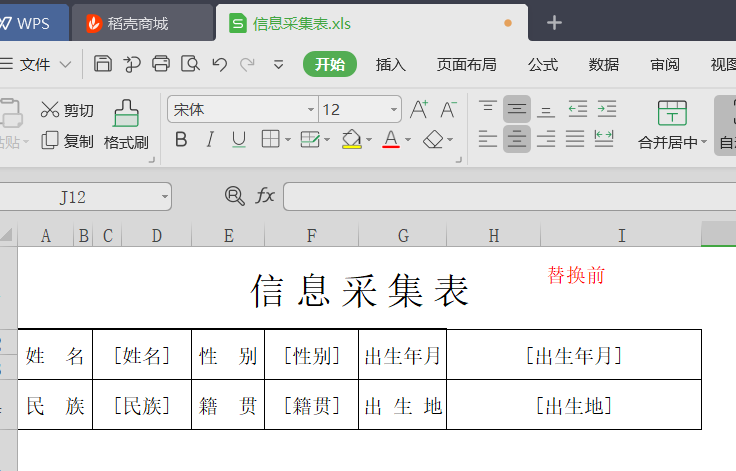

关键代码:
///savedFilePath需要保存的路径  templateDocPath模板路径  替换的关键字和值  格式  [姓名]$%$小王

public static void ReadExcel(string savedFilePath, string templateDocPath,  List<string> ReArray)

        {

            try

            {

                //加载可读可写文件流

                using (FileStream stream = new FileStream(templateDocPath, FileMode.Open, FileAccess.Read))

                {

                    IWorkbook workbook = WorkbookFactory.Create(stream);//使用接口,自动识别excel2003/2007格式

                    ISheet sheet = workbook.GetSheetAt();//得到里面第一个sheet

                    IRow row = null;

                    ICell cell = null;

                    //1读取符合条件的

                    Regex reg = new Regex(@"\[\S+?\]", RegexOptions.Singleline);

                    List<string> getList = new List<string>();

                    for (int i = sheet.FirstRowNum; i <= sheet.LastRowNum; i++)

                    {

                        row = sheet.GetRow(i);

                        for (int j = row.FirstCellNum; j < row.LastCellNum; j++)

                        {

                            cell = row.GetCell(j);

                            if (cell != null)

                            {

                                if (cell.CellType == NPOI.SS.UserModel.CellType.String)

                                {

                                    var currentCellVal = cell.StringCellValue;

                                    if (reg.IsMatch(currentCellVal))

                                    {

                                        MatchCollection listsCollection = reg.Matches(currentCellVal);

                                        for (int jNum = ; jNum < listsCollection.Count; jNum++)

                                        {

                                            var aa = listsCollection[jNum].Value;

                                            getList.Add(aa);

                                        }

                                    }

                                }

                            }

                        }

                    }

                    //2替换

                    for (int i = sheet.FirstRowNum; i <= sheet.LastRowNum; i++)

                    {

                        row = sheet.GetRow(i);

                        for (int j = row.FirstCellNum; j < row.LastCellNum; j++)

                        {

                            cell = row.GetCell(j);

                            if (cell != null)

                            {

                                foreach (var item in getList)

                                {

                                    string getX = cell.StringCellValue;

                                    if (getX.Contains(item))

                                    {

                                        foreach (var itemRa in ReArray)

                                        {

                                            var getValue = itemRa.Split(new string[] { "$%$" }, StringSplitOptions.None);

                                            if (item == getValue[])

                                            {

                                                getX = getX.Replace(item, getValue[]);

                                                cell.SetCellValue(getX);

                                            }

                                        }

                                    }

                                }

                                //删除没有的数据   此处是excel中需要替换的关键字,但是数据库替换中却没有的,用空值代替原来“[关键字]”

                                string getXNull = cell.StringCellValue;

                                MatchCollection listsCollection = reg.Matches(getXNull);

                                if (listsCollection.Count > )

                                {

                                    var valNull = getXNull;

                                    getXNull = getXNull.Replace(valNull, "");

                                    cell.SetCellValue(getXNull);

                                }

                            }

                        }

                    }

                    //新建一个文件流,用于替换后的excel保存文件。

                    FileStream success = new FileStream(savedFilePath, FileMode.Create);

                    workbook.Write(success);

                    success.Close();

                }

            }

            catch (Exception ex)

            {

            }

            finally

            {

            }

        }
2】word的占位符替换
 /// <summary>

        /// world自定义模板导出

        /// </summary>

        /// <param name="savedFilePath">保存路劲</param>

        /// <param name="templateDocPath">获取模板的路径</param>

        /// <param name="ReArray">需要替换的值    [姓名]$%$张三</param>

        ///

        public static void ReadWord(string savedFilePath, string templateDocPath, List<string> ReArray)

        {

            try

            {

                #region 进行替换

                Aspose.Words.Document doc = new Aspose.Words.Document(templateDocPath);

                DocumentBuilder builder = new DocumentBuilder(doc);

                foreach (var item in ReArray)

                {

                    var reA = item.Split(new string[] { "$%$" }, StringSplitOptions.None);

                    string oneValue = reA[];

                    string towValue = ToDBC(reA[]).Replace("\r", "<br/>");//\r和中文符号必须替换否则报错

                    doc.Range.Replace(oneValue, towValue, false, false);

                }

                doc.Save(savedFilePath);//也可以保存为1.doc 兼容03-07

                #endregion

            }

            catch (Exception ex)

            {

                throw;

            }

        }
3】excel的占位符替换=》多字段
效果图

        /// <summary>

        /// 根据模版导出Excel

        /// </summary>

        /// <param name="templateFile">模版路径(包含后缀)  例:"/Template/Exceltest.xls"</param>

        /// <param name="strFileName">文件名称(不包含后缀)  例:"Excel测试"</param>

        /// <param name="source">源DataTable</param>

        /// <param name="cellKes">需要导出的对应的列字段  例:string[] cellKes = { "name","sex" };</param>

        /// <param name="rowIndex">从第几行开始创建数据行,第一行为0</param>

        /// <returns>是否导出成功</returns>

        public static string ExportScMeeting(string templateFile, string strFileName, DataTable source, List<string> cellKes, int rowIndex)

        {

            templateFile = HttpContext.Current.Server.MapPath(templateFile);

            int cellCount = cellKes.Count();//总列数,第一列为0

            IWorkbook workbook = null;

            try

            {

                using (FileStream file = new FileStream(templateFile, FileMode.Open, FileAccess.Read))

                {

                    workbook = WorkbookFactory.Create(file);

                    //if (Path.GetExtension(templateFile) == ".xls")

                    //    workbook = new HSSFWorkbook(file);

                    //else if (Path.GetExtension(templateFile) == ".xlsx")

                    //    workbook = new XSSFWorkbook(file);

                }

                ISheet sheet = workbook.GetSheetAt();

                if (sheet != null && source != null && source.Rows.Count > )

                {

                    IRow row; ICell cell;

                    //获取需插入数据的首行样式

                    IRow styleRow = sheet.GetRow(rowIndex);

                    if (styleRow == null)

                    {

                        for (int i = , len = source.Rows.Count; i < len; i++)

                        {

                            row = sheet.CreateRow(rowIndex);

                            //创建列并插入数据

                            for (int index = ; index < cellCount; index++)

                            {

                                row.CreateCell(index)

                                    .SetCellValue(!(source.Rows[i][cellKes[index]] is DBNull) ? source.Rows[i][cellKes[index]].ToString() : string.Empty);

                            }

                            rowIndex++;

                        }

                    }

                    else

                    {

                        for (int i = , len = source.Rows.Count; i < len; i++)

                        {

                            row = sheet.CreateRow(rowIndex);

                            row.HeightInPoints = styleRow.HeightInPoints;

                            row.Height = styleRow.Height;

                            //创建列并插入数据

                            for (int index = ; index < cellCount; index++)

                            {

                                var tx = source.Rows[i][cellKes[index]];

                                var tc = styleRow.GetCell(index).CellType;

                                cell = row.CreateCell(index, styleRow.GetCell(index).CellType);

                                cell.CellStyle = styleRow.GetCell(index).CellStyle;

                                cell.SetCellValue(!(source.Rows[i][cellKes[index]] is DBNull) ? source.Rows[i][cellKes[index]].ToString() : string.Empty);

                            }

                            rowIndex++;

                        }

                    }

                }

                return NPOIExport(strFileName + "." + templateFile.Split('.')[templateFile.Split('.').Length - ], workbook);

            }

            catch (Exception ex)

            {

                return ex.Message;

            }

        }

                public static string NPOIExport(string fileName, IWorkbook workbook)

        {

            try

            {

                System.IO.MemoryStream ms = new System.IO.MemoryStream();

                workbook.Write(ms);

                HttpContext.Current.Response.Clear();

                HttpContext.Current.Response.ClearHeaders();

                HttpContext.Current.Response.Cache.SetCacheability(System.Web.HttpCacheability.Private);

                HttpContext.Current.Response.Buffer = true;

                HttpContext.Current.Response.ContentEncoding = System.Text.Encoding.UTF8;

                HttpContext.Current.Response.AddHeader("Content-Disposition", string.Format("attachment; filename={0}", fileName));

                HttpContext.Current.Response.ContentType = "application/ms-excel";

                HttpContext.Current.Response.BinaryWrite(ms.ToArray());

                HttpContext.Current.Response.Flush();

                HttpContext.Current.Response.End();

                ms.Close();

                ms.Dispose();

                return "导出成功";

            }

            catch (Exception ex)

            {

                return "导出失败";

            }

        }
另外,需要引用的using也一同贴图
using Aspose.Words;

using NPOI.HSSF.UserModel;

using NPOI.SS.UserModel;

using NPOI.XSSF.UserModel;

using System;

using System.Collections;

using System.Collections.Generic;

using System.Data;

using System.IO;

using System.Linq;

using System.Reflection;

using System.Text.RegularExpressions;

using System.Web;
4】关于换行符
此处 如果 Environment.NewLine 、<br/> \n 无效,则建议使用下列换行符 ,但先必须引用 using Aspose.Words;
using Aspose.Words;
换行符:ControlChar.LineBreak
列:string ts="测试1"+ControlChar.LineBreak +"测试2";
关于.net导出数据到excel/word【占位符替换】的更多相关文章
- NPOI导出数据到Excel
NPOI导出数据到Excel 前言 Asp.net操作Excel已经是老生长谈的事情了,可下面我说的这个NPOI操作Excel,应该是最好的方案了,没有之一,使用NPOI能够帮助开发者在没有安装微 ...
- word模板导出的几种方式:第一种:占位符替换模板导出(只适用于word中含有表格形式的)
1.占位符替换模板导出(只适用于word中含有表格形式的): /// <summary> /// 使用替换模板进行到处word文件 /// </summary> public ...
- python 导出数据到excel 中,一个好用的导出数据到excel模块,XlsxWriter
最近公司有项目需要导出数据到excel,首先想到了,tablib,xlwt,xlrd,xlwings,win32com[还可以操作word],openpyxl,等模块但是 实际操作中tablib 写入 ...
- Delphi 导出数据至Excel的7种方法【转】
一; delphi 快速导出excel uses ComObj,clipbrd; function ToExcel(sfilename:string; ADOQuery:TADOQuery): ...
- java代码导出数据到Excel、js导出数据到Excel(三)
jsp内容忽略,仅写个出发按钮: <button style="width: 100px" onclick="expertExcel()&quo ...
- 导出数据到Excel表格
开发工具与关键技术:Visual Studio 和 ASP.NET.MVC,作者:陈鸿鹏撰写时间:2019年5月25日123下面是我们来学习的导出数据到Excel表格的总结首先在视图层写导出数据的点击 ...
- Delphi 导出数据至Excel的7种方法
一; delphi 快速导出excel uses ComObj,clipbrd; function ToExcel(sfilename:string; ADOQuery:TADOQuery):bool ...
- ASP导出数据到excel遇到的一些问题
一直用动易平台的ASP做新闻发布网站,直到现在才接触导出数据到Excel的问题,目的在于公司要统计各部门的投稿量,要做这么个东西,实现起来是挺简单的,但是第一次做,还是费了一些功夫的,特此记录一下 主 ...
- 1.ASP.NET MVC使用EPPlus,导出数据到Excel中
好久没写博客了,今天特地来更新一下,今天我们要学习的是如何导出数据到Excel文件中,这里我使用的是免费开源的Epplus组件. 源代码下载:https://github.com/caofangshe ...
随机推荐
- nfs 、ftp 和samba都有什么区别?
NFS:Network File System 是已故的Sun公司制定的用于分布式访问的文件系统,它的本质是文件系统.主要在Unix系列操作系统上使用,基于TCP/IP协议层,可以将远程的计算机磁盘挂 ...
- Java程序基础编程基础
1.在屏幕上输出"你好" //Programmer name Helloword.javapublic class Helloword { public static void m ...
- java中你不知道的字符串知识!!!
声明:这是上次写完String和StringBuffer后的补充(看上次的请复制链接在搜索栏粘贴访问) 链接:http://www.cnblogs.com/ytsbk/p/7420581.html 一 ...
- DX11 Without DirectX SDK--03 渲染一个立方体
回到 DirectX11--使用Windows SDK来进行开发 一个立方体有8个顶点,然而绘制一个立方体需要画12个三角形,如果按照前面的方法绘制的话,则需要提供36个顶点,而且这里面的顶点数据会重 ...
- 进阶-MongoDB 知识梳理
MongoDB 一.MongoDB简介 MongoDB是一个高性能,开源,无模式的文档型数据库,是当前NoSql数据库中比较热门的一种.它在许多场景下可用于替代传统的关系型数据库或键/值存储方式.Mo ...
- C# 插入、删除Excel分页符
引言 对Excel表格设置分页对我们预览.打印文档时是很方便的,特别是一些包含很多复杂数据的.不规则的表格,为保证打印时每一页的排版美观性或者数据的前后连接的完整性,此时的分页符就发挥了极大的作用.因 ...
- R画网络图
R 画网络图 目的:用R做生信分析,画基因样本的网络图,从中观察样本的致病性情况. 一.所用到的包 library(tidyr) library(ggplot2) library(reshape2) ...
- Netty中的EventLoop和线程模型
一.前言 在学习了ChannelHandler和ChannelPipeline的有关细节后,接着学习Netty的EventLoop和线程模型. 二.EventLoop和线程模型 2.1. 线程模型 线 ...
- sql优化总结
在项目前期目标是确保功能能够正常运行,但是随着时间的推移,数据的增加,逻辑的复杂,导致数据查询会越来越慢,这个时候我们首先想到的应该就是尽量优化sql. sql优化常见注意点: 1.对查询进行优化,应 ...
- java通过反射获取字段的类型
import java.lang.reflect.Field; //这是需要引入的包 Field[] f = 类名.class.getDeclaredFields(); //获取该类的字段for(F ...