
Spring boot+ maven + thymeleaf + HTML 实现简单的web项目
第一步: 创建一个SpringBoot应用
第二步: 创建一个实体,用来存储数据,在src/main/java/com/example/first下创建包entity , 在entity下创建Person.java文件
package com.example.first.entity;

public class Person {

    private String name;

    private int age;

  //seter , getter,toString方法

}
第三步: 创建resource, 在src/main/java/com/example/first下创建包resource, resource下创建PersonResource.java
package com.example.first.resource;

import com.example.first.entity.Person;

import org.springframework.stereotype.Controller;

import org.springframework.ui.ModelMap;

import org.springframework.web.bind.annotation.RequestMapping;

import org.springframework.web.bind.annotation.RequestMethod;

import org.springframework.web.bind.annotation.RequestParam;

@Controller

@RequestMapping("/person")

public class PersonResource {

    @RequestMapping(value = "/show",method = RequestMethod.GET)  /**请求地址: localhost:8080/person/show?name=zhang&age=23 请求方式是get*/

    private String show(@RequestParam("name")String name,@RequestParam("age")int age,ModelMap map){   /**@RequestParam("name")绑定请求地址中的name到参数name中    ModelMap map 存放返回内容*/

        Person person = new Person();

        person.setName(name);

        person.setAge(age);

        map.addAttribute("person",person);

        return "index";    /**返回的是显示数据的html的文件名*/

    }

}
第三步:创建index.html文件
<!DOCTYPE html>

<html xmlns:th="http://www.thymeleaf.org" lang="zh">

<head>

    <meta charset="UTF-8"/>

    <title>Title</title>

</head>

<body>

<span th:text="${person.name}"></span><hr/>

<span th:text="${person.age}"></span><hr/>

<span th:text="${person}"></span>

</body>

</html>
第四步:在application.properties中添加模板引擎
spring.thymeleaf.prefix=classpath:/templates/

spring.thymeleaf.suffix=.html

spring.thymeleaf.mode = HTML5
第五步: 在pom文件中添加依赖
<?xml version="1.0" encoding="UTF-8"?>

<project xmlns="http://maven.apache.org/POM/4.0.0" xmlns:xsi="http://www.w3.org/2001/XMLSchema-instance"

    xsi:schemaLocation="http://maven.apache.org/POM/4.0.0 http://maven.apache.org/xsd/maven-4.0.0.xsd">

    <modelVersion>4.0.0</modelVersion>

    <groupId>com.example.first</groupId>

    <artifactId>springboot</artifactId>

    <version>0.0.1-SNAPSHOT</version>

    <packaging>jar</packaging>

    <name>springboot</name>

    <description>Demo project for Spring Boot</description>

    <parent>

        <groupId>org.springframework.boot</groupId>

        <artifactId>spring-boot-starter-parent</artifactId>

        <version>1.5.6.RELEASE</version>

        <relativePath/> <!-- lookup parent from repository -->

    </parent>

    <properties>

        <project.build.sourceEncoding>UTF-8</project.build.sourceEncoding>

        <project.reporting.outputEncoding>UTF-8</project.reporting.outputEncoding>

        <java.version>1.8</java.version>

    </properties>

    <dependencies>

        <dependency>

            <groupId>org.springframework.boot</groupId>

            <artifactId>spring-boot-starter-web</artifactId>

        </dependency>

        <dependency>

            <groupId>org.springframework.boot</groupId>

            <artifactId>spring-boot-starter-test</artifactId>

            <scope>test</scope>

        </dependency>

        <dependency>

            <groupId>org.springframework.boot</groupId>

            <artifactId>spring-boot-starter-thymeleaf</artifactId>

        </dependency>

    </dependencies>

    <build>

        <plugins>

            <plugin>

                <groupId>org.springframework.boot</groupId>

                <artifactId>spring-boot-maven-plugin</artifactId>

            </plugin>

        </plugins>

    </build>

</project>
第五步:启动前目录结构
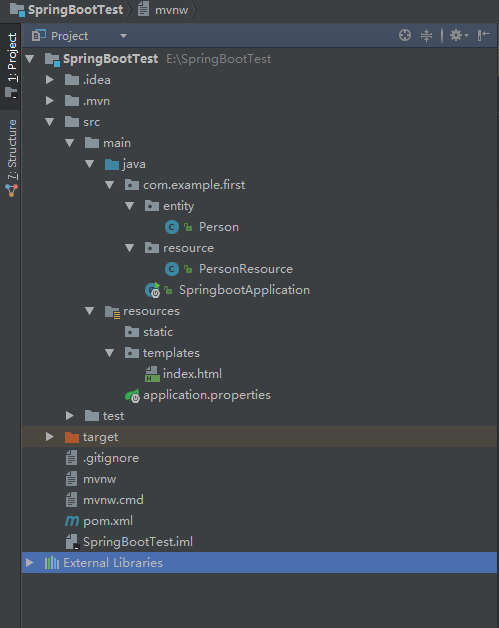
第六步: 配置启动

第七步:启动SpringbootApplication
package com.example.first;

import org.springframework.boot.SpringApplication;

import org.springframework.boot.autoconfigure.SpringBootApplication;

import org.springframework.web.bind.annotation.RestController;

@RestController

@SpringBootApplication

public class SpringbootApplication {

    public static void main(String[] args) {

        SpringApplication.run(SpringbootApplication.class, args);

    }

}
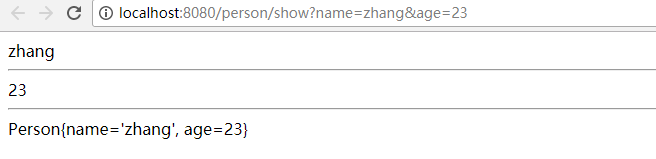
第八步:在地址栏输入http://localhost:8080/person/show?name=zhang&age=23
第九步: 显示效果
Spring boot+ maven + thymeleaf + HTML 实现简单的web项目的更多相关文章
- Spring Boot从入门到实战:整合Web项目常用功能
在Web应用开发过程中,一般都涵盖一些常用功能的实现,如数据库访问.异常处理.消息队列.缓存服务.OSS服务,以及接口日志配置,接口文档生成等.如果每个项目都来一套,则既费力又难以维护.可以通过Spr ...
- idea+Spring+Mybatis+jersey+jetty构建一个简单的web项目
一.先使用idea创建一个maven项目. 二.引入jar包,修改pom.xml <dependencies> <dependency> <groupId>org. ...
- 配置Maven环境并创建简单的web项目步骤
Maven的介绍 主要包含以下三个内容: 1.POM(Project Object Model):即An xml file(pom.xml):依赖管理.生命周期和插件的需要等都在pom.xml文件中完 ...
- 一个小demo熟悉Spring Boot 和 thymeleaf 的基本使用
目录 介绍 零.项目素材 一. 创建 Spring Boot 项目 二.定制首页 1.修改 pom.xml 2.引入相应的本地 css.js 文件 3.编辑 login.html 4.处理对 logi ...
- Spring Boot Maven Plugin(二):run目标
简介 Spring Boot Maven Plugin插件提供spring boot在maven中的支持.允许你打包可运行的jar包或war包. 插件提供了几个maven目标和Spring Boot ...
- Spring Boot Maven Plugin(一):repackage目标
简介 Spring Boot Maven Plugin插件提供spring boot在maven中的支持.允许你打包可运行的jar包或war包. 插件提供了几个maven目标和Spring Boot ...
- Spring Boot 整合 Thymeleaf 完整 Web 案例
Thymeleaf 是一种模板语言.那模板语言或模板引擎是什么?常见的模板语言都包含以下几个概念:数据(Data).模板(Template).模板引擎(Template Engine)和结果文档(Re ...
- Spring Boot2 系列教程(九)Spring Boot 整合 Thymeleaf
虽然现在慢慢在流行前后端分离开发,但是据松哥所了解到的,还是有一些公司在做前后端不分的开发,而在前后端不分的开发中,我们就会需要后端页面模板(实际上,即使前后端分离,也会在一些场景下需要使用页面模板, ...
- 极简 Spring Boot 整合 Thymeleaf 页面模板
虽然现在慢慢在流行前后端分离开发,但是据松哥所了解到的,还是有一些公司在做前后端不分的开发,而在前后端不分的开发中,我们就会需要后端页面模板(实际上,即使前后端分离,也会在一些场景下需要使用页面模板, ...
随机推荐
- 记录线上与本地docker镜像一致,但Dockerfile却构建失败的问题
背景 公司新开了某个项目,我在新的服务器部署了docker环境,本着ctrl+c 和ctrl+v的惯例,直接把以前的php环境的Dockerfile文件直接复制到新项目服务器那里,结果构建失败,失败的 ...
- kafka集群partition分布原理分析
1. Kafka集群partition replication默认自动分配分析 下面以一个Kafka集群中4个Broker举例,创建1个topic包含4个Partition,2 Replication ...
- mysql主从复制总结
第一步:开启所有MYSQL服务器的BIN日志,每台服务器设置一个唯一的server-id的值(默认是1,一般取IP最后一段) 修改主服务器(master)的my.cnf [mysqld] log-bi ...
- [SCOI2012] 喵星球上的点名
Description 给定 \(N\) 个姓名串和 \(M\) 个点名串.询问每个点名串点到了多少姓名和每个姓名串被点到了几次.\(N\leq 5\cdot 10^4,M\leq 10^5\). S ...
- 设计模式-----Builder模式
前言 近日,看到Myabtis中组件中SqlSessionFactory由SqlSessionFactoryBuilder().build()生成时,且采用Builder模式,遂记录学习之. SqlS ...
- DataGridView样式生成器使用说明
啥都不说先看图 一. 功能介绍 1. winform DataGridView样式代码可视化即时生成,所见即所得 2. 预置DataGridView样式代码方案 预置三 ...
- 使用Git Extensions简单入门Git
前言 关于这个主题,之前我录了段视频教程,在本地看清晰度还可以,但传到优酷上就很不清晰了,即使是后来重制后还是一样不清晰,所以现在想整理成文字版.当然,大家还可以将我百度云上的视频下载下来观看,连同优 ...
- 以前没有写笔记的习惯,现在慢慢的发现及时总结是多么的重要。 这一篇文章主要关于java多线程一些常见的疑惑点。因为讲解多线程的书籍和文章已经很多了,所以我也不好意思多说,嘻嘻嘻、大家可以去参考一些那些书籍。我这个文章主要关于实际的一些问题。同时也算是我以后复习的资料吧,。还请大家多多指教。 同时希望多结交一些技术上的朋友。谢谢。
在java中要想实现多线程,有两种手段,一种是继续Thread类,另外一种是实现Runable接口. 以下就是我们常见的问题了: 1. 为什么我们不能直接调用run()方法呢? 我的理解是:线程的运行 ...
- (3)Microsoft office Word 2013版本操作入门_段落设定
1.查看文件: 打开word查看左下角 会显示 word一共有多少页,当前第几页,共多少字等,如下图所示 2.word快速翻页: Ctrl+PageDown 向下翻页, Ctrl+PageUp 向上 ...
- 【读书笔记】iOS-iOS安全基础知识
一,iOS硬件/设备的类型. iPad的问世,就是在这一方向上迈出的第一步.第一代iPad使用了ARM Cortex-A8架构的CUP,它的速度大约是第一代iPhone所使用CPU速度的两倍. iPa ...