
Entity Framework Tutorial Basics(32):Enum Support
Enum in Entity Framework:
You can now have an Enum in Entity Framework 5.0 onwards. EF 5 should target .NET framework 4.5 in order to use Enum.
Enum can be created for the following data types:
- Int16
- Int32
- Int64
- Byte
- SByte
You can create and use an Enum type in your entity data model in three ways:
- Convert an existing property of entity to Enum from EDM designer
- Add a new Enum from EDM designer
- Use an existing Enum type from different namespace
For the purposes of this demo, we have included the TeacherType integer column in the Teacher table of SchoolDB. TeacherType 1 is for permanent teachers, 2 is for contractor teachers, and 3 is for guest teachers.
1. Convert an existing property to Enum:
Next, we will see how to convert a TeacherType to an Enum.
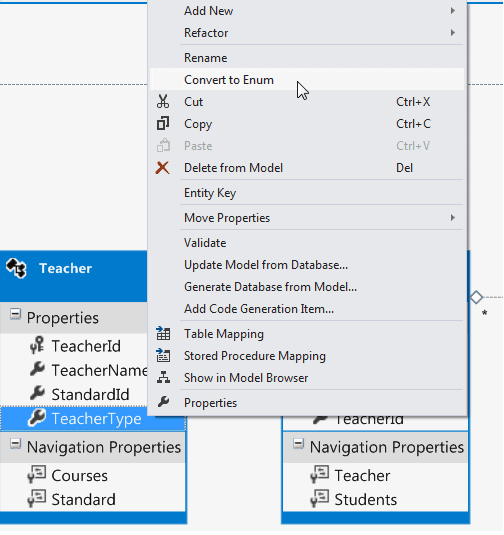
First, right click on the TeacherType property of a Teacher entity and click 'Convert to Enum' in the context menu.
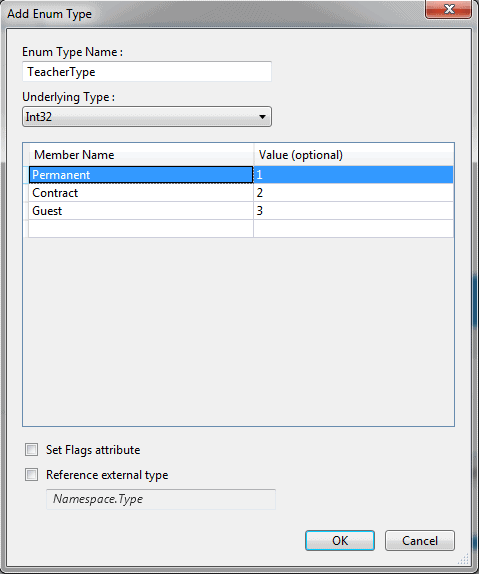
It will open the 'Add Enum Type' dialog box where you can enter the 'Enum Type Name' and, select 'Underlying Type' and Enum member names. For example:
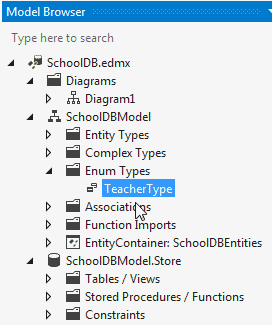
After converting it to Enum, you can see TeacherType as Enum Type in the Model Browser, as shown below:
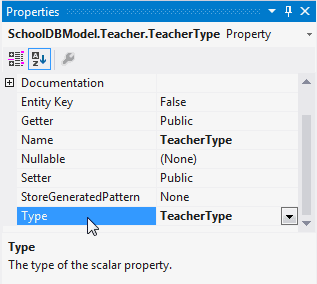
Also, you can see that the type of the TeacherType property is converted to TeacherType Enum:
Now, you can use TeacherType Enum in CRUD operation using DBContext. For example:
using (var ctx = new SchoolDBEntities())

{

      Teacher tchr = new Teacher();

      tchr.TeacherName = "New Teacher";

      //assign enum value

      tchr.TeacherType = TeacherType.Permanent;

      ctx.Teachers.Add(tchr);

      ctx.SaveChanges();

}
2. Add New Enum from Designer:
You can also add a new Enum by right clicking on EDM designer and selecting Add → Enum Type. It will open the same 'Add Enum Type' dialog box, where you can enter enum members.
After creating an Enum Type you can change the type of the TeacherType property to the newly created TeacherType Enum from the property window.
3. If you already have Enum type created in your code, then you can use that as a data type of any entity property.
To use an existing Enum type, right click on designer → Add New → Enum Type. Enter the Enum Type Name in the dialog box. Do not enter the member as you already have that in your code.
Now, select 'Reference external type' checkbox and enter the namespace of your existing enum and click OK. This will add the Enum type in the Model browser. Then, you can assign this Enum type to any property of an entity from the property window.
Note: Select 'Set Flags attribute' if you want to use bitwise operators with your Enum.
Entity Framework Tutorial Basics(32):Enum Support的更多相关文章
- Entity Framework Tutorial Basics(1):Introduction
以下系列文章为Entity Framework Turial Basics系列 http://www.entityframeworktutorial.net/EntityFramework5/enti ...
- Entity Framework Tutorial Basics(4):Setup Entity Framework Environment
Setup Entity Framework Environment: Entity Framework 5.0 API was distributed in two places, in NuGet ...
- Entity Framework Tutorial Basics(43):Download Sample Project
Download Sample Project: Download sample project for basic Entity Framework tutorials. Sample projec ...
- Entity Framework Tutorial Basics(42):Colored Entity
Colored Entity in Entity Framework 5.0 You can change the color of an entity in the designer so that ...
- Entity Framework Tutorial Basics(41):Multiple Diagrams
Multiple Diagrams in Entity Framework 5.0 Visual Studio 2012 provides a facility to split the design ...
- Entity Framework Tutorial Basics(37):Lazy Loading
Lazy Loading: One of the important functions of Entity Framework is lazy loading. Lazy loading means ...
- Entity Framework Tutorial Basics(36):Eager Loading
Eager Loading: Eager loading is the process whereby a query for one type of entity also loads relate ...
- Entity Framework Tutorial Basics(34):Table-Valued Function
Table-Valued Function in Entity Framework 5.0 Entity Framework 5.0 supports Table-valued functions o ...
- Entity Framework Tutorial Basics(33):Spatial Data type support in Entity Framework 5.0
Spatial Data type support in Entity Framework 5.0 MS SQL Server 2008 introduced two spatial data typ ...
随机推荐
- CodeForces - 803F: Coprime Subsequences(莫比乌斯&容斥)
Let's call a non-empty sequence of positive integers a1, a2... ak coprime if the greatest common div ...
- LeetCode Reshape the Matrix
原题链接在这里:https://leetcode.com/problems/reshape-the-matrix/#/description 题目: In MATLAB, there is a ver ...
- Python函数-compile()
compile(source, filename, mode[, flags[, dont_inherit]]) 作用: 将source编译为代码或者AST对象.代码对象能够通过exec语句来执行或者 ...
- Apache Htpasswd生成和验证密码
Assuming you create the password using the following command and "myPassword" as the passw ...
- 分治思想的应用:C++实现快速排序和随机化的快速排序
分治思想的应用:C++实现快速排序和随机化的快速排序 原创 2014年09月08日 14:04:49 标签: 快速排序 / 随机化快速排序 / 排序算法 / 数据结构 947 1. 快速排序时冒泡排序 ...
- Python使用SMTP模块、email模块发送邮件
一.smtplib模块: 主要通过SMTP类与邮件系统进行交互.使用方法如下: 1.实例化一个SMTP对象: s = smtplib.SMTP(邮件服务地址,端口号) s = smtplib.SMTP ...
- spring 学习二 @RequestMapping
RequestMapping是一个用来处理请求地址映射的注解,可用于类或方法上.用于类上,表示类中的所有响应请求的方法都是以该地址作为父路径. RequestMapping注解有六个属性,下面我们把她 ...
- Rails 表单总结
1.button <%= button_to "删除",{:controller =>"welcome",:action =>"de ...
- “百度杯”CTF比赛 2017 二月场(Misc Web)
爆破-1: 打开链接,是502 我直接在后面加个变量传参数:?a=1 出了一段代码 var_dump()函数中,用了$$a,可能用了超全局变量GLOBALS 给hello参数传个GLOBALS 得到f ...
- 用命令查看端口占用情况 netstat -ano
查看所有端口 netstat -ano 可以看到进程ID 参考某个具体端口,第五列就是PID进程ID了. netstat -aon|findstr "80"