
python爬虫之Beautiful Soup基础知识+实例
python爬虫之Beautiful Soup基础知识
Beautiful Soup是一个可以从HTML或XML文件中提取数据的python库。它能通过你喜欢的转换器实现惯用的文档导航,查找,修改文档的方式。
需要注意的是,Beautiful Soup已经自动将输入文档转换为Unicode编码,输出文档转换为utf-8编码。因此在使用它的时候不需要考虑编码方式,仅仅需要说明一下原始编码方式就可以了。
一、安装Beautiful Soup库
使用pip命令工具安装Beautiful Soup4库
pip install beautifulsoup4
二、BeautifulSoup库的主要解析器
| 解析器 | 使用方法 | 条件 |
|---|---|---|
| bs4的html解析器 | BeautifulSoup(markup, 'html.parser') | 安装bs4库 |
| lxml的html解析器 | BeautifulSoup(markup, 'lxml') | pip install lxml |
| lxml的lxml解析器 | BeautifulSoup(markup, 'lxml') | pip install lxml |
| html5lib的解析器 | BeautifulSoup(markup, 'html5lib') | pip install html5lib |
具体操作:
html = 'https://www.baidu.com'

bs = BeautifulSoup(html, 'html.parser')
三、BeautifulSoup的简单使用
提取百度搜索页面的部分源代码为例:
<!DOCTYPE html>

<html>

<head>

  <meta content="text/html;charset=utf-8" http-equiv="content-type" />

  <meta content="IE=Edge" http-equiv="X-UA-Compatible" />

  <meta content="always" name="referrer" />

  <link

href="https://ss1.bdstatic.com/5eN1bjq8AAUYm2zgoY3K/r/www/cache/bdorz/baidu.min.

css" rel="stylesheet" type="text/css" />

  <title>百度一下,你就知道 </title>

</head>

<body link="#0000cc">

 <div id="wrapper">

  <div id="head">

    <div class="head_wrapper">

     <div id="u1">

      <a class="mnav" href="http://news.baidu.com" name="tj_trnews">新闻

</a>

      <a class="mnav" href="https://www.hao123.com"

name="tj_trhao123">hao123 </a>

      <a class="mnav" href="http://map.baidu.com" name="tj_trmap">地图 </a>

      <a class="mnav" href="http://v.baidu.com" name="tj_trvideo">视频 </a>

      <a class="mnav" href="http://tieba.baidu.com" name="tj_trtieba">贴吧

</a>

      <a class="bri" href="//www.baidu.com/more/" name="tj_briicon"

style="display: block;">更多产品 </a>

     </div>

    </div>

  </div>

 </div>

</body>

</html>
综合requests和使用BeautifulSoup库的html解析器,对其进行解析如下:
import requests

from bs4 import BeautifulSoup

# 使用requests库加载页面代码

r = requests.get('https://www.baidu.com')

r.encoding = r.apparent_encoding

html = r.text

bs = BeautifulSoup(html, 'html.parser')

print(bs.prettify())    # prettify 方式输出页面
结果如下:
<!DOCTYPE html>
<!--STATUS OK-->
<html>
<head>
<meta content="text/html;charset=utf-8" http-equiv="content-type"/>
<meta content="IE=Edge" http-equiv="X-UA-Compatible"/>
<meta content="always" name="referrer"/>
<link href="https://ss1.bdstatic.com/5eN1bjq8AAUYm2zgoY3K/r/www/cache/bdorz/baidu.min.css" rel="stylesheet" type="text/css"/>
<title>
百度一下,你就知道
</title>
</head>
<body link="#0000cc">
<div id="wrapper">
<div id="head">
<div class="head_wrapper">
<div class="s_form">
<div class="s_form_wrapper">
<div id="lg">
<img height="129" hidefocus="true" src="//www.baidu.com/img/bd_logo1.png" width="270"/>
</div>
<form action="//www.baidu.com/s" class="fm" id="form" name="f">
<input name="bdorz_come" type="hidden" value="1"/>
<input name="ie" type="hidden" value="utf-8"/>
<input name="f" type="hidden" value="8"/>
<input name="rsv_bp" type="hidden" value="1"/>
<input name="rsv_idx" type="hidden" value="1"/>
<input name="tn" type="hidden" value="baidu"/>
<span class="bg s_ipt_wr">
<input autocomplete="off" autofocus="autofocus" class="s_ipt" id="kw" maxlength="255" name="wd" value=""/>
</span>
<span class="bg s_btn_wr">
<input autofocus="" class="bg s_btn" id="su" type="submit" value="百度一下"/>
</span>
</form>
</div>
</div>
<div id="u1">
<a class="mnav" href="http://news.baidu.com" name="tj_trnews">
新闻
</a>
<a class="mnav" href="https://www.hao123.com" name="tj_trhao123">
hao123
</a>
<a class="mnav" href="http://map.baidu.com" name="tj_trmap">
地图
</a>
<a class="mnav" href="http://v.baidu.com" name="tj_trvideo">
视频
</a>
<a class="mnav" href="http://tieba.baidu.com" name="tj_trtieba">
贴吧
</a>
<noscript>
<a class="lb" href="http://www.baidu.com/bdorz/login.gif?login&tpl=mn&u=http%3A%2F%2Fwww.baidu.com%2f%3fbdorz_come%3d1" name="tj_login">
登录
</a>
</noscript>
<script>
document.write('<a href="http://www.baidu.com/bdorz/login.gif?login&tpl=mn&u='+ encodeURIComponent(window.location.href+ (window.location.search === "" ? "?" : "&")+ "bdorz_come=1")+ '" name="tj_login" class="lb">登录</a>');
</script>
<a class="bri" href="//www.baidu.com/more/" name="tj_briicon" style="display: block;">
更多产品
</a>
</div>
</div>
</div>
<div id="ftCon">
<div id="ftConw">
<p id="lh">
<a href="http://home.baidu.com">
关于百度
</a>
<a href="http://ir.baidu.com">
About Baidu
</a>
</p>
<p id="cp">
2017 Baidu
<a href="http://www.baidu.com/duty/">
使用百度前必读
</a>
<a class="cp-feedback" href="http://jianyi.baidu.com/">
意见反馈
</a>
京ICP证030173号
<img src="//www.baidu.com/img/gs.gif"/>
</p>
</div>
</div>
</div>
</body>
</html>
四、BeautifulSoup类的基本元素
BeautifulSoup将复制的HTML文档转换成一个复杂的树型结构,每个节点都是python对象,所有对象可以归纳为四种Tag,NavigableString,Comment,Beautifulsoup。
| 基本元素 | 说明 |
|---|---|
| Tag | 标签,最基本的信息组织单元,分别用<>和</>标明开头和结尾,格式:bs.a或者bs.p(获取a标签中或者p标签中的内容)。 |
| Name | 标签的名字,格式为.name. |
| Attributes | 标签的属性,字典形式,格式:.attrs. |
| NavigableString | 标签内非属性字符串,<>...</>中的字符串,格式:.string. |
| Comment | 标签内的注释部分,一种特殊的Comment类型。 |
Tag
任何存在于HTML语法中的标签都可以bs.tag访问获得,如果在HTML文档中存在多个相同的tag对应的内容时,bs.tag返回第一个。示例代码如下:
import requests

from bs4 import BeautifulSoup

# 使用requests库加载页面代码

r = requests.get('https://www.baidu.com')

r.encoding = r.apparent_encoding

html = r.text

bs = BeautifulSoup(html, 'html.parser')

# 获取第一个a标签的所有内容

print(bs.a)	# <a class="mnav" href="http://news.baidu.com" name="tj_trnews">新闻</a>

print(type(bs.a))	# <class 'bs4.element.Tag'>
在Tag标签中最重要的就是html页面中的nam和attrs属性,使用方法如下:
print(bs.a.name)    # a

# 把a标签的所有属性打印输出出来,返回一个字典类型

print(bs.a.attrs)   # {'href': 'http://news.baidu.com', 'name': 'tj_trnews', 'class': ['mnav']}

# 等价 bs.a.get('class')

print(bs.a['class'])    # ['mnav']

bs.a['class'] = 'newClass'  # 对class属性的值进行修改

print(bs.a) # <a class="newClass" href="http://news.baidu.com" name="tj_trnews">新闻</a>

del bs.a['class']   # 删除class属性

print(bs.a) # <a href="http://news.baidu.com" name="tj_trnews">新闻</a>
NavigableString
NavigableString中的string方法用于获取标签内部的文字,代码如下:
import requests

from bs4 import BeautifulSoup

# 使用requests库加载页面代码

r = requests.get('https://www.baidu.com')

r.encoding = r.apparent_encoding

html = r.text

bs = BeautifulSoup(html, 'html.parser')

print(bs.title.string)  # 百度一下,你就知道

print(type(bs.title.string))    # <class 'bs4.element.NavigableString'>
Comment
Comment对象是一个特殊类型的NavigableString对象,其输出的内容不包括注释符号,用于输出注释的内容。
from bs4 import BeautifulSoup

html = """<a class="mnav" href="http://news.baidu.com" name="tj_trnews"><!--新闻--></a>"""

bs = BeautifulSoup(html, 'html.parser')

print(bs.a.string)  # 新闻

print(type(bs.a.string))    # <class 'bs4.element.Comment'>
BeautifulSoup
bs对象表示的是一个文档的全部内容,大部分时候,可以把它当作Tag对象,支持遍历文档树和搜索文档中描述的大部分方法。
因为Beautifulsoup对象并不是真正的HTML或者XML的tag,所以它没有name和attribute属性。所以BeautifulSoup对象一般包含值为"[document]"的特殊属性.name
print(bs.name) # [document]
五、基于bs4库的HTML内容的遍历方法
在HTML中有如下特定的基本格式,也是构成HTML页面的基本组成成分。
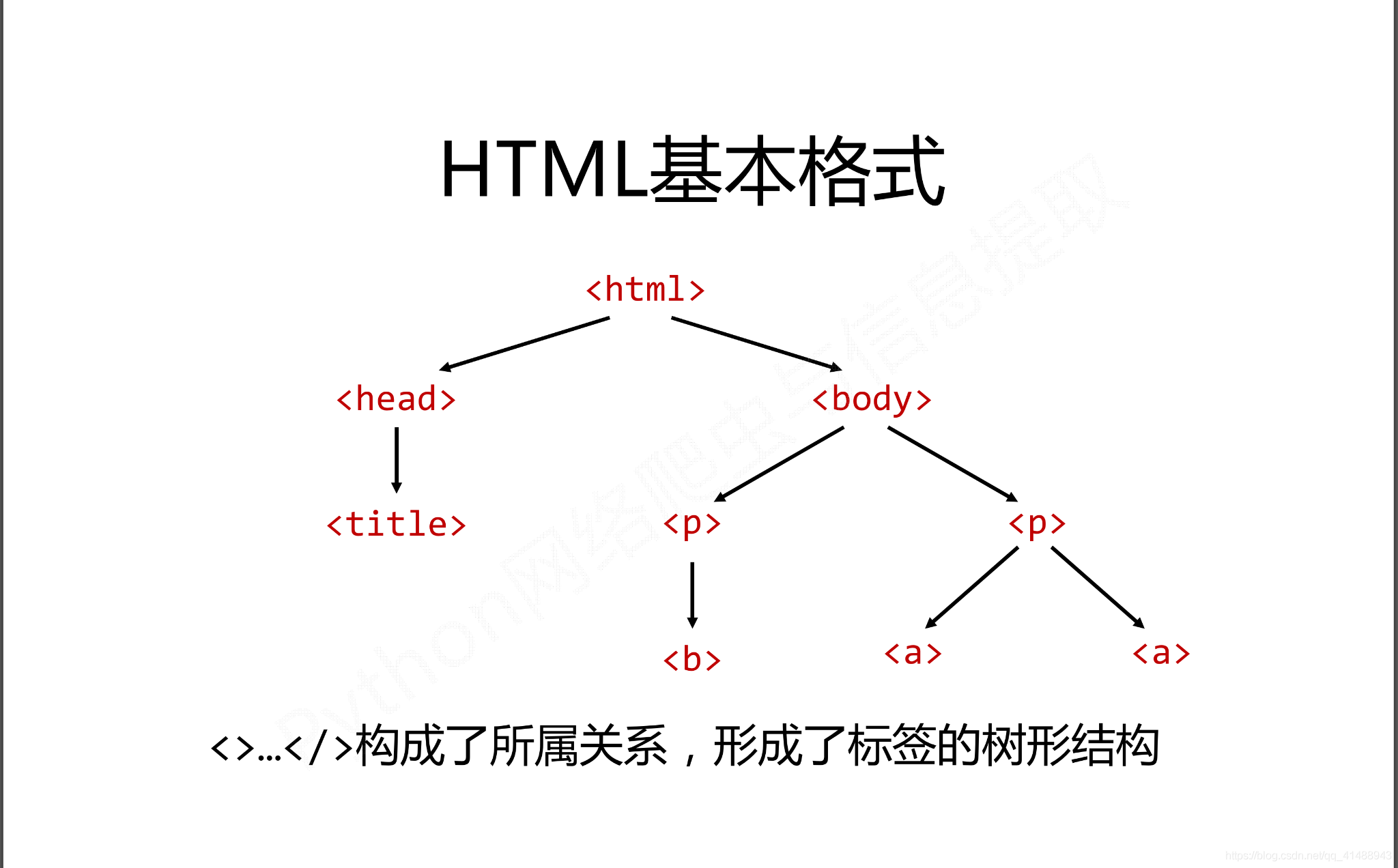
而在这种基本的格式下有三种基本的遍历流程
- 下行遍历
- 上行遍历
- 平行遍历
三种遍历方式分别是从当前节点出发,对之上、之下、平行的格式以及关系进行遍历。
下行遍历
下行遍历分别有三种遍历属性,如下所示:
| 属性 | 说明 |
|---|---|
| .contents | 子节点的列表,将所有儿子节点存入列表。 |
| .children | 子节点的迭代类型,用于循环遍历儿子节点。 |
| .descendants | 子孙节点的迭代类型,包涵所有子孙节点,用于循环遍历。 |
代码如下:
import requests

from bs4 import BeautifulSoup

# 使用requests库加载页面代码

r = requests.get('https://www.baidu.com')

r.encoding = r.apparent_encoding

html = r.text

bs = BeautifulSoup(html, 'html.parser')

# 循环遍历儿子节点

for child in bs.body.children:

    print(child)

# 循环遍历子孙节点

for child in bs.body.descendants:

    print(child)

# 输出子节点,以列表的形式

print(bs.head.contents)

print(bs.head.contents[0])  # 用列表索引来获取它的某一个元素
上行遍历
上行遍历有两种方式,如下所示:
| 属性 | 说明 |
|---|---|
| .parent | 节点的父亲标签。 |
| .parents | 节点先辈标签的迭代类型,用于循环遍历先辈节点,返回一个生成器。 |
代码如下:
import requests

from bs4 import BeautifulSoup

# 使用requests库加载页面代码

r = requests.get('https://www.baidu.com')

r.encoding = r.apparent_encoding

html = r.text

bs = BeautifulSoup(html, 'html.parser')

for parent in bs.a.parents:

    if parent is not None:

        print(parent.name)

print(bs.a.parent.name)
平行遍历
平行遍历有四种属性,如下所示:
| 属性 | 说明 |
|---|---|
| .next_sibling | 返回按照HTML文本顺序的下一个平行节点标签。 |
| .previous_sibling | 返回按照HTML文本顺序的上一个平行节点标签。 |
| .next_siblings | 迭代类型,返回按照HTML文本顺序的所有后续平行节点标签。 |
| .previous_siblings | 迭代类型,返回按照HTML文本顺序的前序所有平行节点标签。 |
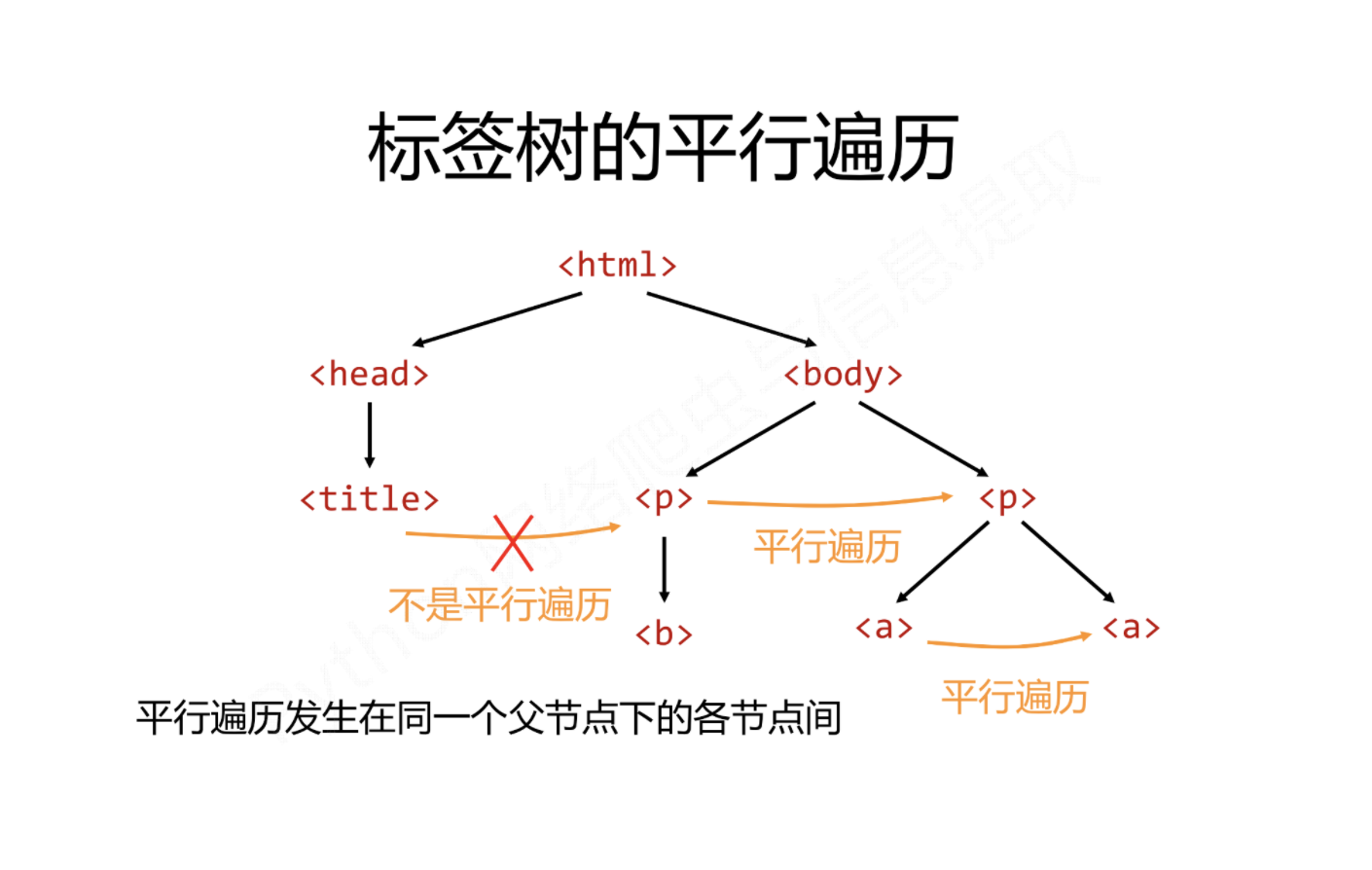
代码如下:
import requests

from bs4 import BeautifulSoup

# 使用requests库加载页面代码

r = requests.get('https://www.baidu.com')

r.encoding = r.apparent_encoding

html = r.text

bs = BeautifulSoup(html, 'html.parser')

for sibling in bs.a.next_siblings:

    print(sibling)

for sibling in bs.a.previous_siblings:

    print(sibling)
其它遍历
| 属性 | 说明 |
|---|---|
| .strings | 如果Tag包含多个字符串,即在子孙节点中有内容,可以用此获取,然后进行遍历。 |
| .stripped_strings | 与strings用法一致,可以去除掉那些多余的空白内容。 |
| .has_attr | 判断Tag是否包含属性。 |
六、文件树搜索
使用bs.find_all(name, attires, recursive, string, **kwargs)方法,用于返回一个列表类型,存储查找的结果。
| 属性 | 说明 |
|---|---|
| name | 对标签的名称的检索字符串。 |
| attrs | 对标签属性值的检索字符串,可标注属性检索。 |
| recursive | 是否对子孙全部检索,默认为True。 |
| string | 用与在信息文本中特定字符串的检索。 |
name参数
如果是指定的字符串:会查找与字符串完全匹配的内容,代码如下:
a_list = bs.find_all("a")

print(a_list)
使用正则表达式:将会使用BeautifulSoup4中的search()方法来匹配,代码如下:
import requests

from bs4 import BeautifulSoup

import re

# 使用requests库加载页面代码

r = requests.get('https://www.baidu.com')

r.encoding = r.apparent_encoding

html = r.text

bs = BeautifulSoup(html, 'html.parser')

t_list = bs.find_all(re.compile("p"))

for item in t_list:

    print(item)
传入一个列表:Beautifulsoup4将会与列表中的任一元素匹配到的节点返回,代码如下:
import requests

from bs4 import BeautifulSoup

# 使用requests库加载页面代码

r = requests.get('https://www.baidu.com')

r.encoding = r.apparent_encoding

html = r.text

bs = BeautifulSoup(html, 'html.parser')

t_list = bs.find_all(["meta", "link"])

for item in t_list:

    print(item)
传入一个函数或方法:将会根据函数或者方法来匹配,代码如下:
import requests

from bs4 import BeautifulSoup

# 使用requests库加载页面代码

r = requests.get('https://www.baidu.com')

r.encoding = r.apparent_encoding

html = r.text

bs = BeautifulSoup(html, 'html.parser')

def name_is_exists(tag):

    return tag.has_attr("name")

t_list = bs.find_all(name_is_exists)

for item in t_list:

    print(item)
attrs参数
并不是所有的属性都可以使用上面这种方法进行搜索,比如HTML的data属性,用与指定属性搜索。
import requests

from bs4 import BeautifulSoup

# 使用requests库加载页面代码

r = requests.get('https://www.baidu.com')

r.encoding = r.apparent_encoding

html = r.text

bs = BeautifulSoup(html, 'html.parser')

t_list = bs.find_all(attrs={"class": "mnav"})

for item in t_list:

    print(item)
string参数
通过string参数可以搜索文档中的字符串内容,与name参数的可选值一样,string参数接受字符串,正则表达式,列表。
import requests

from bs4 import BeautifulSoup

import re

# 使用requests库加载页面代码

r = requests.get('https://www.baidu.com')

r.encoding = r.apparent_encoding

html = r.text

bs = BeautifulSoup(html, 'html.parser')

t_list = bs.find_all(attrs={"class": "mnav"})

for item in t_list:

    print(item)

# text用于搜索字符串

t_list = bs.find_all(text="hao123")

for item in t_list:

    print(item)

# text可以通其它参数混合使用用来过滤tag

t_list = bs.find_all("a", text=["hao123", "地图", "贴吧"])

for item in t_list:

    print(item)

t_list = bs.find_all(text=re.compile("\d\d"))

for item in t_list:

    print(item)
使用find_all()方法,常用到的正则表达式形式import re代码如下:
bs.find_all(string = re.compile('python'))	# 指定查找内容

# 或者指定使用正则表达式要搜索的内容

string = re.compile('python')	# 字符为python

bs.find_all(string)	# 调用方法模版
七、常用的find()方法如下
| 方法 | 说明 |
|---|---|
| <>find() | 搜索且只返回一个结果,字符串类型,同.find_all()参数。 |
| <>find_parent() | 在先辈节点中返回一个结果,字符串类型,同.find_all()参数。 |
| <>.find_parents() | 在先辈节点中搜索,返回列表类型,同.find_all()参数。 |
| <>.find_next_sibling() | 在后续平行节点中返回一个结果,同.find_all()参数。 |
| <>.find_next_siblings() | 在后续平行节点中搜索,返回列表类型,同.find_all()参数。 |
| <>.find_previous_sibling() | 在前序平行节点中返回一个结果,字符串类型,同.find_all()参数。 |
| <>.find_previous_siblings() | 在前序平行节点中搜索,返回列表类型,同.find_all()参数。 |
八、爬取京东电脑数据
爬取的例子直接输出到屏幕。
(1)要爬取京东一页的电脑商品信息,下图所示:

(2)所爬取的网页连接:https://search.jd.com/search?keyword=macbook pro&qrst=1&suggest=5.def.0.V09&wq=macbook pro
(3)我们的目的是需要获取京东这一个页面上所有的电脑数据,包括价格,名称,ID等。具体代码如下:
#!/usr/bin/env python

# -*- coding:utf-8 -*-

import requests

from bs4 import BeautifulSoup

headers = {

        'User-agent': "Mozilla/5.0 (Windows NT 10.0; WOW64) AppleWebKit/537.36 (KHTML, like Gecko) "

                      "Chrome/66.0.3359.139 Safari/537.36"

    }

URL = "https://search.jd.com/search?keyword=macbook%20pro&qrst=1&suggest=5.def.0.V09&wq=macbook%20pro"

r = requests.get(URL, headers=headers)

r.encoding = r.apparent_encoding

html = r.text

bs = BeautifulSoup(html, 'html.parser')

all_items = bs.find_all('li', attrs={"class": "gl-item"})

for item in all_items:

    computer_id = item["data-sku"]

    computer_name = item.find('div', attrs={'class': 'p-name p-name-type-2'})

    computer_price = item.find('div', attrs={'class': 'p-price'})

    print('电脑ID为:' + computer_id)

    print('电脑名称为:' + computer_name.em.text)

    print('电脑价格为:' + computer_price.find('i').string)

    print('------------------------------------------------------------')
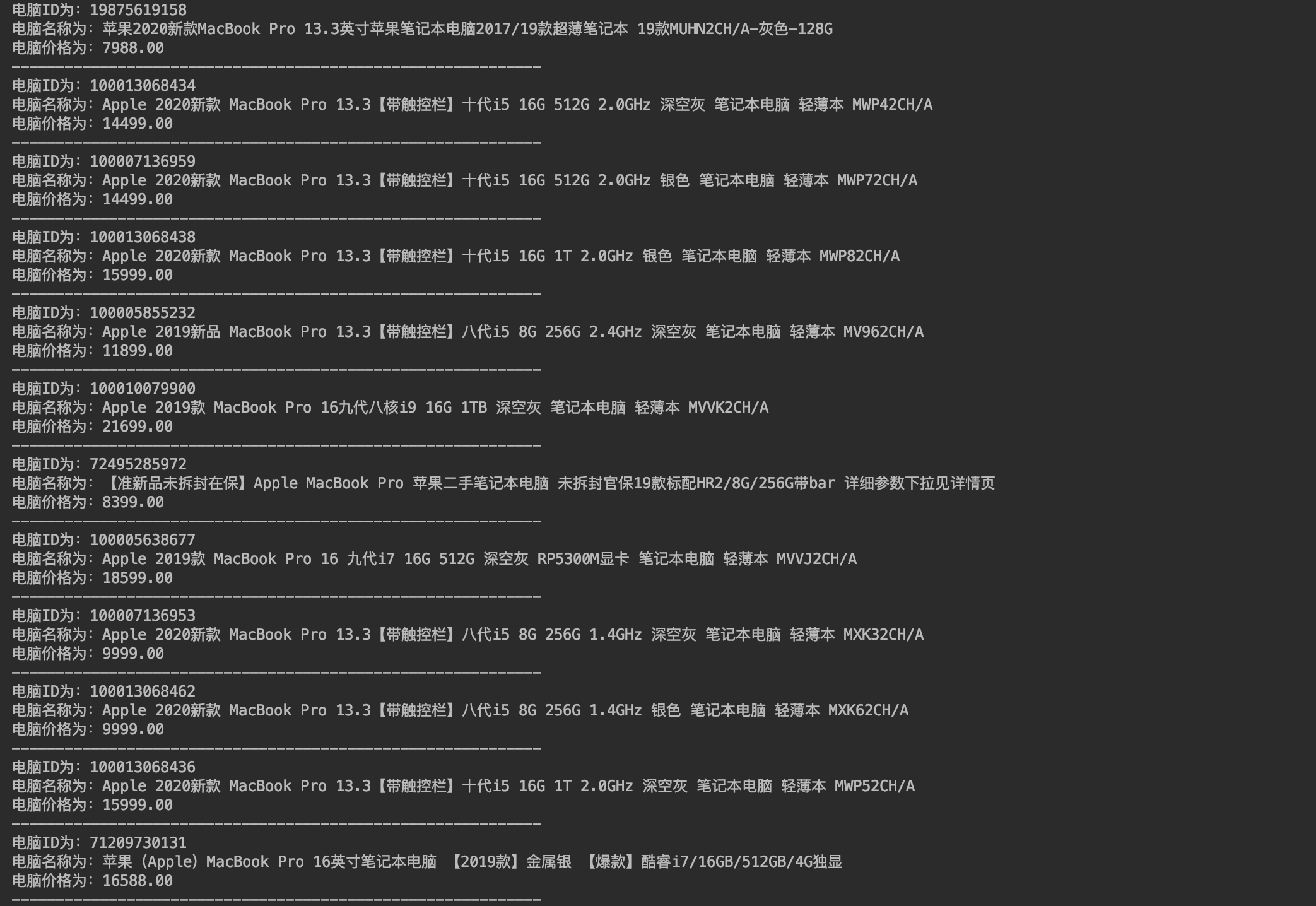
部分结果如下图所示:
python爬虫之Beautiful Soup基础知识+实例的更多相关文章
- Python爬虫之Beautiful Soup解析库的使用(五)
Python爬虫之Beautiful Soup解析库的使用 Beautiful Soup-介绍 Python第三方库,用于从HTML或XML中提取数据官方:http://www.crummv.com/ ...
- python 爬虫利器 Beautiful Soup
python 爬虫利器 Beautiful Soup Beautiful Soup 是一个可以从HTML或XML文件中提取数据的Python库.它能够通过你喜欢的转换器实现惯用的文档导航,查找,修改文 ...
- [Python爬虫] 使用 Beautiful Soup 4 快速爬取所需的网页信息
[Python爬虫] 使用 Beautiful Soup 4 快速爬取所需的网页信息 2018-07-21 23:53:02 larger5 阅读数 4123更多 分类专栏: 网络爬虫 版权声明: ...
- python爬虫之Beautiful Soup的基本使用
1.简介 简单来说,Beautiful Soup是python的一个库,最主要的功能是从网页抓取数据.官方解释如下: Beautiful Soup提供一些简单的.python式的函数用来处理导航.搜索 ...
- Python爬虫库-Beautiful Soup的使用
Beautiful Soup 是一个可以从HTML或XML文件中提取数据的Python库,简单来说,它能将HTML的标签文件解析成树形结构,然后方便地获取到指定标签的对应属性. 如在上一篇文章通过爬虫 ...
- python 爬虫5 Beautiful Soup的用法
1.创建 Beautiful Soup 对象 from bs4 import BeautifulSoup html = """ <html><head& ...
- Python 爬虫(1)基础知识和简单爬虫
Python上手很容易,免费开源,跨平台不受限制,面向对象,框架和库很丰富. Python :Monty Python's Flying Circus (Python的名字来源,和蟒蛇其实无关). 通 ...
- Python爬虫之Beautiful Soup库的基本使用
- Python爬虫入门有哪些基础知识点
1.什么是爬虫 爬虫,即网络爬虫,大家可以理解为在网络上爬行的一直蜘蛛,互联网就比作一张大网,而爬虫便是在这张网上爬来爬去的蜘蛛咯,如果它遇到资源,那么它就会抓取下来.想抓取什么?这个由你来控制它咯. ...
随机推荐
- centos 构建dns服务 dnsmasq
1 安装yum -y install dnsmasq开放udp tcp 53 端口2,修改配置文件 dnsmasq.conf# grep -Ev "^$|^[#;]" /etc/d ...
- 谷歌浏览器又隐藏的HTTPS和WWW前缀
谷歌工程师 Emily Schechter 曾在 Chromium 反馈页面中提到:Chrome 团队一直将简易性.可用性.安全性作为衡量 UI 的标准.为了让 URL 能更好地被用户理解.移除那些容 ...
- PyQt5基础控件
QLabel标签 功能:在界面上显示文字.图片.链接等 接口: 方法 描述 setText() 设置显示的内容 setAlignment() 设置文字对齐方式 setToolTip() 设置提示信息 ...
- CSS和JS实现文本溢出显示省略号
本文记录实现文本溢出显示省略号的几种方式. 单行文本 三行CSS代码实现: overflow: hidden; // 文本溢出隐藏 text-overflow: ellipsis; // 显示省略号 ...
- npm 使用报错合集
1.Unexpected end of JSON input while parsing near '...e,"directories":{},"d' 这个问题经常会出 ...
- vue学习 `${HH}-${mm}-${dd}` 按键修饰符
vue 有一种拼接字符串的规范写法 //键盘 Tab 键 上边的键 英文输入状态 然后采用类似EL表达式${变量}return `${}:${}:${}` //有时候我们经常在输入完密码之后,按回车E ...
- 关于git的一些简单命令
git简介 1 Git是什么? Git is a free and open source distributed version control system designed to handle ...
- kafka笔记——kafka启动
1. 准备 阿里云Linux服务器一个(Centos7) 腾讯云Linux服务器一个(CentOs7) zookeeper,kafka压缩包 Java环境配置好 要死....脚本之家 2. 安装 zo ...
- Redis的事件机制
目录 一.Redis的运行过程 二.事件数据结构 2.1 文件事件数据结构 2.2 事件事件数据结构 3.3 事件循环 三.事件的注册过程 3.1 文件事件的注册过程 3.2 时间事件的注册过程 四. ...
- Python实现数据结构 图
邻接矩阵 class Vertex: def __init__(self, node): self.id = node # Mark all nodes unvisited self.visited ...