
[Cocos2d-x For WP8]DrawPrimitives画图
在Silverlight框架的WP8应用程序里面,我们画几何图形的时候会通过Line等等的类在用C#代码或者在XAML上画图,那么在Cocos2d-x For WP8里面我们一样也可以实现这样的功能。那么在Cocos2d-x中画图的逻辑要放在自己写的draw函数里面,这样图形引擎才会把你的图形给画出来。
比如说:
将画一条直线放到下面这函数是画不出来的
bool HelloWorld::init()
{
ccDrawLine( ccp(0, 0), ccp(s.width, s.height) ); CHECK_GL_ERROR_DEBUG();
}
而放到draw函数就能画出来,也不需要调用
void HelloWorld::draw()
{
ccDrawLine( ccp(0, 0), ccp(s.width, s.height) ); CHECK_GL_ERROR_DEBUG();
}
示例代码:
void HelloWorld::draw()

{

    CCLayer::draw();

    CCSize s = CCDirector::sharedDirector()->getWinSize();

    // 画两条对角的直线

    // 默认的数值:

    // Line Width: 1

    // color: 255,255,255,255 (white, non-transparent)

    // Anti-Aliased

    //glEnable(GL_LINE_SMOOTH);

    //ccDrawLine( CCPointMake(0, 0), CCPointMake(s.width, s.height) );

    // line: color, width, aliased

    //glDisable(GL_LINE_SMOOTH);

    //glLineWidth( 5.0f );

    /*glColor4ub(255,0,0,255);*/

    CCDrawingPrimitive::D3DColor4f(1.0, 0.0, 0.0, 1.0);

    ccDrawLine( CCPointMake(, s.height), CCPointMake(s.width, ) );

    ccDrawLine( CCPointMake(, ), CCPointMake(s.width,s.height ) );

    // TIP:

    //如果是使用同一种颜色则不需要重新去调用CCDrawingPrimitive::D3DColor4f方法去设置颜色 I

    //

    // Remember: OpenGL is a state-machine.

    // draw big point in the center

    //glPointSize(64);

    /*glColor4ub(0,0,255,128);*/

    CCDrawingPrimitive::D3DColor4f(0.0, 0.0, 1.0, 0.5);

    ccDrawPoint( CCPointMake(, ) );

    /*ccDrawPoint( CCPointMake(s.width / 2, s.height / 2) );*/

    // draw 4 small points

    CCPoint points[] = { CCPointMake(,), CCPointMake(,), CCPointMake(,), CCPointMake(,) };

    //glPointSize(4);

    /*glColor4ub(0,255,255,255);*/

    CCDrawingPrimitive::D3DColor4f(0.0, 1.0, 1.0, 1.0);

    ccDrawPoints( points, );

    // draw a green circle with 10 segments

    //glLineWidth(16);

    /*glColor4ub(0, 255, 0, 255);*/

    CCDrawingPrimitive::D3DColor4f(0.0, 1.0, 0.0, 1.0);

    ccDrawCircle( CCPointMake(s.width/,  s.height/), , , , false);

    // draw a green circle with 50 segments with line to center

    //glLineWidth(2);

    /*glColor4ub(0, 255, 255, 255);*/

    CCDrawingPrimitive::D3DColor4f(0.0, 1.0, 1.0, 1.0);

    ccDrawCircle( CCPointMake(s.width/, s.height/), , CC_DEGREES_TO_RADIANS(), , true);

    // open yellow poly

    /*glColor4ub(255, 255, 0, 255);*/

    CCDrawingPrimitive::D3DColor4f(1.0, 1.0, 0.0, 1.0);

    //glLineWidth(10);

    CCPoint vertices[] = { CCPointMake(,), CCPointMake(,), CCPointMake(,), CCPointMake(,), CCPointMake(,) };

    ccDrawPoly( vertices, , false);

    // closed purble poly

    /*glColor4ub(255, 0, 255, 255);*/

    CCDrawingPrimitive::D3DColor4f(1.0, 0.0, 1.0, 1.0);

    //glLineWidth(2);

    CCPoint vertices2[] = { CCPointMake(,), CCPointMake(,), CCPointMake(,) };

    ccDrawPoly( vertices2, , true);

    // draw quad bezier path

    ccDrawQuadBezier(CCPointMake(,s.height), CCPointMake(s.width/,s.height/), CCPointMake(s.width,s.height), );

    // draw cubic bezier path

    ccDrawCubicBezier(CCPointMake(s.width/, s.height/), CCPointMake(s.width/+,s.height/+), CCPointMake(s.width/+,s.height/-),CCPointMake(s.width, s.height/),);

    // restore original values

    //glLineWidth(1);

    /*glColor4ub(255,255,255,255);*/

    CCDrawingPrimitive::D3DColor4f(1.0, 1.0, 1.0, 1.0);

    //glPointSize(1);

}
运行的效果: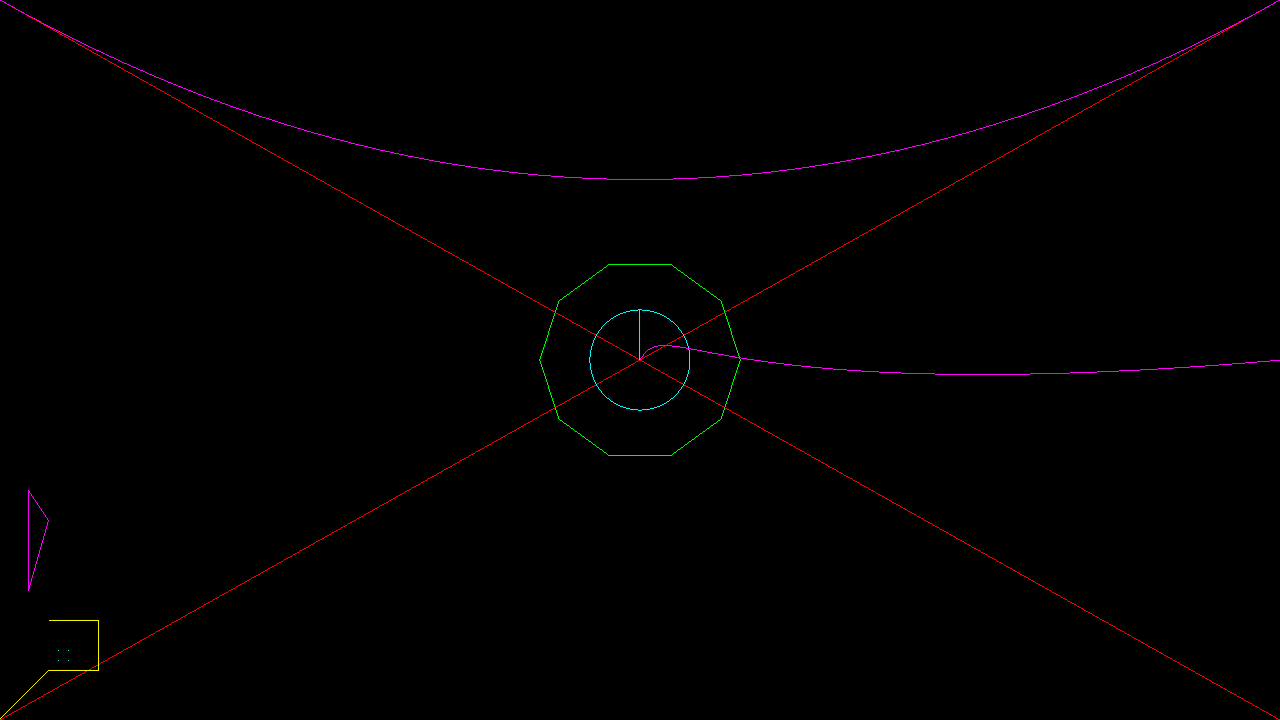
[Cocos2d-x For WP8]DrawPrimitives画图的更多相关文章
- Cocos2d-x游戏移植到WP8之路 -- c++和c#交互
Cocos2d-x是眼下最流行的手机游戏引擎之中的一个,开源.轻量.多平台等的诸多特性使得它被非常多国内外手游开发人员所喜爱. 利用Cocos2d-x来开发Windows Phone 8的游戏相同也是 ...
- cocos2d_x_03_经常使用类的使用_事件_画图
一.TextFieldTTF输入框的使用 #pragma mark - 自己定义方法 // 自己定义方法,加入一个 TextField void TextFieldScene::addOneTextF ...
- cocos2dx基础篇(16) 基本绘图DrawPrimitives
[3.x] (1)去掉前缀 "cc" (2)将 ccDraw***() 封装到了 DrawPrimitives 命名空间中. (3)重写绘图函数: draw(Ren ...
- 【Cocos2d-x for WP8 学习整理】(4)CCTableView 实现《天天爱消除》中的得分榜
接上回 CCScrollView 继续,在GUI 里还有个 CCScrollView 的子类---CCTableView . 这个名字应该是从 IOS 里的 UITableView来的,其实是跟WP8 ...
- [Cocos2D-x For WP8]CocosDenshion音频播放
Cocos2D-x的音频分为长时间的背景音乐和短的音效两种,我们可以通过SimpleAudioEngine::sharedEngine()方法来获取音频播放的引擎,然后调用对音频相关的操作方法就可以了 ...
- [Cocos2D-x For WP8]Box2D物理引擎
物理引擎通过为刚性物体赋予真实的物理属性的方式来计算运动.旋转和碰撞反映.为每个游戏使用物理引擎并不是完全必要的—简单的“牛顿”物理(比如加速和减速)也可以在一定程度上通过编程或编写脚本来实现.然而, ...
- [Cocos2d-x For WP8]EaseActions缓动动作
我们用Silverlight框架开发WP8的应用程序的时,编写动画可以使用缓动效果来实现缓动动画对吧,那么在Cocos2d-x框架里面我们一样是可以缓动动作(缓动动画),其实技术的东西都是想通的,如果 ...
- [Cocos2d-x For WP8]Hello world
[Cocos2d-x For WP8]Hello world Cocos2d-x For WP8使用C++开发,使用cocos2d-xv0.13同样的接口,Cocos2d-x For WP8的相关项目 ...
- [Cocos2d-x for WP8学习笔记] HelloWorld结构分析
先来看一下目录结构: Assets:游戏资源文件,图片音频等,Resource文件夹也有类似功能 include:用于放置游戏头文件 Shaders:渲染器着色器文件(大雾) cocos2dorig. ...
随机推荐
- Unity依赖注入使用
构造器注入(Constructor Injection):IoC容器会智能地选择选择和调用适合的构造函数以创建依赖的对象.如果被选择的构造函数具有相应的参数,IoC容器在调用构造函数之前会自定义创建相 ...
- 【Java EE 学习 21 上】【其它类型的监听器】【使用HttpSessionActivationListener监听session的活化和钝化】
一.ServletContextListener Method Summary void contextDestroyed(ServletContextEvent sce) R ...
- Oracle性能优化之SQL语句
1.SQL语句执行过程 1.1 SQL语句的执行步骤 1)语法分析,分析语句的语法是否符合规范,衡量语句中各表达式的意义. 2)语义分析,检查语句中涉及的所有数据库对象是否存在,且用户有相应的权限. ...
- NuGet学习笔记(1) 初识NuGet及快速安装使用
关于NuGet园子里已经有不少介绍及使用经验,本文仅作为自己研究学习NuGet一个记录. 初次认识NuGet是在去年把项目升级为MVC3的时候,当时看到工具菜单多一项Library Package M ...
- Vs2012调试本地windows服务
背景: 在我的工作经历中,我用到了一个我们以前学习中没有接触过的老东西-服务.之所说以前没有接触过,是因为自己没有系统的研究过这东西:之所以又说它是老东西,是因为我们其实早就知道他的存在,经常用它去干 ...
- jq获取后台json并解析
参考: $(function () { $.ajax({ url: 'tsconfig.json', type: 'GET', dataType: 'json', timeout: 1000, cac ...
- javascript关键字和保留字
1 关键字breakcasecatchcontinuedefaultdeletedoelsefinallyforfunctionifininstanceofnewreturnswitchthisthr ...
- Appium Java Windows环境搭建篇
1. 安卓SDK及配置环境变量 1.1.先下载sdk安装包:installer_r24.4.1-windows.exe 下载地址:链接: http://pan.baidu.com/s/1dEyPSa9 ...
- 4、delphi record数组复制
SetLength(OldDeptInfo,0); //释放旧数组 OldDeptInfo:=nil; 这样也可以: //SetLength(OldDeptInfo,Length(NewDeptInf ...
- windows安装python问题
在安装python过程中,直接下一步,安装好了,配置环境变量的时候如果找不到安装路径在哪,打开开始菜单,在左边的程序栏找到: 这样就找到了,然后在系统变量中加入即可.如果找不到的话,以联想电脑为例一般 ...