
(三十七)c#Winform自定义控件-有标题的面板-HZHControls
官网
前提
入行已经7,8年了,一直想做一套漂亮点的自定义控件,于是就有了本系列文章。
GitHub:https://github.com/kwwwvagaa/NetWinformControl
码云:https://gitee.com/kwwwvagaa/net_winform_custom_control.git
如果觉得写的还行,请点个 star 支持一下吧
欢迎前来交流探讨: 企鹅群568015492 idkey=6e08741ef16fe53bf0314c1c9e336c4f626047943a8b76bac062361bab6b4f8d">
目录
https://www.cnblogs.com/bfyx/p/11364884.html
准备工作
用到了控件基类 UCControlBase,如果你还不了解UCControlBase,请移步 (一)c#Winform自定义控件-基类控件 查看
开始
添加一个用户控件,命名UCPanelTitle,继承自UCControlBase
2个属性
 [Description("边框颜色"), Category("自定义")]

         public Color BorderColor

         {

             get { return this.RectColor; }

             set

             {

                 this.RectColor = value;

                 this.lblTitle.BackColor = value;

             }

         }

         [Description("面板标题"), Category("自定义")]

         public string Title

         {

             get { return lblTitle.Text; }

             set { lblTitle.Text = value; }

         }
全部代码
 using System;

 using System.Collections.Generic;

 using System.ComponentModel;

 using System.Drawing;

 using System.Data;

 using System.Linq;

 using System.Text;

 using System.Windows.Forms;

 namespace HZH_Controls.Controls

 {

     public partial class UCPanelTitle : UCControlBase

     {

         [Description("边框颜色"), Category("自定义")]

         public Color BorderColor

         {

             get { return this.RectColor; }

             set

             {

                 this.RectColor = value;

                 this.lblTitle.BackColor = value;

             }

         }

         [Description("面板标题"), Category("自定义")]

         public string Title

         {

             get { return lblTitle.Text; }

             set { lblTitle.Text = value; }

         }

         public UCPanelTitle()

         {

             InitializeComponent();

         }

     }

 }
 namespace HZH_Controls.Controls

 {

     partial class UCPanelTitle

     {

         /// <summary>

         /// 必需的设计器变量。

         /// </summary>

         private System.ComponentModel.IContainer components = null;

         /// <summary>

         /// 清理所有正在使用的资源。

         /// </summary>

         /// <param name="disposing">如果应释放托管资源,为 true;否则为 false。</param>

         protected override void Dispose(bool disposing)

         {

             if (disposing && (components != null))

             {

                 components.Dispose();

             }

             base.Dispose(disposing);

         }

         #region 组件设计器生成的代码

         /// <summary>

         /// 设计器支持所需的方法 - 不要

         /// 使用代码编辑器修改此方法的内容。

         /// </summary>

         private void InitializeComponent()

         {

             this.lblTitle = new System.Windows.Forms.Label();

             this.SuspendLayout();

             //

             // lblTitle

             //

             this.lblTitle.BackColor = System.Drawing.Color.FromArgb(((int)(((byte)()))), ((int)(((byte)()))), ((int)(((byte)()))));

             this.lblTitle.Dock = System.Windows.Forms.DockStyle.Top;

             this.lblTitle.ForeColor = System.Drawing.Color.White;

             this.lblTitle.Location = new System.Drawing.Point(, );

             this.lblTitle.Name = "lblTitle";

             this.lblTitle.Size = new System.Drawing.Size(, );

             this.lblTitle.TabIndex = ;

             this.lblTitle.Text = "面板";

             this.lblTitle.TextAlign = System.Drawing.ContentAlignment.MiddleCenter;

             //

             // UCPanelTitle

             //

             this.AutoScaleMode = System.Windows.Forms.AutoScaleMode.None;

             this.BackColor = System.Drawing.Color.Transparent;

             this.ConerRadius = ;

             this.Controls.Add(this.lblTitle);

             this.FillColor = System.Drawing.Color.White;

             this.IsRadius = true;

             this.IsShowRect = true;

             this.Name = "UCPanelTitle";

             this.RectColor = System.Drawing.Color.FromArgb(((int)(((byte)()))), ((int)(((byte)()))), ((int)(((byte)()))));

             this.Size = new System.Drawing.Size(, );

             this.ResumeLayout(false);

         }

         #endregion

         private System.Windows.Forms.Label lblTitle;

     }

 }
用处及效果
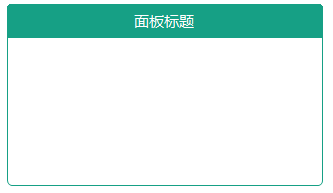
最后的话
如果你喜欢的话,请到 https://gitee.com/kwwwvagaa/net_winform_custom_control 点个星 星吧
(三十七)c#Winform自定义控件-有标题的面板-HZHControls的更多相关文章
- winform 自定义控件属性在属性面板中显示
Jan.David Nothing is impossible, the word itself says 'I'm possible'!" — Audrey Hepburn winform ...
- (二十四)c#Winform自定义控件-单标题窗体
前提 入行已经7,8年了,一直想做一套漂亮点的自定义控件,于是就有了本系列文章. 开源地址:https://gitee.com/kwwwvagaa/net_winform_custom_control ...
- (三)c#Winform自定义控件-有图标的按钮
前提 入行已经7,8年了,一直想做一套漂亮点的自定义控件,于是就有了本系列文章. 开源地址:https://gitee.com/kwwwvagaa/net_winform_custom_control ...
- (五十七)c#Winform自定义控件-传送带(工业)-HZHControls
官网 http://www.hzhcontrols.com 前提 入行已经7,8年了,一直想做一套漂亮点的自定义控件,于是就有了本系列文章. GitHub:https://github.com/kww ...
- (五十六)c#Winform自定义控件-瓶子(工业)-HZHControls
官网 http://www.hzhcontrols.com 前提 入行已经7,8年了,一直想做一套漂亮点的自定义控件,于是就有了本系列文章. GitHub:https://github.com/kww ...
- (五十九)c#Winform自定义控件-池子(工业)-HZHControls
官网 http://www.hzhcontrols.com 前提 入行已经7,8年了,一直想做一套漂亮点的自定义控件,于是就有了本系列文章. GitHub:https://github.com/kww ...
- (六十一)c#Winform自定义控件-信号灯(工业)-HZHControls
官网 http://www.hzhcontrols.com 前提 入行已经7,8年了,一直想做一套漂亮点的自定义控件,于是就有了本系列文章. GitHub:https://github.com/kww ...
- (六十三)c#Winform自定义控件-箭头(工业)-HZHControls
官网 http://www.hzhcontrols.com 前提 入行已经7,8年了,一直想做一套漂亮点的自定义控件,于是就有了本系列文章. GitHub:https://github.com/kww ...
- winform 自定义控件(高手)
高手推荐:https://www.cnblogs.com/bfyx/p/11364884.html c#Winform自定义控件-目录 前提 入行已经7,8年了,一直想做一套漂亮点的自定义控件 ...
随机推荐
- hdu 6299 Balanced Sequence (贪心)
Balanced Sequence Time Limit: 2000/1000 MS (Java/Others) Memory Limit: 32768/32768 K (Java/Others ...
- 2019 The Preliminary Contest for ICPC China Nanchang National Invitational(A 、H 、I 、K 、M)
A. PERFECT NUMBER PROBLEM 题目链接:https://nanti.jisuanke.com/t/38220 题意: 输出前五个完美数 分析: 签到.直接百度完美数输出即可 #i ...
- Dc:7 Vulnhub Walkthrough
靶机下载地址: https://www.vulnhub.com/entry/dc-7,356/ 主机扫描: http://10.10.202.161/ Google搜索下: SSH 登录 以上分析得出 ...
- laravel身份验证-Auth的使用
laravel自带了auth类和User模型来帮助我们很方便的实现用户登陆.判断.首先,先配置一下相关参数 app/config/auth.php: model 指定模型table 指定用户表这里我只 ...
- webpack入门——构建简易版vue-cli
前言:(面试让介绍webpack,你可以这么答)简单地说,Webpack其最核心的功能就是 解决模板之间的依赖,把各个模块按照特定的规则和顺序组织在一起,最终合并成一个JS文件(比如bun ...
- nginx和swoole怎么混合使用
有需要学习交流的友人请加入交流群的咱们一起,有问题一起交流,一起进步!前提是你是学技术的.感谢阅读! 点此加入该群jq.qq.com 基于epoll的Nginx 有了epoll,理论上1个进程就可以 ...
- 痛苦的 java.net.BindException: Address already in use: connect —— Nacos的坑
我的dubbo应用, 刚开始的时候,启动一两个是没有问题的, 启动多了就大量出现: -- :: --- [TaskScheduler-] o.s.c.a.nacos.discovery.NacosWa ...
- 小程序如何实现rem
最近在学习小程序,要把html的代码转换成小程序界面,其中就遇到了rem的转换问题,但小程序不太兼容rem,不是不能用rem,而是没办法设置根元素的font-size,因为rem是相对于根元素的fon ...
- python 调试大法
说在前面 我觉得没有什么错误是调试器无法解决的,如果没有,那我再说一遍,如果有,那当我没说 一.抛出异常 可以通过 raise 语句抛出异常,使程序在我们已经知道的缺陷处停下,并进入到 except ...
- GO汇总
1.基础 GO语言介绍以及开发环境配置 Go-包 Go-数据类型以及变量,常量 Go-获取变量数据类型 GO-数组与切片 GO-切片拷贝以及赋值 Go-函数 Go-闭包 GO-逻辑判断(if,else ...