
家庭版记账本app进度之编辑框组件
<EditText>中设置提示信息是用到的语句是android:hint来进行提示语句的书写。
android:inputType可以将此编辑框设置为输入密码的编辑框(现实的是小黑点)
android:drawableLeft属性来确定相应编辑框开始时候对应的头像。
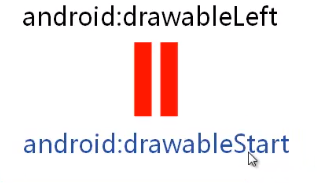
除了在文字的左侧设置图片的,也可以在其他的地方进行图片的设置。
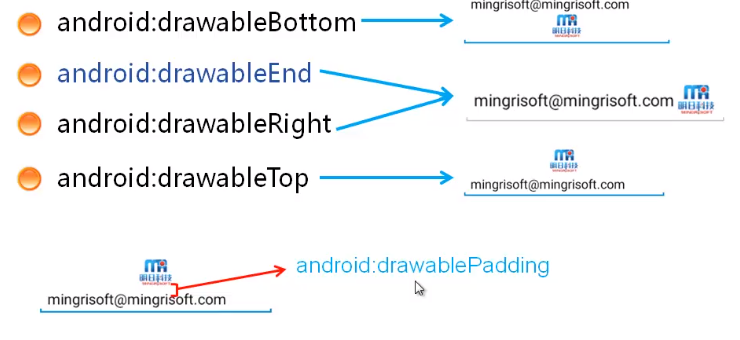 padding应用pd为单位
设置编辑框的文本行数android:lines这样的话当内容较多时。
android:gravity设置提示文字的的对其方式:
android:layout_marginBottom来设置外边距;
android:inputType="textMultiLine"这样来设置编辑框可以显示多行
制作出的添加小事件的程雪截图如图所示:

相应的主要是代码如下:
activity_main.xml
<LinearLayout xmlns:android="http://schemas.android.com/apk/res/android"

    xmlns:tools="http://schemas.android.com/tools"

    android:id="@+id/activity_main"

    android:layout_width="match_parent"

    android:layout_height="match_parent"

    android:orientation="vertical"

    android:padding="10dp"

    android:background="@color/qianhui"

    tools:context=".MainActivity">

    <TextView

        android:id="@+id/texnum1"

        android:layout_width="match_parent"

        android:layout_height="wrap_content"

        android:text="添加新的小事件"

        android:textSize="30dp"

        android:gravity="center_horizontal"

        android:padding="5dp"

        android:background="@color/baise"

        android:layout_marginBottom="10dp"

    />

    <EditText

        android:layout_width="match_parent"

        android:layout_height="wrap_content"

        android:hint="请输入新事件的标题"

        android:lines="2"

        android:padding="8dp"

        android:background="@color/baise"

        android:layout_marginBottom="10dp"

        />

    <EditText

        android:layout_width="match_parent"

        android:layout_height="wrap_content"

        android:hint="请输入新事件的相关内容"

        android:lines="15"

        android:padding="8dp"

        android:background="@color/baise"

        android:layout_marginBottom="10dp"

        android:gravity="top"

        />

    <LinearLayout

        android:id="@+id/ll_date"

        android:layout_width="match_parent"

        android:layout_height="wrap_content"

        android:orientation="horizontal">

        <TextView

            android:layout_width="wrap_content"

            android:layout_height="wrap_content"

            android:text="选择日期:"

            android:padding="8dp"

            android:background="@color/baise"

            android:textSize="18sp" />

        <TextView

            android:id="@+id/tv_date"

            android:layout_width="match_parent"

            android:layout_height="wrap_content"

            android:padding="8dp"

            android:background="@color/qianhuang"

            android:textSize="18sp" />

    </LinearLayout>

    <LinearLayout

        android:id="@+id/ll_time"

        android:layout_width="match_parent"

        android:layout_height="wrap_content"

        android:layout_marginTop="10dp"

        android:orientation="horizontal">

        <TextView

            android:layout_width="wrap_content"

            android:layout_height="wrap_content"

            android:text="选择时间:"

            android:padding="8dp"

            android:background="@color/baise"

            android:textSize="18sp" />

        <TextView

            android:id="@+id/tv_time"

            android:layout_width="match_parent"

            android:layout_height="wrap_content"

            android:background="@color/qianhuang"

            android:padding="8dp"

            android:textSize="18sp" />

    </LinearLayout>

</LinearLayout>
家庭版记账本app进度之编辑框组件的更多相关文章
- 家庭记账本app进度之下拉框和数字转轮的相关应用
这次主要是悬系的下拉框Spinner和数字转轮NumberPicker的使用.先分析相关的用到的知识点. 在Android中,用string-array是一种简单的提取XML资源文件数据的方法. 例子 ...
- 家庭版记账本app进度之关于listview显示账单,并为其添加点击事件
这个主要学习是关于listview的学习. 怎样去自定义adapter,以及使用.自己创建文件,还有就是为listview的每一个子控件添加点击事件. 在整个过程中收获到的知识点如下: 一.对于数据库 ...
- 家庭版记账本app进度之关于android界面布局的相关学习
1.线性布局(linearlayout)是一种让视图水平或垂直线性排列的布局线性布局使用<LinearLayout>标签进行配置对应代码中的类是android.widget.LinearL ...
- 家庭版记账本app进度之对于按钮的点击事件以及线性布局以及(alertdialog)等相关内容的应用测试
通过线性布局,制作出连个按钮还有文本输入框以及嘴上放的标题文本进行信息的相关显示,完后最后的信息的输入,之后在屏幕的的下方进行显示 当点击第一个按钮的时候,在下方就会简单的出现你自己刚刚输入的相关信息 ...
- 家庭版记账本app开发完成
经过这几天关于android的相关学习,对于家庭版记账本app以及开发结束. 实现的功能为:用户的注册.登录.添加支出账单.添加收入账单.显示所有的该用户的账单情况(收入和支出).生产图表(直观的显示 ...
- 家庭记账本app进度之android中AlertDialog的相关应用以及对日期时间的相关操作(应用alertdialog使用的谈话框)
对于AlertDialog的相关知识: 1.创建构造器AlertDialog.Builder的对象: 2.通过构造器对象调用setTitle.setMessage.setIcon等方法构造对话框 ...
- 家庭记账本app进度之复选框以及相应滚动条的应用
这次主要是对于android中复选框的相应的操作.以及其中可能应用到的滚动条的相关应用.每一个复选框按钮都要有一个checkBox与之相对应. 推荐使用XML配置,基本语法如下:<CheckBo ...
- 家庭版记账本app开发进度相关界面的规划
总的app界面包括四个页面,页面可以来回滑动.设计的时候就和微信的四个页面类似. 由于没有找到合适的图标进行替换,在此仍应用微信对应的四个图标. 总的四个页面是: 1.增加收入或者支出的小账单.当点击 ...
- 家庭版记账本app开发进度。开发到现在整个app只剩下关于图表的设计了,具体功能如下
首先说一下自己的功能: 实现了用户的登录和注册.添加收入记账和添加支出记账.粗略显示每条账单基本情况.通过点击每条账单来显示具体的情况, 之后就是退出当前用户的操作. 具体的页面情况如下: 这就是整个 ...
随机推荐
- 用shell脚本实现定时备份数据库
1.备份数据库的方法 可以使用命令查看 ls /usr/local/mysql/bin 这个mysqldump就是系统内置的用来备份数据库的工具. 2.实现方法 ①先随便进入一个位置创建一个目录 ② ...
- 提示消息无缝向上滚动(vue)
<div class="order-tips__message-item" :class="getClass(index)" v-for="(o ...
- Angular介绍
Angulay介绍 1.介绍:是一个用于Html和TypeScript构建客户端应用平台与框架.Angular 本身就是用 TypeScript 写成的.基本构造块是 NgModule,它为组件提供了 ...
- delphi真正实现延时暂停功能
用delphi怎么实现延时功能?在delphi中有一个sleep()函数是用来暂停线程的,使用了它好像和死掉了似得,不好用,这么简单的延时动作用Timer控件有显得复杂了.下面给大家分享一个真正好用的 ...
- java-FileUtils(复制文件夹、复制文件、字符串直接写入文件中)(新手)
实例: lx1: import org.apache.commons.io.FileUtils; import java.io.File; import java.io.IOException; pu ...
- 五分钟了解Semaphore
一.前言 多个线程之间的同步,我们会用到Semaphore,翻译成中文就是信号量.使用Semaphore可以限制多个线程对同一资源的访问.我们先看下C#中对Semaphore的定义,如下图: 翻译成中 ...
- Flutter 实现不同样式(有样式) 的TextField (可自定义),类似微博#话题#、@用户,(给TextField加TextSpan)
描述 先上效果图 在项目中,有 @ 和 话题功能,需要在编辑时即可回显,但是官方原生的TextField不支持对部分文字定义不同的样式,所以封装了一个. 注意:这不是富文本插件,不支持在输入框中显示图 ...
- laravel的中间件创建思路
网上有很多解析laravel中间件的实现原理,但是不知道有没有读者在读的时候不明白,作者是怎么想到要用array_reduce函数的? 本文从自己的角度出发,模拟了如果我是作者,我是怎么实现这个中间件 ...
- Java第十三周实验作业
实验十三 图形界面事件处理技术 实验时间 2018-11-22 1.实验目的与要求 (1) 掌握事件处理的基本原理,理解其用途: 事件源:能够产生事件的对象都可以成为事件源,如文本框.按钮等,一个事 ...
- ThreadPoolTaskExecutor 中 corePoolSize vs. maxPoolSize
1. 概览 Spring中的 ThreadPoolTaskExecutor 是一个 JavaBean ,提供围绕java.util.concurrent.ThreadPoolExecutor 的抽象实 ...