
Android布局控件
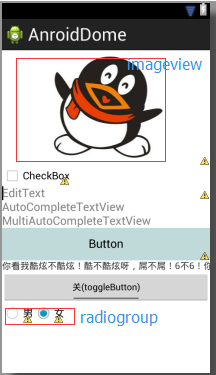
 <LinearLayout xmlns:android="http://schemas.android.com/apk/res/android"

     android:layout_width="match_parent"

     android:layout_height="match_parent"

     android:orientation="vertical"

     android:gravity="center_vertical"

     >

     <ImageView

         android:id="@+id/imageView1"

         android:layout_width="match_parent"

         android:layout_height="wrap_content"

         android:src="@drawable/qq_image" />

     <CheckBox

         android:id="@+id/checkBox1"

         android:layout_width="wrap_content"

         android:layout_height="wrap_content"

         android:text="CheckBox" />

     <EditText

         android:id="@+id/editText1"

         android:layout_width="match_parent"

         android:layout_height="wrap_content"

         android:hint="EditText"

         android:ems="10" >

         <requestFocus />

     </EditText>

     <AutoCompleteTextView

         android:id="@+id/autoCompleteTextView1"

         android:layout_width="match_parent"

         android:layout_height="wrap_content"

         android:completionThreshold="2"

         android:hint="@string/editText1_name" >

     </AutoCompleteTextView>

     <MultiAutoCompleteTextView

         android:id="@+id/multiAutoCompleteTextView1"

         android:layout_width="match_parent"

         android:layout_height="wrap_content"

         android:completionThreshold="2"

         android:hint="@string/editText2_name" >

     </MultiAutoCompleteTextView>

     <Button

         android:id="@+id/button1"

         android:layout_width="match_parent"

         android:layout_height="50dp"

         android:background="#C0D9D9"

         android:text="Button" />

     <com.example.anroiddome.MyTextView

         android:id="@+id/textView1"

         android:layout_width="match_parent"

         android:layout_height="wrap_content"

         android:ellipsize="marquee"

         android:focusable="true"

         android:focusableInTouchMode="true"

         android:singleLine="true"

         android:text="@string/view_name" />

     <ToggleButton

         android:id="@+id/toggleButton"

         android:layout_width="match_parent"

         android:layout_height="wrap_content"

         android:checked="false"

         android:textOff="关(toggleButton)"

         android:textOn="开(toggleButton)" />

     <RadioGroup

         android:id="@+id/radioGroup1"

         android:layout_width="wrap_content"

         android:layout_height="wrap_content"

         android:orientation="horizontal"

         >

         <RadioButton

             android:id="@+id/radio0"

             android:layout_width="match_parent"

             android:layout_height="wrap_content"

             android:text="男" />

         <RadioButton

             android:id="@+id/radio1"

             android:layout_width="match_parent"

             android:layout_height="wrap_content"

             android:checked="true"

             android:text="女" />

     </RadioGroup>

 </LinearLayout>
整理于http://naotu.baidu.com/file/e5880b84b1a906838116f7a45f58de78
Android布局控件的更多相关文章
- Mono for Android布局控件属性小结
1. layout_weight 用于给一个线性布局中的诸多视图的重要度赋值. 所有的视图都有一个layout_weight值,默认为零,意思是需要显示 多大的视图就占据多大的屏幕空 间.若赋一个高于 ...
- Android 布局控件——滚动条视图,日期,时间
今天学长讲了一些控件,比较强的那种控件. 刚开始讲了图片,但是图片我前面写过了就跳过. 滚动条牛牛们应该很熟悉,也常用哈. 这是垂直的滚动条视图哈 一起来用吧! <ScrollView andr ...
- Android:控件布局(相对布局)RelativeLayout
RelativeLayout是相对布局控件:以控件之间相对位置或相对父容器位置进行排列. 相对布局常用属性: 子类控件相对子类控件:值是另外一个控件的id android:layout_above-- ...
- Android:控件布局(线性布局)LinearLayout
LinearLayout是线性布局控件:要么横向排布,要么竖向排布 决定性属性:必须有的! android:orientation:vertical (垂直方向) .horizontal(水平方向) ...
- 【Android】7.1 布局控件常用的公共属性
分类:C#.Android.VS2015: 创建日期:2016-02-10 一.简介 Android应用程序中的布局控件都是容器控件,用于控制子元素的排列和放置方式.Android提供的布局控件有: ...
- Android:控件布局(相对布局)RelativeLayout(转)
相对布局常用属性: 子类控件相对子类控件:值是另外一个控件的id android:layout_above----------位于给定DI控件之上android:layout_below ------ ...
- Android之控件使用
Android系统为我们提供了大量的控件,例如:开关控件.单选按钮.多选按钮.单选菜单等等,那么这些控件如何使用呢?本篇我将带领大家一道学习一下如何使用这些控件.所谓无图无真相,先让大家看一下效果图: ...
- android 基础控件(EditView、SeekBar等)的属性及使用方法
android提供了大量的UI控件,本文将介绍TextView.ImageView.Button.EditView.ProgressBar.SeekBar.ScrollView.WebView ...
- Android基本控件之Menus
在我们的手机中有很多样式的菜单,比如:我们的短信界面,每条短信,我们长按都会出现一个菜单,还有很多的种类.那么现在,我们就来详细的讨论一下安卓中的菜单 Android的控件中就有这么一个,叫做Menu ...
随机推荐
- Emacs下编译C++/C程序<转>
1.启动Emacs,在终端输入“emacs&”命令后回车(你也可以输入“emacs”命令,不过当你在使用Emacs的时候,当前终端 就不为你工作了:并且如果你熟练使用Emacs的话也可以输入“ ...
- struts2.x中因变量命名错误不被注入到值栈的问题
//I declare... private String aBC="abc"; Then I Alt+Shift+R and S(Generate Getter/Setter) ...
- oracle的nvl和sql server的isnull函数
最近公司在做Oracle数据库相关产品,在这里作以小结: ISNULL()函数 语法 ISNULL ( check_expression , replacement_value) 参数 ...
- label的for属性与inputde的id元素绑定
<form> <label for="male">Male</label> <input type="radio" n ...
- 磁盘管理二-LVM相关内容
1.基本概念 LVM:logical volume manager 逻辑卷管理器 LVM构成:物理卷PV,卷组VG(PE物理区域,最小存储单元),逻辑卷LV(LE逻辑区域,最小存储单元) 三者如下图所 ...
- Python解析json字符串
{"status":0,"result":{"location":{"lng":116.47847460177,&quo ...
- Centos下搭建 nginx+uwsgi+python
python做web应用最麻烦的还是配置服务器了,此话不假,光中间件就有好几种选择,fastcgi.wsgi.uwsgi,难 免让人眼花缭乱. 而听说uwsgi的效率是fastcgi和wsgi的10倍 ...
- BZOJ NOI十连测 第二测 T2
思路:20%可以搜索.. #include<algorithm> #include<cstdio> #include<cmath> #include<cstr ...
- USB设备类型代码(class类型)
Base Class E0h (Wireless Controller) This base class is defined for devices that are Wireless contro ...
- Keil C -WARNING L15: MULTIPLE CALL TO SEGMENT
1.第一种错误信息 ***WARNING L15: MULTIPLE CALL TO SEGMENT SEGMENT: ?PR?_WRITE_GMVLX1_REG?D_GMVLX1 CALLER1: ...