
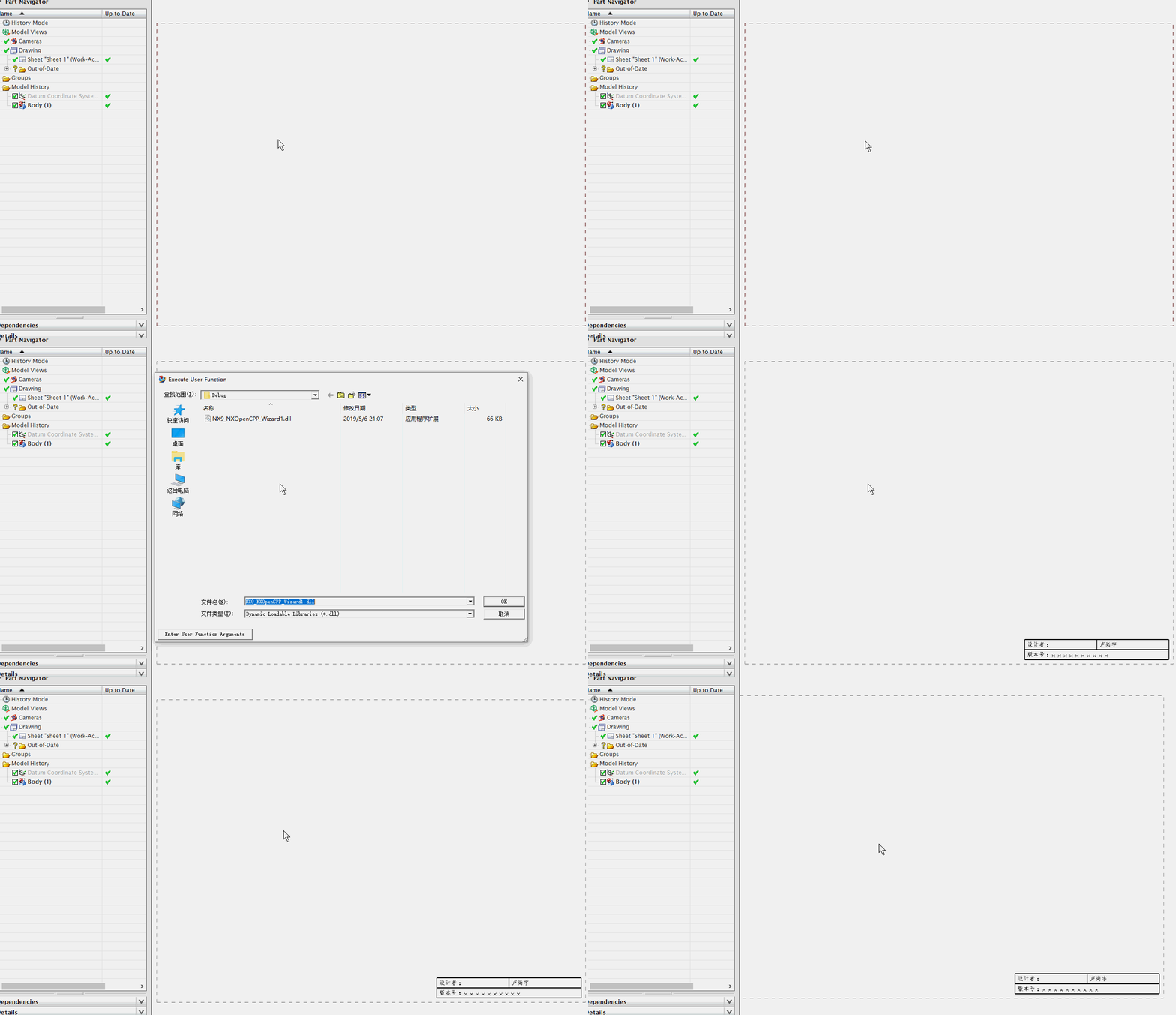
NX二次开发-UFUN工程图表格注释section转tag函数UF_TABNOT_ask_tabular_note_of_section
 NX9+VS2012

 #include <uf.h>

 #include <uf_tabnot.h>

 #include <NXOpen/Part.hxx>

 #include <NXOpen/PartCollection.hxx>

 #include <NXOpen/Session.hxx>

 #include <NXOpen/Annotations_TableSectionCollection.hxx>

 #include <NXOpen/Annotations_AnnotationManager.hxx>

 #include <NXOpen/FontCollection.hxx>

 UF_initialize();

 //创建表格注释

 Annotations::TableSection *nullAnnotations_TableSection(NULL);

 Annotations::TableSectionBuilder *tableSectionBuilder1;

 tableSectionBuilder1 = workPart->Annotations()->TableSections()->CreateTableSectionBuilder(nullAnnotations_TableSection);

 NXOpen::Point3d TablePoint(194.0, 17.0, 0.0);

 tableSectionBuilder1->Origin()->SetOriginPoint(TablePoint);

 tableSectionBuilder1->SetNumberOfColumns();

 tableSectionBuilder1->SetNumberOfRows();

 tableSectionBuilder1->SetRowHeight(20.0);

 tableSectionBuilder1->SetColumnWidth();

 tableSectionBuilder1->Commit();

 NXObject *nXObject1;

 nXObject1 = tableSectionBuilder1->Commit();

 tableSectionBuilder1->Destroy();

 //section转tag

 tag_t TabularNote = NULL_TAG;

 UF_TABNOT_ask_tabular_note_of_section(nXObject1->Tag(), &TabularNote);

 //获取第一行的Tag

 tag_t Row0Tag = NULL_TAG;

 UF_TABNOT_ask_nth_row(TabularNote, , &Row0Tag);

 //获取第二行的Tag

 tag_t Row1Tag = NULL_TAG;

 UF_TABNOT_ask_nth_row(TabularNote, , &Row1Tag);

 //获取第一列的Tag

 tag_t Column0Tag = NULL_TAG;

 UF_TABNOT_ask_nth_column(TabularNote, , &Column0Tag);

 //获取第二列的Tag

 tag_t Column1Tag = NULL_TAG;

 UF_TABNOT_ask_nth_column(TabularNote, , &Column1Tag);

 //得到第一行第一列单元格的Tag

 tag_t Cell0Tag = NULL_TAG;

 UF_TABNOT_ask_cell_at_row_col(Row0Tag, Column0Tag, &Cell0Tag);

 //得到第一行第二列单元格的Tag

 tag_t Cell1Tag = NULL_TAG;

 UF_TABNOT_ask_cell_at_row_col(Row0Tag, Column1Tag, &Cell1Tag);

 //得到第二行第一列单元格的Tag

 tag_t Cell2Tag = NULL_TAG;

 UF_TABNOT_ask_cell_at_row_col(Row1Tag, Column0Tag, &Cell2Tag);

 //得到第二行第二列单元格的Tag

 tag_t Cell3Tag = NULL_TAG;

 UF_TABNOT_ask_cell_at_row_col(Row1Tag, Column1Tag, &Cell3Tag);

 //写文本

 UF_TABNOT_set_cell_text(Cell0Tag, "设计者:");

 UF_TABNOT_set_cell_text(Cell1Tag, "卢尚宇");

 //合并最底下的单元格

 UF_TABNOT_merge_cells(Cell2Tag, Cell3Tag);

 //获取合并单元格的行Tag

 tag_t MergeRowTag = NULL_TAG;

 UF_TABNOT_ask_nth_row(TabularNote, , &MergeRowTag);

 //获取合并单元格的列Tag

 tag_t MergeColumnTag = NULL_TAG;

 UF_TABNOT_ask_nth_column(TabularNote, , &MergeColumnTag);

 tag_t MergeCellTag = NULL_TAG;

 UF_TABNOT_ask_cell_at_row_col(MergeRowTag, MergeColumnTag, &MergeCellTag);

 //写文本

 UF_TABNOT_set_cell_text(MergeCellTag, "版本号:xxxxxxxxxx");

 //检索默认单元格首选项

 UF_TABNOT_cell_prefs_t  cell_prefs;

 UF_TABNOT_ask_default_cell_prefs(&cell_prefs);

 //设置单元格首选项

 int fontIndex1 = workPart->Fonts()->AddFont("chinesef_fs", NXOpen::FontCollection::TypeNx);//更改字体

 cell_prefs.text_font = fontIndex1; //字体

 UF_TABNOT_set_cell_prefs(Cell0Tag, &cell_prefs);

 UF_TABNOT_set_cell_prefs(Cell1Tag, &cell_prefs);

 UF_TABNOT_set_cell_prefs(MergeCellTag, &cell_prefs);

 UF_terminate();
NX二次开发-UFUN工程图表格注释section转tag函数UF_TABNOT_ask_tabular_note_of_section的更多相关文章
- NX二次开发-UFUN工程图表格注释获取某一行的tag函数UF_TABNOT_ask_nth_row
NX9+VS2012 #include <uf.h> #include <uf_tabnot.h> #include <NXOpen/Part.hxx> #incl ...
- NX二次开发-UFUN工程图表格注释获取某一列的tag函数UF_TABNOT_ask_nth_column
NX9+VS2012 #include <uf.h> #include <uf_tabnot.h> #include <NXOpen/Part.hxx> #incl ...
- NX二次开发-UFUN工程图表格注释获取某一行某一列的tag函数UF_TABNOT_ask_cell_at_row_col
NX9+VS2012 #include <uf.h> #include <uf_tabnot.h> #include <NXOpen/Part.hxx> #incl ...
- NX二次开发-UFUN工程图表格注释写入文本内容UF_TABNOT_set_cell_text
NX9+VS2012 #include <uf.h> #include <uf_tabnot.h> #include <NXOpen/Part.hxx> #incl ...
- NX二次开发-UFUN工程图表格注释检索默认单元格首选项UF_TABNOT_ask_default_cell_prefs
NX9+VS2012 #include <uf.h> #include <uf_tabnot.h> #include <NXOpen/Part.hxx> #incl ...
- NX二次开发-UFUN工程图表格注释设置单元格首选项UF_TABNOT_set_cell_prefs
NX9+VS2012 #include <uf.h> #include <uf_tabnot.h> #include <NXOpen/Part.hxx> #incl ...
- NX二次开发-UFUN读取表格注释内容UF_TABNOT_ask_cell_text
NX11+VS2013 #include <uf.h> #include <uf_ui.h> #include <uf_tabnot.h> #include < ...
- NX二次开发-UFUN按类型遍历名字获取Tag函数UF_OBJ_cycle_by_name_and_type
NX9+VS2012 #include <uf.h> #include <uf_draw.h> #include <uf_obj.h> #include <u ...
- NX二次开发-UFUN返回当前图纸页的Tag函数UF_DRAW_ask_current_drawing
除了UF_DRAW_ask_current_drawing这个函数外,用UF_DRAW_ask_drawings也可以获得tag.UF_DRAW_ask_current_drawing只能获得当前这一 ...
随机推荐
- css自适应问题
1. 图片自适应 <img src="app-logo.png" srcset="app-logo.png 175w,app-logo-double.png 365 ...
- magento开发必备插件列表汇总
magento和wordpress一样,因为开放而倍加优秀 ,搜集下常用的magento插件以便大家使用时更加方便快捷 导航放到右侧:magento-community/RicoNeitzel_Ver ...
- Delphi QueryPerformanceCounter、QueryPerformanceFrequency函数,精确定时到ns
var t1,t2:int64; r1,r2,r3:double; begin QueryPerformanceFrequency(c1);//WINDOWS API 返回计数频率 (Intel86: ...
- linux IPC的FIFO
FIFO命名管道原型: #include <sys/stat.h> int mkfifo(const char *path, mode_t mode); int mkfifoat(int ...
- html标签中的 MIME 类型
1.<script type="text/x-template"> MIME 类型 2.MIME类型是什么 : http://www.w3school.com.cn/ ...
- LInux文件基础知识和文件目录操作(系统调用函数方式)
1.进程是处于活动状态的程序,某个用户通过操作系统运行程序所产生的进程代表着该用户的行为.如果用户不具备访问某个目录和文件的权限,那么该用户的进程也不能访问. 2.Linux系统中文件安全机制是通过给 ...
- share memory
header for public argument:shmdata.h #define TEXT_SZ 2048 struct shared_use_st { int written; char t ...
- java中trim()方法是用来干什么的?
trim()的作用是去掉字符串两端的多余的空格,注意,是两端的空格,且无论两端的空格有多少个都会去掉,当然 中间的那些空格不会被去掉,如: String s = " a s f g ...
- centos7下利用nfs搭建wordpress
拓扑环境 web1 192.168.198.110 web2 192.168.198.120 mysql 192.168.198.130 DNS 192.168.198.10 NFS 192.168. ...
- 用scala 实现top N 排名
object TopNApp { def main (args: Array[String]) { if (args != 3) { System.err.println("usage: & ...