
NX二次开发-UFUN工程图表格注释写入文本内容UF_TABNOT_set_cell_text
 NX9+VS2012

 #include <uf.h>

 #include <uf_tabnot.h>

 #include <NXOpen/Part.hxx>

 #include <NXOpen/PartCollection.hxx>

 #include <NXOpen/Session.hxx>

 #include <NXOpen/Annotations_TableSectionCollection.hxx>

 #include <NXOpen/Annotations_AnnotationManager.hxx>

 #include <NXOpen/FontCollection.hxx>

 UF_initialize();

 //创建表格注释

 Annotations::TableSection *nullAnnotations_TableSection(NULL);

 Annotations::TableSectionBuilder *tableSectionBuilder1;

 tableSectionBuilder1 = workPart->Annotations()->TableSections()->CreateTableSectionBuilder(nullAnnotations_TableSection);

 NXOpen::Point3d TablePoint(194.0, 17.0, 0.0);

 tableSectionBuilder1->Origin()->SetOriginPoint(TablePoint);

 tableSectionBuilder1->SetNumberOfColumns();

 tableSectionBuilder1->SetNumberOfRows();

 tableSectionBuilder1->SetRowHeight(20.0);

 tableSectionBuilder1->SetColumnWidth();

 tableSectionBuilder1->Commit();

 NXObject *nXObject1;

 nXObject1 = tableSectionBuilder1->Commit();

 tableSectionBuilder1->Destroy();

 //section转tag

 tag_t TabularNote = NULL_TAG;

 UF_TABNOT_ask_tabular_note_of_section(nXObject1->Tag(), &TabularNote);

 //获取第一行的Tag

 tag_t Row0Tag = NULL_TAG;

 UF_TABNOT_ask_nth_row(TabularNote, , &Row0Tag);

 //获取第二行的Tag

 tag_t Row1Tag = NULL_TAG;

 UF_TABNOT_ask_nth_row(TabularNote, , &Row1Tag);

 //获取第一列的Tag

 tag_t Column0Tag = NULL_TAG;

 UF_TABNOT_ask_nth_column(TabularNote, , &Column0Tag);

 //获取第二列的Tag

 tag_t Column1Tag = NULL_TAG;

 UF_TABNOT_ask_nth_column(TabularNote, , &Column1Tag);

 //得到第一行第一列单元格的Tag

 tag_t Cell0Tag = NULL_TAG;

 UF_TABNOT_ask_cell_at_row_col(Row0Tag, Column0Tag, &Cell0Tag);

 //得到第一行第二列单元格的Tag

 tag_t Cell1Tag = NULL_TAG;

 UF_TABNOT_ask_cell_at_row_col(Row0Tag, Column1Tag, &Cell1Tag);

 //得到第二行第一列单元格的Tag

 tag_t Cell2Tag = NULL_TAG;

 UF_TABNOT_ask_cell_at_row_col(Row1Tag, Column0Tag, &Cell2Tag);

 //得到第二行第二列单元格的Tag

 tag_t Cell3Tag = NULL_TAG;

 UF_TABNOT_ask_cell_at_row_col(Row1Tag, Column1Tag, &Cell3Tag);

 //写文本

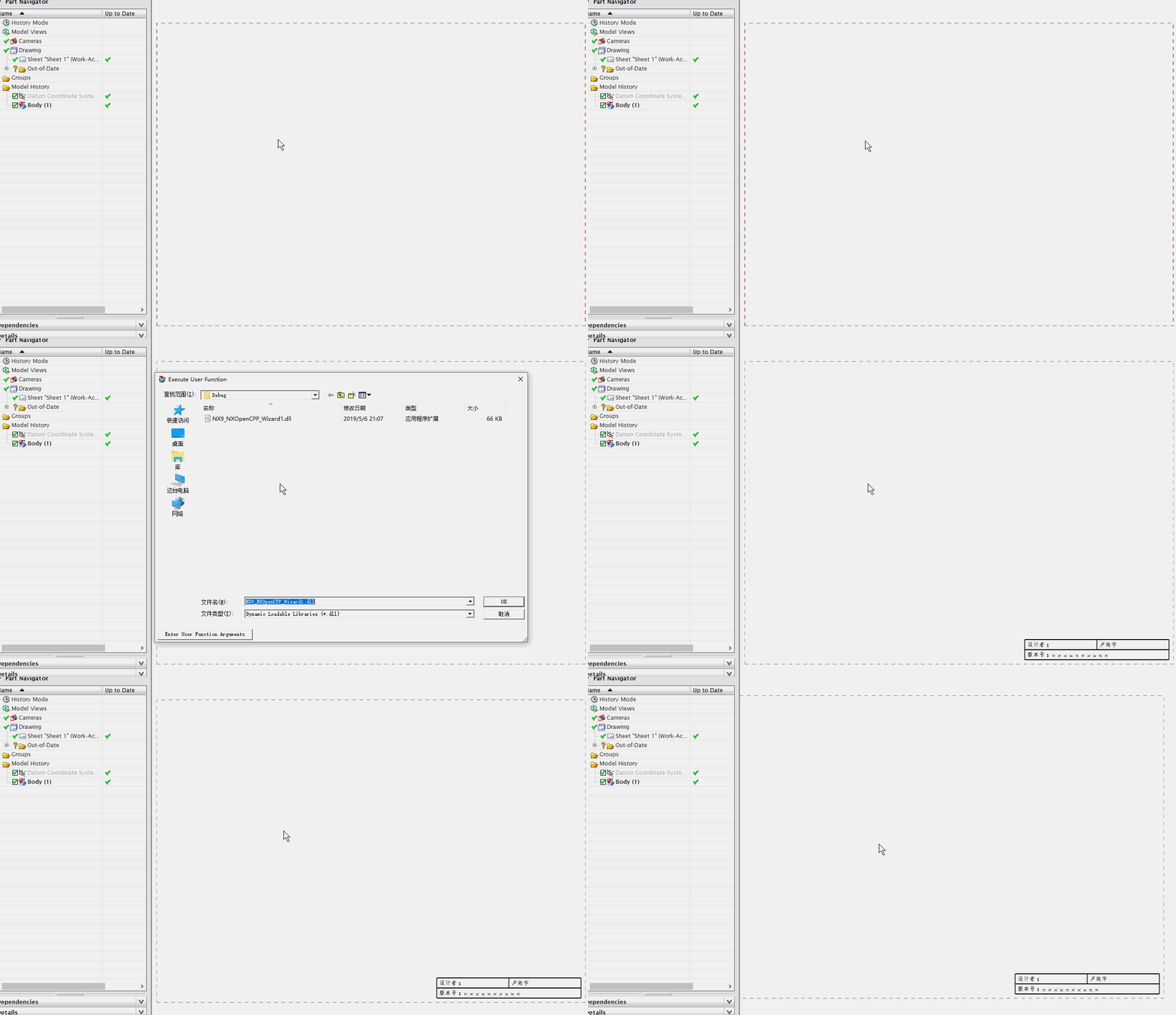
 UF_TABNOT_set_cell_text(Cell0Tag, "设计者:");

 UF_TABNOT_set_cell_text(Cell1Tag, "卢尚宇");

 //合并最底下的单元格

 UF_TABNOT_merge_cells(Cell2Tag, Cell3Tag);

 //获取合并单元格的行Tag

 tag_t MergeRowTag = NULL_TAG;

 UF_TABNOT_ask_nth_row(TabularNote, , &MergeRowTag);

 //获取合并单元格的列Tag

 tag_t MergeColumnTag = NULL_TAG;

 UF_TABNOT_ask_nth_column(TabularNote, , &MergeColumnTag);

 tag_t MergeCellTag = NULL_TAG;

 UF_TABNOT_ask_cell_at_row_col(MergeRowTag, MergeColumnTag, &MergeCellTag);

 //写文本

 UF_TABNOT_set_cell_text(MergeCellTag, "版本号:xxxxxxxxxx");

 //检索默认单元格首选项

 UF_TABNOT_cell_prefs_t  cell_prefs;

 UF_TABNOT_ask_default_cell_prefs(&cell_prefs);

 //设置单元格首选项

 int fontIndex1 = workPart->Fonts()->AddFont("chinesef_fs", NXOpen::FontCollection::TypeNx);//更改字体

 cell_prefs.text_font = fontIndex1; //字体

 UF_TABNOT_set_cell_prefs(Cell0Tag, &cell_prefs);

 UF_TABNOT_set_cell_prefs(Cell1Tag, &cell_prefs);

 UF_TABNOT_set_cell_prefs(MergeCellTag, &cell_prefs);

 UF_terminate();
NX二次开发-UFUN工程图表格注释写入文本内容UF_TABNOT_set_cell_text的更多相关文章
- NX二次开发-UFUN工程图表格注释section转tag函数UF_TABNOT_ask_tabular_note_of_section
NX9+VS2012 #include <uf.h> #include <uf_tabnot.h> #include <NXOpen/Part.hxx> #incl ...
- NX二次开发-UFUN工程图表格注释获取某一行的tag函数UF_TABNOT_ask_nth_row
NX9+VS2012 #include <uf.h> #include <uf_tabnot.h> #include <NXOpen/Part.hxx> #incl ...
- NX二次开发-UFUN工程图表格注释获取某一列的tag函数UF_TABNOT_ask_nth_column
NX9+VS2012 #include <uf.h> #include <uf_tabnot.h> #include <NXOpen/Part.hxx> #incl ...
- NX二次开发-UFUN工程图表格注释获取某一行某一列的tag函数UF_TABNOT_ask_cell_at_row_col
NX9+VS2012 #include <uf.h> #include <uf_tabnot.h> #include <NXOpen/Part.hxx> #incl ...
- NX二次开发-UFUN工程图表格注释检索默认单元格首选项UF_TABNOT_ask_default_cell_prefs
NX9+VS2012 #include <uf.h> #include <uf_tabnot.h> #include <NXOpen/Part.hxx> #incl ...
- NX二次开发-UFUN工程图表格注释设置单元格首选项UF_TABNOT_set_cell_prefs
NX9+VS2012 #include <uf.h> #include <uf_tabnot.h> #include <NXOpen/Part.hxx> #incl ...
- NX二次开发-UFUN读取表格注释内容UF_TABNOT_ask_cell_text
NX11+VS2013 #include <uf.h> #include <uf_ui.h> #include <uf_tabnot.h> #include < ...
- NX二次开发-读取图纸表格注释与部件属性关联的名字
NX11+VS2013 #include <uf.h> #include <uf_ui.h> #include <uf_tabnot.h> #include < ...
- NX二次开发-UFUN工程图导入视图UF_DRAW_import_view
NX9+VS2012 #include <uf.h> #include <uf_draw.h> #include <uf_obj.h> #include <u ...
随机推荐
- leetcode-162周赛-1252-奇数值单元格数目
题目描述: 自己的提交: class Solution: def oddCells(self, n: int, m: int, indices: List[List[int]]) -> int: ...
- 深入理解Magento-第九章-修改、扩展、重写Magento代码
(博主提示:本章应该不是原作者的第九章,仅作补充和参考) 作为一个开发者的你,肯定要修改Magento代码去适应你的业务需求,但是在很多时候我们不希望修改Magento的核心代码,这里有很多原因,例如 ...
- javascript表单验证的例子
function checkUsername(){ //对username的内容进行验证. //要求:首字符是字母或下划线,其他由下划线字母数字组成,共4-20位 var inputOb=docume ...
- EXCEL设置三级下拉框
EXCEL设置三级下拉框 1.添加下拉框数据源 公式--->指定 公式--->名称管理器 2.设置第一级下拉框的值 3.第一级下拉框选出一个值 4.设置第二级下拉框(INDIRECT($A ...
- Android中attrs.xml文件的使用详解
$*********************************************************************************************$ 博主推荐 ...
- 模拟+双指针——cf1244E
排一遍序然后用l,r指针进行移动,每次移动的是靠1,或靠n更近的那个指针 #include<bits/stdc++.h> using namespace std; typedef long ...
- HBase与Sqoop集成案例
HBase与Sqoop集成 案例:将RDBMS中的数据抽取到HBase中 Step1.配置sqoop-env.sh如下: Step2.在Mysql中创建一张数据库library,一张表book CRE ...
- AcWing 144. 最长异或值路径 01字典树打卡
给定一个树,树上的边都具有权值. 树中一条路径的异或长度被定义为路径上所有边的权值的异或和: ⊕ 为异或符号. 给定上述的具有n个节点的树,你能找到异或长度最大的路径吗? 输入格式 第一行包含整数n, ...
- shellcode加密与解密
// Encoder.cpp : Defines the entry point for the console application.// #include "stdafx.h" ...
- SDNU 1217 CD收藏——并查集
Description lmh平常爱听歌,所以买了很多的CD来收藏,但是因为平常整理不当,所以忘记了这些CD的歌手是谁.现在他想知道他到底收藏了多少位歌手的专辑,于是他想了一个办法,同时拿出两 ...