
Hbase之过滤器的使用
一、过滤器概念
基础API中的查询操作在面对大量数据的时候是非常物无力的,这里Hbase提供了高级的查询方法:Filter(过滤器)。过滤器可以根据簇、列、版本等更多的条件来对数据进行过滤,基于Hbase本身提供的三维有序(主键有序、列有序、版本有序),这些Filter可以高效的完成查询过滤的任务。带有Filter条件的RPC查询请求会把Filter分发到各个RegionServer,是一个服务器端的过滤器,这样可以减少网络传输的压力。
二、数据准备

二、Hbase过滤器的分类
比较过滤器
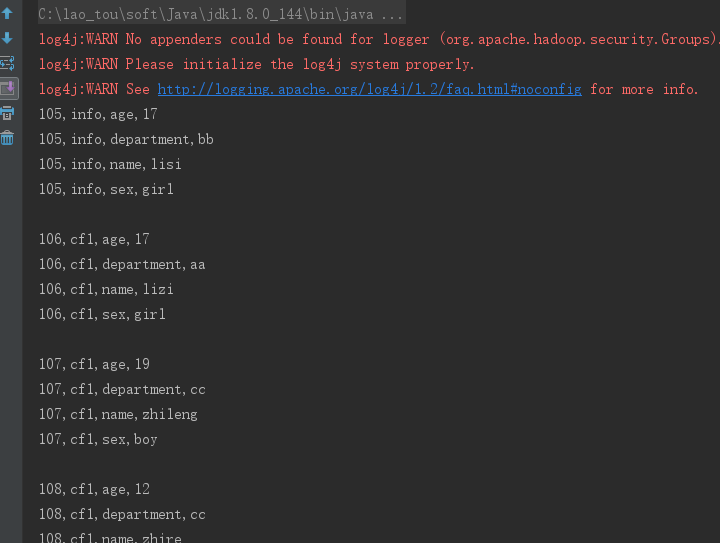
1、行键过滤器——Rowfilter,过滤rowkey=104以前的行
  Filter rowFilter = new RowFilter(CompareFilter.CompareOp.GREATER, new BinaryComparator("104".getBytes()));

  scan.setFilter(rowFilter);
package com.laotou;

import org.apache.hadoop.conf.Configuration;

import org.apache.hadoop.hbase.*;

import org.apache.hadoop.hbase.client.*;

import org.apache.hadoop.hbase.filter.BinaryComparator;

import org.apache.hadoop.hbase.filter.CompareFilter;

import org.apache.hadoop.hbase.filter.Filter;

import org.apache.hadoop.hbase.filter.RowFilter;

import org.apache.hadoop.hbase.util.Bytes;

/**

 * @Author:

 * @Date: 2019/5/17

 */

public class Test {

    private static final String ZK_CONNECT_KEY = "hbase.zookeeper.quorum";

    private static final String ZK_CONNECT_VALUE = "192.168.200.100,192.168.200.101,192.168.200.102";

    private static final String ZK_CONNECT_CLIENT = "hbase.zookeeper.property.clientPort";

    private static final String ZK_CONNECT_CLIENT_PORT = "2181";

    private static Configuration conf = new Configuration();

    private static Connection connection = null;

    public static void main(String[] args) throws Exception {

        conf.set(ZK_CONNECT_CLIENT,ZK_CONNECT_CLIENT_PORT);

        conf.set(ZK_CONNECT_KEY,ZK_CONNECT_VALUE);

        connection = ConnectionFactory.createConnection(conf);

        scanData();

    }

    private static void scanData() throws Exception {

        //拿到表

        Table table = connection.getTable(TableName.valueOf("filtertest"));

        Scan scan=new Scan();

        Filter rowFilter = new RowFilter(CompareFilter.CompareOp.GREATER, new BinaryComparator("104".getBytes()));

        scan.setFilter(rowFilter);

//        //调一次返回50的cell,可以减少请求次数

//        scan.setCaching(50);

        ResultScanner scanner = table.getScanner(scan);

        //是通过迭代器的方式,每调用 一次next,将光标向下移动一个,所以需要动态修改next对象的值

        Result next = scanner.next();

        while (next!=null){

            //将一个Result中的对象转为一个cell数组

            Cell[] cells = next.rawCells();

            for(Cell cell:cells){

                System.out.println(Bytes.toString(CellUtil.cloneRow(cell))+

                        ","+Bytes.toString(CellUtil.cloneFamily(cell))+

                        ","+ Bytes.toString(CellUtil.cloneQualifier(cell))+

                        ","+Bytes.toString(CellUtil.cloneValue(cell)));

            }

            System.out.println();

            //每循环一次,修改next的值一次

            next=scanner.next();

        }

        scanner.close();

        table.close();

    }

}
运行结果部分截图
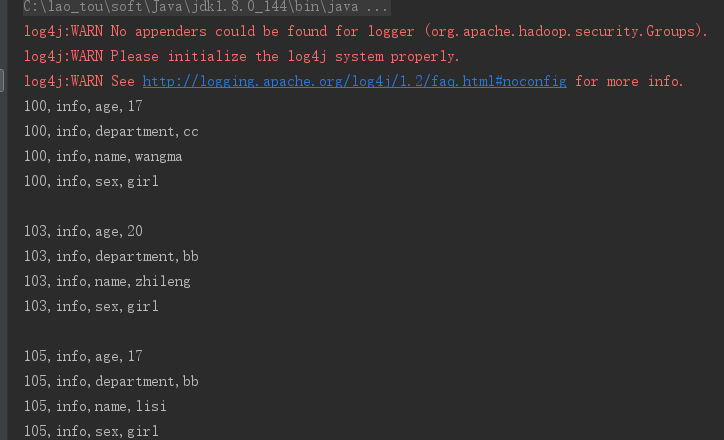
2、列簇过滤器 FamilyFilter (将列簇为info的行全部取出来)
Filter familyFilter = new FamilyFilter(CompareFilter.CompareOp.EQUAL, new BinaryComparator("info".getBytes()));
scan.setFilter(familyFilter);
package com.laotou;

import org.apache.hadoop.conf.Configuration;

import org.apache.hadoop.hbase.*;

import org.apache.hadoop.hbase.client.*;

import org.apache.hadoop.hbase.filter.*;

import org.apache.hadoop.hbase.util.Bytes;

/**

 * @Author:

 * @Date: 2019/5/17

 */

public class Test {

    private static final String ZK_CONNECT_KEY = "hbase.zookeeper.quorum";

    private static final String ZK_CONNECT_VALUE = "192.168.200.100,192.168.200.101,192.168.200.102";

    private static final String ZK_CONNECT_CLIENT = "hbase.zookeeper.property.clientPort";

    private static final String ZK_CONNECT_CLIENT_PORT = "2181";

    private static Configuration conf = new Configuration();

    private static Connection connection = null;

    public static void main(String[] args) throws Exception {

        conf.set(ZK_CONNECT_CLIENT,ZK_CONNECT_CLIENT_PORT);

        conf.set(ZK_CONNECT_KEY,ZK_CONNECT_VALUE);

        connection = ConnectionFactory.createConnection(conf);

        scanData();

    }

    private static void scanData() throws Exception {

        //拿到表

        Table table = connection.getTable(TableName.valueOf("filtertest"));

        Scan scan=new Scan();

        Filter familyFilter = new FamilyFilter(CompareFilter.CompareOp.EQUAL, new BinaryComparator("info".getBytes()));

        scan.setFilter(familyFilter);

//        //调一次返回50的cell,可以减少请求次数

        scan.setCaching(50);

        ResultScanner scanner = table.getScanner(scan);

        //是通过迭代器的方式,每调用 一次next,将光标向下移动一个,所以需要动态修改next对象的值

        Result next = scanner.next();

        while (next!=null){

            //将一个Result中的对象转为一个cell数组

            Cell[] cells = next.rawCells();

            for(Cell cell:cells){

                System.out.println(Bytes.toString(CellUtil.cloneRow(cell))+

                        ","+Bytes.toString(CellUtil.cloneFamily(cell))+

                        ","+ Bytes.toString(CellUtil.cloneQualifier(cell))+

                        ","+Bytes.toString(CellUtil.cloneValue(cell)));

            }

            System.out.println();

            //每循环一次,修改next的值一次

            next=scanner.next();

        }

        scanner.close();

        table.close();

    }

}
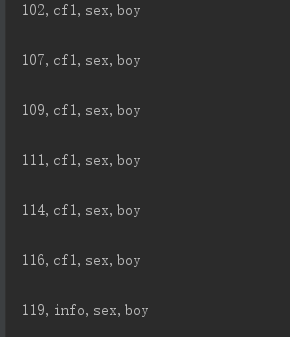
3、列过滤器 QualifierFilter
Filter valueFilter = new ValueFilter(CompareFilter.CompareOp.EQUAL, new SubstringComparator("boy"));
scan.setFilter(valueFilter);
 private static void scanData() throws Exception {

        //拿到表

        Table table = connection.getTable(TableName.valueOf("filtertest"));

        Scan scan=new Scan();

        Filter valueFilter = new ValueFilter(CompareFilter.CompareOp.EQUAL, new SubstringComparator("boy"));

        scan.setFilter(valueFilter);

//        //调一次返回50的cell,可以减少请求次数

        scan.setCaching(50);

        ResultScanner scanner = table.getScanner(scan);

        //是通过迭代器的方式,每调用 一次next,将光标向下移动一个,所以需要动态修改next对象的值

        Result next = scanner.next();

        while (next!=null){

            //将一个Result中的对象转为一个cell数组

            Cell[] cells = next.rawCells();

            for(Cell cell:cells){

                System.out.println(Bytes.toString(CellUtil.cloneRow(cell))+

                        ","+Bytes.toString(CellUtil.cloneFamily(cell))+

                        ","+ Bytes.toString(CellUtil.cloneQualifier(cell))+

                        ","+Bytes.toString(CellUtil.cloneValue(cell)));

            }

            System.out.println();

            //每循环一次,修改next的值一次

            next=scanner.next();

        }

        scanner.close();

        table.close();

    }
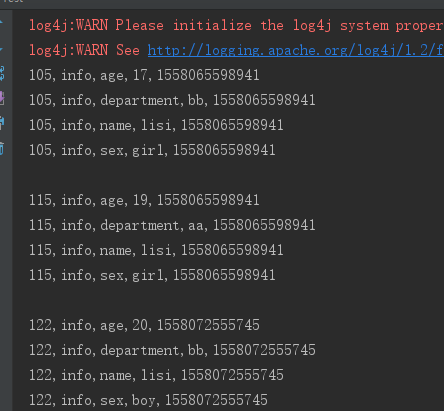
4、时间戳过滤器 TimestampsFilter
List<Long> list = new ArrayList<>();
list.add( Long.valueOf("1558072555745").longValue());
TimestampsFilter timestampsFilter = new TimestampsFilter(list);
scan.setFilter(timestampsFilter);
private static void scanData() throws Exception {

        //拿到表

        Table table = connection.getTable(TableName.valueOf("filtertest"));

        Scan scan=new Scan();

        List<Long> list = new ArrayList<>();

        list.add( Long.valueOf("1558072555745").longValue());

        TimestampsFilter timestampsFilter = new TimestampsFilter(list);

        scan.setFilter(timestampsFilter);

//        //调一次返回50的cell,可以减少请求次数

        scan.setCaching(50);

        ResultScanner scanner = table.getScanner(scan);

        //是通过迭代器的方式,每调用 一次next,将光标向下移动一个,所以需要动态修改next对象的值

        Result next = scanner.next();

        while (next!=null){

            //将一个Result中的对象转为一个cell数组

            Cell[] cells = next.rawCells();

            for(Cell cell:cells){

                System.out.println(Bytes.toString(CellUtil.cloneRow(cell))+

                        ","+Bytes.toString(CellUtil.cloneFamily(cell))+

                        ","+ Bytes.toString(CellUtil.cloneQualifier(cell))+

                        ","+Bytes.toString(CellUtil.cloneValue(cell))+

                        ","+cell.getTimestamp());

            }

            System.out.println();

            //每循环一次,修改next的值一次

            next=scanner.next();

        }

        scanner.close();

        table.close();

    }

专用过滤器
1、单列值过滤器 SingleColumnValueFilter ----会返回满足条件的整行
SingleColumnValueFilter singleColumnValueFilter = new SingleColumnValueFilter(
        "info".getBytes(), //列簇
        "name".getBytes(), //列
        CompareFilter.CompareOp.EQUAL,
        new SubstringComparator("lisi"));
 private static void scanData() throws Exception {

        //拿到表

        Table table = connection.getTable(TableName.valueOf("filtertest"));

        Scan scan=new Scan();

        SingleColumnValueFilter singleColumnValueFilter = new SingleColumnValueFilter(

                "info".getBytes(), //列簇

                "name".getBytes(), //列

                CompareFilter.CompareOp.EQUAL,

                new SubstringComparator("lisi"));

//如果不设置为 true,则那些不包含指定 column 的行也会返回

        singleColumnValueFilter.setFilterIfMissing(true);

        scan.setFilter(singleColumnValueFilter);

//        //调一次返回50的cell,可以减少请求次数

        scan.setCaching(50);

        ResultScanner scanner = table.getScanner(scan);

        //是通过迭代器的方式,每调用 一次next,将光标向下移动一个,所以需要动态修改next对象的值

        Result next = scanner.next();

        while (next!=null){

            //将一个Result中的对象转为一个cell数组

            Cell[] cells = next.rawCells();

            for(Cell cell:cells){

                System.out.println(Bytes.toString(CellUtil.cloneRow(cell))+

                        ","+Bytes.toString(CellUtil.cloneFamily(cell))+

                        ","+ Bytes.toString(CellUtil.cloneQualifier(cell))+

                        ","+Bytes.toString(CellUtil.cloneValue(cell))+

                        ","+cell.getTimestamp());

            }

            System.out.println();

            //每循环一次,修改next的值一次

            next=scanner.next();

        }

        scanner.close();

        table.close();

    }
2、单列值排除器 SingleColumnValueExcludeFilter
SingleColumnValueExcludeFilter singleColumnValueExcludeFilter = new SingleColumnValueExcludeFilter(

                "info".getBytes(),

                "name".getBytes(),

                CompareOp.EQUAL,

                new SubstringComparator("lisi"));

singleColumnValueExcludeFilter.setFilterIfMissing(true);

scan.setFilter(singleColumnValueExcludeFilter);
  private static void scanData() throws Exception {

        //拿到表

        Table table = connection.getTable(TableName.valueOf("filtertest"));

        Scan scan=new Scan();

        SingleColumnValueExcludeFilter singleColumnValueExcludeFilter = new SingleColumnValueExcludeFilter(

                "info".getBytes(),

                "name".getBytes(),

                CompareFilter.CompareOp.EQUAL,

                new SubstringComparator("lisi"));

        singleColumnValueExcludeFilter.setFilterIfMissing(true);

        scan.setFilter(singleColumnValueExcludeFilter);

//        //调一次返回50的cell,可以减少请求次数

        scan.setCaching(50);

        ResultScanner scanner = table.getScanner(scan);

        //是通过迭代器的方式,每调用 一次next,将光标向下移动一个,所以需要动态修改next对象的值

        Result next = scanner.next();

        while (next!=null){

            //将一个Result中的对象转为一个cell数组

            Cell[] cells = next.rawCells();

            for(Cell cell:cells){

                System.out.println(Bytes.toString(CellUtil.cloneRow(cell))+

                        ","+Bytes.toString(CellUtil.cloneFamily(cell))+

                        ","+ Bytes.toString(CellUtil.cloneQualifier(cell))+

                        ","+Bytes.toString(CellUtil.cloneValue(cell))+

                        ","+cell.getTimestamp());

            }

            System.out.println();

            //每循环一次,修改next的值一次

            next=scanner.next();

        }

        scanner.close();

        table.close();

    }
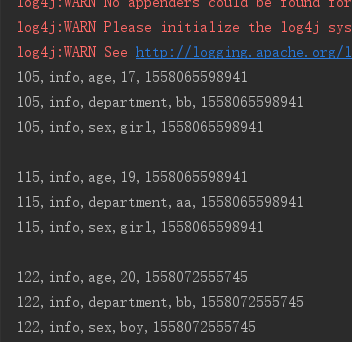
与上面单列值过滤器相比结果中排除了打印lisi这个字段和值
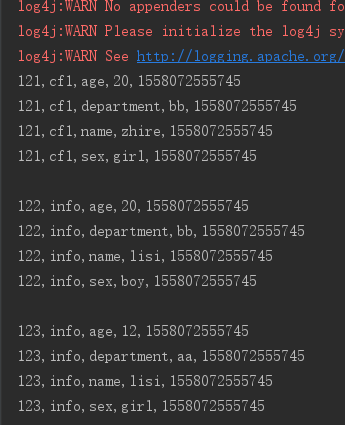
3、前缀过滤器 PrefixFilter----针对行键,将rowkey以12开头的打印出来
PrefixFilter prefixFilter = new PrefixFilter("12".getBytes());

scan.setFilter(prefixFilter);
package com.laotou;

import org.apache.hadoop.conf.Configuration;

import org.apache.hadoop.hbase.*;

import org.apache.hadoop.hbase.client.*;

import org.apache.hadoop.hbase.filter.*;

import org.apache.hadoop.hbase.util.Bytes;

import java.util.ArrayList;

import java.util.List;

/**

 * @Author:

 * @Date: 2019/5/17

 */

public class Test {

    private static final String ZK_CONNECT_KEY = "hbase.zookeeper.quorum";

    private static final String ZK_CONNECT_VALUE = "192.168.200.100,192.168.200.101,192.168.200.102";

    private static final String ZK_CONNECT_CLIENT = "hbase.zookeeper.property.clientPort";

    private static final String ZK_CONNECT_CLIENT_PORT = "2181";

    private static Configuration conf = new Configuration();

    private static Connection connection = null;

    public static void main(String[] args) throws Exception {

        conf.set(ZK_CONNECT_CLIENT,ZK_CONNECT_CLIENT_PORT);

        conf.set(ZK_CONNECT_KEY,ZK_CONNECT_VALUE);

        connection = ConnectionFactory.createConnection(conf);

        scanData();

    }

    private static void scanData() throws Exception {

        //拿到表

        Table table = connection.getTable(TableName.valueOf("filtertest"));

        Scan scan=new Scan();

        PrefixFilter prefixFilter = new PrefixFilter("12".getBytes());

        scan.setFilter(prefixFilter);

//        //调一次返回50的cell,可以减少请求次数

        scan.setCaching(50);

        ResultScanner scanner = table.getScanner(scan);

        //是通过迭代器的方式,每调用 一次next,将光标向下移动一个,所以需要动态修改next对象的值

        Result next = scanner.next();

        while (next!=null){

            //将一个Result中的对象转为一个cell数组

            Cell[] cells = next.rawCells();

            for(Cell cell:cells){

                System.out.println(Bytes.toString(CellUtil.cloneRow(cell))+

                        ","+Bytes.toString(CellUtil.cloneFamily(cell))+

                        ","+ Bytes.toString(CellUtil.cloneQualifier(cell))+

                        ","+Bytes.toString(CellUtil.cloneValue(cell))+

                        ","+cell.getTimestamp());

            }

            System.out.println();

            //每循环一次,修改next的值一次

            next=scanner.next();

        }

        scanner.close();

        table.close();

    }
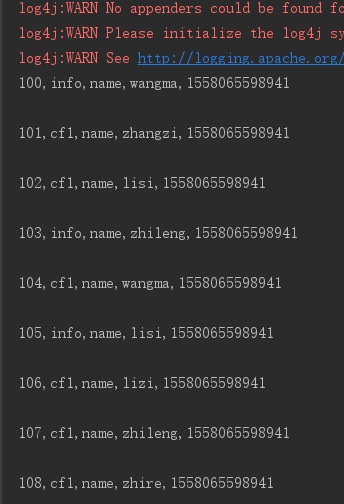
4、列前缀过滤器 ColumnPrefixFilter
ColumnPrefixFilter columnPrefixFilter = new ColumnPrefixFilter("name".getBytes());

scan.setFilter(columnPrefixFilter);
  private static void scanData() throws Exception {

        //拿到表

        Table table = connection.getTable(TableName.valueOf("filtertest"));

        Scan scan=new Scan();

        ColumnPrefixFilter columnPrefixFilter = new ColumnPrefixFilter("name".getBytes());

        scan.setFilter(columnPrefixFilter);

//        //调一次返回50的cell,可以减少请求次数

        scan.setCaching(50);

        ResultScanner scanner = table.getScanner(scan);

        //是通过迭代器的方式,每调用 一次next,将光标向下移动一个,所以需要动态修改next对象的值

        Result next = scanner.next();

        while (next!=null){

            //将一个Result中的对象转为一个cell数组

            Cell[] cells = next.rawCells();

            for(Cell cell:cells){

                System.out.println(Bytes.toString(CellUtil.cloneRow(cell))+

                        ","+Bytes.toString(CellUtil.cloneFamily(cell))+

                        ","+ Bytes.toString(CellUtil.cloneQualifier(cell))+

                        ","+Bytes.toString(CellUtil.cloneValue(cell))+

                        ","+cell.getTimestamp());

            }

            System.out.println();

            //每循环一次,修改next的值一次

            next=scanner.next();

        }

        scanner.close();

        table.close();

    }
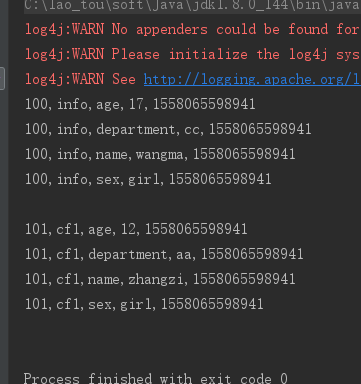
5、分页过滤器 PageFilter
每一页打印两条数据
Filter filter = new PageFilter(2);
private static void scanData() throws Exception {

        //拿到表

        Table table = connection.getTable(TableName.valueOf("filtertest"));

        Scan scan=new Scan();

        Filter filter = new PageFilter(2);

        scan.setFilter(filter);

//        //调一次返回50的cell,可以减少请求次数

        scan.setCaching(50);

        ResultScanner scanner = table.getScanner(scan);

        //是通过迭代器的方式,每调用 一次next,将光标向下移动一个,所以需要动态修改next对象的值

        Result next = scanner.next();

        while (next!=null){

            //将一个Result中的对象转为一个cell数组

            Cell[] cells = next.rawCells();

            for(Cell cell:cells){

                System.out.println(Bytes.toString(CellUtil.cloneRow(cell))+

                        ","+Bytes.toString(CellUtil.cloneFamily(cell))+

                        ","+ Bytes.toString(CellUtil.cloneQualifier(cell))+

                        ","+Bytes.toString(CellUtil.cloneValue(cell))+

                        ","+cell.getTimestamp());

            }

            System.out.println();

            //每循环一次,修改next的值一次

            next=scanner.next();

        }

        scanner.close();

        table.close();

    }
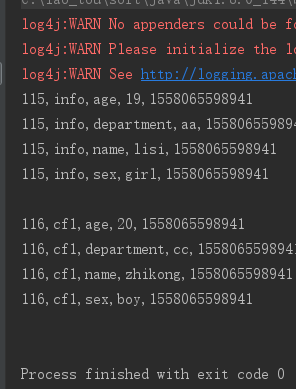
6、行键范围过滤 [startkey,endkey),结果为左闭右开
 scan.setStartRow(Bytes.toBytes("115"));

 scan.setStopRow(Bytes.toBytes("117"));
private static void scanData() throws Exception {

        //拿到表

        Table table = connection.getTable(TableName.valueOf("filtertest"));

        Scan scan=new Scan();

        scan.setStartRow(Bytes.toBytes("115"));

        scan.setStopRow(Bytes.toBytes("117"));

//        //调一次返回50的cell,可以减少请求次数

        scan.setCaching(50);

        ResultScanner scanner = table.getScanner(scan);

        //是通过迭代器的方式,每调用 一次next,将光标向下移动一个,所以需要动态修改next对象的值

        Result next = scanner.next();

        while (next!=null){

            //将一个Result中的对象转为一个cell数组

            Cell[] cells = next.rawCells();

            for(Cell cell:cells){

                System.out.println(Bytes.toString(CellUtil.cloneRow(cell))+

                        ","+Bytes.toString(CellUtil.cloneFamily(cell))+

                        ","+ Bytes.toString(CellUtil.cloneQualifier(cell))+

                        ","+Bytes.toString(CellUtil.cloneValue(cell))+

                        ","+cell.getTimestamp());

            }

            System.out.println();

            //每循环一次,修改next的值一次

            next=scanner.next();

        }

        scanner.close();

        table.close();

    }
Hbase之过滤器的使用的更多相关文章
- Hbase Filter过滤器查询详解
过滤器查询 引言:过滤器的类型很多,但是可以分为两大类——比较过滤器,专用过滤器 过滤器的作用是在服务端判断数据是否满足条件,然后只将满足条件的数据返回给客户端: hbase过滤器的比较运算符: LE ...
- HBase - Filter - 过滤器的介绍以及使用 | 那伊抹微笑
博文作者:那伊抹微笑 csdn 博客地址:http://blog.csdn.net/u012185296 itdog8 地址链接 : http://www.itdog8.com/thread-214- ...
- HBase之过滤器
filter ==> SQL 中的Where filter的执行流程: 过滤器在客户端创建,然后通过RPC发送到服务器上,由服务器执行 基础过滤器: 比较器: Comparator D ...
- HBase - Filter - 过滤器的介绍以及使用
1 过滤器HBase 的基本 API,包括增.删.改.查等.增.删都是相对简单的操作,与传统的 RDBMS 相比,这里的查询操作略显苍白,只能根据特性的行键进行查询(Get)或者根据行键的范围来查询( ...
- hbase 自定义过滤器
1.首先生成自定义过滤器,生成jar包,然后拷贝到服务器hbase目录的lib下. 1.1 自定义过滤器CustomFilter import com.google.protobuf.InvalidP ...
- Hbase(四) 过滤器查询
引言:过滤器的类型很多,但是可以分为两大类——比较过滤器,专用过滤器过滤器的作用是在服务端判断数据是否满足条件,然后只将满足条件的数据返回给客户端: 一.hbase过滤器的分类 1.比较过滤器 行键过 ...
- HBase之八--(3):Hbase 布隆过滤器BloomFilter介绍
布隆过滤器( Bloom filters) 数据块索引提供了一个有效的方法,在访问一个特定的行时用来查找应该读取的HFile的数据块.但是它的效用是有限的.HFile数据块的默认大小是64KB,这个大 ...
- 大数据笔记(十四)——HBase的过滤器与Mapreduce
一. HBase过滤器 1.列值过滤器 2.列名前缀过滤器 3.多个列名前缀过滤器 4.行键过滤器5.组合过滤器 package demo; import javax.swing.RowFilter; ...
- HBase Filter 过滤器概述
abc 过滤器介绍 HBase过滤器是一套为完成一些较高级的需求所提供的API接口. 过滤器也被称为下推判断器(push-down predicates),支持把数据过滤标准从客户端下推到服务器,带有 ...
随机推荐
- 第15.6节 PyQt5安装与配置
一. 引言 关于PyQt5的安装网上有很多的文章,老猿也是学习了好多,最后结合其他模块安装的知识发现其实安装很简单,就是直接使用pip或pip3安装就可以了,这样既无需预先下载好软件,也无需担心版本的 ...
- java课后作业2019.11.04
一.编写一个程序,指定一个文件夹,能够自动计算出其总容量 1.代码 package HomeWork; import java.io.File; public class getFileDaxiao ...
- HTML引入外部字体
HTML5如何引入外部字体 背景 现在我需要 "Montserrat-ExtraLight ExtraLight"类型的字体,但是html的font-family中找不到这个类型的 ...
- 剑指offer二刷——数组专题——构建乘积数组
构建乘积数组 题目描述 给定一个数组A[0,1,...,n-1],请构建一个数组B[0,1,...,n-1],其中B中的元素B[i]=A[0]*A[1]*...*A[i-1]*A[i+1]*...*A ...
- 总括订单Blanket order
总括订单Blanket order是客户向其供应方发出的采购订单,但其中包含一段时间内的多个交货日期,通常使用谈判时的预定价格.大多数情况下,它用于对消耗性商品有经常性需求的情况.总括订单通常用于客户 ...
- 《图解TCP/IP》笔记
OSI参考模型 协议分层 为什么需要分层? 简化网络协议. 每一层只需要衔接上下层的服务. 利于模块化开发. 解耦. 分层的问题 过分模块化.提高数据处理的开销. OSI参考模型 作用及意义 将复杂的 ...
- uni-app全局属性和方法
全局变量和全局方法是软件开发中常用的技术点! 实现方式大致分为: 1.vuex实现,值变动灵活 2.建立js文件,页面内引用 3.挂载vue实例后使用 4.小程序中的globalData 5.本地存储 ...
- 从零开始了解多线程 之 深入浅出AQS -- 上
java锁&AQS深入浅出学习--上 上一篇文章中我们一起学习了jvm缓存一致性.多线程间的原子性.有序性.指令重排的相关内容, 这一篇文章便开始和大家一起学习学习AQS(AbstractQu ...
- Taro 周报 #7: 收获「e代驾」案例,发布 v2.2.16 和 v3.2.0-canary.2
Taro 周报 2020 年 12 月 05 日 - 2020 年 12 月 12 日 ,更多的Taro周报点击 Taro 大事件 58 技术发布文章<开源 | Taro 3 支持 React ...
- js下 Day18、综合案例
一.分页 效果图: 功能思路分析: 分页就是将所有的数据按指定条数分成若干份: 假如有24条数据,每页只显示5条,则需要分成Math.ceil(24 / 5) = 5页; 每次只显示1页数据,所以需要 ...