
UITableView的使用
参考:IOS7.0 programming cookbook.
http://www.cnblogs.com/kenshincui/p/3931948.html
http://blog.csdn.net/duxinfeng2010/article/details/7725897
MYTableViewCell.h
#import <UIKit/UIKit.h>

@interface MYTableViewCell : UITableViewCell

@property (weak, nonatomic) IBOutlet UIImageView *imgViewLeft;//xib中绑定

@property (weak, nonatomic) IBOutlet UIImageView *imgViewRight;//xib中绑定

@property (weak, nonatomic) IBOutlet UIView *txtView;//xib中绑定

@end
MYTableViewCell.m
#import "MYTableViewCell.h"

@implementation MYTableViewCell

- (void)awakeFromNib {

    // Initialization code

}

- (void)setSelected:(BOOL)selected animated:(BOOL)animated {

    [super setSelected:selected animated:animated];

    // Configure the view for the selected state

}

@end
MyTableViewCell.xib
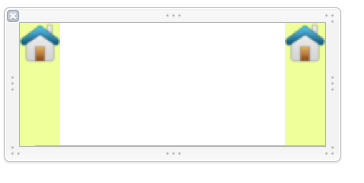
ViewController.h
/* 本例中,tableview是在sb中建立,cell是在xib中建立,主要展现常用的代理函数。

 PS个人更喜欢纯代码*/

#import <UIKit/UIKit.h>

@interface ViewController : UIViewController<UITableViewDelegate,UITableViewDataSource,UIScrollViewAccessibilityDelegate>

@end
ViewController.m
/* 本例中,tableview是在sb中建立,cell是在xib中建立,主要展现常用的代理函数。

 PS个人更喜欢纯代码*/

#import "ViewController.h"

#import "MYTableViewCell.h"

@interface ViewController ()

@property (weak, nonatomic) IBOutlet UITableView *tbView;//从storyboard关联而来,代理也是在storyboard中关联

@property (strong,nonatomic) NSMutableArray *arr;

@property (strong,nonatomic) UIRefreshControl *refreshControl;

@end

@implementation ViewController

- (void)viewDidLoad {

    [super viewDidLoad];

    self.arr = [[NSMutableArray alloc]init];

    [self.arr addObject:@[@"1-1",@"1-2"]];

    [self.arr addObject:@[@"I am a very very very very very very very very very very very very very very very very very very very very very very very very very very very very very very very very very very very very very very very very very very very very long message"]];

    [self.arr addObject:@[@"3-1",@"3-2"]];

    [self.arr addObject:@[@"4-1",@"4-2",@"4-3",@"4-4",@"4-5",@"4-6",@"4-7",@"4-8",@"4-9",@"4-10"]];

    //refreshControl

    self.refreshControl = [[UIRefreshControl alloc]initWithFrame:CGRectMake(0, 20, 10, 40)];

    [self.refreshControl addTarget:self action:@selector(handleRefresh:) forControlEvents:UIControlEventValueChanged];

    NSLog(@"%@",self.refreshControl);

    [self.tbView registerNib:[UINib nibWithNibName:NSStringFromClass([MYTableViewCell class]) bundle:nil] forCellReuseIdentifier:@"CELL_CELL"];//若用xib布局

//    [self.tbView registerClass:[MYTableViewCell class] forCellReuseIdentifier:@"CELL_CELL"];//若用纯代码

    //[self.tbView setEditing:YES animated:YES];//设置后,直接删除比较方便

    [self.tbView addSubview:self.refreshControl];

    NSLog(@"%@",self.refreshControl);

    [self.tbView reloadData];

}

#pragma mark - RefreshControl

- (void)handleRefresh:(UIRefreshControl *)sender

{

    NSLog(@"handleRefresh");

    [sender endRefreshing];

}

#pragma mark - TableView

//Header

- (CGFloat)tableView:(UITableView *)tableView heightForHeaderInSection:(NSInteger)section

{

    return 20.0f;

}

//Header

- (UIView *)tableView:(UITableView *)tableView viewForHeaderInSection:(NSInteger)section

{

    return nil;

}

//Rows Number

- (NSInteger)tableView:(UITableView *)tableView numberOfRowsInSection:(NSInteger)section

{

    return _arr.count;

}

//Cell的界面

- (UITableViewCell *)tableView:(UITableView *)tableView cellForRowAtIndexPath:(NSIndexPath *)indexPath

{

    MYTableViewCell *cell = [tableView dequeueReusableCellWithIdentifier:@"CELL_CELL"];

    /*如果开始注册了,就直接使用dequeueReusableCellXXX函数。

     如果开始未注册,可以使用以下方法:

    MYTableViewCell *cell = [tableVice dequeueReusableCellWithIdentifier:@"CELL_CELL"];

    if(!cell){

        cell = [[UITableViceCell alloc]initWithStyle:UITableViceCellStyleDefault reuseIdentifier:@"CELL_CELL"];

    }

     */

    //cell.contentView.backgroundColor = [UIColor redColor];//尽量吧所有控件家在contentView中,而不是cell中

    //cell.selectedBackgroundView = [[UIView alloc]init];//设置选中时候的背景View

    //cell.selectionStyle = UITableViewCellSelectionStyleNone;//选中时的效果,自己试

    //cell.selectionStyle = UITableViewCellSelectionStyleGray;//选中时的效果,自己试

    //cell.accessoryType = UITableViewCellAccessoryCheckmark;//accesory 类型

    /*自适应高度的处理,感觉不断remove add效率很低,有待新解决方案*/

    NSArray *arrSubView = cell.txtView.subviews;

    for (UIView *viewElement in arrSubView) {

        [viewElement removeFromSuperview];

    }

    NSArray *arrSub = _arr[indexPath.row];

    CGFloat height = 0.0f;

    for (NSString *strElement in arrSub) {

        NSDictionary *attr = @{NSFontAttributeName:[UIFont systemFontOfSize:14.0f]};

        //根据显示的宽度、字符串、字体三者来决定自适应高度,数字80左右两个图片的宽度综合

        CGSize size = [strElement boundingRectWithSize:CGSizeMake(self.tbView.frame.size.width - 80,MAXFLOAT) options:NSStringDrawingUsesLineFragmentOrigin attributes:attr context:nil].size;

        height += size.height;

        UILabel *lbl = [[UILabel alloc]init];

        [lbl.layer setBorderWidth:1.0f];

        lbl.font = [UIFont systemFontOfSize:14.0f];

        [lbl.layer setBorderColor:[[UIColor grayColor]CGColor]];

        lbl.frame = CGRectMake(0, height - size.height, self.tbView.frame.size.width - 80, size.height);

        lbl.textColor = [UIColor blackColor];

        lbl.text = strElement;

        lbl.numberOfLines = 0;

        [cell.txtView addSubview:lbl];

    }

    return cell;

}

//Cell的高度(此处添加了自适应高度)

- (CGFloat)tableView:(UITableView *)tableView heightForRowAtIndexPath:(NSIndexPath *)indexPath

{

    NSArray *arrSub = _arr[indexPath.row];

    CGFloat height = 0.0f;

    NSDictionary *attr = @{NSFontAttributeName:[UIFont systemFontOfSize:14.0f]};

    for (NSString *strElement in arrSub) {

        //根据显示的宽度、字符串、字体三者来决定自适应高度,数字80左右两个图片的宽度综合

        CGSize size = [strElement boundingRectWithSize:CGSizeMake(self.tbView.frame.size.width - 80,MAXFLOAT) options:NSStringDrawingUsesLineFragmentOrigin attributes:attr context:nil].size;

        height += size.height;

    }

    return MAX(40, height);

}

//When Click

- (void)tableView:(UITableView *)tableView didSelectRowAtIndexPath:(NSIndexPath *)indexPath

{

    [self.tbView deselectRowAtIndexPath:indexPath animated:YES];//取消indexPath的被选择状态

}

//when scroll to the top or bottom

- (void)tableView:(UITableView *)tableView didEndDisplayingCell:(UITableViewCell *)cell forRowAtIndexPath:(NSIndexPath *)indexPath

{

    //NSLog(@"to top or bottom");

}

//在Cell出现之前响应

- (void)tableView:(UITableView *)tableView willDisplayCell:(UITableViewCell *)cell forRowAtIndexPath:(NSIndexPath *)indexPath

{

    //NSLog(@"%ld-%ld",indexPath.section,indexPath.row);

}

#pragma mark - TableView long press

//长按

- (BOOL)tableView:(UITableView *)tableView shouldShowMenuForRowAtIndexPath:(NSIndexPath *)indexPath

{

    return YES;

}

- (BOOL)tableView:(UITableView *)tableView canPerformAction:(SEL)action forRowAtIndexPath:(NSIndexPath *)indexPath withSender:(id)sender

{

    //也可以自定义菜单,用UIButton组即可

    if(action==@selector(copy:))

        return YES;

    return NO;

}

- (void)tableView:(UITableView *)tableView performAction:(SEL)action forRowAtIndexPath:(NSIndexPath *)indexPath withSender:(id)sender

{

    if(action==@selector(copy:)){

        //NSLog(@"copied");

    }

}

#pragma mark - TableView delete

- (BOOL)tableView:(UITableView *)tableView canEditRowAtIndexPath:(NSIndexPath *)indexPath

{

    return YES;

}

- (UITableViewCellEditingStyle)tableView:(UITableView *)tableView editingStyleForRowAtIndexPath:(NSIndexPath *)indexPath

{

    return UITableViewCellEditingStyleDelete;

}

-(NSString *)tableView:(UITableView *)tableView titleForDeleteConfirmationButtonForRowAtIndexPath:(NSIndexPath *)indexPath

{

    return @"MyDelete";

}

- (void)tableView:(UITableView *)tableView commitEditingStyle:(UITableViewCellEditingStyle)editingStyle forRowAtIndexPath:(NSIndexPath *)indexPath

{

    //NSLog(@"deleted");

    if(editingStyle == UITableViewCellEditingStyleDelete){

        //以下两句话顺序不可反

        [self.arr removeObjectAtIndex:indexPath.row];

        [tableView deleteRowsAtIndexPaths:@[indexPath]

                           withRowAnimation:UITableViewRowAnimationLeft];

    }

}

#pragma mark - scrollDelegate

//开始drag

- (void)scrollViewWillBeginDragging:(UIScrollView *)scrollView

{

    //NSLog(@"begin drag");

}

//drag过程

- (void)scrollViewDidScroll:(UIScrollView *)scrollView

{

    //NSLog(@"%f",self.tbView.contentOffset.y);

}

//结束drag

- (void)scrollViewDidEndDragging:(UIScrollView *)scrollView willDecelerate:(BOOL)decelerate

{

    //NSLog(@"end drag");

}

@end

补充1:自定义accessoryView的方式(ios7 cookbook ch4.3)

补充2: UIRefreshControl控件尽管没有设定frame以及autoresizing,但是其位置总是在头部居中。原因是:
UIRefreshControl.h文件里面下面说明:
NS_CLASS_AVAILABLE_IOS(6_0) @interface UIRefreshControl : UIControl
/* The designated initializer
* This initializes a UIRefreshControl with a default height and width.
* Once assigned to a UITableViewController, the frame of the control is managed automatically.
* When a user has pulled-to-refresh, the UIRefreshControl fires its UIControlEventValueChanged event.
*
*/
补充3: 如果TableView是在xib中创建,那么绑定的dataDelegate与Delegate的时候,是绑定到fileOwner的。
补充4:使分割线充满
- (void)tableView:(UITableView *)tableView willDisplayCell:(UITableViewCell *)cell forRowAtIndexPath:(NSIndexPath *)indexPath {
if ([cell respondsToSelector:@selector(setSeparatorInset:)]){
[cell setSeparatorInset:UIEdgeInsetsZero];
}
if ([cell respondsToSelector:@selector(setPreservesSuperviewLayoutMargins:)]){
[cell setPreservesSuperviewLayoutMargins:NO];
}
if ([cell respondsToSelector:@selector(setLayoutMargins:)]){
[cell setLayoutMargins:UIEdgeInsetsZero];
}
}
UITableView的使用的更多相关文章
- iOS UITableView 与 UITableViewController
很多应用都会在界面中使用某种列表控件:用户可以选中.删除或重新排列列表中的项目.这些控件其实都是UITableView 对象,可以用来显示一组对象,例如,用户地址薄中的一组人名.项目地址. UITab ...
- UITableView(二)
#import "ViewController.h" @interface ViewController () @end @implementation ViewControlle ...
- iOS: 在UIViewController 中添加Static UITableView
如果你直接在 UIViewController 中加入一个 UITableView 并将其 Content 属性设置为 Static Cells,此时 Xcode 会报错: Static table ...
- iOS 编辑UITableView(根据iOS编程编写)
上个项目我们完成了 JXHomepwner 简单的应用展示,项目地址.本节我们需要在上节项目基础上,增加一些响应用户操作.包括添加,删除和移动表格. 编辑模式 UITableView 有一个名为 e ...
- 使用Autolayout实现UITableView的Cell动态布局和高度动态改变
本文翻译自:stackoverflow 有人在stackoverflow上问了一个问题: 1 如何在UITableViewCell中使用Autolayout来实现Cell的内容和子视图自动计算行高,并 ...
- iOS - UITableView中Cell重用机制导致Cell内容出错的解决办法
"UITableView" iOS开发中重量级的控件之一;在日常开发中我们大多数会选择自定Cell来满足自己开发中的需求, 但是有些时候Cell也是可以不自定义的(比如某一个简单的 ...
- UITableView cell复用出错问题 页面滑动卡顿问题 & 各杂七杂八问题
UITableView 的cell 复用机制节省了内存,但是有时对于多变的自定义cell,重用时会出现界面出错(例如复用出错,出现cell混乱重影).滑动卡顿等问题,这里只简单敲下几点复用出错时的解决 ...
- UITableview delegate dataSource调用探究
UITableview是大家常用的UIKit组件之一,使用中我们最常遇到的就是对delegate和dataSource这两个委托的使用.我们大多数人可能知道当reloadData这个方法被调用时,de ...
- UITableView点击每个Cell,Cell的子内容的收放
关于点击TableviewCell的子内容收放问题,拿到它的第一个思路就是, 方法一: 运用UITableview本身的代理来处理相应的展开收起: 1.代理:- (void)tableView:(UI ...
- 使用UITableView的分组样式
分组样式顾名思义是对TableView中的数据行进行分组处理,每个分组都有一个header和footer. TableView中header的英文文本是大写的,footer的英文文本是小写的.如下图浅 ...
随机推荐
- [Android]Android端ORM框架——RapidORM(v1.0)
以下内容为原创,欢迎转载,转载请注明 来自天天博客:http://www.cnblogs.com/tiantianbyconan/p/4748077.html Android上主流的ORM框架有很多 ...
- [Android]对MVC和MVP的总结
以下内容为原创,欢迎转载,转载请注明 来自天天博客:http://www.cnblogs.com/tiantianbyconan/p/5036289.html 经历过的客户端的架构分为这么几个阶段: ...
- html之file标签 --- 图片上传前预览 -- FileReader
记得以前做网站时,曾经需要实现一个图片上传到服务器前,先预览的功能.当时用html的<input type="file"/>标签一直实现不了,最后舍弃了这个标签,使用了 ...
- 【Swift 2.0】实现简单弹幕功能
前言 简单实现弹幕功能,表跟我谈效率,但也有用队列控制同时弹的数量. 声明 欢迎转载,但请保留文章原始出处:) 博客园:http://www.cnblogs.com 农民伯伯: http://over ...
- TortoiseSVN与VisualSVN Server搭建SVN版本控制系统
本片主要介绍如何搭建SVN版本控制系统,主要使用工具: 1 客户端:TortoiseSVN (小乌龟) 2 服务端:VisualSVN Server 搭建出图形化管理,以及右键菜单版本控制管理的SVN ...
- C语言链表实现约瑟夫环问题
需求表达:略 分析: 实现: #include<stdio.h> #include<stdlib.h> typedef struct node { int payload ; ...
- RedHat Linux RHEL6配置本地YUM源
YUM是Yellow dog Updater Modified的简称,起初是由yellow dog这一发行版的开发者Terra Soft研发,用python写成,那时还叫做yup(yellow dog ...
- SSRS Reports 2008性能优化案例二
前几天一同事反映海外工厂A的SSRS报表比较慢,让我检查优化一下.于是我检查了下2015-07-13到2015-07-15 12:00这段时间报表的耗时记录 USE [ReportServer]; ...
- 从零自学Hadoop(09):使用Maven构建Hadoop工程
阅读目录 序 Maven 安装 构建 示例下载 系列索引 本文版权归mephisto和博客园共有,欢迎转载,但须保留此段声明,并给出原文链接,谢谢合作. 文章是哥(mephisto)写的,Source ...
- 机器学习之寻找KMeans的最优K
K-Means聚类算法是最为经典的,同时也是使用最为广泛的一种基于划分的聚类算法,它属于基于距离的无监督聚类算法.KMeans算法简单实用,在机器学习算法中占有重要的地位.对于KMeans算法而言,如 ...