
使用springboot实现一个简单的restful crud——02、dao层单元测试,测试从数据库取数据
接着上一篇,上一篇我们创建了项目、创建了实体类,以及创建了数据库数据。这一篇就写一下Dao层,以及对Dao层进行单元测试,看下能否成功操作数据库数据。
Dao
EmpDao
package com.jotal.springboot08restfulcrud.dao;

//将类扫描进spring ioc容器中

@Mapper

public interface EmpDao {

//    得到所有员工

    List<Employee> getAllEmp();

//    根据id得到员工

    Employee getEmpById(Integer id);

    //    保存员工

    void saveEmp(Employee employee);

    //添加员工

    void addEmp(Employee employee);

    //    删除员工

    void delEmp(Integer emp_id);

}
EmpMapper.xml
<?xml version="1.0" encoding="UTF-8"?>

<!DOCTYPE mapper

        PUBLIC "-//mybatis.org//DTD Mapper 3.0//EN"

        "http://mybatis.org/dtd/mybatis-3-mapper.dtd">

<mapper namespace="com.jotal.springboot08restfulcrud.dao.EmpDao">

    <select id="getAllEmp" resultMap="DeptInEmpMap">

        select * from employee,department

        where employee.department = department.departmentId

    </select>

    <select id="getEmpById" resultMap="DeptInEmpMap" parameterType="Integer">

        select * from employee,department

        where employee.emp_id=#{id} and department.departmentId=employee.department

    </select>

    <resultMap id="DeptInEmpMap" type="employee" autoMapping="true">

        <id property="emp_id" column="emp_id"/>

        <result property="lastName" column="lastName"/>

        <result property="email" column="email"/>

        <result property="gender" column="gender"/>

        <result property="birth" column="birth"/>

        <association property="department" javaType="department" autoMapping="true">

            <id column="departmentId" property="departmentId"/>

            <result column="departmentName" property="departmentName"/>

        </association>

    </resultMap>

    <delete id="delEmp" parameterType="Integer">

        delete from employee

        where emp_id=#{id}

    </delete>

    <insert id="addEmp" parameterType="employee">

        insert into employee(lastName,email,gender,birth,department)

         values (#{lastName},#{email},#{gender},#{birth},#{department.departmentId})

    </insert>

    <update id="saveEmp" parameterType="employee">

        update employee set

        lastName=#{lastName},email=#{email},gender=#{gender},department=#{department.departmentId},birth=#{birth}

        where emp_id=#{emp_id}

    </update>

</mapper>
我们重点看一下getEmpById( )的操作,也就是根据ID得到一个员工。因为员工类当中有一个department属性,department部门类的引用,也就是说employee类的实例中会包含着一个department类的实例。那么这种情况在Mybatis中称为"一对一",一个员工对应一个部门。
这种情况我们需要用resultMap,我们定义了一个resultMap,指定了id和类型: id="DeptInEmpMap",type="employee",这个类型我们指定了实体类中的employee,然后在result中将类的属性和数据库表中的字段一一对应,property是类中的属性名,column是数据库表的字段。id是表中的主键id。如果属性名和字段名完全一致,就可以用autoMapping="true"来自动映射,不用写result。
在association中映射我们包含在employee中的department实例。property="department"是属性名,javaType="department"是类名。里面的id和result也和上面一样。也可以用autoMapping="true"来自动映射
在select中使用该resultMap:resultMap="DeptInEmpMap"。
上面的有说到的是resultMap的嵌套结果的使用方式,resultMap还有一种嵌套查询的使用方式。下面看一下实现方式:
嵌套查询是分步完成的:
1、先按照员工id查询员工信息
<select id="getEmpById" resultMap="DeptInEmpMap" parameterType="Integer">

    select * from employee

    where employee.emp_id=#{id}

</select>
2、根据员工实例中的部门实例的ID值去查询部门信息
<select id="getDeptById" resultType="department" parameterType="Integer">

    select * from department

    where departmentId=#{id}

</select>
ps: getDeptById在DeptDao.xml里
3、将部门信息设置到员工中
<resultMap id="DeptInEmpMap" type="employee" autoMapping="true">

    <association property="department" column="department" select="com.jotal.springboot08restfulcrud.dao.DeptDao.getDeptById">

    </association>

</resultMap>
在这种方式中,association要设置三个值:property="department" column="department" select=""
select:表明当前属性是调用select指定的方法查出的结果
column:指定将哪一列的值作为参数传给这个方法
property:属性名
同样,修改一下getAllEmp的查询语句也可以用嵌套查询的方式实现getAllEmp。
Dao层单元测试、控制台输出sql
单元测试可以在编码的初期帮我们发现错误,尽快修正。如果编码后期整个系统完整的时候再进行测试,需要走完整个系统流程,耗费时间精力资源。那么springboot怎么进行基本的单元测试呢?
依赖
<!--测试-->

<dependency>

    <groupId>org.springframework.boot</groupId>

    <artifactId>spring-boot-starter-test</artifactId>

    <scope>test</scope>

</dependency>
测试类
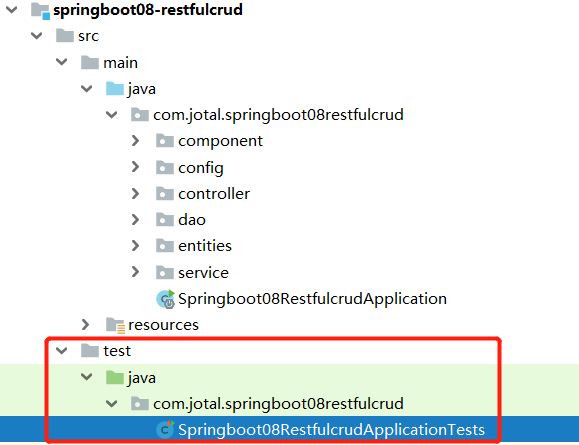
这是idea为我们自动创建好的测试类,然后自己在里面添加测试方法就可以了。
@RunWith(SpringRunner.class)

//主启动类

@SpringBootTest(classes = Springboot08RestfulcrudApplication.class)

public class Springboot08RestfulcrudApplicationTests {

    //自动装配

    @Autowired

    EmpDao empDao;

    @Test

    public void contextLoads() {

    }

}
控制台输出sql
为了更好地了解数据库操作情况,还可以在项目中加入日志输出,在控制台输出sql语句。在配置文件中加入日志的配置。
com.jotal.springboot08restfulcrud.dao是包名
debug是日志的等级
#日志

logging:

  level:

    com.jotal.springboot08restfulcrud.dao: debug
下面进行进行两个测试,在方法代码处右键点击Debug 方法名就可以了:
getAllEmpTest
@Test

public void getAllEmpTest() {

    List<Employee> employeeList = empDao.getAllEmp();

    System.out.println(empDao.getAllEmp());

    Iterator iterator = employeeList.iterator();

    int i=0;

    while (iterator.hasNext()) {

        Employee employee = (Employee) iterator.next();

        System.out.println(i+":"+employee);

        i++;

    }

}
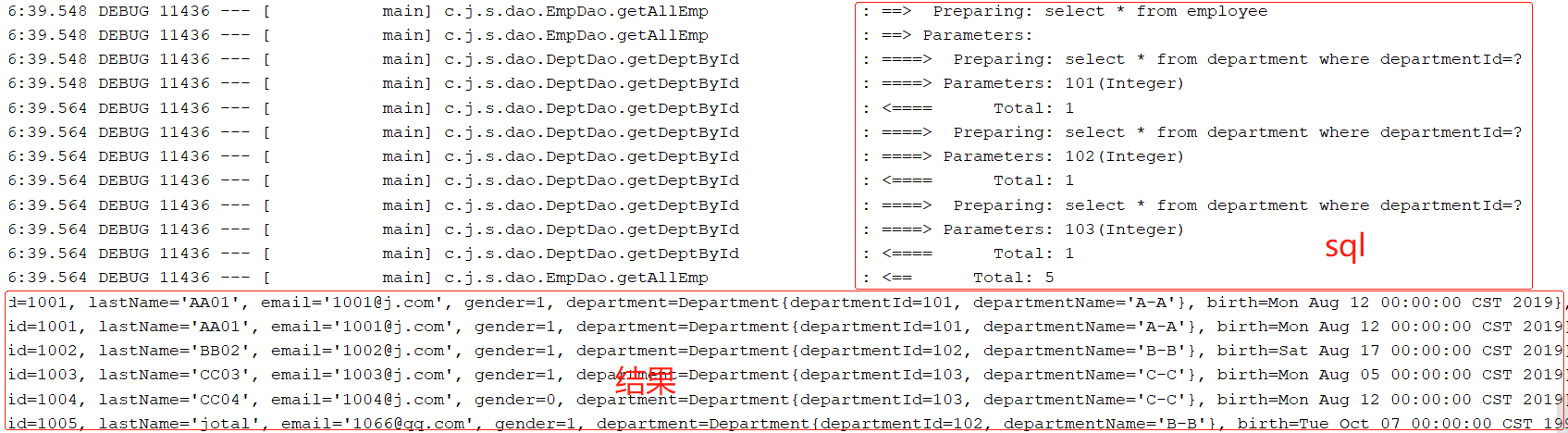
基于resultMap的嵌套查询,sql语句是分开执行的
getEmpByIdTest
@Test

public void getEmpByIdTest() {

    System.out.println(empDao.getEmpById(1002));

}

yoyo,成功地从数据库拿到了数据。我们的项目进度取得了“重大”进展。其他方法的单元测试也是如此,就不在这里一一贴出来了。
这篇就讲到这里,今天进行部分Dao层代码的编写,以及进行了Dao层代码的单元测试,成功地从数据库中拿到了数据。接下来就会从一个个功能入手,完成前后端的整合。
使用springboot实现一个简单的restful crud——02、dao层单元测试,测试从数据库取数据的更多相关文章
- 使用springboot实现一个简单的restful crud——01、项目简介以及创建项目
前言 之前一段时间学习了一些springboot的一些基础使用方法和敲了一些例子,是时候写一个简单的crud来将之前学的东西做一个整合了 -- 一个员工列表的增删改查. 使用 restful api ...
- 使用springboot实现一个简单的restful crud——03、前端页面、管理员登陆(注销)功能
前言 这一篇我们就先引入前端页面和相关的静态资源,再做一下管理员的登陆和注销的功能,为后续在页面上操作数据做一个基础. 前端页面 前端的页面是我从网上找的一个基于Bootstrap 的dashboar ...
- 使用webpy创建一个简单的restful风格的webservice应用
下载:wget http://webpy.org/static/web.py-0.38.tar.gz解压并进入web.py-0.38文件夹安装:easy_install web.py 这是一个如何使用 ...
- 使用springboot写一个简单的测试用例
使用springboot写一个简单的测试用例 目录结构 pom <?xml version="1.0" encoding="UTF-8"?> < ...
- springboot搭建一个简单的websocket的实时推送应用
说一下实用springboot搭建一个简单的websocket 的实时推送应用 websocket是什么 WebSocket是一种在单个TCP连接上进行全双工通信的协议 我们以前用的http协议只能单 ...
- python 多进程——使用进程池,多进程消费的数据)是一个队列的时候,他会自动去队列里依次取数据
我的mac 4核,因此每次执行的时候同时开启4个线程处理: # coding: utf-8 import time from multiprocessing import Pool def long_ ...
- 【SpingBoot】 测试如何使用SpringBoot搭建一个简单后台1
很久没写博客了,最近接到一个组内的测试开发任务是做一个使用SpringBoot 开发一个后台程序(还未完成),特写感想记录一下 1. 为什么选择SpringBoot ? 首先是目前很多公司的后台还是J ...
- 基础项目构建,引入web模块,完成一个简单的RESTful API 转载来自翟永超
简介 在您第一次接触和学习Spring框架的时候,是否因为其繁杂的配置而退却了?在你第n次使用Spring框架的时候,是否觉得一堆反复粘贴的配置有一些厌烦?那么您就不妨来试试使用Spring Boot ...
- laravel 实现一个简单的 RESTful API
创建一个 Article 资源 php artisan make:resource Article 你可以在 app/Http/Resources 目录下看到你刚刚生成的 Article 资源 当然我 ...
随机推荐
- MongoDB 索引 和 explain 的使用
索引基本使用 索引是对数据库表中一列或多列的值进行排序的一种结构,可以让我们查询数据库变得 更快.MongoDB 的索引几乎与传统的关系型数据库一模一样,这其中也包括一些基本的查 询优化技巧. 首先我 ...
- Windows安装Python3 curses模块
目录 0.前提 1.pip install wheel 2.下载.whl文件 3.pip install 它 参考 0.前提 确定你已经配置好了Python相关环境,可以正常在命令行使用pip安装. ...
- [源码分析]LinkedHashMap
一个键有序的 HashMap 可以将 LinkedHashMap 理解为 LinkList + HashMap,所以研究LinkedHashMap之前要先看HashMap代码.这里不再赘述.其实L ...
- AIX 系统参数配置
AIX 系统参数配置 原创 Linux操作系统 作者:fanhongjie 时间:2008-05-08 22:46:37 540 0 AIX内核属于动态内核,核心参数基本上可以自动调整,因此当系统安装 ...
- http请求传参问题解决
1.接口参数:使用form-data形式传参如果值太多就会报错误. 2.接口参数:使用form-data形式传参如果值太多就会报错误.这样前端可以传json就可以避免这样问题
- JSON序列化和反序列化 对decmail 取值问题
地图API返回经纬度:经度: 纬度: lng":114.03483089395202,"lat":22.615589046911805 decmail 接收数据后两位会截 ...
- spring cloud Eureka server 问题 Spring Cloud java.lang.TypeNotPresentException
版本: spring-cloud.version : Greenwich.SR2 pom配置: <project xmlns="http://maven.apache.org/POM/ ...
- 使用 Fiddler 代理调试本地手机页面
文件下载:http://files.cnblogs.com/files/dtdxrk/fiddler4_4.6.2.0_setup.rar 从事前端开发的同学一定对 Fiddler 不陌生,它是一个非 ...
- [LeetCode] 60. Permutation Sequence 序列排序
The set [1,2,3,…,n] contains a total of n! unique permutations. By listing and labeling all of the p ...
- [LeetCode] 752. Open the Lock 开锁
You have a lock in front of you with 4 circular wheels. Each wheel has 10 slots: '0', '1', '2', '3', ...