
利用rebase来压缩多次提交
我们可以用Git merge –squash来将分支中多次提交合并到master后,只保留一次提交历史。但是有些提交到github远程仓库中的commit信息如何合并呢?
历史记录
首先我们查看一下master分支的提交历史:
$ git log

commit 415a0be986a48113829b3c60ee2387c6dbdc81d8

Author: xuxu <xuxu_1988@.com>

Date:   Mon Jan  ::  +

    ->

commit ed09a6cbe0797275ceead3f8c8d829d01f0e604b

Author: xuxu <xuxu_1988@.com>

Date:   Mon Jan  ::  +

    2015.01.

commit 1821f6a1c1ed074fe886228cf33b3b3cb71819c4

Author: xuxu <xuxu_1988@.com>

Date:   Mon Jan  ::  +

    2015.01.

commit cc779982fc61e82ec494d6a5654417fa7194d748

Author: xuxu <xuxu_1988@.com>

Date:   Mon Jan  ::  +

    2015.1.
我们看到上面有四次commit,如何将这个四次合并到一次呢?
压缩
使用下面的命令,最后一个数字4代表压缩最后四次提交。
git rebase -i HEAD~
该命令执行后,会弹出vim的编辑窗口,4次提交的信息会按照提交时间顺序排列,最上面的是最早一次提交,最下面的是最近一次提交。
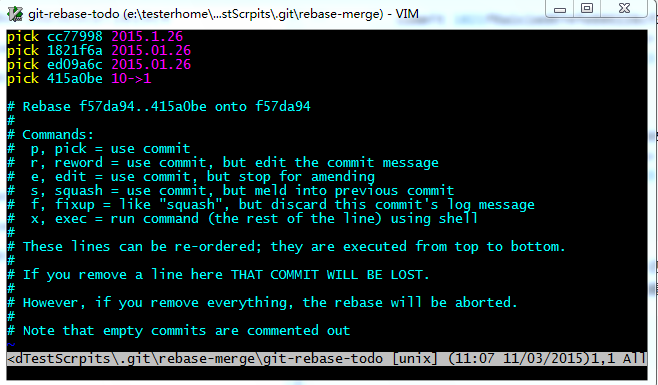
我们需要修改第2-4行的第一个单词pick为squash,意思就是将下面的三次提交压缩到第一行中去,效果就是我们在pick所在的提交就已经做了4次动作,但是看起来就是一次而已。
注意:并不会删除下面的三次提交内容,只会将四次提交压缩为一次。

然后我们保存退出,git会一个一个压缩提交历史。
如果有冲突,需要修改,修改的时候要注意,保留最新的历史,不然我们的修改就丢弃了。修改以后要记得敲下面的命令:
git add .

git rebase --continue
如果你想放弃这次压缩的话,执行以下命令:
git rebase --abort
如果所有冲突都已经解决了,会出现如下的编辑窗口:

这个时候我们需要修改一下合并后的commit的描述信息,我们将其描述为helloworld吧:
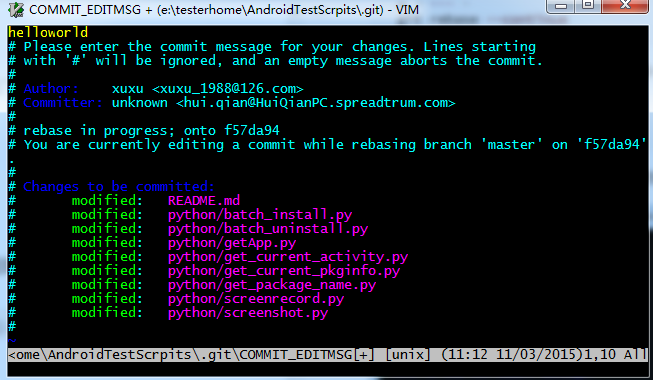
保存退出后会看到我们完整的信息:
$ git rebase -i HEAD~

[detached HEAD ] helloworld

 Author: xuxu <xuxu_1988@.com>

 Committer: unknown <hui.qian@HuiQianPC.spreadtrum.com>

Your name and email address were configured automatically based

on your username and hostname. Please check that they are accurate.

You can suppress this message by setting them explicitly:

    git config --global user.name "Your Name"

    git config --global user.email you@example.com

After doing this, you may fix the identity used for this commit with:

    git commit --amend --reset-author

  files changed,  insertions(+),  deletions(-)

Successfully rebased and updated refs/heads/master.
现在我们来查看一下历史:
$ git log

commit 90976848524251b0a62376a9e45ea5c8aae25d87

Author: xuxu <xuxu_1988@.com>

Date:   Mon Jan  ::  +

    helloworld

commit f57da9460196b950036fe4c2c8f7e4c9131ee04e

Author: xuxu <xuxu_1988@.com>

Date:   Mon Jan  ::  +

    2015.01.

commit 64104e057f48d6dd0e432af8b55cbccd0a09ee63

Author: xuxu <xuxu_1988@.com>

Date:   Mon Jan  ::  +

    2015.01.

commit 8499d4fa23c4395660d21e0b7dca873a7a3ef2b8

Author: xuxu <xuxu_1988@.com>

Date:   Mon Jan  ::  +

    2015.01.
提交历史很清楚的显示出了我们的压缩成功了。
同步到远程仓库
github上的提交历史还是之前的,如何更新我们压缩后的历史记录呢?
我们采用git push 试试:
To https://github.com/DoctorQ/AndroidTestScrpits.git

 ! [rejected]        master -> master (non-fast-forward)

error: failed to push some refs to 'https://github.com/DoctorQ/AndroidTestScrpit

s.git'

hint: Updates were rejected because the tip of your current branch is behind

hint: its remote counterpart. Integrate the remote changes (e.g.

hint: 'git pull ...') before pushing again.

hint: See the 'Note about fast-forwards' in 'git push --help' for details.
被拒绝了,因为我们合并的历史记录已经在远程仓库之前了,你无法覆盖它。
那怎么办?如果你确定你的合并过程都是正确无误的,那么就可以强制push:
$ git push -f

warning: push.default is unset; its implicit value is changing in

Git 2.0 from 'matching' to 'simple'. To squelch this message

and maintain the current behavior after the default changes, use:

  git config --global push.default matching

To squelch this message and adopt the new behavior now, use:

  git config --global push.default simple

When push.default is set to 'matching', git will push local branches

to the remote branches that already exist with the same name.

In Git 2.0, Git will default to the more conservative 'simple'

behavior, which only pushes the current branch to the corresponding

remote branch that 'git pull' uses to update the current branch.

See 'git help config' and search for 'push.default' for further information.

(the 'simple' mode was introduced in Git 1.7.. Use the similar mode

'current' instead of 'simple' if you sometimes use older versions of Git)

Counting objects: , done.

Writing objects: % (/),  bytes |  bytes/s, done.

Total  (delta ), reused  (delta )

To https://github.com/DoctorQ/AndroidTestScrpits.git

 + 415a0be... master -> master (forced update)
OK,不出意外的话,打开gitlab应该可以看到结果了。
利用rebase来压缩多次提交的更多相关文章
- git中利用rebase来压缩多次提交 ----- 原文:https://blog.csdn.net/itfootball/article/details/44154121
之前我们用git merge –squash来将分支中多次提交合并到master后,只保留一次提交历史.但是有些提交到github远程仓库中的commit信息如何合并呢? 使用下面的命令,最后一个数字 ...
- PHP简单利用token防止表单重复提交
<?php /* * PHP简单利用token防止表单重复提交 * 此处理方法纯粹是为了给初学者参考 */ session_start(); function set_token() { $_S ...
- PHP简单利用token防止表单重复提交(转)
<?php/* * PHP简单利用token防止表单重复提交 */function set_token() { $_SESSION['token'] = md5(microtime(true)) ...
- 利用session防止表单重复提交
转自:http://www.cnblogs.com/xdp-gacl/p/3859416.html 利用Session防止表单重复提交 对于[场景二]和[场景三]导致表单重复提交的问题,既然客户端无法 ...
- 利用十字链表压缩稀疏矩阵(c++)-- 数据结构
题目: 7-1 稀疏矩阵 (30 分) 如果一个矩阵中,0元素占据了矩阵的大部分,那么这个矩阵称为“稀疏矩阵”.对于稀疏矩阵,传统的二维数组存储方式,会使用大量的内存来存储0,从而浪费大量内存.为 ...
- 利用javascript:void(0)制作假的提交按钮替代button
在写html页面,我们很自然的在表单提交的地方采用button来作为提交按钮,但是,用<button type=”button”>按钮</button>作为提交代码会有个问题, ...
- C#利用WinRAR实现压缩和解压缩
using System; using Microsoft.Win32; using System.Diagnostics; using System.IO; namespace MSCL { /// ...
- 利用ICSharpCode进行压缩和解压缩
说说我利用ICSharpCode进行压缩和解压缩的一些自己的一下实践过程 1:组件下载地址 参考文章:C#使用ICSharpCode.SharpZipLib.dll压缩文件夹和文件 2: 文件类 // ...
- 重新理解了重定向,利用重定向可以防止用户重复提交表单(兼谈springmvc重定向操作)
自己用springmvc框架有一段时间了,但是都还一直分不清楚什么时候应该用转发,什么时候应该用重定向.可能用转发的情形太多了,以致于自己都忘记了还有重定向. 当用户提交post请求之后,刷新页面就会 ...
随机推荐
- javaScript的原型继承与多态性
1.prototype 我们可以简单的把prototype看做是一个模版,新创建的自定义对象都是这个模版(prototype)的一个拷贝 (实际上不是拷贝而是链接,只不过这种链接是不可见,给人们的感觉 ...
- HTML文档头部
前面的话 在声明文档类型之后,HTML文档的下一部分为<html>标签,告知浏览器应将括在<html>...</html>内的所有内容解析为HTML.然后是HT ...
- C#与C++通信
# C#与C++相互发送消息 # ## C#端: ## namespace CshapMessage { /// /// MainWindow.xaml 的交互逻辑 /// public partia ...
- 总结iOS开发中的断点续传那些事儿
前言 断点续传概述 断点续传就是从文件赏赐中断的地方重新开始下载或者上传数据,而不是从头文件开始.当下载大文件的时候,如果没有实现断点续传功能,那么每次出现异常或者用户主动的暂停,都会从头下载,这样很 ...
- GSD_WeiXin(高仿微信)应用源码
高仿微信计划:已经实现功能 1.微信首页(cell侧滑编辑.下拉眼睛动画.下拉拍短视频.点击进入聊天详情界面) 2.通讯录(联系人字母排序.搜索界面) 3.发现(朋友圈) 4.我(界面) 待实现功能( ...
- 初识npm
一.npm简介: npm全称为Node Package Manager,是一个基于Node.js的包管理器,也是整个Node.js社区最流行.支持的第三方模块最多的包管理器. npm的初衷:JavaS ...
- x01.os.23: 制作 linux LiveCD
1.首先运行如下命令 sudo apt-get install wget bc build-essential gawk genisoimage 2.下载如下资源,make all 即可 http: ...
- 我的MYSQL学习心得(十五) 日志
我的MYSQL学习心得(十五) 日志 我的MYSQL学习心得(一) 简单语法 我的MYSQL学习心得(二) 数据类型宽度 我的MYSQL学习心得(三) 查看字段长度 我的MYSQL学习心得(四) 数据 ...
- Java下好用的开源库推荐
作者:Jack47 转载请保留作者和原文出处 欢迎关注我的微信公众账号程序员杰克,两边的文章会同步,也可以添加我的RSS订阅源. 本文想介绍下自己在Java下做开发使用到的一些开源的优秀编程库,会不定 ...
- CSharpGL(21)用鼠标拾取、拖拽VBO图元内的点、线或本身
CSharpGL(21)用鼠标拾取.拖拽VBO图元内的点.线或本身 效果图 以最常见的三角形网格(用GL_TRIANGLES方式进行渲染)为例. 在拾取模式为GeometryType.Point时,你 ...