
Android实现简单登录界面
LoginActivity
 1 package com.example.myapplication;

 2

 3 import android.os.Bundle;

 4 import android.view.View;

 5

 6 import androidx.annotation.Nullable;

 7 import androidx.appcompat.app.AppCompatActivity;

 8

 9 public class LoginActivity extends AppCompatActivity implements View.OnClickListener{

10     @Override

11     protected void onCreate(@Nullable Bundle savedInstanceState) {

12         super.onCreate(savedInstanceState);

13         setContentView(R.layout.activity_login);

14

15

16

17     }

18

19     @Override

20     public void onClick(View v) {

21

22     }

23 }
Activity_login
 1 <?xml version="1.0" encoding="utf-8"?>

 2 <RelativeLayout xmlns:android="http://schemas.android.com/apk/res/android"

 3     android:layout_width="match_parent"

 4     android:layout_height="match_parent"

 5     android:layout_centerInParent="true"

 6     >

 7     <LinearLayout

 8         android:id="@+id/ll_input"

 9         android:layout_centerInParent="true"

10         android:layout_width="match_parent"

11         android:layout_height="wrap_content"

12         android:orientation="vertical">

13         <LinearLayout

14             android:layout_width="match_parent"

15             android:layout_height="wrap_content"

16             android:orientation="horizontal"

17             >

18             <TextView

19                 android:layout_width="wrap_content"

20                 android:layout_height="wrap_content"

21                 android:width="50dp"

22                 android:text="账号"

23                 >

24             </TextView>

25             <EditText

26                 android:layout_width="match_parent"

27                 android:layout_height="wrap_content"

28                 android:hint="请输入账号" />

29         </LinearLayout>

30         <LinearLayout

31             android:layout_width="match_parent"

32             android:layout_height="wrap_content"

33             android:orientation="horizontal"

34             >

35             <TextView

36                 android:layout_width="wrap_content"

37                 android:layout_height="wrap_content"

38                 android:width="50dp"

39                 android:text="密码"

40                 >

41             </TextView>

42

43             <EditText

44                 android:layout_width="match_parent"

45                 android:layout_height="wrap_content"

46                 android:hint="请输入密码" />

47         </LinearLayout>

48         <Button

49             android:layout_width="match_parent"

50             android:layout_height="wrap_content"

51             android:text="登录"

52             />

53         <LinearLayout

54             android:layout_width="match_parent"

55             android:layout_height="wrap_content"

56             android:orientation="horizontal"

57             >

58             <Button

59                 android:layout_width="0dp"

60                 android:layout_height="wrap_content"

61                 android:layout_weight="1"

62                 android:text="注册"

63                 />

64             <Button

65                 android:layout_width="0dp"

66                 android:layout_height="wrap_content"

67                 android:layout_weight="1"

68                 android:text="忘记密码"

69                 />

70         </LinearLayout>

71     </LinearLayout>

72     <LinearLayout

73         android:layout_width="match_parent"

74         android:gravity="center"

75         android:orientation="vertical"

76         android:layout_height="match_parent"

77         android:layout_above="@id/ll_input"

78         >

79         <ImageView

80             android:layout_width="wrap_content"

81             android:layout_height="wrap_content"

82             android:src="@android:drawable/btn_star_big_on"

83             ></ImageView>

84     </LinearLayout>

85     <TextView

86         android:layout_width="wrap_content"

87         android:layout_height="wrap_content"

88         android:layout_alignParentBottom="true"

89         android:layout_centerHorizontal="true"

90         android:text="最终解释权归本公司所有"

91         >

92     </TextView>

93 </RelativeLayout>
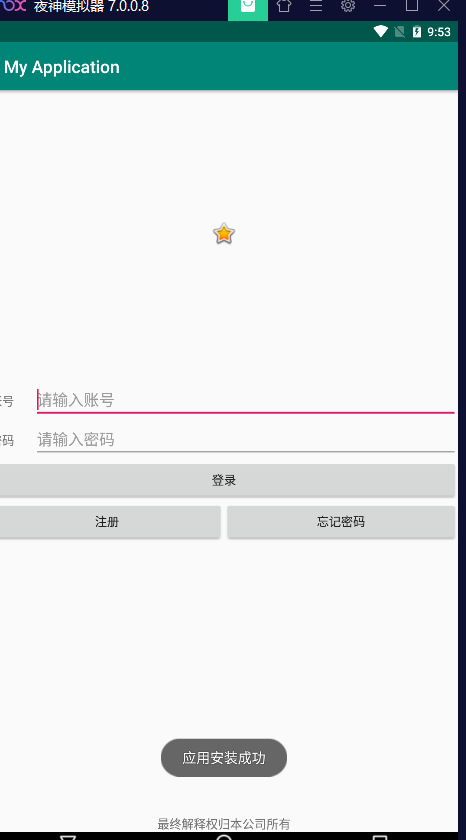
效果图
Android实现简单登录界面的更多相关文章
- android 案例二 登录界面
效果图: 运行图: 总结: 编写这个简单的用户登录界面,主要用到了以下的知识: java基础中的IO流的操作 用以读取.显示用户的信息 Android布局 线性布局和相对布局 数据的存储选在包 ...
- Android之QQ登录界面
首先过程中碰到的几个问题: 1.对 EditText 进行自定义背景 2.运行时自动 EditText 自动获得焦点 3.在获得焦点时即清空 hint ,而不是输入后清空 4.清空按钮的出现时机(在得 ...
- Cookie案例:简单登录界面中的应用
ServletDemo1.java package ztq.servlet.study; import java.io.IOException; import java.io.PrintWriter; ...
- 以java实现的一个简单登录界面(带验证码)
本文参考于:https://blog.csdn.net/wyf2017/article/details/78831744 https://blog.csdn.net/MengKun822/articl ...
- JSP内置对象的cookie和session实现简单登录界面
创建一个index.jsp页面 <%@ page language="java" contentType="text/html; charset=utf-8&quo ...
- JAVA语言实现简单登录界面
程序设计思想: 使用Math.random()方法循环生成6个97~122之间的随机整数(对应ASCII码值‘a’~‘z’),将其转化为char型变量,连接成为一个6位字符串作为验证码输出,提示用户输 ...
- Android studio 简易登录界面
•参考资料 [1]:视频资源 [2]:Android TextView设置图标,调整图标大小 •效果展示图 •前置知识 TextView EditText Button 以及按压效果,点击事件 •出现 ...
- qt 简单登录界面(一)
widget.h #ifndef WIDGET_H #define WIDGET_H #include <QWidget> #include<QLineEdit> class ...
- 设计简单登录界面(Java web)
程序设计思想: 在Input.jsp中创建一个表格里边分别是课程名称,任课老师,教学地点,并分别用三个文本框来接受输入的三个属性, 并传到另外的Jsp页面中,又来接受三个数据,并判断传来的教师,与教室 ...
- Java简单登录图形界面
本文参考与:https://blog.csdn.net/wyf2017/article/details/78831744 https://blog.csdn.net/MengKun822/articl ...
随机推荐
- java zTree异步加载实战
zTree简介 zTree 是一个依靠 jQuery 实现的多功能 "树插件".优异的性能.灵活的配置.多种功能的组合是 zTree 最大优点. zTree 是开源免费的软件(MI ...
- Java集合框架学习(一)介绍
介绍 Java集合框架是一组接口和类的集合,它使得存储和处理数据更加有效率. 该框架有一些类,有很多函数使得程序员更加容易的处理集合类型数据. 后面的教程就是针对这些常用类展开,配合例子代码来给大家一 ...
- 记录级别索引:Hudi 针对大型数据集的超快索引
介绍 索引是一个关键组件,有助于 Hudi 写入端快速更新和删除,并且它在提高查询执行方面也发挥着关键作用. Hudi提供了多种索引类型,包括全局变化的Bloom索引和Simple索引.利用HBase ...
- 正则表达式re模块---day18
1.匹配单个字符 import re lst = re.findall(正则表达式,要匹配的字符串) 返回的是列表,按照正则表达式匹配到的内容都扔到列表中 # ### 1.预定义字符集 # \d 匹配 ...
- 【LeetCode动态规划#17】知道秘密的人,维护多个dp数组
知道秘密的人数 在第 1 天,有一个人发现了一个秘密. 给你一个整数 delay ,表示每个人会在发现秘密后的 delay 天之后,每天 给一个新的人 分享 秘密.同时给你一个整数 forget ,表 ...
- 从零开始学Spring Boot系列-集成MySQL
在Spring Boot中集成MySQL是为了让开发者能够轻松地与MySQL数据库进行交互.本篇文章将指导你如何在Spring Boot 3.2.3项目中使用Gradle来集成MySQL.在此之前,我 ...
- Jmeter参数化-用户自定义变量
一 首先我们先来了解下jmeter 做参数化的目的: 1通过参数化来集中管理配置和测试数据 2通过参数化实现数据驱动测试 二 线程组添加配置元件中的用户自定义变量 添加变量名称,变量值 三 使用变量 ...
- Java 异常处理(1) :try-catch-finally的使用
1 package com.bytezero.throwable; 2 3 import java.io.File; 4 import java.io.FileInputStream; 5 impor ...
- React函数式组件使用@emotion时一定要注意的问题!
怎么说呢,一个坑,踩了两天,总觉得是useSate和input的传值方法问题 在useMemo和useCallback反复测试问题 最后没办法,通过最傻方式,一点点注释代码,发现了问题 const C ...
- 云计算 - 内容分发网络CDN技术与应用全解
在这篇全面解析CDN的技术文章中,我们深入探讨了CDN的基础概念.核心架构.多样化产品和在不同行业中的应用案例.文章揭示了CDN技术如何优化内容分发,提升用户体验,并展望了CDN面临的挑战和未来发展趋 ...