
IdentityServer4 密码模式认证
授权服务器设置
添加用户
添加测试用户,也可以从数据库查
public static List<TestUser> GetTestUser()

        {

            return new List<TestUser>() {

                new TestUser(){

                    SubjectId = "",

                    Username ="zps",

                    Password = "zps",

                    Claims = new List<Claim>(){

                        new Claim("role","zps"),

                        new Claim("aaa","asdasdsd"),

                    }

                },

                 new TestUser(){

                    SubjectId = "",

                    Username ="admin",

                    Password = "admin",

                     Claims = new List<Claim>(){

                        new Claim("role","admin")

                    }

                }

            };

        }
添加Api资源
添加api资源 ,api的key要和注册的client的api要匹配
  public static IEnumerable<ApiResource> GetResource()

        {

            return new List<ApiResource>(){

                new ApiResource("api","my api")

            };

        }
添加客户端
- 客户端模式
- 密码模式
- 授权码模式
- 混合模式
授权码模式和mvc模式的时候 这两个模式先不管
//请求确认
RequireConsent = false, 这个属性要注意 如果是true 会先跳转到确认页面 然后再跳转到RedirectUris
 public static IEnumerable<Client> GetClients()

        {

            return new List<Client>(){

                new Client(){

                    ClientId="client",

                    //客户端模式

                     AllowedGrantTypes=GrantTypes.ClientCredentials,

                     ClientSecrets={new Secret("secret".Sha256())},

                     AllowedScopes={"api"}

                },

                new Client(){

                    ClientId="pwdClient",

                    //OAuth密码模式

                     AllowedGrantTypes=GrantTypes.ResourceOwnerPassword,

                     ClientSecrets={new Secret("secret".Sha256())},

                     AllowedScopes={"api"}

                },

                new Client

                {

                   ClientId = "mvc",

                   ClientName = "MVC Client",

                   AllowedGrantTypes = GrantTypes.Hybrid,

                   ClientSecrets =

                   {

                       new Secret("secret".Sha256())

                   },

                   // where to redirect to after login

                   RedirectUris = { "http://localhost:5001/signin-oidc" },

                   RequireConsent = false,

                   AllowOfflineAccess = true,

                    // where to redirect to after logout

                    PostLogoutRedirectUris = { "http://localhost:5001/signout-callback-oidc" },

                     AllowedScopes = new List<string>

                  {

                    IdentityServerConstants.StandardScopes.OpenId,

                    IdentityServerConstants.StandardScopes.Profile,

                  }

                },

                new Client

                {

                   ClientId = "js",

                    ClientName = "JavaScript Client",

                    AllowedGrantTypes = GrantTypes.Code,

                    RequirePkce = true,

                    RequireClientSecret = false,

                    RedirectUris =           { "http://localhost:5003/callback.html" },

                    PostLogoutRedirectUris = { "http://localhost:5003/index.html" },

                    AllowedCorsOrigins =     { "http://localhost:5003" },

                    RequireConsent = false,

                    AllowedScopes =

                    {

                        IdentityServerConstants.StandardScopes.OpenId,

                        IdentityServerConstants.StandardScopes.Profile,

                        "api"

                    }

                }

            };

        }
添加IdentityServer 保护的资源
可以自定义Claim
 public static IEnumerable<IdentityResource> GetIdentityResources()

        {

            return new IdentityResource[]

            {

                new IdentityResources.OpenId(),

                new IdentityResources.Profile(),

            };

        }
把identityserver注入到容器
.AddDeveloperSigningCredential() 生成token 需要的密钥和公钥 正式环境需要换成正经的
o.UserInteraction.LoginUrl = "/Auth/Login";
o.UserInteraction.LogoutUrl = "/Auth/Logout";
   o.UserInteraction.ErrorUrl = "/Auth/Error";
  这三个是混合模式需要的  登录的地址  登出的地址  授权失败的地址
services.AddIdentityServer(o =>

            {

                o.UserInteraction.LoginUrl = "/Auth/Login";

                o.UserInteraction.LogoutUrl = "/Auth/Logout";

                o.UserInteraction.ErrorUrl = "/Auth/Error";

            })

                    .AddInMemoryIdentityResources(Config.GetIdentityResources())

                    .AddDeveloperSigningCredential()

                    .AddInMemoryClients(Config.GetClients())

                    .AddInMemoryApiResources(Config.GetResource())

                    .AddTestUsers(Config.GetTestUser());
Configure把中间件加到netcore中
app.UseIdentityServer();
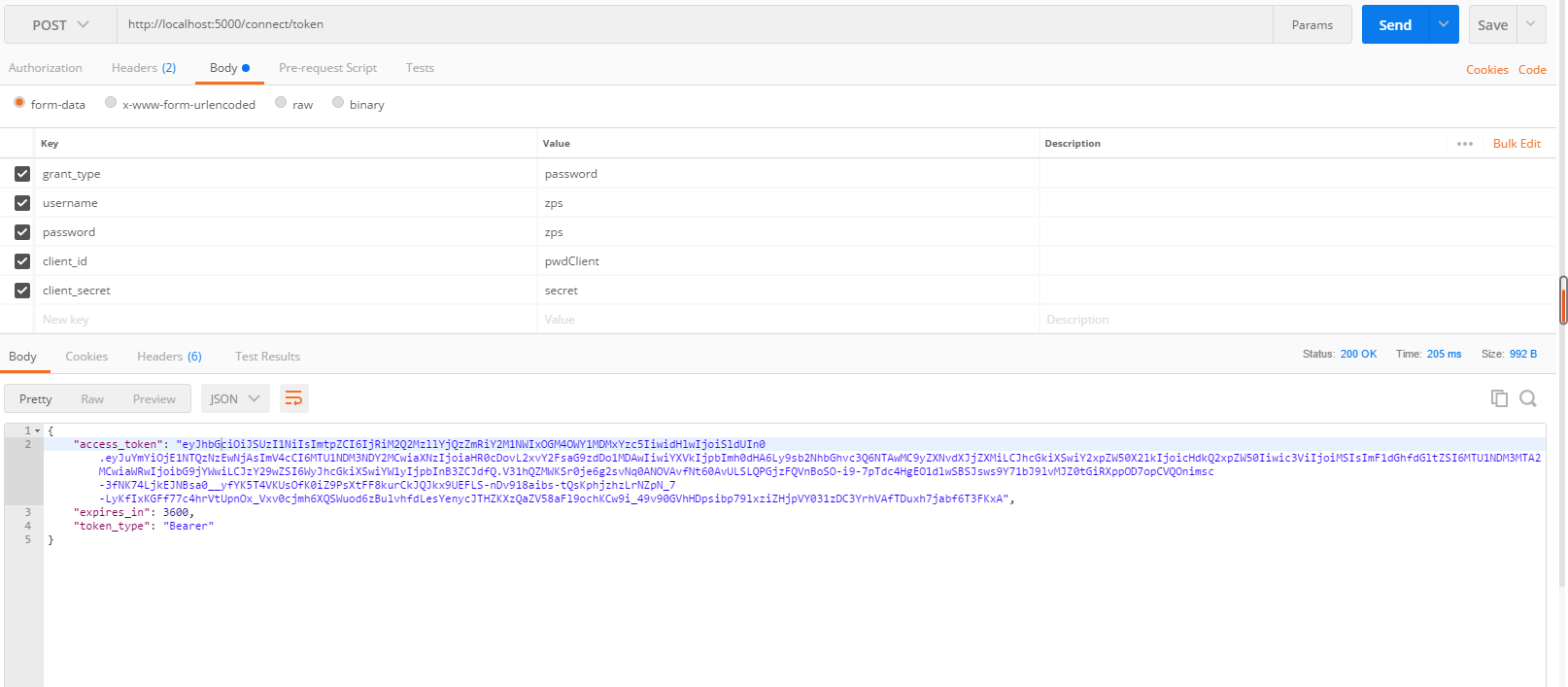
postman测试
- grant-type:密码模式对应 password
- username 用户名
- password 密码
- client_id 客户端id 对应 授权服务ClientId
- client_secret 客户端secret
IdentityServer4 密码模式认证的更多相关文章
- IdentityServer4 密码模式实现
1. 修改 Config.cs using System.Collections; using System.Collections.Generic; using IdentityServer4.M ...
- IdentityServer4密码模式接入现有用户数据表
具体接入identityserver请看文档,这里只简单列举部分步骤 1.创建一个web项目,引入Identityserver4的nuget包 2.新建一个类,实现IResourceOwnerPass ...
- Core篇——初探IdentityServer4(客户端模式,密码模式)
Core篇——初探IdentityServer4(客户端模式,密码模式) 目录 1.Oatuth2协议的客户端模式介绍2.IdentityServer4客户端模式实现3.Oatuth2协议的密码模式介 ...
- asp.net权限认证:OWIN实现OAuth 2.0 之密码模式(Resource Owner Password Credential)
asp.net权限认证系列 asp.net权限认证:Forms认证 asp.net权限认证:HTTP基本认证(http basic) asp.net权限认证:Windows认证 asp.net权限认证 ...
- asp.net core 使用identityServer4的密码模式来进行身份认证(一)
IdentityServer4是ASP.NET Core的一个包含OpenID和OAuth 2.0协议的框架.具体Oauth 2.0和openId请百度. 前言本博文适用于前后端分离或者为移动产品来后 ...
- 【ASP.NET Core分布式项目实战】(一)IdentityServer4登录中心、oauth密码模式identity server4实现
本博客根据http://video.jessetalk.cn/my/course/5视频整理 资料 OAuth2 流程:http://www.ruanyifeng.com/blog/2014/05/o ...
- IdentityServer4 实现OAuth2.0四种模式之密码模式
接上一篇:IdentityServer4 实现OAuth2.0四种模式之客户端模式,这一篇讲IdentityServer4 使用密码模式保护API访问. 一,IdentityServer配置 1,添加 ...
- OAuth2密码模式已死,最先进的Spring Cloud认证授权方案在这里
旧的Spring Security OAuth2停止维护已经有一段时间了,99%的Spring Cloud微服务项目还在使用这些旧的体系,严重青黄不接.很多同学都在寻找新的解决方案,甚至还有念念不忘密 ...
- IdentityServer4:IdentityServer4+API+Client+User实践OAuth2.0密码模式(2)
一.密码模式实操 仍然使用第一节的代码:做如下改动: 1.授权服务端 前面我们使用项目:Practice.IdentityServer作为授权服务器 修改项目的Config.cs类: 添加测试用户,并 ...
随机推荐
- SpringCloud 过滤器
在网关中配置过滤器 验证签名 package com.kps.zuul.filter; import com.kps.common.BodyReaderHttpServletRequestWrappe ...
- Quartus13.1全编译出现引脚错误(神级bug)
BUG现象:分配完管脚后全编译出现如下错误. Error (171172):Detected confilicting assignments for the following nodes.Erro ...
- Makefile 常用函数表
Makefile 常用函数表 一.字符串处理函数1.$(subst FROM,TO,TEXT)函数名称:字符串替换函数—subst.函数功能:把字串“TEXT”中的“FROM”字符替换为“TO”.返 ...
- 初识并发编程 MPI
MPI是一个跨语言的通讯协议,用于并发编程.MPI标准定义了一组具有可移植性的编程接口. 安装环境 MPICH 是开源的消息传递接口(MPI)标准的实现. 下载地址 # 解压文件 tar -xzvf ...
- 【WC2018】即时战略
题目描述 小M在玩一个即时战略(Real Time Strategy)游戏.不同于大多数同类游戏,这个游戏的地图是树形的. 也就是说,地图可以用一个由 n个结点,n?1条边构成的连通图来表示.这些结点 ...
- mysql ssh 跳板机(堡垒机???)连接服务器
跳板机(Jump Server),也称堡垒机,是一类可作为跳板批量操作远程设备的网络设备,是系统管理员或运维人员常用的操作平台之一. 正常的登录流程 使用ssh命令登录跳板机: 登录跳板机成功后,在跳 ...
- Sobel 边缘检测算子
转自:http://blog.csdn.net/xiaqunfeng123/article/details/17302003 Sobel 算子是一个离散微分算子 (discrete different ...
- 第三节: Quartz.Net五大构件之Scheduler(创建、封装、基本方法等)和Job(创建、关联等)
一. 五大构件 引言: Quartz.Net的五大构件 1. 调度器:Scheduler 2. 作业任务:Job 3. 触发器: Trigger 4. 线程池: SimpleThreadPoo ...
- Navier-Stokes equations (Lectured by Luis Caffarelli)
百万美元问题: http://www.claymath.org/millennium-problems/navier%E2%80%93stokes-equation Official Problem ...
- [物理学与PDEs]第1章第6节 电磁场的标势与矢势 6.3 例 --- 电偶极辐射
1. 偶极子: 相距为 $l$, 带电量分别为 $\pm q$ 的一对电荷组成的系统. 称 $$\bex {\bf m}=q{\bf l} \eex$$ 为电偶极矩, 其中 ${\bf l}$ 为 $ ...