
【水滴石穿】MyFirstRNDemo
比较简单的项目
//index.js

/** @format */

import {AppRegistry} from 'react-native';

//默认创建的类

import App from './App';

//json

import {name as appName} from './app.json';

//FlatList类

import DWBFlatList from './DWBHomeFlatList'

import DWBTestVC from './DWBTestVC'

import DWBTButton from './DWBTButton'

// import DWBSwipeout from './DWBSwipeout'

import DWBNavVC from './DWBNavVC'

import DWBTouchableOpacity from './DWBTouchableOpacity'

import DWBSectionList from './DWBSectionList'

import DWBActionButton from './DWBActionButton'

//修改这里可以切换不同的类显示: => App

AppRegistry.registerComponent(appName, () => DWBFlatList);

// react-native关闭所有黄色警告,将这两句话加在index.js文件中,放在AppRegistry.registerComponent('App', () => App)之前。

console.ignoredYellowBox = ['Warning: BackAndroid is deprecated. Please use BackHandler instead.','source.uri should not be an empty string','Invalid props.style key'];

console.disableYellowBox = true // 关闭全部黄色警告
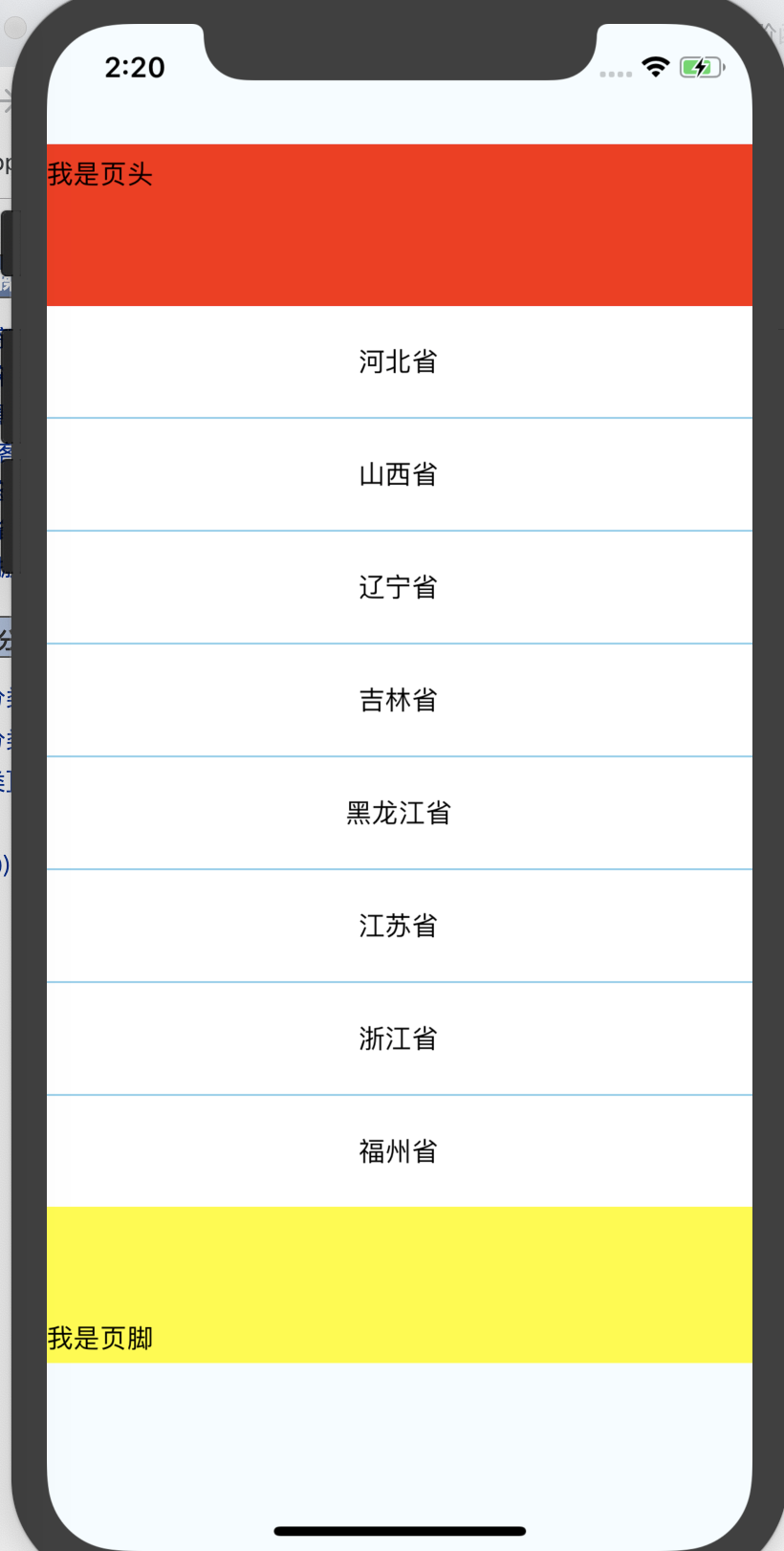
//DWBHomeFlatList.js

import React, { Component } from 'react';

import {

    AppRegistry,

    StyleSheet,

    Text,

    View,

    FlatList,

    TouchableOpacity, Button,

} from 'react-native';

// 初始化数据

var Arr = [

    {name:'河北省',},

    {name:'山西省',},

    {name:'辽宁省',},

    {name:'吉林省',},

    {name:'黑龙江省',},

    {name:'江苏省',},

    {name:'浙江省',},

    {name:'福州省',}];

export default class MyFlatList extends Component {

    render() {

        //给数据追加一个key的字段,不然会有警告的,参数数组中的每一项,需要包含 key 值作为唯一标示

        for (var i = 0; i < Arr.length; i++) {

            Arr[i]['key'] = i;

        }

        return (

            //初始化FlatList

            <View style={styles.container}>

                <FlatList style={styles.FlatListStyle}

                          data = {Arr}

                          ListHeaderComponent={this.ListHeaderComponent.bind(this)}

                          ListFooterComponent={this.ListFooterComponent.bind(this)}

                          renderItem={this.renderItemView.bind(this)}

                          //分割线组件

                          ItemSeparatorComponent={ItemDivideComponent}

                >

                </FlatList>

            </View>

        );

    }

    //列表的每一行

    renderItemView({item,index}){

        return(

            <TouchableOpacity onPress={()=>{

                this.Cellheader(item)}

            }

            >

                <View style={{

                    backgroundColor:'#ffffff',//背景色

                    height:59,//view高度

                    justifyContent:'center',//内容上下居中

                    alignItems: 'center'//内容左右居中

                }}>

                    <Text>{item.name}</Text>

                </View>

            </TouchableOpacity>

        );

    }

    //点击每一行的对象

    Cellheader(data){

        alert(data.name);

    }

    //定义页头

    ListHeaderComponent(){

        return(

            <View style={{height:140,backgroundColor:'red',justifyContent: 'center',}}>

                <Text>我是页头</Text>

            </View>

        );

    }

    //定义页脚

    ListFooterComponent(){

        return(

            <View style={{height:140,backgroundColor:'yellow',justifyContent: 'center',}}>

                <Text>我是页脚</Text>

            </View>

        );

    }

}

// //设置分割线

// renderSeparator(){

//     return (

//         <View style={{height: 1, backgroundColor: 'skyblue'}}></View>

//     );

// };

class ItemDivideComponent extends Component {

    render() {

        return (

            <View style={{height: 1, backgroundColor: 'skyblue'}}></View>

        );

    }

};

const styles = StyleSheet.create({

    //控制器属性

    container: {

        flex: 1,

        flexDirection: 'column',

        justifyContent: 'space-between',

        backgroundColor: '#F5FCFF',

    },

//FlatList属性

    FlatListStyle:{

        backgroundColor:'#f6f6f6',

        flex:1,

        marginTop:64,

        marginBottom: 100,

        // width:300

    }

});
//DWBActionButton.js

import React, { Component } from 'react';

import { StyleSheet, View,Text,Alert } from 'react-native';

import ButtonMy from 'apsl-react-native-button'

export default class ActionButton extends Component {

        render() {

        return (

            <View style={styles.ViewSyt}>

                <ButtonMy style={{backgroundColor: '#c771ec'}} onPress={()=>{

                    Alert.alert('我是一个button');

                }}>

                    <View style={styles.actionButtonIcon}>

                        <Text style={styles.actionButtonIcon}>我是一个button</Text>

                    </View>

                </ButtonMy>

            </View>

        );

    }

}

const styles = StyleSheet.create({

    ViewSyt:{

        flex:1,

        marginTop:100,

        fontSize: 20,

        height: 40,

        color: 'white',

    },

    actionButtonIcon: {

        fontSize: 20,

        height: 22,

        color: 'white',

    },

});
比较基础,=-=
【水滴石穿】MyFirstRNDemo的更多相关文章
- iOS 开发笔记 -- 各种细枝末节的知识(水滴石穿)
在此总结整理,遇到的各种的小问题: 1.通过从字典(数组)中取出的NSString的length==0 作为if的判断条件导致的carsh: 由于在字典中通过Key取出值之后直接做了length相关操 ...
- 【水滴石穿】react-native-book
先推荐一个学习的地址:https://ke.qq.com/webcourse/index.html#cid=203313&term_id=100240778&taid=12778558 ...
- 【水滴石穿】rnTest
其实就是一个小的demo,不过代码分的挺精巧的 先放地址:https://github.com/linchengzzz/rnTest 来看看效果 确实没有什么可以说的,不过代码部分还行 先入口文件 / ...
- 【水滴石穿】rn_statusbar
先放项目地址https://github.com/hezhii/rn_statusbar 来看一下效果 咩有感觉很怎么样,看代码 根入口文件 //index.js //看代码我们知道入口是app.js ...
- 【水滴石穿】react-native-ble-demo
项目的话,是想打开蓝牙,然后连接设备 点击已经连接的设备,我们会看到一些设备 不过我这边在开启蓝牙的时候报错了 先放作者的项目地址: https://github.com/hezhii/react-n ...
- 【水滴石穿】ReactNative-Redux-Thunk
老实说,运行出来的项目让人失望,毕竟我想看各种有趣的demo啊- 先放上源码地址:https://github.com/ludejun/ReactNative-Redux-Thunk 我们来一起看看代 ...
- 【水滴石穿】mobx-todos
我觉得代码在有些程序员手里,就好像是画笔,可以创造很多东西 不要觉得创意少就叫没有创意,每天进步一点点,世界更美好 首先源码地址为:https://github.com/byk04712/mobx-t ...
- 【水滴石穿】ReactNativeMobxFrame
项目地址如下:https://github.com/FTD-ZF/ReactNativeMobxFrame 应该可以说的是,项目也只是一个花架子,不过底部的tab稍微改变了 我们一起来看代码 //in ...
- 【水滴石穿】react-native-aze
说个题外话,早上打开电脑的时候,电脑变成彩色的了,锅是我曾经安装的一个chrome扩展,没有经过我的同意开启了 (也许是昨天迷迷糊糊开启了) 上午运行项目都不成功,还以为被黑客攻击了---然后下午就排 ...
随机推荐
- THUWC 游记
考试前的一个周末 PKUWC没过,去不了,自闭,我死了. 考试前的星期一 THUWC居然过了!!!大恩大德永世难忘,我又活了. 考试前的周四 WTF!??为什么要用Ubuntu,我完全不会,凉了凉了, ...
- JZOJ100045 【NOIP2017提高A组模拟7.13】好数
题目 题目大意 首先有一个定义: 对于一个数,如果和它互质的数可以组成一个等差数列,那么这个数叫"好数". 现在给你一个数列,有三种操作: 1.询问一段区间内的好数的个数. 2.将 ...
- day 71作业
作业: url配置 urlpatterns = [ url(r'^v2/cars/$',views.CarAPIView.as_view()), url(r'^v2/cars/(?P<pk> ...
- 19-10-18-Night-U
话说T3: 一句话题意……见过这个嘛…… 于是:$\sum \limits_{i!=j} \binom{a_i+b_i+a_j+b_j}{a_i+a_j}$ ------------前言结束----- ...
- win10文件名或文件路径过长导致无法删除或复制的解决办法
试过了百度上的所有方法,命令行中del没有作用,Unlocker也没用,批处理也不起作用,360的强力删除也没有作用. 最后找到一种方法,在压缩该文件的时候选择删除源文件. 但是需要注意一点,用360 ...
- PAT甲级——A1057 Stack
Stack is one of the most fundamental data structures, which is based on the principle of Last In Fir ...
- YUM配置文件
创建容器,位置在/etc/yum.repos.d,扩展名必须是.repo #cd /etc/yum.repos.d #vim yum.repo 新建一个仓库文件,名字可以随便定义,在 ...
- Docker(四)安装Redis
1.安装redis https://blog.csdn.net/qq_29917523/article/details/78019511 2.测试连接
- JDK8日期时间操作小汇总
统一使用java.time.*包下的类 1.获取当前的日期.时间.日期加时间 LocalDate todayDate = LocalDate.now(); //今天的日期 LocalTime now ...
- 2017年8月9日学习内容存放 #socket通信介绍
2017年8月9日学习内容存放 #socket通信介绍 ''' OSI七层 应用 表示 会话 传输 网络 ip 数据链路 mac 物理层 网线 http smtp dns ftp ssh snmp i ...