
Matplotlib 绘制折线图
Matplotlib
matplotlib: 最流行的Python底层绘图库,主要做数据可视化图表,名字取材于MATLAB,模仿MATLAB构建
绘制折线图
绘制两小时的温度变化
from matplotlib import pyplot as plt

x = range(2, 26, 2)

y = [15, 13, 14, 5, 17, 20, 25, 26, 24, 22, 19, 15]

# 全局变量fig figure方法(figsize画板尺寸=(长float,宽float), dpi=整数int)

fig = plt.figure(figsize=(20, 8), dpi=80)

# 传入X坐标和Y坐标,并绘图

plt.plot(x, y)

# 调整X轴刻度,传入的列表密集与否,决定X轴的密集程度

plt.xticks(x)

# 调整X轴刻度同理

plt.yticks(range(min(y), max(y)+1))

# savefig方法,传入一个路径

plt.savefig("./t1.png")

# 展示

plt.show()
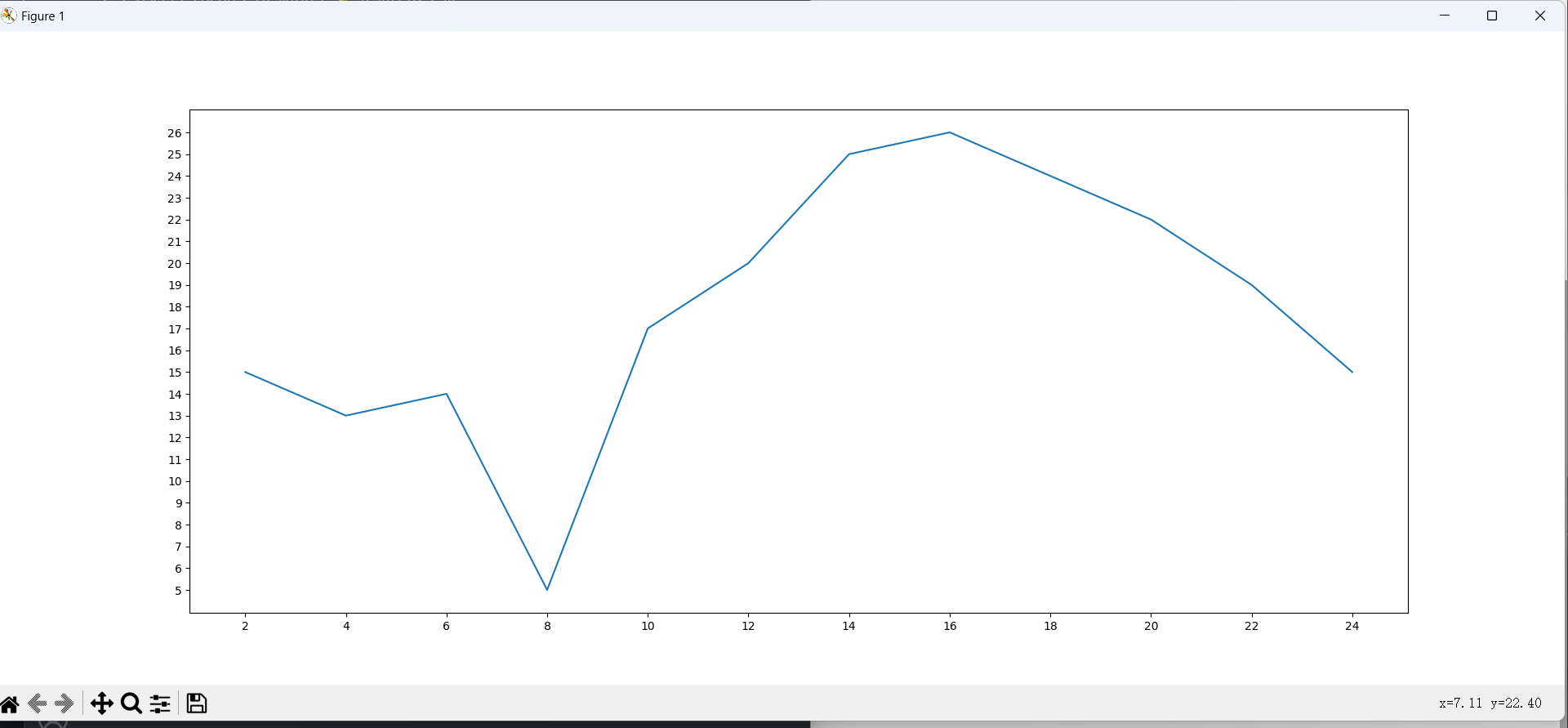
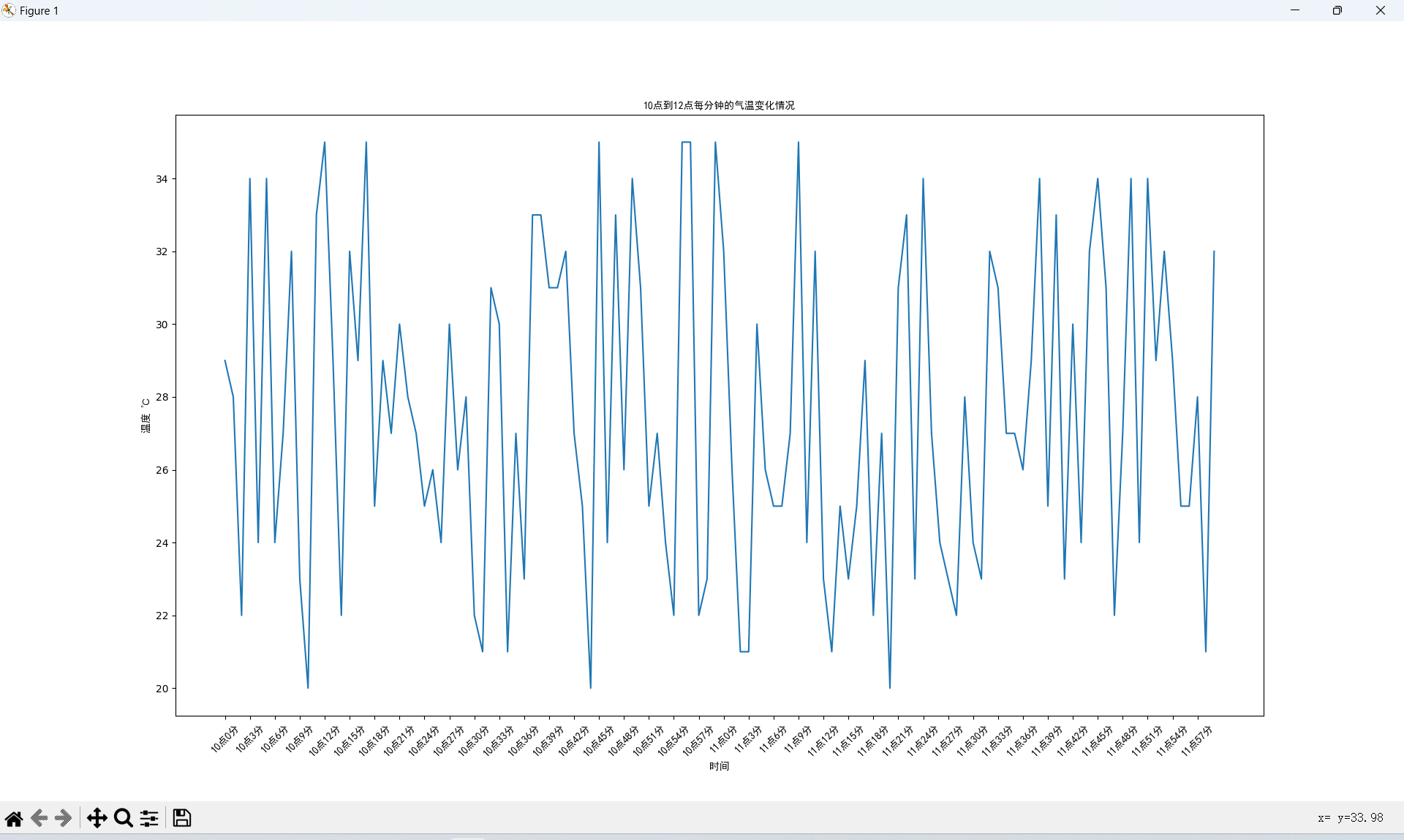
from matplotlib import pyplot as plt

import random

from matplotlib import font_manager

x = range(0, 120)

y = [random.randint(20, 35) for i in range(120)]

# C:\Windows\Fonts\simhei.ttf 字体路径

# 实例化font_manager

my_font = font_manager.FontProperties(fname="C:\Windows\Fonts\simhei.ttf")

plt.figure(figsize=(20, 8), dpi=80)

plt.plot(x, y)

# 调整x轴的刻度

_xtick_labels = ["10点{}分".format(i) for i in range(60)]

_xtick_labels += ["11点{}分".format(i) for i in range(60)]

# 取步长,数字和字符串一一对应,数据的长度与数据的刻度一笔一致

# param: rotation=旋转角度(int)

# param: fontproperties=实例化的字体(object)

plt.xticks(list(x)[::3], _xtick_labels[::3],

           rotation=45, fontproperties=my_font)

# 添加描述信息

plt.xlabel("时间", fontproperties=my_font)  # X轴标签

plt.ylabel("温度 ℃", fontproperties=my_font)  # Y轴标签

plt.title("10点到12点每分钟的气温变化情况", fontproperties=my_font)  # 标题

plt.show()
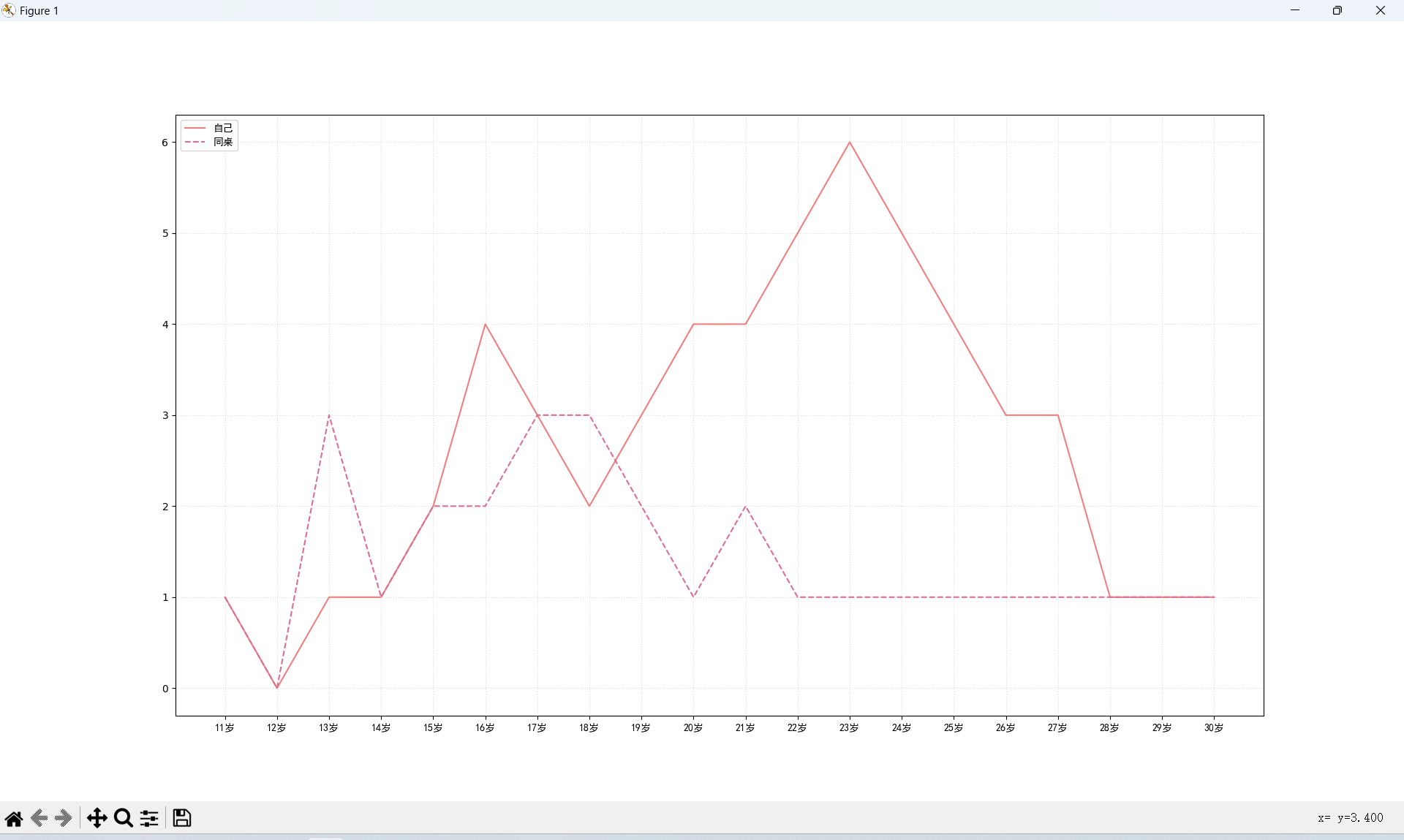
模拟11岁到30岁自己和同桌交女朋友的走势
# coding=utf-8

from matplotlib import pyplot as plt

from matplotlib import font_manager

my_font = font_manager.FontProperties(fname="C:\Windows\Fonts\simhei.ttf")

y_1 = [1, 0, 1, 1, 2, 4, 3, 2, 3, 4, 4, 5, 6, 5, 4, 3, 3, 1, 1, 1]

y_2 = [1, 0, 3, 1, 2, 2, 3, 3, 2, 1, 2, 1, 1, 1, 1, 1, 1, 1, 1, 1]

x = range(11, 31)

# 设置图形大小

plt.figure(figsize=(20, 8), dpi=80)

plt.plot(x, y_1, label="自己", color="red")

plt.plot(x, y_2, label="同桌", color="#DB7093", linestyle="--")

# 设置x轴刻度

_xtick_labels = ["{}岁".format(i) for i in x]

plt.xticks(x, _xtick_labels, fontproperties=my_font)

# plt.yticks(range(0,9))

# 绘制网格

plt.grid(alpha=0.4, linestyle=':')

# 添加图例

plt.legend(prop=my_font, loc="upper left")

# 展示

plt.show()
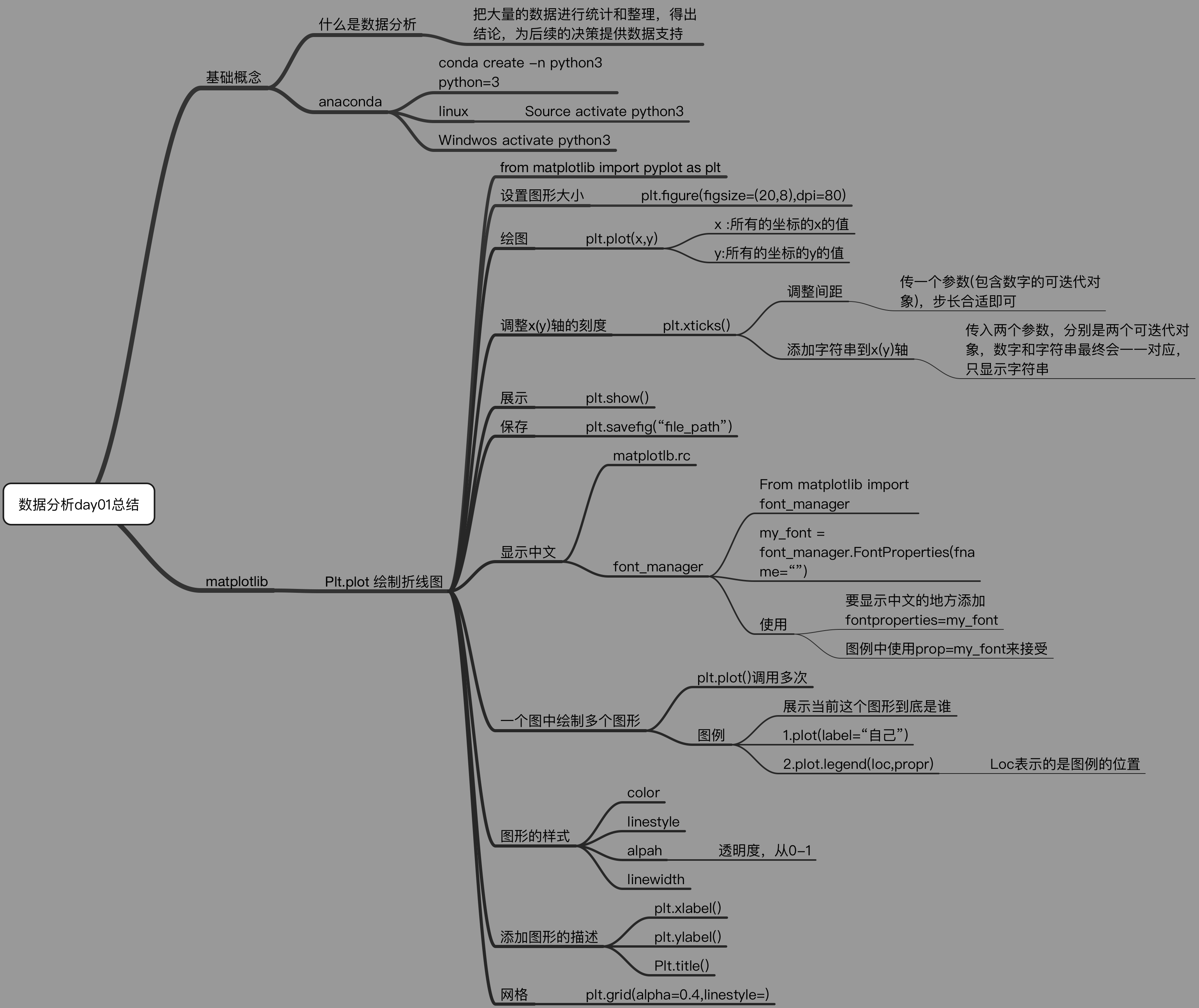
绘制折线图总结
Matplotlib 绘制折线图的更多相关文章
- python使用matplotlib绘制折线图教程
Matplotlib是一个Python工具箱,用于科学计算的数据可视化.借助它,Python可以绘制如Matlab和Octave多种多样的数据图形.下面这篇文章主要介绍了python使用matplot ...
- Python开发【模块】:matplotlib 绘制折线图
matplotlib 1.安装matplotlib ① linux系统安装 # 安装matplotlib模块 $ sudo apt-get install python3-matplotlib # 如 ...
- 【Python】matplotlib绘制折线图
一.绘制简单的折线图 import matplotlib.pyplot as plt squares=[1,4,9,16,25] plt.plot(squares) plt.show() 我们首先导入 ...
- 1 matplotlib绘制折线图
from matplotlib import pyplot as plt #设置图形大小 plt.figure(figsize=(20,8),dpi=80) plt.plot(x,y,color=&q ...
- matplotlib之折线图
1.案例一 # coding=utf-8 from matplotlib import pyplot as plt import random # 设置字体相关 from matplotlib imp ...
- Python绘制折线图
一.Python绘制折线图 1.1.Python绘制折线图对应代码如下图所示 import matplotlib.pyplot as pltimport numpy as np from pylab ...
- 用canvas绘制折线图
<!DOCTYPE html> <html lang="en"> <head> <meta charset="UTF-8&quo ...
- php中用GD绘制折线图
php中用GD绘制折线图,代码如下: Class Chart{ private $image; // 定义图像 private $title; // 定义标题 private $ydata; // 定 ...
- python中matplotlib画折线图实例(坐标轴数字、字符串混搭及标题中文显示)
最近在用python中的matplotlib画折线图,遇到了坐标轴 "数字+刻度" 混合显示.标题中文显示.批量处理等诸多问题.通过学习解决了,来记录下.如有错误或不足之处,望请指 ...
- UUChart的使用--iOS绘制折线图
UUChart是一个用于绘制图表的第三方,尤其适合去绘制折线图. 二.下载地址: https://github.com/ZhipingYang/UUChartView 三.使用 第一步.首先我们将下载 ...
随机推荐
- 获取cpu的核数
//获取cpu的核数 System.out.println(Runtime.getRuntime().availableProcessors());
- Teambition企业内部应用开发指南
Teambition企业内部应用Python开发指南 注意:此文章并非搬运,一小部分仅为借鉴. Teambition提供了API接口,我们可以注册成为开发者,然后通过接口获取Teambition的数据 ...
- python-windows下如何将单个py文件生成exe文件
这需要pyinstaller,在cmd执行pip install pyinstaller命令 安装完成后,执行 pyinstaller -F 目录 可执行文件于是就在同个目录下的dist目录顺利生成了 ...
- 来啦来啦|开源 * 安全 * 赋能 - .NET Conf China 2022
大会介绍 .NET Conf China 2022 是面向开发人员的社区峰会,延续 .NET Conf 2022 的活动,庆祝 .NET 7 的发布和回顾过去一年来 .NET 在中国的发展成果,它是由 ...
- VP记录
预计在最后的日子里适量VP 简单记录一下 CF 1037 Link 上来秒了ABCD,很快啊 A是二进制拆分,B是一眼贪心,C是一个非常简单且好写的dp D把边遍历顺序按照所需的bfs顺序排序,最后比 ...
- Modbus协议及python库实现
基础知识 硬件层协议:解决0和1的可靠传输,常有RS232.RS485.CAN.IIC.SPI - 软件层协议:解决传输目的,常有Modbus.TCP/IP.CANopen - 协议优点: Modbu ...
- day01-Tomcat框架分析
引入课程和Maven 1.Maven maven中央仓库:Maven Repository: Search/Browse/Explore (mvnrepository.com) maven仓库是国外的 ...
- React实用插件收集
1.react-img-editor 图片编辑 demo: npm install react-img-editor -S 引入和使用 import ReactImgEditor from 'reac ...
- npm卸载"Tracker idealTree already exists"
问题 使用npm卸载babel插件的时候执行命令npm uninstall babel...出现如下报错 npm ERR! Tracker "idealTree" already ...
- Bugku 字符?正则?
打开是一段中规中矩的php代码 先读一下代码 高亮文件2.php 定义变量key 定义变量IM其值是一个正则表达式匹配的结果 如果IM是真就输出key 所以这道题的关键也就是IM正则匹配的结果了,我们 ...