
Androi开发 ---Fragment片段布局案例
效果图:
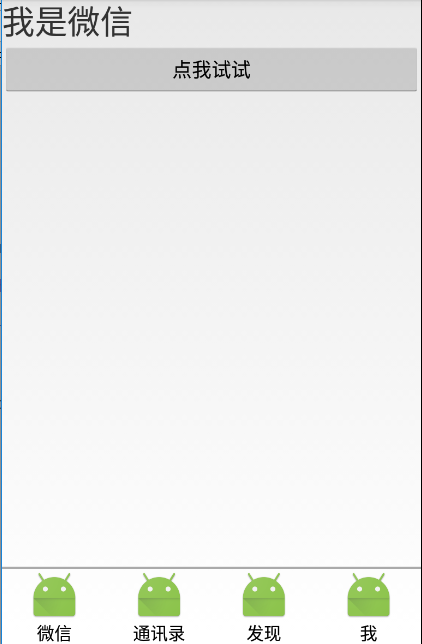
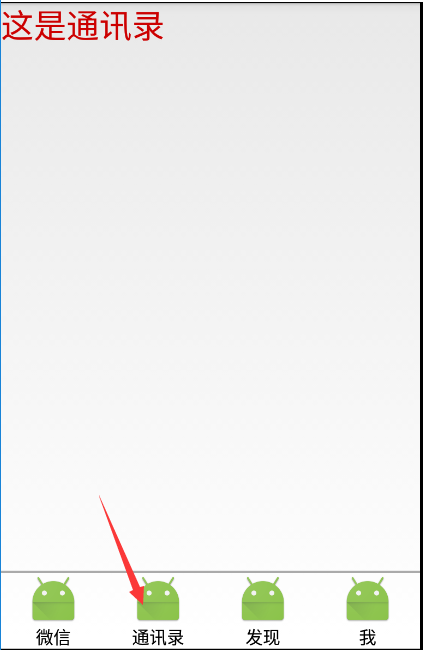
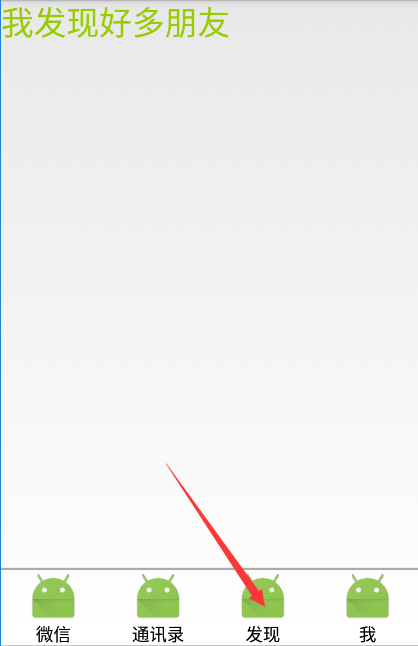
1、MainActivity.java
package com.example.android_activity;

import android.app.Activity;

import android.content.Intent;

import android.os.Bundle;

import android.view.View;

public class MainActivity extends Activity {

    @Override

    protected void onCreate(Bundle savedInstanceState) {

        super.onCreate(savedInstanceState);

        setContentView(R.layout.activity_main);

    }

    //片段布局

    public void test_3(View view){

        Intent intent=new Intent(this,WeixinActivity.class);

        startActivity(intent);

    }

}
2、WeixinActivity.java
package com.example.android_activity;

import android.app.Activity;

import android.app.FragmentManager;

import android.app.FragmentTransaction;

import android.os.Bundle;

import android.view.Window;

import android.view.WindowManager;

import android.widget.RadioGroup;

public class WeixinActivity extends Activity {

    //片段管理器

    private FragmentManager fm;

    //片段事务对象

    private FragmentTransaction trans;

    //获取单选按钮组

    private RadioGroup rg;

    @Override

    protected void onCreate(Bundle savedInstanceState) {

        super.onCreate(savedInstanceState);

        requestWindowFeature(Window.FEATURE_NO_TITLE);

        getWindow().setFlags(WindowManager.LayoutParams.FLAG_FULLSCREEN,WindowManager.LayoutParams.FLAG_FULLSCREEN);

        setContentView(R.layout.activity_weixin);

        rg=(RadioGroup)findViewById(R.id.radgroup);

        //1:获取片段管理器对象

        fm=getFragmentManager();

        //2:获取片段事务对象

        trans=fm.beginTransaction();

        trans.add(R.id.mainFrame,new WeixinFragment());

        trans.commit();

        //添加选择改变事件

        rg.setOnCheckedChangeListener(new RadioGroup.OnCheckedChangeListener() {

            @Override

            public void onCheckedChanged(RadioGroup radioGroup, int i) {

                switch (i){

                    case R.id.rad_1:

                        trans=fm.beginTransaction();

                        trans.replace(R.id.mainFrame,new WeixinFragment());

                        trans.addToBackStack("back");

                        trans.commit();

                        break;

                    case R.id.rad_2:

                        trans=fm.beginTransaction();

                        trans.replace(R.id.mainFrame,new PhoneNoteFragment());

                        trans.addToBackStack("back");

                        trans.commit();

                        break;

                    case R.id.rad_3:

                        trans=fm.beginTransaction();

                        trans.replace(R.id.mainFrame,new FindFragment());

                        trans.addToBackStack("back");

                        trans.commit();

                        break;

                }

            }

        });

    }

}
3、WeixinFragment.java
package com.example.android_activity;

import android.app.Fragment;

import android.os.Bundle;

import android.view.LayoutInflater;

import android.view.View;

import android.view.ViewGroup;

import android.widget.Button;

import android.widget.Toast;

public class WeixinFragment extends Fragment {

    public WeixinFragment() {

    }

    private Button btn;

    @Override

    public View onCreateView(LayoutInflater inflater, ViewGroup container,

                             Bundle savedInstanceState) {

        //投影【将一个Layout布局xml文件生成一个View对象】

        View view=inflater.inflate(R.layout.fragment_weixin, container, false);

        btn=(Button)view.findViewById(R.id.test_btn);

        btn.setOnClickListener(new View.OnClickListener() {

            @Override

            public void onClick(View view) {

                Toast.makeText(getActivity(),"OK",Toast.LENGTH_LONG).show();

            }

        });

        return view;

    }

}
4、PhoneNoteFragment.java
package com.example.android_activity;

import android.app.Fragment;

import android.os.Bundle;

import android.view.LayoutInflater;

import android.view.View;

import android.view.ViewGroup;

/**

 * A simple {@link Fragment} subclass.

 */

public class PhoneNoteFragment extends Fragment {

    public PhoneNoteFragment() {

        // Required empty public constructor

    }

    @Override

    public View onCreateView(LayoutInflater inflater, ViewGroup container,

                             Bundle savedInstanceState) {

        // Inflate the layout for this fragment

        return inflater.inflate(R.layout.fragment_phone_note, container, false);

    }

}
5、FindFragment.java
package com.example.android_activity;

import android.app.Fragment;

import android.os.Bundle;

import android.view.LayoutInflater;

import android.view.View;

import android.view.ViewGroup;

/**

 * A simple {@link Fragment} subclass.

 */

public class FindFragment extends Fragment {

    public FindFragment() {

        // Required empty public constructor

    }

    @Override

    public View onCreateView(LayoutInflater inflater, ViewGroup container,

                             Bundle savedInstanceState) {

        // Inflate the layout for this fragment

        return inflater.inflate(R.layout.fragment_find, container, false);

    }

}
6、activity_main.xml
<?xml version="1.0" encoding="utf-8"?>

<LinearLayout xmlns:android="http://schemas.android.com/apk/res/android"

    android:id="@+id/activity_main"

    android:layout_width="match_parent"

    android:layout_height="match_parent"

    android:orientation="vertical"

    >

    <Button

        android:layout_width="match_parent"

        android:layout_height="wrap_content"

        android:text="FrameLayout"

        android:onClick="test_1"

        />

    <Button

        android:layout_width="match_parent"

        android:layout_height="wrap_content"

        android:text="FrameLayout2"

        android:onClick="test_2"

        />

    <Button

        android:layout_width="match_parent"

        android:layout_height="wrap_content"

        android:text="Fragment案例"

        android:onClick="test_3"

        />

    <Button

        android:layout_width="match_parent"

        android:layout_height="wrap_content"

        android:text="GridLayout布局[4.0]"

        android:onClick="test_4"

        />

</LinearLayout>
7、activity_weixin.xml
<?xml version="1.0" encoding="utf-8"?>

<RelativeLayout xmlns:android="http://schemas.android.com/apk/res/android"

    android:id="@+id/activity_weixin"

    android:layout_width="match_parent"

    android:layout_height="match_parent">

    <!--绘制内容显示容器-->

    <FrameLayout

        android:id="@+id/mainFrame"

        android:layout_width="match_parent"

        android:layout_height="match_parent"/>

    <LinearLayout

        android:id="@+id/weixinMenu"

        android:layout_alignParentBottom="true"

        android:orientation="horizontal"

        android:layout_width="match_parent"

        android:layout_height="wrap_content">

        <RadioGroup

            android:id="@+id/radgroup"

            android:checkedButton="1"

            android:orientation="horizontal"

            android:layout_width="match_parent"

            android:layout_height="match_parent">

            <RadioButton

                android:id="@+id/rad_1"

                android:text="微信"

                android:drawableTop="@mipmap/ic_launcher"

                android:clickable="true"

                android:button="@null"

                android:gravity="center"

                android:layout_width="match_parent"

                android:layout_weight="1"

                android:layout_height="wrap_content" />

            <RadioButton

                android:id="@+id/rad_2"

                android:text="通讯录"

                android:drawableTop="@mipmap/ic_launcher"

                android:clickable="true"

                android:button="@null"

                android:gravity="center"

                android:layout_width="match_parent"

                android:layout_weight="1"

                android:layout_height="wrap_content" />

            <RadioButton

                android:id="@+id/rad_3"

                android:text="发现"

                android:gravity="center"

                android:drawableTop="@mipmap/ic_launcher"

                android:clickable="true"

                android:button="@null"

                android:layout_width="match_parent"

                android:layout_weight="1"

                android:layout_height="wrap_content" />

            <RadioButton

                android:id="@+id/rad_4"

                android:text="我"

                android:gravity="center"

                android:drawableTop="@mipmap/ic_launcher"

                android:clickable="true"

                android:button="@null"

                android:layout_width="match_parent"

                android:layout_weight="1"

                android:layout_height="wrap_content" />

        </RadioGroup>

    </LinearLayout>

    <LinearLayout

        android:layout_above="@id/weixinMenu"

        android:layout_width="match_parent"

        android:layout_height="2dp"

        android:background="@android:color/darker_gray"></LinearLayout>

</RelativeLayout>
8、fragment_weixin.xml
<LinearLayout xmlns:android="http://schemas.android.com/apk/res/android"

    android:layout_width="match_parent"

    android:layout_height="match_parent"

    android:orientation="vertical">

    <TextView

        android:layout_width="match_parent"

        android:layout_height="wrap_content"

        android:textSize="30sp"

        android:text="我是微信" />

    <Button

        android:id="@+id/test_btn"

        android:text="点我试试"

        android:onClick="testClick"

        android:layout_width="match_parent"

        android:layout_height="wrap_content" />

</LinearLayout>
9、fragment_phone_note.xml
<LinearLayout xmlns:android="http://schemas.android.com/apk/res/android"

    xmlns:tools="http://schemas.android.com/tools"

    android:layout_width="match_parent"

    android:layout_height="match_parent"

    >

    <!-- TODO: Update blank fragment layout -->

    <TextView

        android:layout_width="match_parent"

        android:layout_height="match_parent"

        android:textSize="30dp"

        android:textColor="@android:color/holo_red_dark"

        android:text="这是通讯录" />

</LinearLayout>
10、fragment_find.xml
<FrameLayout xmlns:android="http://schemas.android.com/apk/res/android"

    xmlns:tools="http://schemas.android.com/tools"

    android:layout_width="match_parent"

    android:layout_height="match_parent"

    tools:context="com.example.FindFragment">

    <!-- TODO: Update blank fragment layout -->

    <TextView

        android:layout_width="match_parent"

        android:layout_height="match_parent"

        android:textSize="30sp"

        android:textColor="@android:color/holo_green_light"

        android:text="我发现好多朋友" />

</FrameLayout>
Androi开发 ---Fragment片段布局案例的更多相关文章
- Android开发 ---Fragment片段布局
前言 Fragment想必大家不陌生吧,在日常开发中,对于Fragment的使用也很频繁,现在主流的APP中,基本的架构也都是一个主页,然后每个Tab项用Fragment做布局,不同选项做切换,使用起 ...
- Android开发---网格布局案例
Android开发---网格布局案例 效果图: 1.MainActivity.java package com.example.android_activity; import android.ap ...
- Android开发——Fragment知识整理(一)
0. 前言 Fragment,顾名思义是片段的意思,可以把Fragment当成Activity的一个组成部分,甚至Activity的界面可以完全有不同的Fragment组成.Fragment需要被嵌 ...
- Android开发——Fragment的简单使用总结
前言: 之前搞项目的时候,就使用了这个Fragment,中间遇到了许多坑,把坑都解决了,现在写一篇较为简单的Fragment使用总结 Fragment的简单介绍: 简单来说,Fragment其实可以理 ...
- 慕课网5-2编程练习:flex布局制作卡片布局案例
慕课网5-2编程练习:flex布局制作卡片布局案例 小伙伴们,学习了卡片布局,接下来我们根据效果图,也写出一个卡片布局的页面吧! 效果图如下: 任务 1.主体内容的卡片一行只能显示两个. 2.卡片与卡 ...
- Android(java)学习笔记164:Relativelayout相对布局案例
我们看看案例代码,自己心领神会: <?xml version="1.0" encoding="utf-8"?> <RelativeLayout ...
- 移动端页面开发适配 rem布局原理
主题 HTML移动端页面开发适配 rem布局原理 什么是适配,为什么要适配 我们拿到的设计图一般是以640,750,1080分辨率为基准设计的,而现在的手机终端各式各样,分辨率不同,逻辑像素不同 ,适 ...
- Android开发——Fragment知识整理(二)
0. 前言 Android开发中的Fragment的应用非常广泛,在Android开发--Fragment知识整理(一)中简单介绍了关于Fragment的生命周期,常用API,回退栈的应用等知识.这 ...
- 安卓app开发-05-Android xml布局详细介绍
安卓app开发-05-Android xml布局详细介绍 虽然说有 墨刀,墨客 这些图形化开发工具来做 Android 的界面设计,但是我们还是离不开要去学习做安卓原生app,学习 xml 布局还是必 ...
随机推荐
- 雷林鹏分享:jQuery EasyUI 表单 - 表单验证
jQuery EasyUI 表单 - 表单验证 本教程将向您展示如何验证一个表单.easyui 框架提供一个 validatebox 插件来验证一个表单.在本教程中,我们将创建一个联系表单,并应用 v ...
- spring boot ----> jpa连接和操作mysql数据库
环境: centos6.8,jdk1.8.0_172,maven3.5.4,vim,spring boot 1.5.13,mysql-5.7.23 1.引入jpa起步依赖和mysql驱动jar包 &l ...
- WPF程序开发方法小总结
1.先做静态界面(静态界面带有 示例 数据---> 展示布局效果) 2.然后在VM写完之后,再对静态界面绑定数据源属性
- every day a practice —— morning(3)
"WeChat does not store any chat histories. They are stored only on users' phones, computers or ...
- Linear Kingdom Races CodeForces - 115E (线段树优化dp)
大意: n条赛道, 初始全坏, 修复第$i$条花费$a_i$, m场比赛, 第$i$场比赛需要占用$[l_i,r_i]$的所有赛道, 收益为$w_i$, 求一个比赛方案使得收益最大. 设$dp[i]$ ...
- Fragment的onCreateView和onActivityCreate之间的区别(转)
看了有关这个问题的几篇博文,几乎都是引用了stackoverflow上的一个回答: 问题: I know that a fragment’s view hierarchy has to be infl ...
- laravel的重定向
Route::get("redirect1", function () { // redirct的三种写法 // return redirect()->route(" ...
- 函数指针做函数参数,其中有typedef的相关,感觉这是构成大河的小溪
#include<stdio.h> #include<stdlib.h> #include<string.h> int Funcadd(int a, int b) ...
- json加密
有的时候我们为了传参数的URL比较安全,我们一般会用json加密的方法来使自己的URL安全. $a['order_sn'] = $orderNo;$data = json_encode( $a);$d ...
- WebSphere静默安装教程(WAS6.1为例)
1.安装WebSphere 解压守装包: tar -zxf was_soft_64-bit.tar.gz 进入解压出的WAS目录编缉responsefile.nd.txt,将对应选项修值改成以下模样( ...